# Project Input Schema
Generated: 2026-09-13T04:34:26.222Z
Source build: local
Canonical docs: https://teammately.ai/docs
---
id: project-settings.input-schema
title: Project Input Schema
summary: Define the canonical input architecture, case-material fields, and accepted artifact formats for project cases.
kind: reference
product_area: project_settings
status: stable
updated: 2026-09-07
canonical: /docs/project-settings/input-schema
---
# Project Input Schema
## Definition
Project Input Schema is the project-managed contract for future cases. It declares the primary input architecture, optional structured-input schema, named case-material fields, and artifact families or file extensions the project accepts.
The active architectures are **plain text**, **chat**, and **structured**. The schema is a project singleton rather than a versioned benchmark object. When no setting exists, the default accepts one plain-text user message and no case materials or artifacts.
## Fields, states, or lifecycle rules
- `architecture` is `plain_text`, `chat`, or `structured`.
- Structured architecture requires a bounded `structuredInputSchema`.
- `caseMaterialSchema` is a closed, flat object. Each material key has a label, optional description, required flag, type, and any accepted artifact rules.
- Material keys use lowercase letters, digits, and underscores, start with a letter, and remain flat.
- `acceptedArtifacts` declares project-level artifact families. Supported families are image, document, tabular, presentation, source text, and audio.
- A case-material artifact rule must be a subset of the artifact families admitted at the project root.
- Saving a new schema governs future case validation. Operators should inspect existing cases before making a change that would make current content invalid.
## Canonical case content
The primary case payload is `content.input`. Optional supporting values and artifacts live in `content.case_materials`. The product renders `record_content.case_view` so people and execution adapters can inspect the canonical content consistently; that view is a projection rather than an alternate authoring contract.
Static support passed to a Harness uses `case_material_refs`. An executable or queryable environment uses an optional `world_instance_ref`. Do not collapse static documents, images, or values into the world boundary merely because a candidate consumes them during a Run.
{% example-demo title="Example: structured support case" %}
A project selects structured input with `question` and `customer_tier` properties. It declares a required `policy_document` case material that accepts PDF documents and an optional `account_history` tabular material. A case is valid only when its structured input matches the schema and the required document is present in the accepted format.
{% /example-demo %}
## Source confidence
Code-backed: the active settings route and backend validator define the input architectures, closed case-material schema, artifact families, defaults, and canonical case paths. This page explains the product contract without presenting internal handlers as a public API.
## Related task pages
{% related-card-grid title="Related task pages" %}
- [Project Settings](/docs/project-settings)
- [Product quickstart](/docs/quickstart)
- [Work with cases](/docs/assets/cases)
- [Design Review Screen](/docs/assets/review-screens)
{% /related-card-grid %}
---
id: project-settings.overview
title: Project Settings
summary: Configure the project identity, evaluation Regime, case input contract, and project members.
kind: concept
product_area: project_settings
status: stable
updated: 2026-09-07
canonical: /docs/project-settings
---
# Project Settings
Project Settings is a floating project-level surface rather than a benchmark workspace. Its current tabs are **General**, **Regime**, **Input Schema**, and **Project Members**.
| Setting | Governs | Does not replace |
| --- | --- | --- |
| General | Project name and Project Memo | Agent Setup context or instructions |
| Regime | How approved and applicable Rubrics contribute to future Benchmark Versions | Policies, Rubrics, or already-published Benchmark evidence |
| Input Schema | Canonical case input and material contract | A benchmark dataset snapshot |
| Project Members | User and group access to this project | Contribution task assignment |
Changes are project-scoped and may affect future work across multiple benchmarks. Treat input-contract and access changes as governance decisions, and preserve exact versions and snapshots wherever historical evidence depends on them.
## Change boundaries
Project Settings is intentionally separate from Agent Setup and benchmark workspaces. A settings change can influence what future work accepts or displays, but it does not silently rewrite a saved Harness Version, Dataset Snapshot, Contribution, or Run. When a project-wide contract changes, inspect downstream readiness and create new versioned evidence where the product workflow requires it.
Input Schema deserves the most caution because future Case validation follows it. Before tightening a required material or changing architecture, identify existing Cases that may no longer conform. Regime changes create a new immutable Regime Version for future Benchmark Versions; existing Benchmark Versions, Runs, and results retain their published Regime Version. Project Members affects access, not authorship or task history.
## Operating sequence
1. Set a clear project name and human-facing memo.
2. Review the locked Regime and publish a new version only when the scoring contract should change for future Benchmark Versions.
3. Define the Input Schema before importing or constructing substantial Case evidence.
4. Grant users and groups the project access needed for their role.
5. Revisit settings when the project contract changes, then check Assets, benchmarks, and active Contributions for downstream impact.
{% example-demo title="Example: adding a required document" %}
A project decides every future Case must include a controlling policy document. The operator updates Input Schema only after auditing current Cases. Existing Dataset Snapshots remain historical evidence; corrected live Cases enter a new Snapshot. The Project Memo may explain the ownership decision, but it does not enforce the material requirement.
{% /example-demo %}
## Relationship to governance
Workspace administration controls the wider account boundary. Correctness Governance owns Policies and Rubrics. Project Settings should therefore express project contracts and access, not become a catch-all place for evaluator rules, secret values, or informal candidate configuration.
{% related-card-grid title="Project settings" %}
- [General settings](/docs/project-settings/general)
- [Regime settings](/docs/project-settings/regime)
- [Project Input Schema](/docs/project-settings/input-schema)
- [Project Members](/docs/project-settings/project-members)
{% /related-card-grid %}
{% related-card-grid title="Connected workspaces" %}
- [Agent Setup](/docs/agent-setup)
- [Assets](/docs/assets)
- [Benchmark Datasets](/docs/benchmark-datasets)
{% /related-card-grid %}
## Source confidence
Code-backed: the active Project Settings surface defines the General, Regime, Input Schema, and Project Members tabs. Reference Materials is documented under Agent Setup because it supplies governed project knowledge rather than these four settings contracts.
---
id: assets.cases
title: Cases
summary: Understand canonical project cases, their input and materials, and how they become members of benchmark datasets.
kind: reference
product_area: assets
status: stable
updated: 2026-08-22
canonical: /docs/assets/cases
---
# Cases
## Definition
A Case is a project-level situation used for expert contribution, benchmark coverage, or candidate evaluation. It has canonical input content and may include declared supporting materials. Cases live in the Assets pool and can be selected into one or more benchmark datasets.
The Project Input Schema determines how the primary input and materials are represented. A benchmark snapshot determines which selected cases belong to one versioned evidence boundary.
## Fields, states, or lifecycle rules
- Canonical primary input is stored under `content.input`.
- Optional supporting values or artifacts are stored under `content.case_materials` according to the project's declared keys.
- `record_content.case_view` is a rendered projection used for inspection and delivery; it is not a second editable payload.
- Inputs can use plain-text, chat, or structured architecture as configured by the project.
- Materials can include admitted artifact families and must satisfy any required-field and file-extension rules.
- A project Case is not automatically part of every benchmark. Benchmark Datasets owns selection and snapshots.
- Generated or imported Cases should be reviewed for clarity, source authority, and schema conformance before they are trusted as benchmark evidence.
- Static case materials and executable Worlds remain separate. A document supplied to a Harness does not become a world merely because it affects execution.
## Case identity and change
Treat the persisted case identity as opaque. Do not construct IDs in client code or documentation. When case content changes materially, benchmark interpretation must use a snapshot or version boundary that makes the selected content clear.
Responses produced by a Harness are evaluation outputs attached to a Run. They are not the primary case input. Expert-authored acceptable examples can inform standards or contribution work, but the current evaluation contract should remain explicit about which candidate produced each response.
{% example-demo title="Example: multimaterial case" %}
A chat case asks whether an exception applies. Its required `current_policy` PDF and optional `account_history` table are stored as case materials admitted by Project Input Schema. The rendered case view presents the conversation and both materials. A benchmark snapshot selects the case, and a Run records the evaluated Harness response separately.
{% /example-demo %}
## Source confidence
Code-backed: the active Assets Cases route and case-content services define canonical input, case materials, and the rendered case view. Public import or export APIs are outside this reference unless separately documented.
## Related task pages
{% related-card-grid title="Related task pages" %}
- [Configure Project Input Schema](/docs/project-settings/input-schema)
- [Work with Benchmark Datasets](/docs/benchmark-datasets)
- [Manage benchmark coverage](/docs/coverage-management)
{% /related-card-grid %}
---
id: concepts.weave
title: Weave
summary: Construct deliberate challenge sets from coverage structure, canonical cases, variants, multimodal materials, and supported worlds.
kind: concept
product_area: weave
status: stable
updated: 2026-09-07
canonical: /docs/concepts/weave
---
# Weave
Weave is the case-construction capability inside Teammately correctness infrastructure. It turns structured coverage intent into the cases, response variants, supporting materials, and supported environments needed to challenge a specialist AI system. Its goal is deliberate representation, not undirected synthetic volume.
## Definition
Coverage Engineering supplies the structure: Dimensions, Project Topics, Case Construction Patterns, coverage tuples, and known gaps. Weave uses that structure to prepare candidate cases that exercise meaningful combinations and boundaries. Cases follow the project's Input Schema, so their primary input and required materials have a consistent, inspectable shape.
A case can include text, chat messages, structured data, images, documents, tabular files, presentations, source text, or audio when the Project Input Schema accepts those artifacts. Static support belongs to case materials. An executable or queryable environment is a separate world boundary and should only be used where the product supplies an inspectable world reference and runtime.
## Decision checkpoint
| Construction need | Use | Verify before benchmark membership |
| --- | --- | --- |
| Add a known real example | Assets → Cases or dataset import | Input and materials conform to Project Input Schema |
| Cover a missing facet combination | Coverage Management and Case Foundry | The case targets a named tuple or gap |
| Generate a meaningful output variation | Case construction plus Comparison Directions | The idea guides variation without pretending the output is already reviewed |
| Include supporting files | Canonical case materials | Artifact family and extension are accepted by the project |
| Exercise changing state or tools | Supported World | World identity, capabilities, visibility, and lifecycle are explicit |
## Deliberate construction
Case count is a weak target. A useful challenge set explains why every important slice exists and which behavior boundary it exercises. Case Construction Patterns provide reusable ways to instantiate a behavior problem. Coverage Management shows where cases already exist and where the benchmark remains thin. Case Review lets operators inspect generated materials before those cases become trusted dataset members.
Comparison Directions are reusable Assets selected by comparative Contributions. They guide how candidate responses should vary—for example, changing evidence quality or reasoning approach—without serving as a coverage taxonomy or an automatically accepted collection of variants.
## Canonical case boundary
`content.input` is the primary case input. Optional `content.case_materials` contains declared supporting values or artifacts. `record_content.case_view` is a rendered projection for users and execution adapters; it is not a second source of truth. Static runtime delivery uses case-material references. Executable worlds use a world instance reference.
This distinction keeps the same case understandable to case authors, experts, harness code, and evaluation services. It also lets the system reject material that is missing, undeclared, or incompatible before a Run produces misleading evidence.
{% example-demo title="Conflicting-source case" %}
Coverage Management identifies a thin tuple combining policy exception, superseded source, and high customer impact. A Case Construction Pattern describes how to pair a current rule with a plausible older document. Weave creates a chat input and attaches both documents as case materials. Case Review confirms that the conflict is visible and realistic before the case enters the benchmark dataset snapshot.
{% /example-demo %}
## Related workflows
{% related-card-grid title="Related workflows" %}
- [Configure Project Input Schema](/docs/project-settings/input-schema)
- [Manage benchmark coverage](/docs/coverage-management)
- [Work with Benchmark Datasets](/docs/benchmark-datasets)
{% /related-card-grid %}
## Related reference pages
{% related-card-grid title="Related reference pages" %}
- [Assets and cases](/docs/assets)
- [Cases](/docs/object-model/cases)
- [Comparison Directions](/docs/assets/comparison-directions)
{% /related-card-grid %}
## Source confidence
Doctrine-backed: this page defines Weave as the public construction capability. It deliberately limits world claims to the verified runtime boundary and delegates current controls to linked code-backed pages.
---
id: assets.review-screens
title: Review Screens
summary: Configure reusable project templates for the context and presentation experts see during Contribution work.
kind: reference
product_area: assets
status: stable
updated: 2026-09-07
canonical: /docs/assets/review-screens
---
# Review Screens
## Definition
Review Screens are reusable project Assets for designing how experts see Case context and Contribution questions. A screen can present selected inputs, Case materials, Dimensions, candidate outputs, and review controls in a consistent layout.
Review Screens control presentation. They do not change Case content, the Contribution objective, Policy meaning, Rubric semantics, or expert authority.
## Fields, states, or lifecycle rules
- The library is available at **Assets → Review Screens**.
- A screen has a project-owned identity and can be opened in the visual designer for editing and preview.
- The designer can use current Dimensions, context keys, and declared Project Input Schema material fields as presentation inputs.
- A screen can be selected for Contribution work; the Contribution still supplies the benchmark-specific objective, expert, Cases, attachments, and task components.
- Creating or editing a screen affects future presentation. It does not rewrite completed responses, Checkpoints, or historical Contribution evidence.
- A visible field is not automatically required by Project Input Schema, and a required Case material is not automatically appropriate for every screen.
## Designing for judgment
Show the smallest context set that lets an expert make and explain the requested decision. Include source conflicts, Case materials, candidate responses, and relevant coverage dimensions when they affect correctness. Keep administrative metadata and unrelated fields out of the primary judgment surface.
Test a screen against representative and boundary Cases before using it for broad Contribution work. If an expert must rely on private knowledge or locate a missing source, correct Project Context, Reference Materials, the Case, or the Contribution before changing the layout.
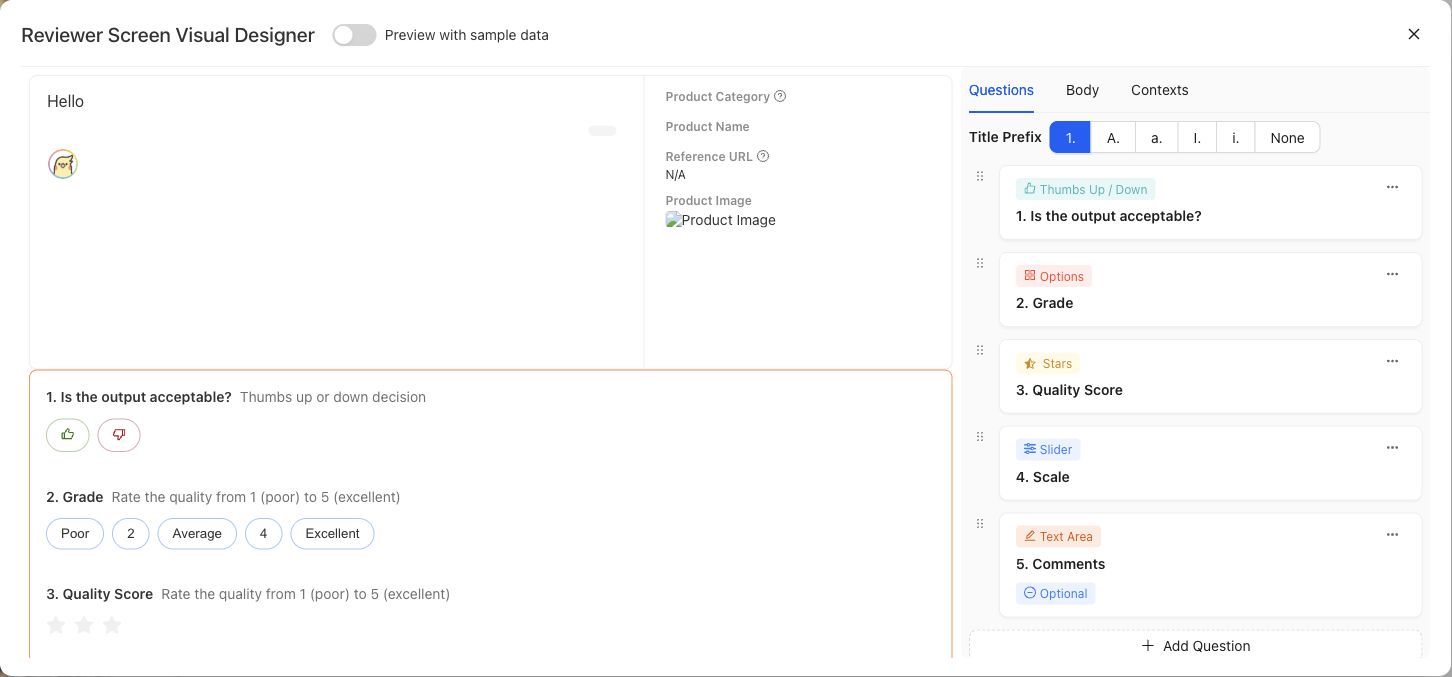
Preview the expert-facing Case and question layout with representative data before using it in a Contribution.
{% example-demo title="Example: source-grounding screen" %}
For a grounding Contribution, the screen displays the user request, candidate response, current source document, superseded source document, and source-freshness Dimension. It omits internal ingestion metadata so the expert can compare the response with both documents and explain which source controls.
{% /example-demo %}
## Source confidence
Code-backed: the active Review Screens library and detail routes provide paginated browsing, usage filtering, creation, editing, preview, and screen-authoring controls. The stable responsibility boundary is documented here without claiming every visual control is permanent.
## Related task pages
{% related-card-grid title="Related task pages" %}
- [Assets](/docs/assets)
- [Configure Project Input Schema](/docs/project-settings/input-schema)
- [Request an Expert Contribution](/docs/expert-contributions/request-contribution)
{% /related-card-grid %}