# Finding Coverage Gaps Before Review
Generated: 2026-09-13T04:42:32.347Z
Source build: local
Canonical docs: https://teammately.ai/docs
---
id: playbooks.coverage-gaps-before-review
title: Finding Coverage Gaps Before Review
summary: Use coverage dimensions, failures, and expert signals to decide where evidence is incomplete.
kind: recipe
product_area: playbooks
status: stable
updated: 2026-08-23
canonical: /docs/playbooks/finding-coverage-gaps-before-review
---
# Finding Coverage Gaps Before Review
Use this playbook when benchmark evidence looks plausible overall but the team needs to know whether important behavior slices are missing or underrepresented.
## Review-readiness trigger
Use this before a customer relies on Benchmark evidence for human review, especially when results are dominated by common Cases, a critical Rubric has few applicable Cases, or specialists identify behavior that the Dataset does not represent.
## Coverage audit
1. Confirm the exact Benchmark Version and Run completeness before interpreting its distribution.
2. Open **Benchmark Datasets → Representation** and inspect the selected Dataset across the configured Coverage Facets.
3. Compare thin or empty slices with Coverage Stories, failed Cases, specialist observations, and must-level Rubrics with few applicable Cases.
4. Classify each issue: missing vocabulary, missing Case, unreviewed candidate, missing Dataset membership, or unclear correctness standard.
5. Route vocabulary changes to Coverage Facets, unclear standards to Expert Contributions, and missing Cases to Assets Synthesis or Case Foundry.
6. Review candidates in **Case Review**, select the intended Cases in **Benchmark Datasets**, and create a new Snapshot.
7. Run the relevant saved Harness Versions against the new Benchmark Version and state any still-unrepresented risk in the customer's review context.
## Evidence threshold
Coverage is ready when critical slices are named, their selected Case counts are visible, candidate-only Cases are not counted as evidence, and remaining gaps are explicit. A balanced-looking aggregate count is not sufficient.
{% example-demo title="Compatibility gaps" %}
Dataset Representation shows many ordinary recommendations but only two accessory-compatibility Cases and no discontinued-model Cases. A Coverage Story records the gap. Case Foundry prepares cross-brand adapter, ambiguous model-number, and discontinued-model candidates; specialists review the source conditions in Case Review. Only the admitted Cases enter the new Snapshot, and the customer withholds compatibility conclusions until the rerun is complete.
{% /example-demo %}
## Evidence to collect
- Benchmark Version, Snapshot, selected Case count, and Dataset Representation.
- Coverage Stories and specialist observations that identify consequential gaps.
- Candidate lineage, Case Review decisions, and final Dataset membership.
- New Snapshot and Benchmark Version after membership changes.
- Rerun completeness and an explicit list of remaining unsupported conclusions.
## Related docs
{% related-card-grid title="Related docs" %}
- [Inspect Dataset representation](/docs/benchmark-datasets/representation)
- [Work with Coverage Stories](/docs/coverage-management/coverage-stories)
- [Review prepared Cases](/docs/coverage-management/case-review)
- [Read run results](/docs/benchmark-evaluations/inspect-results)
- [Run a benchmark](/docs/benchmark-evaluations/run-evaluation)
- [Importing cases](/docs/operating-manual/import-and-prepare-cases)
{% /related-card-grid %}
## Source confidence
Doctrine-backed: the approved product model requires deliberate coverage before Benchmark evidence is trusted. Linked code-backed pages define current Representation, Coverage Story, Case Review, Snapshot, and Run boundaries.
---
id: coverage.coverage-gaps
title: Coverage Gaps
summary: Find missing or underrepresented behavior areas before benchmark evidence becomes misleading.
kind: task
product_area: coverage_engineering
status: stable
updated: 2026-08-23
canonical: /docs/coverage-engineering/coverage-gaps
---
# Coverage Gaps
## When to use it
Use this task when the team suspects that a benchmark result is incomplete because the case set does not represent an important behavior area. A coverage gap is not just a low score. It is a missing or thin slice of the behavior space: a dimension value, ontology category, source condition, user intent, boundary scenario, policy exception, failure cluster, or product flow that should be represented before results are trusted.
Coverage gaps matter because Teammately helps the team reason about whether the benchmark actually represents the correctness space, instead of only running checks over available examples.
## Prerequisites
- A Benchmark Dataset or a named intended behavior slice already exists.
- Dimensions or ontology values are available, or the team knows which behavior axis is missing.
- Relevant Evaluation Runs, failure clusters, Expert Contribution findings, or product signals are available for inspection.
- Policies and rubrics are clear enough that the team can tell whether the problem is missing coverage rather than weak standards.
## Required role or permission
AI engineers, evaluation owners, and product owners usually identify coverage gaps together. Experts may be needed when the missing behavior depends on domain judgment. If the UI blocks investigation or case changes, inspect project membership and artifact access before changing the benchmark.
### Task steps: Coverage Gaps
1. Name the behavior area that may be missing: dimension, ontology value, product flow, policy exception, source condition, or boundary scenario.
2. Inspect **Benchmark Datasets → Representation** and the current Benchmark Version. Check whether the area is absent, represented by too few selected Cases, or represented only by easy examples.
3. Compare the suspected gap against evaluation failures, failure clusters, Expert Contribution notes, and recent product signals.
4. Rule out look-alike problems: missing outputs, stale cases, weak applicability logic, overly broad policies, ambiguous rubrics, or output mapping errors.
5. Route the gap: update Coverage Facets, create a Coverage Story, source or synthesize Cases, request an Expert Contribution, or select already reviewed Cases in Benchmark Datasets.
6. Review candidates in Case Review, create a new Snapshot when membership changes, and preserve the gap rationale in the owning coverage surfaces.
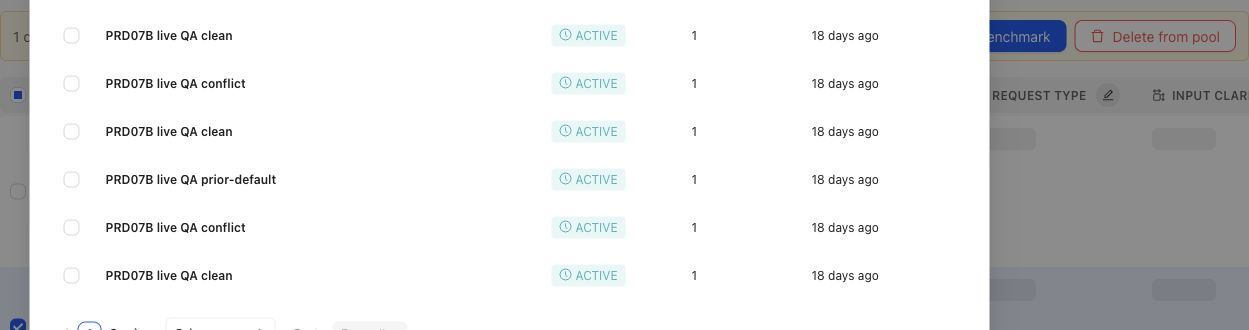
When a gap points to specific candidates, the operator can select cases and prepare them for benchmark membership.
## Object and state changes
Confirming a gap can create a Coverage Story, candidate Cases, Coverage Facet changes, Case Review work, selected Dataset changes, or an Expert Contribution. A gap does not silently change historical Benchmark meaning. When selected membership changes, create a new Dataset Snapshot and Benchmark Version before treating the revised set as reproducible evidence.
## Success criteria
- The missing or underrepresented behavior area is named precisely.
- The team can explain why the issue is a true coverage gap rather than missing outputs, weak applicability, stale artifacts, or mapping errors.
- The resulting case, dimension, ontology, or benchmark change is traceable to source evidence or expert judgment.
- Future benchmark results can distinguish behavior improvement from coverage refresh.
## Common failure modes
- Treating a model failure as a coverage gap when the benchmark already contains representative cases.
- Adding many similar cases without naming the missing dimension or ontology value.
- Refreshing benchmark coverage without preserving the version boundary.
- Mistaking missing outputs or output mapping failures for missing coverage.
- Creating synthetic cases that are unrealistic because they lack source context or expert judgment.
- Ignoring a small high-risk slice because aggregate coverage looks balanced.
{% example-demo title="Boundary case for enterprise search" %}
Raw case: An employee asks for a policy that changed last week, and the retrieved documents contain both old and new guidance.
Expert judgment: Coverage must include cases where stale and current sources conflict.
Policy: Answers must prefer the approved current source and disclose conflicts when confidence is low.
Applicability: Applies when retrieval includes multiple policy versions or stale documents.
Binary rubric: The answer identifies the current source or asks for confirmation instead of blending policies.
Benchmark result: A candidate output fails because it combines old and new terms into one invented policy.
Interpretation: Coverage notes show whether stale-source boundary behavior is represented before the next run is trusted.
{% /example-demo %}
## Related reference pages
{% related-card-grid title="Related reference pages" %}
- [Candidate and In-Use Cases](/docs/coverage-engineering/candidate-and-in-use-cases)
- [Case pool](/docs/coverage-engineering/case-pool)
- [Dimensions and ontology](/docs/coverage-engineering/dimensions-ontology)
- [Benchmark snapshots](/docs/coverage-engineering/benchmark-snapshots)
- [Case versions](/docs/governance/case-versioning)
{% /related-card-grid %}
## Related troubleshooting pages
{% related-card-grid title="Related troubleshooting pages" %}
- [Access troubleshooting](/docs/troubleshooting/authentication)
- [Unbalanced coverage](/docs/troubleshooting/unbalanced-coverage)
- [Weak applicability logic](/docs/troubleshooting/weak-applicability-logic)
- [Missing outputs](/docs/troubleshooting/missing-outputs)
- [Benchmark results changed unexpectedly](/docs/troubleshooting/benchmark-results-changed-unexpectedly)
{% /related-card-grid %}
## Source confidence
Code-backed: Benchmark Dataset Representation exposes selected distribution; Coverage Management and Coverage Stories expose benchmark needs; Case Review exposes the admission boundary for prepared Cases. Human judgment determines whether an observed thin slice is consequential.
---
id: coverage.plan-benchmark-coverage
title: Plan Benchmark Coverage
summary: Apply project Coverage Facets to one benchmark, inspect representation, and turn important gaps into concrete case or contribution work.
kind: task
product_area: coverage_engineering
status: stable
updated: 2026-09-07
canonical: /docs/coverage-engineering/plan-benchmark-coverage
---
# Plan Benchmark Coverage
Plan coverage by applying reusable project facets to one benchmark and comparing the intended behavior space with the selected dataset representation.
## Prerequisites
- A selected project and benchmark.
- A clear benchmark purpose.
- Relevant Dimensions, Project Topics, and Case Construction Patterns, or enough project knowledge to create them.
- Existing Cases or a plan for sourcing and constructing them.
## Steps
1. Review **Coverage Facets** at project scope. Confirm that Dimensions, Project Topics, and Case Construction Patterns describe reusable behavior structure rather than one benchmark's current case count.
2. Open the benchmark and select **Coverage Management → Get Started**.
3. Define the benchmark-specific coverage guidance and confirm setup readiness.
4. Open Coverage Management and inspect current dataset representation across the relevant facets and tuples.
5. Name important thin or absent combinations as Coverage Stories. Explain why each slice matters and what evidence would make it usable.
6. Route the gap according to its cause: Case Foundry or case sourcing for missing situations, Expert Contributions for missing judgment, Correctness Governance for missing standards, or Benchmark Datasets for missing selection.
7. Review generated or contributed cases in Case Review before relying on them.
8. Update dataset selection and create a new snapshot when the represented evidence changes materially.
## Object and state changes
This task can update benchmark coverage setup, representation guidance, Coverage Stories, Case Foundry work, case-review state, contribution requests, dataset selection, and snapshots. Project Coverage Facets may also change when the work discovers a reusable missing axis or construction pattern.
## Success criteria
- The benchmark purpose maps to explicit project Coverage Facets.
- Important combinations have selected evidence or a named gap.
- Each gap is routed to a responsible artifact or workstream.
- Constructed cases pass case review and Project Input Schema checks.
- Dataset snapshots make material coverage changes explicit.
## Common failure modes
- Using case count as the coverage goal.
- Creating benchmark-only tags where a reusable Dimension or Topic is needed.
- Treating response-variation guidance as coverage structure.
- Generating cases before defining which gap they should close.
- Trusting representation after selection changes without a new snapshot boundary.
{% example-demo title="Example: plan high-impact exception coverage" %}
The team maps exception type, source authority, and customer impact. Representation shows many low-impact ordinary cases but no high-impact cases with conflicting authority. A Coverage Story names the gap, an expert Contribution clarifies the controlling rule, and Case Foundry prepares cases for the missing tuple before a new snapshot is created.
{% /example-demo %}
## Related reference pages
{% related-card-grid title="Related reference pages" %}
- [Coverage Engineering](/docs/coverage-engineering)
- [Coverage Management](/docs/coverage-management)
- [Benchmark Datasets](/docs/benchmark-datasets)
{% /related-card-grid %}
## Related troubleshooting pages
{% related-card-grid title="Related troubleshooting pages" %}
- [Unbalanced coverage](/docs/troubleshooting/unbalanced-coverage)
- [Stale dimensions](/docs/troubleshooting/stale-dimensions)
- [Unrealistic synthetic cases](/docs/troubleshooting/unrealistic-synthetic-cases)
{% /related-card-grid %}
## Source confidence
Code-backed: current setup, overview, representation, Coverage Story, Case Foundry, and Case Review routes support this workflow.
---
id: benchmark-evaluations.inspect
title: Inspect Evaluation Results
summary: Trace Dashboard and List signals to Run, Case, Policy, Rubric, completeness, and telemetry evidence.
kind: task
product_area: benchmark_evaluations
status: stable
updated: 2026-09-13
canonical: /docs/benchmark-evaluations/inspect-results
---
# Inspect Evaluation Results
## Prerequisites
- A visible Run or Run Group with output or evaluation progress.
- Access to the exact Benchmark and Harness Version evidence.
Start with completeness and identity, then move from aggregate signals to the Cases and evaluator failures that support them.
## Steps
1. Open Dashboard and confirm the Benchmark Version, candidate Harness Version, Run Group type, attempt count, and evaluation progress.
2. Read rankings with their metric family and uncertainty. Distinguish average score, passed at least once, and passed every time over observed Runs. Inspect Run counts and coverage; historical group-specific pass@n and pass^n retain their original meanings.
3. Open **List → Runs** to inspect group and Run status, output progress, evaluation progress, metadata, and available resource telemetry.
4. Open **List → Evaluation results** for the Case summary, outcome, failed Policies, failed Rubrics, and evaluated count.
5. Use Arena for pairwise disagreement or Compare for a Harness matrix across Cases, evaluator facts, or Coverage Facets.
6. Classify the next action as candidate work, evaluator clarification, Case correction, coverage work, external-output remapping, or no action.
The List results surface is intentionally compact. Do not claim that it exposes full execution trajectories. The **Traces / Spans** segment currently reports a capability fence because the benchmark API does not provide evaluation execution traces.
## Reading incomplete and repeated evidence
An aggregate calculated over fewer evaluable Cases can look better while covering less evidence. Record evaluated, incomplete, and missing counts before comparing candidates. For repeated groups, inspect whether the configured number of attempts exists for every candidate and whether one failed attempt changes the metric interpretation.
Cost, tokens, and latency help route operational work but are nullable telemetry. Missing capture means unknown, not free or instantaneous execution.
> Evaluator authority
>
> Policy and Rubric results are the correctness evidence admitted by the Benchmark Version. Rankings and telemetry summarize that evidence; they do not create a new standard.
{% example-demo title="Example: apparent gain from incomplete evidence" %}
Harness B leads the overall table, but List shows that twelve difficult Cases are still unevaluated for B. Arena also reports incomplete pairs. The operator waits for terminal evidence instead of starting Improve from a ranking that covers a smaller Case population.
{% /example-demo %}
## Object and state changes
Inspection, filtering, and navigation are read-only. Starting Improve, a Contribution, coverage work, or a later Run creates separate durable work while preserving the inspected evidence.
## Success criteria
- Identity, completeness, metric family, and uncertainty are explicit.
- Important signals resolve to Cases and admitted evaluator outcomes.
- The next action targets the responsible artifact or candidate boundary.
## Common failure modes
- Reporting rank without the evaluated population.
- Inventing execution traces from the unavailable segment.
- Starting candidate work when the Case or Rubric is wrong.
## Related reference pages
{% related-card-grid title="Related reference pages" %}
- [Benchmark Evaluations](/docs/benchmark-evaluations)
- [Arena and Rankings](/docs/benchmark-evaluations/arena-and-rankings)
- [Dataset Snapshots](/docs/benchmark-datasets/snapshots)
{% /related-card-grid %}
## Related troubleshooting pages
{% related-card-grid title="Related troubleshooting pages" %}
- [Benchmark results changed unexpectedly](/docs/troubleshooting/benchmark-results-changed-unexpectedly)
- [Benchmark runs](/docs/troubleshooting/benchmark-runs)
- [Missing outputs](/docs/troubleshooting/missing-outputs)
{% /related-card-grid %}
## Source confidence
Code-backed: Dashboard, List, Run detail, and workspace types establish result summaries, completion, rankings, repeated metrics, telemetry, and the current trace capability fence.