# Using Teammately for Enterprise Search
Generated: 2026-09-13T04:42:55.839Z
Source build: local
Canonical docs: https://teammately.ai/docs
---
id: playbooks.enterprise-search
title: Using Teammately for Enterprise Search
summary: Build correctness standards for search and answer systems that must handle context, intent, and authority.
kind: recipe
product_area: playbooks
status: stable
updated: 2026-08-23
canonical: /docs/playbooks/enterprise-search
---
# Using Teammately for Enterprise Search
Use this playbook when an enterprise search or answer system must respect intent, source authority, document freshness, and uncertainty.
## Define the search contract
Use this when search results or generated answers look plausible but specialists disagree about intent, controlling source, freshness, or when the system should return partial evidence instead of a confident answer. Teammately does not ingest private search traces automatically; represent the evidence you need as Cases and materials.
## Route source authority into evidence
1. Choose a bounded search domain and identify who owns source authority in that domain.
2. Configure input fields for the query, result set, document identity, owning team, effective date, and any access context visible to the assistant.
3. Import Cases for navigational search, direct answers, ambiguous intent, conflicting documents, superseded documents, and no-result behavior.
4. Ask specialists to resolve which source controls, what partial answer is allowed, and when uncertainty or escalation is required.
5. Approve source-selection and answer-behavior Policies and Rubrics separately.
6. Inspect Dataset Representation by department, source family, intent, conflict type, and freshness before creating the Snapshot.
7. Compare saved Harness Versions by the relevant Coverage Facets and open failed Cases to distinguish ranking, selection, and answer failures.
## Failure ownership
- Wrong or missing document in the supplied result set: search/retrieval boundary.
- Controlling document present but ignored: Harness answer behavior.
- Source authority genuinely unresolved: Expert Contribution and governance.
- Segment absent from the Dataset: Coverage Management and Case preparation.
{% example-demo title="Conflicting HR search results" %}
An employee searches for remote-work reimbursement rules and receives an obsolete FAQ plus a newer policy page. HR establishes that the policy page controls and that unlisted reimbursement categories must remain unresolved. One Harness ranks the correct page first but still blends the obsolete exception into its answer. Because the Case preserves both documents and the governing Rubric, the failure belongs to answer synthesis rather than search ranking.
{% /example-demo %}
## Evidence to collect
- Canonical queries, result sets, source identity, ownership, and effective dates.
- Attributable specialist decisions for conflicts, ambiguity, partial answers, and no-result behavior.
- Separate governed standards for source selection and answer behavior.
- Representation evidence by domain, intent, source family, freshness, and conflict pattern.
- Exact Harness and Benchmark Version identities plus Case-level Rubric outcomes.
## Related docs
{% related-card-grid title="Related docs" %}
- [Inspect Dataset representation](/docs/benchmark-datasets/representation)
- [Compare Harness Versions](/docs/benchmark-evaluations/compare)
- [Read run results](/docs/benchmark-evaluations/inspect-results)
- [Run a benchmark](/docs/benchmark-evaluations/run-evaluation)
- [Importing cases](/docs/operating-manual/import-and-prepare-cases)
- [Agent Setup](/docs/agent-setup)
{% /related-card-grid %}
## Source confidence
Doctrine-backed: the approved product model grounds source authority in expert judgment, Coverage Facets, Cases, governed standards, and Benchmark evidence. Linked pages define the current operating surfaces and evaluation limits.
---
id: playbooks.rag-benchmark
title: Building a Correctness Benchmark for a RAG System
summary: Represent retrieval-grounded behavior through cases, context, policies, rubrics, and benchmark evidence.
kind: recipe
product_area: playbooks
status: stable
updated: 2026-08-23
canonical: /docs/playbooks/building-correctness-benchmark-rag
---
# Building a Correctness Benchmark for a RAG System
Use this playbook when correctness depends on retrieved context, source authority, and whether the answer should cite, abstain, or explain uncertainty.
## Entry conditions
Use this when you can preserve the query, retrieved material, candidate response, and source identity for representative RAG behavior. If you have only aggregate retrieval metrics, first collect Case-level evidence; Teammately cannot infer source authority from a score.
## Route through Teammately
1. In **Agent Setup**, make the Project Agent Brief describe the retrieval architecture and connect the Reference Materials needed to interpret sources.
2. Configure Project Input Schema fields for the query, retrieved passages, source identifiers, and freshness or authority metadata actually available to the Harness.
3. Import representative Cases under **Assets → Cases**. Keep missing-source and conflicting-source Cases instead of filtering them out as bad data.
4. In **Coverage Facets**, model the slices that change grounding behavior: authority, freshness, answerability, retrieval completeness, and question type.
5. Request an **Expert Contribution** for Cases where the controlling source, required caveat, or abstention boundary is unclear.
6. Materialize and approve the resulting Policies and binary Rubrics in **Correctness Governance**.
7. Use **Coverage Management** to expose missing combinations, review new Cases, and select the intended set in **Benchmark Datasets**.
8. Run saved Harness Versions in **Benchmark Evaluations**. Read response and Rubric evidence; execution traces are not currently exposed.
## Decision gates
- If the correct source was never retrieved, route the finding to retrieval or coverage work.
- If the source was present but the response blended, ignored, or contradicted it, route the finding to Harness behavior.
- If specialists disagree about which source controls, resolve correctness before expanding the Dataset.
- If an important source condition has too few Cases, hold aggregate interpretation until representation improves.
{% example-demo title="Benefits policy retrieval" %}
An employee asks whether caregiver leave applies to contractors. The Case contains an obsolete handbook page and the current controlling policy, which does not state contractor eligibility. Experts approve a Policy requiring the controlling source and a Rubric that passes only when the answer cites it and withholds the unsupported eligibility claim. Results show one Harness succeeds when both passages are retrieved but still fails when the current policy is absent, separating answer behavior from retrieval coverage.
{% /example-demo %}
## Evidence to collect
- Canonical Case input containing the query and material actually available at execution.
- Source identifiers, authority, and freshness facts that reviewers can verify.
- Approved grounding, citation, contradiction, and abstention standards.
- Dataset representation across answerable, conflicting, stale, missing, and multi-source conditions.
- Saved Harness Version, Benchmark Version, execution settings, Run Metadata, response, and Rubric outcomes.
## Related docs
{% related-card-grid title="Related docs" %}
- [Configure Coverage Management](/docs/coverage-management/get-started)
- [Represent conversations in Cases](/docs/object-model/represent-conversations-in-cases)
- [Compare Harness Versions](/docs/benchmark-evaluations/compare)
- [Read run results](/docs/benchmark-evaluations/inspect-results)
- [Run a benchmark](/docs/benchmark-evaluations/run-evaluation)
- [Importing cases](/docs/operating-manual/import-and-prepare-cases)
{% /related-card-grid %}
## Source confidence
Doctrine-backed: the approved five-capability model establishes the RAG correctness loop. Linked code-backed pages define the current Agent Setup, Case, Coverage Management, Expert Contribution, Dataset, and Evaluation surfaces and their capability fences.
---
id: coverage.dimensions-ontology
title: Dimensions and Ontology
summary: Define reusable behavior axes and their allowed values, then inspect how cases and benchmarks cover them.
kind: reference
product_area: coverage_engineering
status: stable
updated: 2026-09-07
canonical: /docs/coverage-engineering/dimensions-ontology
---
# Dimensions and Ontology
## Definition
Dimensions are reusable project-level axes for describing how cases differ. Each Dimension contains ontology values: the named members used to classify cases and measure representation. A Dimension might be **Source condition**, with values such as **Current**, **Superseded**, **Conflicting**, and **Missing**.
Use **Project Foundations → Coverage Facets → Dimension** to create, generate, inspect, and maintain them.
## Fields, states, or lifecycle rules
### What a Dimension contains
| Element | Purpose |
| --- | --- |
| Name and description | Explain the behavior axis and its boundary |
| Ontology values | Define the values used for classification |
| Examples | Show classified cases and the reason for a value assignment |
| Statistics | Show case-pool and benchmark distribution by ontology value |
| Benchmark focus | Show whether values are required, sampled, diagnostic, or ignored in benchmark setup |
Dimensions and ontology values are project foundations. A benchmark does not copy them. **Get Started** assigns benchmark-specific roles to the project values, and **Representation** reports how the selected cases cover them.
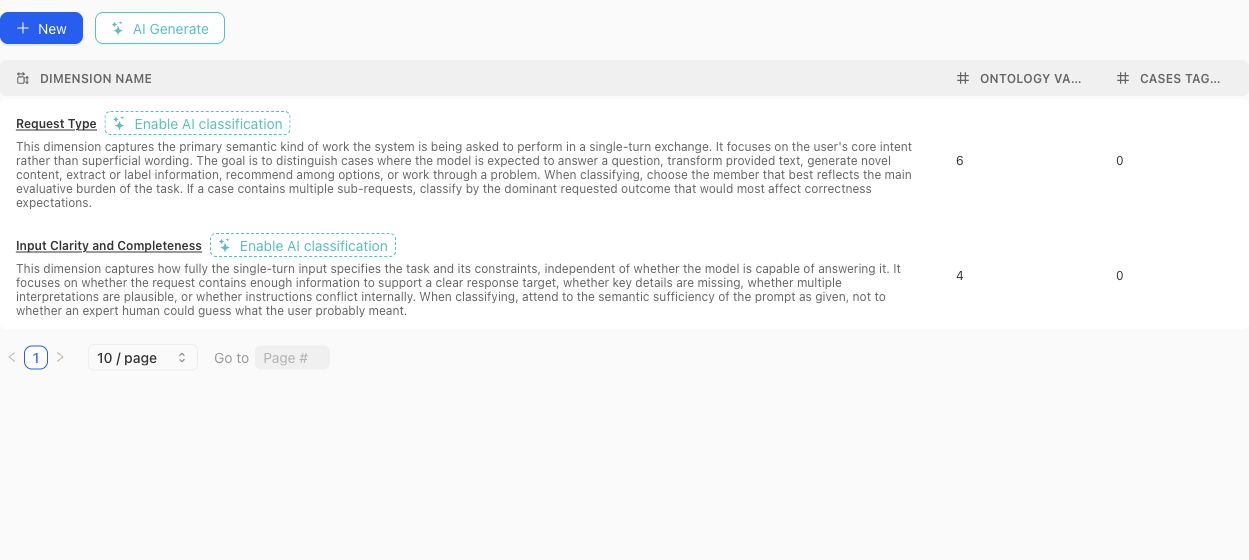
Use the table to compare each Dimension's definition with its ontology and current classification footprint before opening the detail view.
### Create or generate a schema
Create a Dimension manually when the axis and vocabulary are already understood. Use the dimension-schema generator when project context or source material should produce a reviewable proposal. Generated proposals can include a definition, why the Dimension matters, proposed ontology members, and warnings.
A proposal is not the active schema. Review each proposed Dimension and value before accepting it. Avoid accepting near-duplicates simply because they use different wording.
> Classification boundary
>
> Creating or editing a Dimension does not instantly classify every existing case. Missing or stale classifications can be queued and monitored separately. Treat unclassified cases as missing evidence, not as an implicit ontology value.
### Design rules
- Make the Dimension answer one stable question. Split axes that mix several independent concerns.
- Give every ontology value a definition that distinguishes it from neighboring values.
- Prefer values that can be applied consistently to real cases.
- Do not use a Dimension to encode case quality, policy approval, or a desired model score.
- Review distributions after changing values. A clean schema can still leave important cases unclassified.
- Delete only after checking Case Pool and benchmark usage; removal changes the project coverage vocabulary.
### Benchmark roles
In benchmark Get Started, each Dimension and ontology value can receive a focus role:
- **Required:** the benchmark is expected to cover this value.
- **Sampled:** include it as part of the desired mix.
- **Diagnostic:** track it for analysis without making it part of the main denominator.
- **Ignored:** exclude it from the benchmark coverage intention.
- **Unset:** no explicit benchmark instruction has been recorded.
Those roles shape Coverage Story generation and interpretation. They do not alter the project-level definition of the value.
{% example-demo title="Example: source condition" %}
The project defines a Source condition Dimension with Current, Superseded, Conflicting, and Missing values. One benchmark marks all four as required; another marks Current as required and the remaining values as diagnostic. The same project vocabulary supports different benchmark intentions without duplicating the Dimension.
{% /example-demo %}
## Related task pages
{% related-card-grid title="Related task pages" %}
- [Generate a dimension schema](/docs/coverage-engineering/generate-dimension-schema)
- [Work with Project Topics](/docs/coverage-engineering/project-topics)
- [Plan Benchmark Coverage](/docs/coverage-engineering/plan-benchmark-coverage)
- [Analyze dataset representation](/docs/benchmark-datasets/representation)
{% /related-card-grid %}
## Source confidence
Code-backed: the current Dimension list, detail, settings, proposal, classification, examples, and statistics surfaces establish these fields and lifecycle boundaries.
---
id: agent-setup.project-context
title: Project Context
summary: Maintain the Project Agent Brief that gives Teammately agents stable, project-wide understanding.
kind: reference
product_area: agent_setup
status: stable
updated: 2026-08-22
canonical: /docs/agent-setup/project-context
---
# Project Context
## Definition
Project Context is the Agent Setup surface that edits the **Project Agent Brief**. The brief gives Teammately agents stable project-wide understanding: what the specialist AI is for, which behavior matters, important constraints, terminology, and other context that should carry across coverage, contribution preparation, case construction, and improvement work.
The Project Agent Brief is different from the Project Memo in General settings. The memo is administrative project text and explicitly is not used as prompt or agent context. Put agent-relevant project understanding in Project Context.
## Fields, states, or lifecycle rules
- The brief is scoped to the project and reused across benchmark workspaces.
- Editing the brief changes future agent context; it does not rewrite completed Contributions, Runs, or Improvement Session history.
- The brief provides orientation and constraints, not governed correctness authority. Policies and rubrics remain in Correctness Governance.
- Controlling source material belongs in Reference Materials. Summarize stable project intent in the brief and keep source-backed detail in the indexed material.
- The brief should state product-specific meaning directly. Avoid copying transient benchmark goals, one expert's unconfirmed opinion, or a temporary candidate hypothesis into permanent project context.
## Writing a useful brief
Describe the specialist AI's purpose, users, important domain vocabulary, expected interaction shape, and constraints that affect many workflows. Include explicit boundaries where agents might otherwise make unsafe assumptions. Name controlling authorities without duplicating entire manuals.
Review the brief when the product purpose, domain, input architecture, or correctness boundary changes materially. If only one benchmark needs a special objective, put it in that benchmark's setup or Contribution. If only one Improvement Session needs a constraint, put it in the Goal Contract.
{% example-demo title="Example: project context boundary" %}
The brief states that a procurement assistant supports internal buyers, must distinguish current agreements from expired ones, and should expose uncertainty rather than invent an exception. The current agreements themselves remain indexed Reference Materials. The exact evaluation target for expired-agreement cases belongs to the benchmark and Improvement Session, not the brief.
{% /example-demo %}
## Source confidence
Code-backed: the active Agent Setup Project Context route renders the Project Agent Brief editor. The distinction from General settings is supported by the current project settings UI.
## Related task pages
{% related-card-grid title="Related task pages" %}
- [Product quickstart](/docs/quickstart)
- [Use Reference Materials](/docs/agent-setup/reference-materials)
- [Request an Expert Contribution](/docs/expert-contributions/request-contribution)
{% /related-card-grid %}