# Import and prepare cases
Generated: 2026-09-13T04:42:32.246Z
Source build: local
Canonical docs: https://teammately.ai/docs
---
id: operating.import-prepare-cases
title: Import and prepare cases
summary: Bring cases into the project, conform them to Project Input Schema, inspect materials, and prepare benchmark selection.
kind: task
product_area: operating_manual
status: stable
updated: 2026-08-23
canonical: /docs/operating-manual/import-and-prepare-cases
---
# Import and prepare cases
Bring existing examples into the project and make them usable by experts, coverage work, and Harness execution without losing their input or material boundaries.
## Prerequisites
- A saved Project Input Schema.
- Source examples with identifiable primary input.
- Required case materials and accepted artifact formats.
- A selected project and permission to manage Cases.
## Steps
1. Review **Project Settings → Input Schema** and confirm plain-text, chat, or structured architecture.
2. Identify the primary input for each source example and map it to `content.input`.
3. Map supporting values or artifacts to declared `content.case_materials` keys.
4. Reject or correct records missing required materials, using unsupported artifact types, or violating the structured schema.
5. Import or create the Cases through the available product path.
6. Open representative Cases and inspect the rendered case view. Confirm that inputs, materials, labels, and source authority are understandable without private explanation.
7. Classify or connect the relevant Coverage Facets.
8. Select reviewed Cases in Benchmark Datasets and create a snapshot when the membership defines a new evaluation boundary.
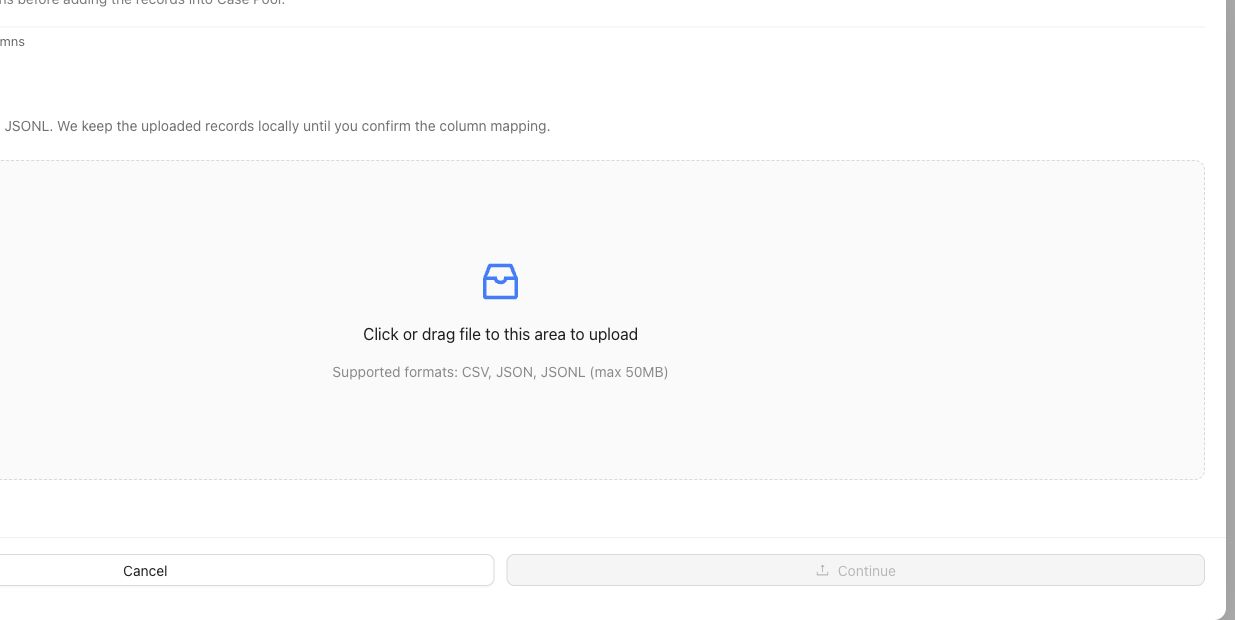
The upload step stages source records. Continue through column mapping and inspect representative rendered Cases before selecting them for a Benchmark.
## Object and state changes
This task creates project Cases and may attach artifact records, material references, coverage classifications, and benchmark selection. The rendered case view is derived from canonical content. Selecting a Case for one benchmark does not remove it from the reusable project pool or select it for every benchmark.
## Success criteria
- Every Case conforms to the Project Input Schema.
- Required materials are present and use accepted formats.
- The rendered case view preserves the intended input and evidence.
- Cases can be understood by an expert and delivered to a Harness.
- Benchmark selection and snapshot state are explicit.
## Common failure modes
- Putting supporting documents into an unstructured metadata field.
- Treating candidate responses as the primary case input.
- Importing artifacts the project schema does not admit.
- Selecting unclear Cases into a benchmark before review.
- Changing case content while comparing Runs against an earlier snapshot.
{% example-demo title="Example: import chat cases with documents" %}
A project uses chat architecture and requires a `policy_document` material. The operator maps each conversation to canonical messages, attaches the controlling PDF, rejects rows without the document, and inspects rendered case views. Only reviewed Cases are selected for the benchmark snapshot.
{% /example-demo %}
## Related reference pages
{% related-card-grid title="Related reference pages" %}
- [Cases](/docs/assets/cases)
- [Project Input Schema](/docs/project-settings/input-schema)
- [Benchmark Datasets](/docs/benchmark-datasets)
{% /related-card-grid %}
## Related troubleshooting pages
{% related-card-grid title="Related troubleshooting pages" %}
- [Dataset upload](/docs/troubleshooting/dataset-upload)
- [Unclear cases](/docs/troubleshooting/unclear-cases)
- [Missing outputs](/docs/troubleshooting/missing-outputs)
{% /related-card-grid %}
## Source confidence
Code-backed: the active Cases surface and case-content contract support canonical input, materials, rendering, and schema validation. Exact import mechanisms can depend on the available product configuration.
---
id: assets.cases
title: Cases
summary: Understand canonical project cases, their input and materials, and how they become members of benchmark datasets.
kind: reference
product_area: assets
status: stable
updated: 2026-08-22
canonical: /docs/assets/cases
---
# Cases
## Definition
A Case is a project-level situation used for expert contribution, benchmark coverage, or candidate evaluation. It has canonical input content and may include declared supporting materials. Cases live in the Assets pool and can be selected into one or more benchmark datasets.
The Project Input Schema determines how the primary input and materials are represented. A benchmark snapshot determines which selected cases belong to one versioned evidence boundary.
## Fields, states, or lifecycle rules
- Canonical primary input is stored under `content.input`.
- Optional supporting values or artifacts are stored under `content.case_materials` according to the project's declared keys.
- `record_content.case_view` is a rendered projection used for inspection and delivery; it is not a second editable payload.
- Inputs can use plain-text, chat, or structured architecture as configured by the project.
- Materials can include admitted artifact families and must satisfy any required-field and file-extension rules.
- A project Case is not automatically part of every benchmark. Benchmark Datasets owns selection and snapshots.
- Generated or imported Cases should be reviewed for clarity, source authority, and schema conformance before they are trusted as benchmark evidence.
- Static case materials and executable Worlds remain separate. A document supplied to a Harness does not become a world merely because it affects execution.
## Case identity and change
Treat the persisted case identity as opaque. Do not construct IDs in client code or documentation. When case content changes materially, benchmark interpretation must use a snapshot or version boundary that makes the selected content clear.
Responses produced by a Harness are evaluation outputs attached to a Run. They are not the primary case input. Expert-authored acceptable examples can inform standards or contribution work, but the current evaluation contract should remain explicit about which candidate produced each response.
{% example-demo title="Example: multimaterial case" %}
A chat case asks whether an exception applies. Its required `current_policy` PDF and optional `account_history` table are stored as case materials admitted by Project Input Schema. The rendered case view presents the conversation and both materials. A benchmark snapshot selects the case, and a Run records the evaluated Harness response separately.
{% /example-demo %}
## Source confidence
Code-backed: the active Assets Cases route and case-content services define canonical input, case materials, and the rendered case view. Public import or export APIs are outside this reference unless separately documented.
## Related task pages
{% related-card-grid title="Related task pages" %}
- [Configure Project Input Schema](/docs/project-settings/input-schema)
- [Work with Benchmark Datasets](/docs/benchmark-datasets)
- [Manage benchmark coverage](/docs/coverage-management)
{% /related-card-grid %}
---
id: project-settings.input-schema
title: Project Input Schema
summary: Define the canonical input architecture, case-material fields, and accepted artifact formats for project cases.
kind: reference
product_area: project_settings
status: stable
updated: 2026-09-07
canonical: /docs/project-settings/input-schema
---
# Project Input Schema
## Definition
Project Input Schema is the project-managed contract for future cases. It declares the primary input architecture, optional structured-input schema, named case-material fields, and artifact families or file extensions the project accepts.
The active architectures are **plain text**, **chat**, and **structured**. The schema is a project singleton rather than a versioned benchmark object. When no setting exists, the default accepts one plain-text user message and no case materials or artifacts.
## Fields, states, or lifecycle rules
- `architecture` is `plain_text`, `chat`, or `structured`.
- Structured architecture requires a bounded `structuredInputSchema`.
- `caseMaterialSchema` is a closed, flat object. Each material key has a label, optional description, required flag, type, and any accepted artifact rules.
- Material keys use lowercase letters, digits, and underscores, start with a letter, and remain flat.
- `acceptedArtifacts` declares project-level artifact families. Supported families are image, document, tabular, presentation, source text, and audio.
- A case-material artifact rule must be a subset of the artifact families admitted at the project root.
- Saving a new schema governs future case validation. Operators should inspect existing cases before making a change that would make current content invalid.
## Canonical case content
The primary case payload is `content.input`. Optional supporting values and artifacts live in `content.case_materials`. The product renders `record_content.case_view` so people and execution adapters can inspect the canonical content consistently; that view is a projection rather than an alternate authoring contract.
Static support passed to a Harness uses `case_material_refs`. An executable or queryable environment uses an optional `world_instance_ref`. Do not collapse static documents, images, or values into the world boundary merely because a candidate consumes them during a Run.
{% example-demo title="Example: structured support case" %}
A project selects structured input with `question` and `customer_tier` properties. It declares a required `policy_document` case material that accepts PDF documents and an optional `account_history` tabular material. A case is valid only when its structured input matches the schema and the required document is present in the accepted format.
{% /example-demo %}
## Source confidence
Code-backed: the active settings route and backend validator define the input architectures, closed case-material schema, artifact families, defaults, and canonical case paths. This page explains the product contract without presenting internal handlers as a public API.
## Related task pages
{% related-card-grid title="Related task pages" %}
- [Project Settings](/docs/project-settings)
- [Product quickstart](/docs/quickstart)
- [Work with cases](/docs/assets/cases)
- [Design Review Screen](/docs/assets/review-screens)
{% /related-card-grid %}
---
id: benchmark-datasets.overview
title: Benchmark Datasets
summary: Select benchmark Cases, inspect representation, and freeze immutable Snapshots for reproducible evidence.
kind: concept
product_area: benchmark_datasets
status: stable
updated: 2026-08-22
canonical: /docs/benchmark-datasets
---
# Benchmark Datasets
Benchmark Datasets defines the evidence set for one benchmark through **Cases**, **Representation**, and **Snapshots**.
The current dataset is editable. It selects reusable project Cases and reflects current facet, policy, rubric, and contributor facts. A Snapshot freezes the exact dataset state needed by a Benchmark Version and its evaluations. These are deliberately different surfaces: editing the current set must not rewrite historical evidence.
## Decision checkpoint
| Surface | Use it to | Evidence rule |
| --- | --- | --- |
| Cases | Inspect and change current benchmark membership | Selection is live until snapshotted |
| Representation | Find concentration and absence across governed facets | Read distribution together with distinct Case counts |
| Snapshots | Freeze Cases, evaluator links, and representation facts | Snapshot content is read-only |
Coverage Management acts on gaps found in the dataset. Assets remains the project-level reusable pool. Benchmark Evaluations runs exact Harness Versions against an immutable Benchmark Version rather than an unspecified “current dataset.”
## Evidence flow
Cases usually begin in project Assets or materialize through Case Review or Expert Contributions. Selecting them makes them part of the current benchmark dataset. Representation then summarizes the current assignments and evaluator relationships. Snapshot readiness checks whether that state can be frozen. A Snapshot supplies the immutable dataset facts used by a Benchmark Version.
This flow is one-way for historical evidence. Later edits to an Asset, facet assignment, Policy, Rubric, or current membership may improve the next Snapshot, but they do not update a previous Snapshot. Compare candidates within one Benchmark Version unless the analysis explicitly accounts for a moved evidence boundary.
## Before creating evidence
Check Case clarity and schema conformance, then inspect Representation for intended behavior and provenance. Confirm approved eligible evaluator links. Resolve Snapshot blockers and preserve the resulting label, version, content hash, creation time, and Case count.
A Snapshot can be reproducible while still being incomplete as product coverage. Reproducibility answers which evidence was evaluated; Representation and Coverage Management answer whether that evidence supports the intended product claim.
{% example-demo title="Example: editable set versus frozen evidence" %}
The current dataset gains four Cases and a corrected Rubric link after an expert Contribution is reconciled. An earlier Run still points to its old Benchmark Version. The operator creates a new Snapshot and Version for the changed set rather than comparing the new candidate against the old Run as though only Harness behavior moved.
{% /example-demo %}
{% related-card-grid title="Dataset workflows" %}
- [Manage benchmark Cases](/docs/benchmark-datasets/cases)
- [Inspect Representation](/docs/benchmark-datasets/representation)
- [Create and inspect Snapshots](/docs/benchmark-datasets/snapshots)
- [Manage coverage](/docs/coverage-management)
{% /related-card-grid %}
## Source confidence
Code-backed: the active dataset routes establish the editable current set, representation workspace, and immutable Snapshot boundary.