# Case Pool surface
Generated: 2026-09-13T04:33:15.043Z
Source build: local
Canonical docs: https://teammately.ai/docs
---
id: object-model.case-pool
title: Case Pool surface
summary: Understand Case Pool as the Assets view for reusable project Cases, candidates, and explicit Benchmark selection.
kind: reference
product_area: object_model
status: stable
updated: 2026-09-07
canonical: /docs/object-model/case-pool
---
# Case Pool surface
## Definition
**Case Pool** is a tab under **Assets → Cases**, not a separate Case object type. It shows reusable project Cases and candidate material that can be inspected before explicit selection into a Benchmark Dataset.
Use this reference when deciding whether a Case should stay in the project collection, be prepared further, or be selected for a Benchmark. **Sourcing Tasks** is the adjacent job and audit surface; it is not another Case state.
## Fields, states, or lifecycle rules
- Case Pool can contain useful Cases that are not selected into any Benchmark.
- Candidate and in-use labels describe curation and membership context; they do not create a different persisted Case type.
- Coverage dimensions and ontology values help explain what behavior the pool represents.
- Adding a Case to a current Benchmark Dataset changes mutable membership. A new Dataset Snapshot is required to freeze that change as an evidence boundary.
- This page does not define public upload schemas, export contracts, or retention behavior.
## Related objects
Read Case Pool with [Cases](/docs/object-model/cases), [Candidate and In-Use Cases](/docs/coverage-engineering/candidate-and-in-use-cases), [Coverage Dimensions](/docs/object-model/coverage-dimensions), and [Benchmark Dataset Cases](/docs/benchmark-datasets/cases). Use [Case Pool](/docs/coverage-engineering/case-pool) for operating instructions.
{% example-demo title="Case pool boundary" %}
Raw case: A new support transcript shows a refund exception question that reviewers have not seen before.
Case pool state: The example is a candidate case because it may close an exception-handling coverage gap.
Interpretation: It should not affect benchmark scores until source context, output identity, coverage labels, and benchmark membership are clear.
{% /example-demo %}
## Source confidence
Code-backed: the Assets Cases routes expose Case Pool and Sourcing Tasks tabs, candidate and in-use views, and an explicit add-to-Benchmark action. Case Pool is therefore a curation surface, not automatic Benchmark membership, a separate Case schema, or a public storage contract.
## Related task pages
{% related-card-grid title="Related task pages" %}
- [Case Pool](/docs/coverage-engineering/case-pool)
- [Candidate and In-Use Cases](/docs/coverage-engineering/candidate-and-in-use-cases)
- [Cases](/docs/object-model/cases)
- [Product quickstart](/docs/quickstart)
- [Task index](/docs/operating-manual/task-index)
{% /related-card-grid %}
---
id: coverage.case-pool
title: Case Pool
summary: Use the Case Pool to collect, triage, enrich, and promote candidate cases.
kind: concept
product_area: coverage_engineering
status: stable
updated: 2026-09-07
canonical: /docs/coverage-engineering/case-pool
---
# Case Pool
## Definition
Case Pool is the project-level working set for reusable Cases and Case sourcing activity. The current UI routes Case inspection through **Assets → Cases** and keeps **Sourcing Tasks** under Coverage Engineering. Together they let operators inspect Case content and provenance, follow preparation tasks, classify coverage, and select Cases for one or more Benchmarks.
## Why it matters
Cases often arrive before the team knows whether they are clear, representative, or tied to a meaningful coverage need. The Case Pool provides a project boundary where imported, generated, or contributed Cases can be reviewed without treating every item as benchmark evidence.
## Where it appears in the product
Use Assets → Cases for the reusable Case collection. Use Sourcing Tasks to inspect find, synthesize, classification, and preparation activity. From selected Cases, use the supported add-to-benchmark action to change editable Benchmark Dataset membership. Use Benchmark Datasets to inspect the selected set and create Snapshots.
## Artifacts it affects
Each Case keeps backend-issued identity, canonical content, materials, source or contributor context, Coverage Facet assignments, and benchmark inclusion where available. Task state is not Case approval, and benchmark inclusion is not Snapshot membership. Preserve those separate states when reporting progress.
## Operational check
Before selecting a Case, inspect its canonical input, required materials, source trace, coverage assignments, and any supported reference output or evaluator relationship relevant to the intended Benchmark. Check for near duplicates and verify that selection closes a named need rather than merely increasing row count.
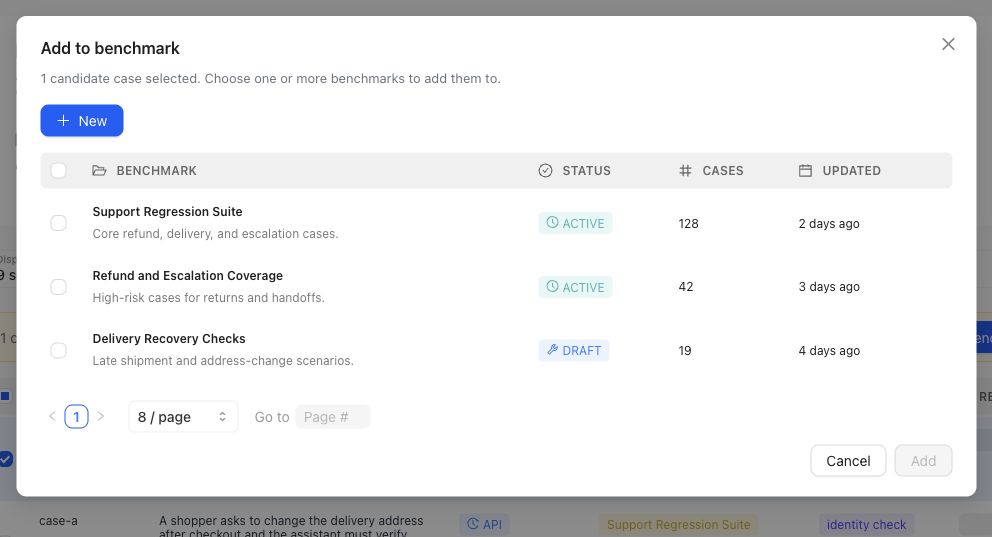
Selection is explicit: choose the intended Benchmark in this dialog. The action changes editable dataset membership, not a historical Snapshot.
{% example-demo title="Routing a sourced Case" %}
A sourcing task finds a production-informed question involving a superseded policy attachment. The operator opens the Case in Assets, confirms the current Input Schema and both materials, assigns the source-authority Coverage Facet, and adds it to the support Benchmark's current dataset. The team reviews Representation and creates a new Snapshot later; the selection action alone does not change historical Runs.
{% /example-demo %}
## Related workflows
{% related-card-grid title="Related workflows" %}
- [Assets](/docs/assets)
- [Importing cases](/docs/operating-manual/import-and-prepare-cases)
- [Synthesize cases](/docs/coverage-engineering/synthesize-cases)
- [Dimensions and ontology](/docs/coverage-engineering/dimensions-ontology)
- [Product quickstart](/docs/quickstart)
{% /related-card-grid %}
## Source confidence
Code-backed: current Case Pool navigation separates reusable Assets Cases from Sourcing Tasks, while Case sourcing types expose provenance, coverage targets, classification context, and benchmark inclusion. Benchmark Dataset pages own selection and Snapshot evidence.
---
id: coverage.candidate-in-use-cases
title: Candidate and In-Use Cases
summary: Distinguish examples under consideration from cases that actively support benchmark evidence.
kind: reference
product_area: coverage_engineering
status: stable
updated: 2026-09-07
canonical: /docs/coverage-engineering/candidate-and-in-use-cases
---
# Candidate and In-Use Cases
## Definition
Candidate Cases are Cases or prepared Case proposals still being considered for reuse or benchmark membership. In-use Cases are already selected by one or more Benchmarks. The distinction describes current use, not intrinsic quality: a Candidate can be excellent but not yet selected, while an in-use Case can later require correction or removal from the editable dataset.
## Fields, states, or lifecycle rules
- Case Pool rows can retain source type, source label, coverage targets, review notes, and the Benchmarks that currently include the Case.
- Adding a Case to a Benchmark changes editable membership. It does not retroactively add the Case to an existing Snapshot or Benchmark Version.
- Removing a Case from a Benchmark does not delete the reusable project Case.
- A Case can be in use by several Benchmarks at once; membership must be interpreted per Benchmark.
- Generated or contributed Cases still require review for schema conformance, materials, realism, and intended coverage before selection.
- Historical Runs continue to reference the Case versions frozen into their Benchmark Version.
## Related objects
Use [Case Pool](/docs/coverage-engineering/case-pool) to inspect reusable Cases and sourcing work. Use [Benchmark Dataset Cases](/docs/benchmark-datasets/cases) to inspect or change membership for one Benchmark. Use [Dataset Snapshots](/docs/benchmark-datasets/snapshots) when that membership must become immutable evaluation evidence.
{% example-demo title="Promotion without rewriting history" %}
Case Foundry prepares a Case for a missing high-impact exception tuple. It remains a Candidate while reviewers inspect its input and materials. After approval, the operator adds it to the current dataset for the support Benchmark, so it becomes in use there. Earlier Snapshots remain unchanged; the Case enters evaluation evidence only after the team creates a new Snapshot and Benchmark Version.
{% /example-demo %}
## Source confidence
Code-backed: Case Pool navigation, benchmark Dataset Case actions, and Case sourcing types expose candidate counts, in-use counts, source context, coverage targets, and benchmark inclusion. Snapshot pages define the separate immutable evidence boundary.
## Related task pages
{% related-card-grid title="Related task pages" %}
- [Case Pool](/docs/coverage-engineering/case-pool)
- [Case pool](/docs/object-model/case-pool)
- [Importing cases](/docs/operating-manual/import-and-prepare-cases)
- [Product quickstart](/docs/quickstart)
- [Task index](/docs/operating-manual/task-index)
{% /related-card-grid %}
---
id: object-model.cases
title: Cases
summary: Understand cases as the situations Teammately uses to represent important AI behavior.
kind: reference
product_area: object_model
status: stable
updated: 2026-08-23
canonical: /docs/object-model/cases
---
# Cases
## Definition
Cases are the behavior situations Teammately uses for review, coverage, and benchmark evidence. A case should preserve the input, source context, metadata, and version boundary needed to understand what behavior is being judged.
Use this reference when a workflow depends on whether an example is reviewable, benchmark-ready, stale, duplicated, or missing the context a reviewer needs.
## Fields, states, or lifecycle rules
- A case is not the same thing as an output; the case holds the situation and context, while the output is the behavior being judged.
- A case can be useful for coverage planning before it is ready for benchmark use.
- Case versions matter when source context, metadata, or expected behavior changes.
- A benchmark result is weak if the failed output cannot be traced back to the exact case version.
- Exact import schema and export behavior belong to source-backed integration pages, not this object reference.
## Related objects
Cases should be read with [Outputs](/docs/object-model/outputs), [Case versions](/docs/governance/case-versioning), [Case pool](/docs/object-model/case-pool), and [Benchmarks](/docs/object-model/benchmarks). Use [Importing cases](/docs/operating-manual/import-and-prepare-cases) when the next step is bringing source examples into Teammately.
{% example-demo title="Cases boundary" %}
Raw record: A transcript includes a customer question, assistant answer, account context, and later human correction.
Case: The reviewable unit preserves the customer question and account context.
Output: The candidate answer is attached separately so reviewers know which behavior is being judged.
Interpretation: If the candidate fails later, the run result can point to the exact case and output rather than to a vague transcript.
{% /example-demo %}
## Source confidence
Code-backed: Case view types and the Cases asset route establish the product object and its presentation; internal Case-content types establish how input and contextual material remain separate from outputs. These implementation sources support object semantics, not a customer-facing serialization contract.
## Related task pages
{% related-card-grid title="Related task pages" %}
- [Case model overview](/docs/assets)
- [Case Pool](/docs/coverage-engineering/case-pool)
- [Case pool](/docs/object-model/case-pool)
- [Product quickstart](/docs/quickstart)
- [Task index](/docs/operating-manual/task-index)
{% /related-card-grid %}