# Integrations
Generated: 2026-09-13T04:33:05.344Z
Source build: local
Canonical docs: https://teammately.ai/docs
---
id: integrations.overview
title: Integrations
summary: Move Cases, source materials, external outputs, and benchmark evidence across Teammately's supported product boundaries.
kind: concept
product_area: data_integrations
status: stable
updated: 2026-09-07
canonical: /docs/integrations
---
# Integrations
## Definition
An integration connects customer-owned data or execution systems to a specific Teammately workflow. The useful boundary is not “send arbitrary records.” It is preserving enough identity, context, and version information for imported material to remain reviewable and for exported evidence to remain interpretable.
## Choose the boundary
| need | Teammately boundary | preserve |
| --- | --- | --- |
| Bring behavior examples into a Project | Assets Cases or the Case import workflow | source identity, input, materials, attributes, current Project Input Schema |
| Give agents Project knowledge | Agent Setup → Reference Materials | source document identity, indexing state, intended use |
| Evaluate outputs produced elsewhere | Benchmark Evaluations → Import reference outputs | immutable Benchmark Version, exact Case IDs, output identity, measured telemetry |
| Send work to specialists | Expert Contributions and Expert UI | assignment, task context, Contribution state, Checkpoint, provenance |
| Use evidence in another system | Run and Case result context | Run, Benchmark Version, Case version, Policy version, Rubric version, incomplete states |
Each pattern has a different lifecycle. Reference Materials are not Case materials. An external response is neither a Case-scoped reference output nor a Harness Version. A Contribution assignment is not a generic notification integration.
## Data movement principles
1. Read the owning product contract before transforming data. For Cases, start with Project Input Schema; for outputs, start with the immutable Benchmark Version.
2. Use backend-issued IDs as join keys and customer IDs as correlation keys.
3. Preserve versions when a downstream result depends on mutable source objects.
4. Distinguish acceptance from completion. Upload, artifact processing, evaluation, and expert work can have separate states.
5. Keep missing values missing. Do not turn unknown telemetry or incomplete evaluation into zero or false.
6. Reconcile a small sample before moving a full collection.
## Product UI and API boundaries
The product UI owns interactive setup, mapping, preview, conflict resolution, and human decisions. Automated integrations should use only a supported external contract that preserves the same object and version boundaries.
Internal browser endpoints, event payloads, database shapes, and service-to-service handlers are not customer integration contracts. Their presence in source code does not make them stable or safe to automate against.
{% example-demo title="External candidate evaluation" %}
A team produces assistant outputs in its own evaluation pipeline. It selects an immutable Benchmark Version, downloads the exact Case IDs, and maps one output to each Case. The imported output set becomes an output-only reference Run.
The team retains its own generation ID as correlation metadata while using the Teammately Run, Benchmark Version, and Case IDs as correctness-evidence identity. Missing cost remains absent. The Run becomes interpretable after Rubric evaluation completes; successful upload alone is not a result.
{% /example-demo %}
## Fields, states, or lifecycle rules
- Projects scope reusable Cases, Project Context, Reference Materials, Harness assets, and correctness governance. Contribution-specific agent behavior and direction selection belong to benchmark-scoped Contributions.
- Benchmark Versions freeze the Case and evaluator boundary used by a Run.
- API keys belong to organization administration and do not replace Project permissions.
- Imports and evaluations can be asynchronous.
- External outputs create non-Harness reference evidence.
- Teammately evidence informs customer review; it does not record a customer deployment decision.
## Source confidence
Code-backed: current Case, Reference Materials, Expert Contributions, and Benchmark Evaluation output-mapping surfaces prove the product data-movement boundaries described here. Exact Public API serialization remains separately publication-gated until the refreshed external service implements its contract.
## Related task pages
{% related-card-grid title="Integration workflows" %}
- [Import case examples](/docs/integrations/import-case-examples)
- [Reference Materials](/docs/agent-setup/reference-materials)
- [Connect model outputs](/docs/integrations/connect-model-outputs)
- [Expert UI](/docs/integrations/reviewer-workspace)
- [Check candidate correctness](/docs/integrations/check-candidate-correctness)
{% /related-card-grid %}
---
id: integrations.check-candidate-correctness
title: Check candidate correctness
summary: Use Teammately benchmark evidence to compare a candidate behavior change against a baseline before internal human review.
kind: recipe
product_area: benchmark_evaluations
status: stable
updated: 2026-08-23
canonical: /docs/integrations/check-candidate-correctness
---
# Check candidate correctness
This page belongs with Benchmark Evaluations because it uses benchmark runs, comparisons, failures, and coverage gaps to prepare evidence for internal human review.
## When to use this check
Use this when a candidate behavior change already has comparable benchmark runs and the team needs human-readable context before an internal reviewer decides what to do next.
## Operating pattern
1. Confirm the baseline and candidate runs use the intended benchmark version and run metadata.
2. Inspect comparison results, must-level rubric failures, incomplete evidence, and coverage gaps.
3. Separate improvements from regressions by policy, rubric, case segment, or benchmark dimension.
4. Identify failures that require expert judgment before the candidate can be trusted.
5. Prepare review context from Benchmark Evaluations results without claiming Teammately records the final approval.
6. Link reviewers to the relevant run results, comparison view, and failing case details.
{% example-demo title="Candidate review" %}
Raw case: A team compares the current assistant with a candidate assistant before human review.
Expert judgment: Downstream action should depend on approved standards, representative coverage, and explainable failures.
Policy: Must-level policies are hard gates; prefer-level policies are quality signals for tradeoff review.
Applicability: Applies to benchmark cases included in the approved benchmark version.
Binary rubric: Each applicable rubric produces pass, fail, or incomplete evidence for the candidate output.
Benchmark result: The candidate improves grounding but fails several must-level compatibility rubrics.
Human review context: If the customer assembles a review packet, it names the exact Benchmark Version and saved Harness Version and separates compatibility failures from unresolved coverage gaps.
{% /example-demo %}
## Evidence to collect
- Baseline run, candidate run, benchmark version, and run metadata.
- Comparison results for must-level rubrics, incomplete evidence, regressions, and improvements.
- Failing cases, relevant policies, applicability logic, and rubric results.
- Coverage gaps or missing-output states that limit confidence.
- Review notes that explain what Teammately evidence covers and what remains a human decision.
## Related docs
{% related-card-grid title="Related docs" %}
- [Read run results](/docs/benchmark-evaluations/inspect-results)
- [Compare Harness Versions](/docs/benchmark-evaluations/compare)
- [Run a benchmark](/docs/benchmark-evaluations/run-evaluation)
{% /related-card-grid %}
## Source confidence
Code-backed: this page is grounded in benchmark evaluations routes and types. It does not claim a code-backed downstream approval workflow.
---
id: integrations.connect-model-outputs
title: Connect Model Outputs
summary: Map externally produced outputs to immutable Benchmark Cases and create an output-only reference Run.
kind: task
product_area: benchmark_evaluations
status: stable
updated: 2026-08-22
canonical: /docs/integrations/connect-model-outputs
---
# Connect Model Outputs
## Prerequisites
- An immutable Benchmark Version containing the Cases to evaluate.
- One externally produced output per required Case.
- Durable Case IDs from that Benchmark Version.
- A reference label that identifies the external system or candidate.
- Measured latency, usage, or cost only when the source system actually recorded it.
## Before and after
| before | after |
| --- | --- |
| Outputs exist in an external file or system | Outputs are mapped to exact immutable Benchmark Cases |
| Candidate identity is customer-owned context | A Teammately reference Run preserves both its own ID and the external reference label |
| No Teammately evaluation state exists | Rubric evaluation proceeds as a separate Run lifecycle |
| Missing telemetry may be ambiguous | Unmeasured telemetry remains absent rather than becoming zero |
## Map outputs
### Task steps: Connect external model outputs
1. Open the intended Benchmark Version and go to **Benchmark Evaluations** → **Runs**.
2. Choose **Import reference outputs** and name the external system or candidate clearly.
3. Download the mapping template for the current Benchmark Version. Keep `case_id` unchanged; use input and context columns only to verify the match.
4. Populate `output` for each Case. Add latency, usage, or cost columns only for values measured by the producing system.
5. Upload the file and inspect unknown Case IDs, missing Benchmark Cases, duplicates, and output previews.
6. Resolve every mapping error. Do not join on input text or force an output onto a similar-looking Case.
7. Confirm the mapping and inspect the output-only reference Run.
8. Wait for evaluation to complete before interpreting result summaries or failures.
## Object and state changes
The workflow creates an ordinary output-only reference Run for one immutable Benchmark Version and associates submitted outputs with its Cases. It can also store measured telemetry supplied with those outputs.
It does not create or save a Harness Version, change Benchmark membership, mutate Cases, approve reference responses, or make the external candidate available to Improve as an executable Harness.
## Success criteria
- Every output joins through the exact Case ID from the intended Benchmark Version.
- The reference label distinguishes this output set from other Runs.
- Unknown, missing, duplicate, inserted, and updated counts are understood before interpretation.
- Unmeasured telemetry is absent.
- The output-only Run is not presented as a managed Harness candidate.
- Result interpretation waits for evaluation completion.
## Common failure modes
- Reusing IDs from the editable Project Case collection instead of the frozen Benchmark Version.
- Joining on input text, row order, or a customer ID without verifying the Teammately Case ID.
- Uploading outputs for two candidate versions under one reference label.
- Reporting missing latency or cost as zero.
- Treating successful mapping as successful evaluation.
- Assuming the reference Run can enter Harness Compare, Arena, or Improve as an executable candidate.
{% example-demo title="Retrieval candidate outputs" %}
A retrieval team evaluates a new indexing configuration outside Teammately. It exports one answer per frozen Benchmark Case and preserves its own generation ID. In the mapping template, each answer joins on `case_id`; the generation ID remains correlation context and measured latency is included.
The imported set becomes a reference Run. Teammately evaluates its outputs against the Benchmark Version's Policy and Rubric evidence, while the indexing configuration itself remains outside Teammately as a non-Harness system.
{% /example-demo %}
## Related reference pages
{% related-card-grid title="Related reference pages" %}
- [Map External Evaluation Outputs](/docs/benchmark-evaluations/output-mapping)
- [Benchmark Evaluations](/docs/benchmark-evaluations)
- [Dataset Snapshots](/docs/benchmark-datasets/snapshots)
- [Integrations](/docs/integrations)
{% /related-card-grid %}
## Related troubleshooting pages
{% related-card-grid title="Related troubleshooting pages" %}
- [Output mapping](/docs/troubleshooting/output-mapping)
- [Missing outputs](/docs/troubleshooting/missing-outputs)
- [Benchmark results changed](/docs/troubleshooting/benchmark-results-changed-unexpectedly)
{% /related-card-grid %}
## Source confidence
Code-backed: the current external-reference Run and output-mapping surfaces define the immutable Case join, template fields, reference-Run boundary, and result transition. Exact customer API serialization remains publication-gated separately.
---
id: integrations.import-case-examples
title: Import Case Examples
summary: Bring real product behavior examples into a Project and reconcile them against Project Input Schema before benchmark use.
kind: task
product_area: data_integrations
status: stable
updated: 2026-09-07
canonical: /docs/integrations/import-case-examples
---
# Import Case Examples
## Prerequisites
- A target Project and permission to work with Cases.
- The current Project Input Schema, including required input architecture and case-material fields.
- Source examples with stable provenance or customer correlation IDs.
- Any files referenced as Case materials.
- An operator who can resolve ambiguous column mappings and rejected rows.
## Before and after
| before | after |
| --- | --- |
| Source rows mix input, prior messages, context, outputs, and notes | Each admitted Case has canonical input, named Case materials, and customer-owned attributes |
| File references are local paths or source-system links | Required files are Teammately artifacts with processing state |
| Source identifiers are known only outside Teammately | Correlation IDs remain attached without replacing backend-issued Case IDs |
| No benchmark membership is implied | Imported Cases are reusable Project Assets and can be selected deliberately for benchmark work |
## Import workflow
### Task steps: Import Case examples
1. Open Project Settings and inspect **Project Input Schema**. Confirm whether the Project expects plain text, chat, or structured input and which Case materials are required.
2. Prepare a small representative sample. Separate the Case input from candidate output, human correction, and source-system bookkeeping.
3. Open the Case import flow from the Project's Cases or Case Pool surface and upload the supported source file.
4. Map source columns to input, named Case materials, and customer attributes. Do not map candidate output into Case input merely because it shares a row.
5. Preview the normalized Cases. Inspect conversations, structured values, file associations, empty required fields, and duplicate source identifiers.
6. Resolve validation and artifact-processing failures before admitting the full collection.
7. Complete the import, then inspect the admitted Cases in Assets. Confirm Case identity, current version, source context, and material readiness.
8. Add Cases to coverage or a Benchmark Dataset only after the team has reviewed whether they belong there.
## Object and state changes
Import creates reusable Project Cases and can create artifact-processing work for referenced files. Reimporting a synchronized source example can create a new Case version when canonical content changes.
Import does not automatically approve a Case, assign coverage facets, add it to every Benchmark, create a Dataset Snapshot, attach candidate outputs, or declare the Case representative.
## Success criteria
- Every admitted Case matches the current Project Input Schema.
- Input, conversation history, Case materials, attributes, and outputs remain distinct.
- Required artifacts are ready or visibly pending; none are silently missing.
- Source correlation survives without replacing Teammately Case identity.
- Rejected rows have an understood field-level reason.
- Benchmark membership remains a separate deliberate action.
## Common failure modes
- Treating every source column as arbitrary metadata instead of mapping the canonical input.
- Flattening a multi-turn conversation into one unstructured string.
- Attaching the model's answer as input rather than as external Run output.
- Relying on filenames or input text as durable Case identity.
- Importing the full corpus before validating a representative sample.
- Assuming upload completion means artifact processing and Case admission completed.
- Sending required context as a Reference Material when it must travel with each Case.
{% example-demo title="Support transcript import" %}
A source row contains a ticket ID, three messages, the assistant's answer, region, and the policy PDF used by the support specialist.
The importer keeps the ticket ID as customer correlation, represents the three-message history as chat input, attaches the PDF to the configured `policy_document` Case material, and keeps region as an attribute. The assistant answer is not stored in Case input; it can later enter as an external Run output or an accepted target through its owning workflow.
{% /example-demo %}
## Related reference pages
{% related-card-grid title="Related reference pages" %}
- [Project Input Schema](/docs/project-settings/input-schema)
- [Cases](/docs/assets/cases)
- [Integrations](/docs/integrations)
- [Case object](/docs/object-model/cases)
{% /related-card-grid %}
## Related troubleshooting pages
{% related-card-grid title="Related troubleshooting pages" %}
- [Dataset upload](/docs/troubleshooting/dataset-upload)
- [Unclear Cases](/docs/troubleshooting/unclear-cases)
- [Missing outputs](/docs/troubleshooting/missing-outputs)
{% /related-card-grid %}
## Source confidence
Code-backed: the active Case, Case Pool upload, mapping, and Project Input Schema sources define the workflow and validation boundary. File limits and exact automated import serialization remain outside this stable UI task until the Public API contract is implemented.
---
id: integrations.reviewer-workspace
title: Expert UI
summary: Understand how experts receive assigned work and how expert-facing tasks, interviews, and checkpoints fit into Teammately.
kind: concept
product_area: expert_contributions
status: stable
updated: 2026-09-07
canonical: /docs/integrations/reviewer-workspace
---
# Expert UI
## Definition
Expert UI is the reviewer-facing experience for completing assigned Expert Contribution work. The main Teammately product defines the Contribution, selected benchmark context, intended expert, tasks, and Checkpoints. Expert UI presents the executable activities—such as structured questions, Case review, or an interview—and returns attributable answers and artifacts to that Contribution.
It is not a second correctness-governance workspace. Experts contribute judgment in context; project operators use the main product to inspect Contribution state and reconcile accepted learning into Cases, Policies, Rubrics, or coverage observations.
## Why it matters
Scarce specialists should not have to reconstruct the project or navigate the full benchmark workspace. The assignment packages the relevant Cases, sources, questions, and reason for asking. Keeping the resulting answers attached to task, session, expert, and Checkpoint identity makes later materialization explainable without turning every interaction into approved truth.
## Where it appears in the product
Experts enter through the reviewer-facing route supplied by an assignment. Runtime navigation selects the current executable task and preserves resume or terminal behavior. In the main product, **Expert Contributions** shows preparation, alignment, task materialization, assigned work, progress, Checkpoints, logs, and contributed artifacts.
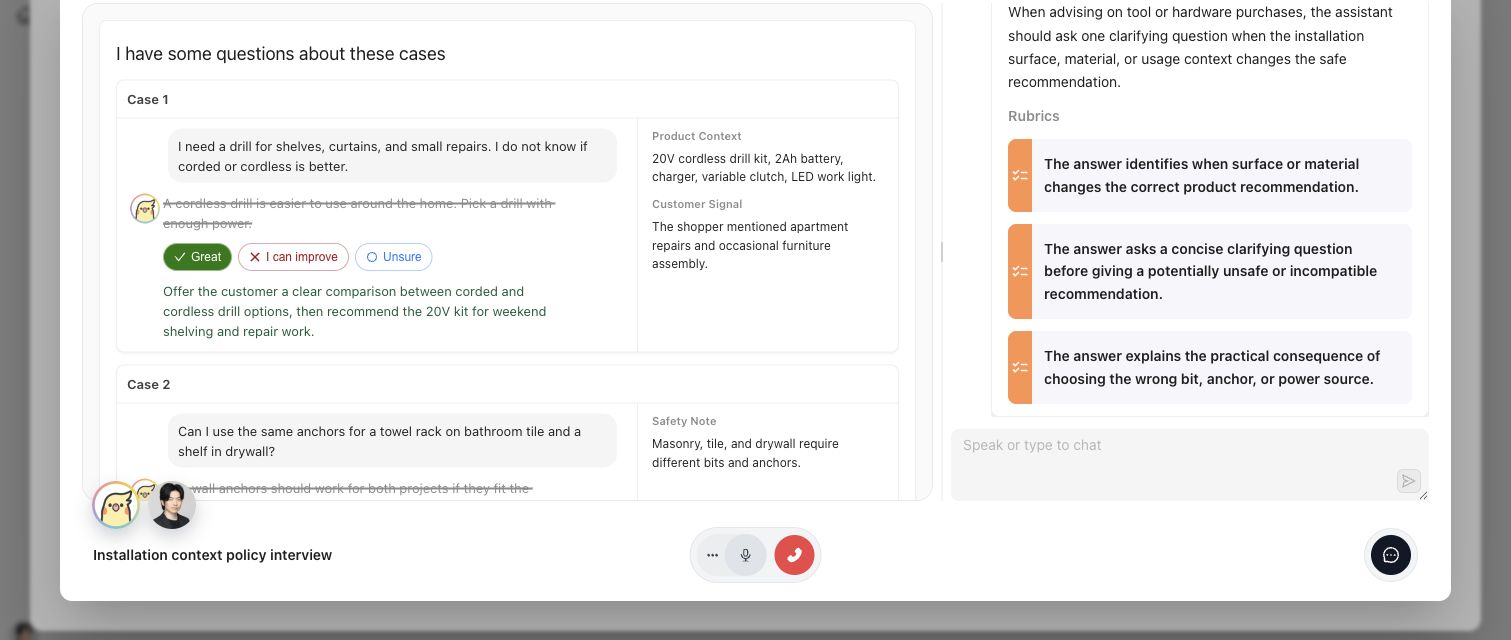
Expert UI keeps the Case, requested judgment, rationale, and relevant standards visible in one assigned activity.
## Artifacts it affects
An executable task contract identifies the Contribution and activity, presentation type, questions or Case context, allowed responses, and completion boundary. An expert answer can include rationale and suggested changes, but it is not automatically an approved Policy, Rubric, Case-scoped reference output, or Benchmark Dataset membership decision. Checkpoint and materialization state must be read from the owning Contribution.
## Operational check
Confirm that the expert is in the intended Project, the assignment opens the correct Contribution, the current activity displays the required source context, and submission reaches the expected completion or Checkpoint state. If the expert cannot answer from the supplied evidence, record that limitation rather than forcing a definitive judgment.
{% example-demo title="Interview returning governed learning" %}
A procurement specialist opens an assigned interview containing three Cases with conflicting source documents. The specialist explains which source controls, qualifies one unresolved exception, and confirms the proposed rule at a Checkpoint. Expert UI returns the attributed answers and state. In the main product, the Contribution materializes a Policy candidate and a coverage observation; neither becomes governed merely because the interview ended.
{% /example-demo %}
## Related workflows
{% related-card-grid title="Related workflows" %}
- [Correctness Elicitation](/docs/concepts/correctness-elicitation)
- [Expert Contributions](/docs/expert-contributions)
- [Complete an Expert Contribution](/docs/expert-contributions/complete-contribution)
- [Contribution Lifecycle and Status](/docs/expert-contributions/lifecycle-and-status)
- [Product quickstart](/docs/quickstart)
- [Task index](/docs/operating-manual/task-index)
{% /related-card-grid %}
## Source confidence
Code-backed: the main-product Contribution route and Review Screen establish assignment context, while the Expert UI executable-task and runtime-navigation contracts establish activity presentation, progression, resume, and terminal behavior. Linked Contribution pages define approval and materialization boundaries.
---
id: agent-setup.reference-materials
title: Reference Materials
summary: Connect project knowledge, inspect indexing state, and verify the blocks available to Teammately agents.
kind: reference
product_area: agent_setup
status: stable
updated: 2026-09-07
canonical: /docs/agent-setup/reference-materials
---
# Reference Materials
## Definition
Reference Materials is the Agent Setup workspace for project knowledge that Teammately agents may use. **Materials** is the unified inventory for websites, Git repositories, and uploaded files. **Indexed Reference** shows the published reference blocks available after extraction and indexing.
Reference Materials is project understanding, not governed correctness. A manual can support an agent's reasoning or an expert Contribution without automatically becoming a policy, rubric, case, or approved statement.
## Fields, states, or lifecycle rules
- A Material identifies a source and its ingestion or freshness state.
- Websites, Git repositories, and files follow source-specific discovery and processing paths in the unified Materials inventory.
- Indexed Reference presents published blocks rather than a second editable copy of the source.
- Publication is atomic: agents should see a coherent published generation rather than a partially updated index.
- Reconnecting, refreshing, or processing a source can create a newer indexed generation. Completed Runs and Contributions keep their own recorded evidence boundaries.
- Removing a Material or source does not imply that previously materialized policies, rubrics, cases, or contribution records should be silently deleted.
- File upload acceptance depends on file type, size, content verification, and the active source-processing path.
## Materials and Indexed Reference
Use Materials to answer: which sources are present, when were they processed, and does a source need attention? Use Indexed Reference to answer: what text or blocks can agents actually retrieve now? A material can be present without the expected controlling content appearing in Indexed Reference.
When sources conflict, retain the conflict in the indexed material and resolve correctness through an expert contribution or governed policy. Do not rewrite Project Context to hide source disagreement.
{% example-demo title="Example: reference publication check" %}
A team adds a policy website and a Git repository containing operational rules. After processing, the operator opens Indexed Reference and searches for the current exception clause. The website block is current, while the repository still contains an older rule. The operator keeps both materials visible and requests an expert Contribution to establish the controlling policy.
{% /example-demo %}
## Source confidence
Code-backed: the active Agent Setup routes expose Materials and Indexed Reference, and the backend publication service supports coherent indexed-reference publication. Exact connector availability may depend on the current product configuration.
## Related task pages
{% related-card-grid title="Related task pages" %}
- [Product quickstart](/docs/quickstart)
- [Maintain Project Context](/docs/agent-setup/project-context)
- [Request an Expert Contribution](/docs/expert-contributions/request-contribution)
{% /related-card-grid %}