# Workspace Administration
Generated: 2026-09-13T04:39:38.349Z
Source build: local
Canonical docs: https://teammately.ai/docs
---
id: governance.workspace-administration
title: Workspace Administration
summary: Administer workspace and project boundaries so correctness work has clear ownership and scope.
kind: reference
product_area: governance
status: stable
updated: 2026-09-07
canonical: /docs/governance/workspace-administration
---
# Workspace Administration
## Definition
Workspace Administration covers two code-backed layers:
- Organization administration in the Admin Console, including members, groups, roles, domain control, IP address control, audit log, usage statistics, profile, support settings, integrations, and API keys.
- Project administration in the main product, including project members, groups, and project permission assignments.
Keep these layers separate when writing or operating from the docs. A workspace-level admin control is not the same as a project-specific correctness workflow.
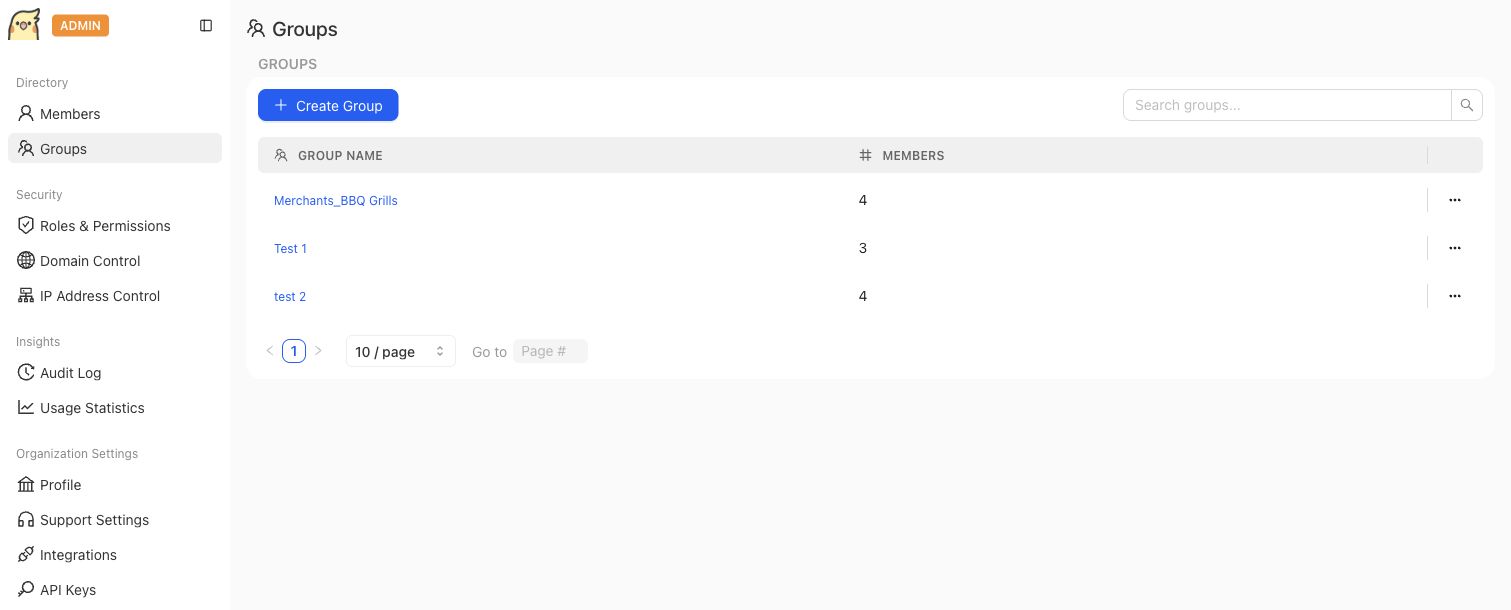
Organization groups belong to the admin layer. Project membership and correctness artifact ownership remain separate concepts.
## Fields, states, or lifecycle rules
- Project permissions in the main product are code-backed for user and group subjects with `ADMIN` or `MEMBER` project roles.
- The Admin Console exposes additional organization-level controls such as roles, domain control, IP address control, integrations, and API keys.
- Do not infer compliance status, retention rules, SSO behavior, billing behavior, rate limits, or deployment options from the existence of an admin screen.
- Approval actions in correctness workflows require accountable ownership; AI suggestions do not approve themselves.
## Related objects
Related objects may include workspace members, groups, workspace roles, permission keys, project permission assignments, domain controls, IP controls, API keys, notification integrations, and the project artifacts those people can access.
{% example-demo title="Human approval boundary" %}
A Workspace administrator manages an organization group in the Admin Console. A Project owner then grants that group access under Project Settings. The group can inspect the Project according to the current Project membership surface, but this does not change organization security controls or create authority over every governed correctness artifact.
{% /example-demo %}
## Source confidence
Code-backed: this page is grounded in the Admin Console navigation and the main product project settings routes listed in source_refs.
## Related task pages
{% related-card-grid title="Related task pages" %}
- [Request an Expert Contribution](/docs/expert-contributions/request-contribution)
- [Manage Project Members](/docs/project-settings/project-members)
- [Import and prepare cases](/docs/operating-manual/import-and-prepare-cases)
{% /related-card-grid %}
---
id: admin-console.overview
title: Admin Console
summary: Understand the organization-level administration surfaces available at admin.teammately.ai.
kind: reference
product_area: admin_console
status: stable
updated: 2026-09-07
canonical: /docs/admin-console
---
# Admin Console
The current Teammately product exposes the Admin Console as a workspace-administration mode under `/admin`. Use this page to distinguish organization-level administration from project-level correctness work in the project workspace. The shared product shell switches between project navigation and workspace administration while preserving the organization-level boundary.
> Administration boundary
>
> Use the Admin Console for organization controls. Use project and benchmark workspace docs for Cases, Expert Contributions, Policies, Rubrics, coverage, evaluations, and improvement evidence.
## Definition
The Admin Console groups organization administration into Directory, Security, Insights, and Organization Settings. The code-backed navigation includes Members, Groups, Roles & Permissions, Domain Control, IP Address Control, Audit Log, Usage Statistics, Profile, Support Settings, Integrations, and API Keys.
This page documents that those surfaces exist. It does not claim detailed compliance, billing, deployment, rate-limit, or security behavior unless a linked source file exposes that behavior directly.

The Admin Console is the organization administration surface. Group management is separate from project-level correctness work.
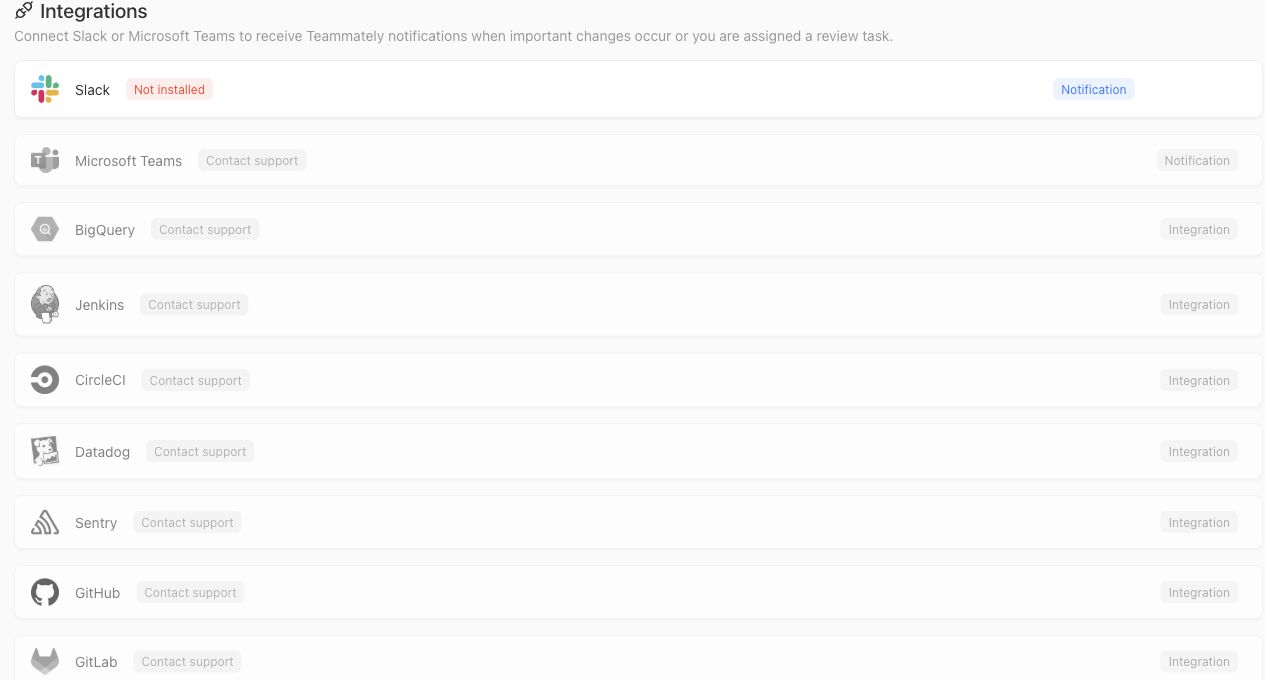
The Integrations screen shows notification and partner connection surfaces that belong to organization administration. Visible contact-support states should not be documented as self-serve integrations.
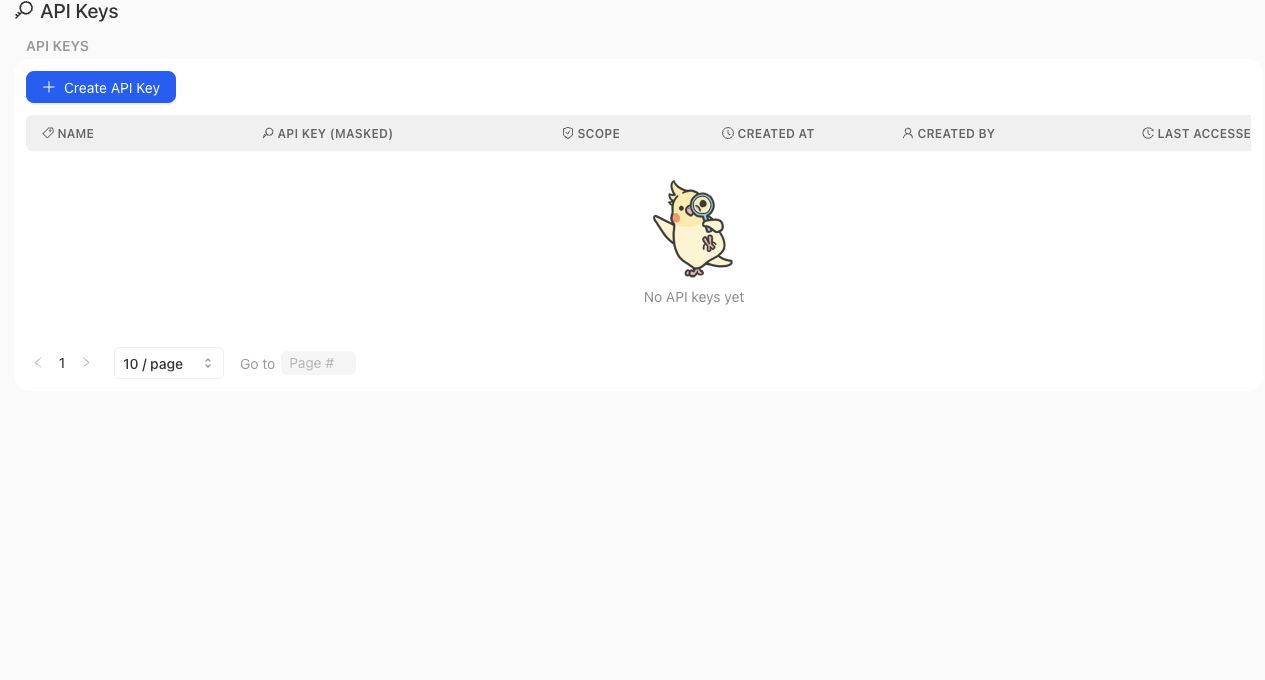
API Keys are managed in the Admin Console and should be documented as an organization administration surface, separate from project correctness artifacts.
> API key boundary
>
> Creating an API key establishes a credential; it does not make every internal endpoint a supported customer API. Endpoint availability, bearer authentication, required scopes, request and response schemas, and error behavior belong to the versioned Public API contract.
## Fields, states, or lifecycle rules
- Members and Groups are organization directory surfaces. Project-level membership and project permissions remain separate surfaces in the main product.
- Roles & Permissions in the Admin Console manage workspace roles and permission keys exposed by the admin application. Do not treat role names in orientation pages as exact permission contracts.
- Domain Control stores whether domain enforcement is enabled and which email domains are allowed for invitation.
- IP Address Control stores whether IP limiting is enabled and the configured allowlist.
- API Keys can be listed, created, copied at creation time, scoped, and deleted from the admin app surface. Treat the full value as a secret and create separate keys for separate integration boundaries.
- Slack is the currently clickable self-serve notification integration in the Admin Console. Microsoft Teams and the other listed partners are visible as contact-support or coming-soon surfaces in the current integrations index, so these docs should not describe them as self-serve integrations.
- Audit Log and Usage Statistics appear as admin console surfaces, but this page does not promise exact event schemas, retention periods, analytics definitions, or export behavior.
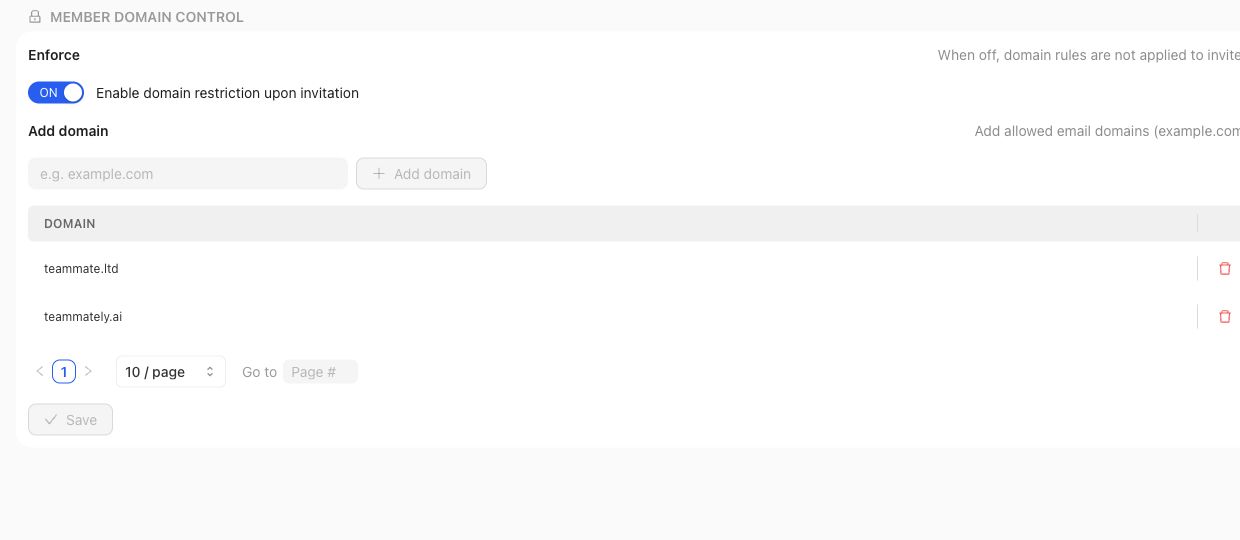
Domain Control and IP Address Control are organization-level security settings. They should not be described as project review or benchmark approval mechanisms.
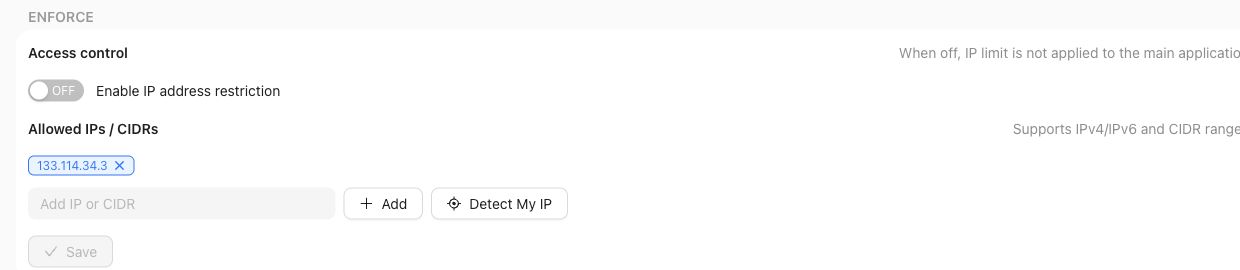
IP Address Control exposes enforcement settings and should be documented only as an admin access-control surface.
## Product boundary
Use the Admin Console when the question is about organization access, security controls, API keys, notification integrations, or organization-level activity. Use project settings and product-area docs when the question is about cases, reviews, policies, rubrics, benchmarks, and project-specific permissions.
A reviewer persona, a Project member, a Workspace role, and an organization administrator are related but not identical. Read each access or authority claim from its owning surface.
Likewise, an API key, its Project access, and an endpoint's action scope are related but not identical. Key administration belongs here; the external service contract must define what a caller can actually do.
## Source confidence
Code-backed: this page is grounded in the current `/admin` workspace route, shared navigation mode, admin directory, integrations index, and representative admin route implementations listed in the frontmatter source_refs.
## Related task pages
{% related-card-grid title="Related task pages" %}
- [Manage Project Members](/docs/project-settings/project-members)
- [Resolve an IP access restriction](/docs/troubleshooting/authentication)
- [Troubleshoot permissions](/docs/troubleshooting/permissions)
{% /related-card-grid %}
## Related reference pages
{% related-card-grid title="Related reference pages" %}
- [Workspace administration](/docs/governance/workspace-administration)
- [Roles and permissions](/docs/governance/roles-and-permissions)
- [Permissions](/docs/reference/permissions)
{% /related-card-grid %}
---
id: object-model.workspaces-projects-systems
title: Workspaces, projects, and target systems
summary: Model organizational boundaries, product boundaries, and the AI system being governed.
kind: reference
product_area: object_model
status: stable
updated: 2026-09-07
canonical: /docs/object-model/workspaces-projects-and-target-systems
---
# Workspaces, projects, and target systems
## Definition
Workspaces, projects, and target systems define where organizational access, product-specific correctness work, and the AI behavior under evaluation are separated. A workspace groups people and administration; a project holds the cases, standards, coverage, and benchmark evidence for a specific target behavior.
Use this reference when a reader needs to know whether an artifact belongs to an organization boundary, a project boundary, or the target system being evaluated.
## Fields, states, or lifecycle rules
- Workspace boundaries should not be used to infer project-level correctness decisions.
- Project boundaries keep cases, policies, rubrics, coverage, benchmark versions, and review context tied to a specific target behavior.
- Target-system identity matters for benchmark-level run metadata and comparison interpretation.
- Cross-project reuse should not imply cross-project approval.
- This page does not make billing, tenancy, deployment, or compliance claims.
## Related objects
Workspaces, projects, and target systems should be read with [Product map](/docs/getting-oriented/product-map), [Product boundaries](/docs/introduction/product-boundaries), [Permissions](/docs/reference/permissions), and [Run metadata](/docs/benchmark-evaluations/run-metadata).
{% example-demo title="Workspaces, projects, and target systems boundary" %}
Scenario: The same company evaluates a support assistant and an internal policy-search assistant.
Project boundary: Each assistant has its own cases, policies, rubrics, benchmark versions, and benchmark-level run metadata.
Interpretation: A passing benchmark in the support project should not imply the policy-search assistant has approved evidence.
{% /example-demo %}
## Source confidence
Code-backed: Project and workspace types establish organization and Project identity; member settings expose Project participation; benchmark Run presentation identifies the evaluated target boundary. These sources do not establish billing, deployment, or tenancy guarantees.
## Related task pages
{% related-card-grid title="Related task pages" %}
- [Workspaces and projects](/docs/concepts/workspaces-projects)
- [Product map](/docs/getting-oriented/product-map)
- [Product boundaries](/docs/introduction/product-boundaries)
- [Product quickstart](/docs/quickstart)
- [Task index](/docs/operating-manual/task-index)
{% /related-card-grid %}
---
id: governance.roles-permissions
title: Roles and Permissions
summary: Use roles and permissions to route ownership, review, and approval work clearly.
kind: reference
product_area: governance
status: stable
updated: 2026-09-07
canonical: /docs/governance/roles-and-permissions
---
# Roles and Permissions
## Definition
Roles and Permissions covers the access controls visible in the current product source. It is not a generic enterprise RBAC promise.
The main product exposes project permission management for users and groups. The Admin Console exposes workspace role management and permission keys. Orientation pages may describe common personas such as product owner, reviewer, expert, AI engineer, or administrator, but those personas are not exact permission values unless a code-backed source says so.
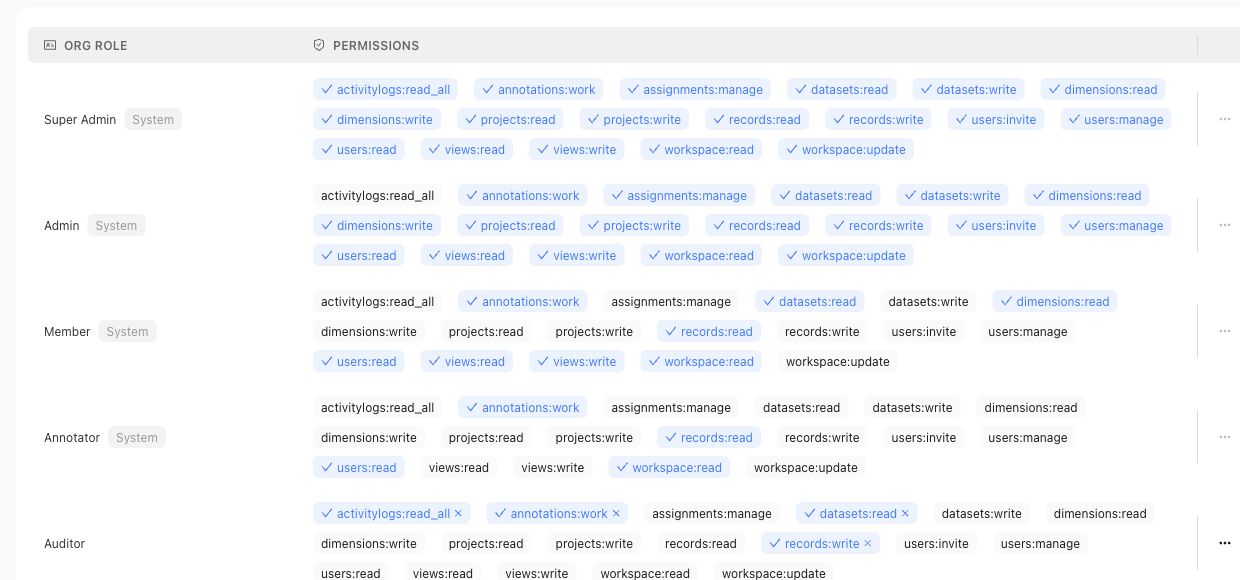
Use the roles table for organization access claims, and use project permission pages for project-level access claims.
## Fields, states, or lifecycle rules
- Main-product project permissions use user or group subjects and code-backed `ADMIN` or `MEMBER` project roles.
- Admin Console roles are workspace roles with permission keys managed through the admin app.
- Reviewer assignments and review ownership are workflow concepts; they should not be treated as workspace role names.
- Approval actions require accountable ownership; AI suggestions do not approve themselves.
## Related objects
Related objects may include workspace users, workspace groups, workspace roles, permission keys, project permission assignments, reviewer assignments, review sessions, approvals, and the correctness artifacts those users can access.
{% example-demo title="Human approval boundary" %}
A domain expert receives a Contribution and can complete its assigned Tasks. The same person is also a member of one Project, so they can inspect that Project's permitted surfaces. Neither fact makes them an organization administrator or grants authority to approve every governed artifact. Read access, Contribution assignment, artifact approval, and Workspace administration from their owning surfaces.
{% /example-demo %}
## Source confidence
Code-backed: this page is grounded in the main product project permission routes and Admin Console role management source listed in source_refs.
## Related task pages
{% related-card-grid title="Related task pages" %}
- [Request an Expert Contribution](/docs/expert-contributions/request-contribution)
- [Build policies and rubrics](/docs/operating-manual/build-policies-and-rubrics)
- [Manage Project Members](/docs/project-settings/project-members)
{% /related-card-grid %}
---
id: orientation.user-roles
title: User roles
summary: Understand the responsibilities of project operators, domain experts, AI engineers, accountable owners, and organization administrators.
kind: reference
product_area: reference
status: stable
updated: 2026-08-22
canonical: /docs/getting-oriented/user-roles
---
# User roles
## Definition
Teammately work is coordinated across responsibilities rather than one universal operator. A **project operator** maintains reusable context, assets, standards, and benchmark work. A **domain expert** supplies specialist judgment through Contributions. An **AI engineer** owns candidate Harness behavior and evaluation interpretation. An **accountable owner** decides how customer-owned downstream processes use the evidence. An **organization administrator** manages membership and organizational controls.
Product roles and permissions determine access, but responsibility can still vary by team. The important rule is to preserve who supplied judgment, who changed an artifact, and who owns the next action.
## Fields, states, or lifecycle rules
- Project operators configure Agent Setup, Project Input Schema, Coverage Facets, Assets, and benchmark work according to their access.
- Domain experts use the focused Contribution experience and do not require the full project workbench to complete assigned work.
- Expert profiles are global rather than a project-specific roster; a Contribution selects an appropriate expert for its application domain.
- AI engineers save Harness versions, start or inspect Benchmark Evaluations, and participate in Improvement Sessions.
- Accountable owners inspect versioned evidence and retain authority over downstream product, governance, or operational choices.
- Organization administrators manage organization-level access and controls without becoming the automatic approver of every policy, rubric, or Contribution.
- AI agents prepare and coordinate work but do not inherit human authority.
## Responsibility handoffs
An operator can prepare a Contribution, but the expert owns the specialist judgment. The resulting material can be reconciled into Correctness Governance, Assets, or Coverage Management. An AI engineer can change the Harness and produce new Runs, but cannot rewrite the expert provenance behind a rubric. An accountable owner can act on the evidence without turning that action into a Teammately artifact unless a source-backed workflow exists.
{% example-demo title="Example: role handoff" %}
A project operator requests a grounding Contribution from the policy owner. The expert confirms source authority and contributes a rubric. The operator reconciles it in Correctness Governance. An AI engineer evaluates a saved Harness version and starts an Improvement Session from the failures. The accountable product owner later decides what downstream action to take from the evidence.
{% /example-demo %}
## Source confidence
Code-backed: current project navigation, Contribution expert routes, and administration surfaces support these responsibility boundaries. Exact permissions remain governed by the active role configuration.
## Related task pages
{% related-card-grid title="Related task pages" %}
- [Request an Expert Contribution](/docs/expert-contributions/request-contribution)
- [Complete an Expert Contribution](/docs/expert-contributions/complete-contribution)
- [Run a Benchmark Evaluation](/docs/benchmark-evaluations/run-evaluation)
{% /related-card-grid %}