# Reviewer and Project Access
Generated: 2026-09-13T04:43:11.642Z
Source build: local
Canonical docs: https://teammately.ai/docs
---
id: governance.reviewer-project-access
title: Reviewer and Project Access
summary: Route reviewers and project participants to the work they are qualified to inspect or approve.
kind: reference
product_area: governance
status: stable
updated: 2026-09-07
canonical: /docs/governance/reviewer-and-project-access
---
# Reviewer and Project Access
## Definition
Reviewer access combines several explicit boundaries. Organization roles are managed in the Admin Console. Project membership determines access to a particular project. Expert Contribution assignment determines which scoped work an expert receives. Artifact approval authority belongs to the owning workflow and must not be inferred from a general role label.
## Fields, states, or lifecycle rules
- A workspace or organization role does not automatically prove access to every Project.
- Project membership does not automatically assign a person to every Expert Contribution.
- Assignment makes work available to the intended expert; it does not pre-approve the expert's response.
- Checkpoint and artifact approval state must be read from the Contribution or governed object itself.
- Removing access can prevent future interaction without erasing already recorded attributable evidence.
- API keys, service scopes, and customer integrations are separate authorization boundaries.
- Exact permission keys and enforcement behavior should be read from current administration and project surfaces, not inferred from persona names.
## Related objects
Use [Admin Console](/docs/admin-console) for organization roles and directory controls, [Project Members](/docs/project-settings/project-members) for project participation, and [Expert Contributions](/docs/expert-contributions) for assignment and expert-runtime state. Use the owning Policy, Rubric, Case, or Contribution page to determine approval.
{% example-demo title="Qualified expert without project access" %}
A specialist is the right reviewer for a source-authority Contribution but cannot open the assigned task. The operator checks organization membership, then Project membership, then Contribution assignment. Granting the missing Project access makes the task reachable; the assignment still controls which work is presented, and the specialist's later Checkpoint decision remains a separate recorded action.
{% /example-demo %}
## Source confidence
Code-backed: Project Permissions, Project Members, user, and workspace types establish project participation and role presentation. Contribution pages define assignment, runtime, and approval state separately; this page does not claim a complete authorization matrix.
## Related task pages
{% related-card-grid title="Related task pages" %}
- [Roles and Permissions](/docs/governance/roles-and-permissions)
- [Reviewer Assignments and Statuses](/docs/expert-contributions)
- [Permissions](/docs/reference/permissions)
- [Product quickstart](/docs/quickstart)
- [Task index](/docs/operating-manual/task-index)
{% /related-card-grid %}
---
id: governance.roles-permissions
title: Roles and Permissions
summary: Use roles and permissions to route ownership, review, and approval work clearly.
kind: reference
product_area: governance
status: stable
updated: 2026-09-07
canonical: /docs/governance/roles-and-permissions
---
# Roles and Permissions
## Definition
Roles and Permissions covers the access controls visible in the current product source. It is not a generic enterprise RBAC promise.
The main product exposes project permission management for users and groups. The Admin Console exposes workspace role management and permission keys. Orientation pages may describe common personas such as product owner, reviewer, expert, AI engineer, or administrator, but those personas are not exact permission values unless a code-backed source says so.
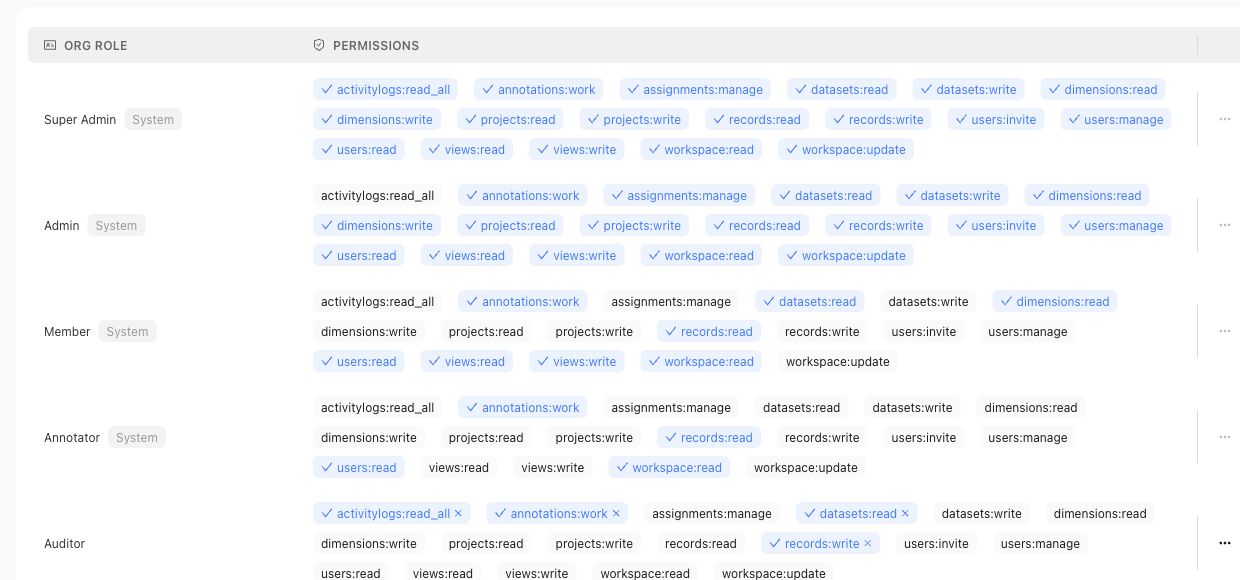
Use the roles table for organization access claims, and use project permission pages for project-level access claims.
## Fields, states, or lifecycle rules
- Main-product project permissions use user or group subjects and code-backed `ADMIN` or `MEMBER` project roles.
- Admin Console roles are workspace roles with permission keys managed through the admin app.
- Reviewer assignments and review ownership are workflow concepts; they should not be treated as workspace role names.
- Approval actions require accountable ownership; AI suggestions do not approve themselves.
## Related objects
Related objects may include workspace users, workspace groups, workspace roles, permission keys, project permission assignments, reviewer assignments, review sessions, approvals, and the correctness artifacts those users can access.
{% example-demo title="Human approval boundary" %}
A domain expert receives a Contribution and can complete its assigned Tasks. The same person is also a member of one Project, so they can inspect that Project's permitted surfaces. Neither fact makes them an organization administrator or grants authority to approve every governed artifact. Read access, Contribution assignment, artifact approval, and Workspace administration from their owning surfaces.
{% /example-demo %}
## Source confidence
Code-backed: this page is grounded in the main product project permission routes and Admin Console role management source listed in source_refs.
## Related task pages
{% related-card-grid title="Related task pages" %}
- [Request an Expert Contribution](/docs/expert-contributions/request-contribution)
- [Build policies and rubrics](/docs/operating-manual/build-policies-and-rubrics)
- [Manage Project Members](/docs/project-settings/project-members)
{% /related-card-grid %}
---
id: expert-contributions.overview
title: Expert Contributions
summary: Coordinate benchmark-scoped expert work, attributable judgment, governed artifacts, and the decisions that move correctness forward.
kind: concept
product_area: expert_contributions
status: stable
updated: 2026-09-07
canonical: /docs/expert-contributions
---
# Expert Contributions
Expert Contributions is the benchmark-scoped workspace for requesting, conducting, and materializing specialist work. It coordinates the expert, objective, selected evidence, task sequence, checkpoints, attributable responses, and contributed artifacts needed to move a benchmark forward.
## Definition
The administrator workspace contains **Overview**, **Contributions**, **Contributed Artifacts**, and **Logs & Status**. **Request Contribution** opens the composer for a new contribution. The expert follows a contribution-specific experience that can contain form, chat, interview, and case-review tasks, along with checkpoints and completion states.
A Contribution is the unit of requested expert effort. It replaces broad workflow configuration with a bounded statement of what this benchmark needs from this expert now. The work can result in contributed policies, rubrics, cases, or coverage observations without flattening all expert activity into one generic approval record.
## Decision checkpoint
| Need | Contribution element | Result to inspect |
| --- | --- | --- |
| Resolve a specific benchmark question | Contribution statement and scoped objectives | The expert can explain the requested decision |
| Ground work in concrete behavior | Selected or designated cases | Case-level responses remain attributable |
| Supply supporting knowledge | Attachments and scoped statements | The expert sees the relevant source boundary |
| Choose the right interaction | Form, chat, interview, or case review task | Task output matches the kind of judgment needed |
| Confirm consequential learning | Checkpoint | Accepted, revised, or unresolved state is explicit |
| Reuse the result | Contributed Artifacts | Policies, rubrics, cases, and coverage observations retain provenance |
## Lifecycle and status
The durable Contribution statuses are `PREPARING_DIRECTION`, `AWAITING_DIRECTION_ALIGNMENT`, `MATERIALIZING_TASKS`, `READY`, `IN_PROGRESS`, `COMPLETED`, and `CANCELLED`. The interface presents these as planning direction, waiting for alignment, preparing tasks, ready, active, completed, or cancelled. The exact task sequence can vary by Contribution.
Realtime updates and durable transitions help the administrator and expert see current progress without inventing completion. A waiting state, checkpoint, or finalization step should be shown as such. Completing the expert experience does not imply that every proposed artifact has been accepted into its project-level owner.
## Contribution evidence
Logs & Status exposes operational and engagement records. Contributed Artifacts organizes materialized or contributed cases, policies, rubrics, and new coverage observations. Correctness Governance, Assets, or Coverage Management owns the resulting project or benchmark artifact after materialization.
This model improves return on expert effort. Agents prepare focused work from project context, indexed material, benchmark cases, and unresolved questions. The expert supplies the authority; the result can be reused across standards, coverage, evaluation, and improvement.
{% example-demo title="Resolve source authority" %}
A benchmark contains cases where an operational runbook conflicts with a newer policy page. The operator requests a Contribution from the policy owner, selects the conflicting cases, attaches both sources, and uses case review plus a checkpoint. The expert establishes which source controls, contributes a scoped policy and rubric, and records one coverage observation for an unrepresented exception.
{% /example-demo %}
## Related workflows
{% related-card-grid title="Related workflows" %}
- [Request an Expert Contribution](/docs/expert-contributions/request-contribution)
- [Complete an Expert Contribution](/docs/expert-contributions/complete-contribution)
- [Build policies and rubrics](/docs/operating-manual/build-policies-and-rubrics)
{% /related-card-grid %}
## Related reference pages
{% related-card-grid title="Related reference pages" %}
- [Contributed Artifacts](/docs/expert-contributions/contributed-artifacts)
- [Contribution lifecycle and status](/docs/expert-contributions/lifecycle-and-status)
- [Logs & Status](/docs/expert-contributions/logs-and-status)
- [Agent Setup](/docs/agent-setup)
- [Human Approval Boundaries](/docs/governance/human-approval-boundaries)
{% /related-card-grid %}
## Source confidence
Code-backed: the active benchmark workspace, Contribution dashboard, composer, administrator detail, and expert routes support the scope, task, status, and artifact model described here.
---
id: reference.permissions
title: Permissions
summary: Understand the user-facing permission boundaries for projects, reviewers, settings, and expert UI access.
kind: reference
product_area: reference
status: stable
updated: 2026-09-07
canonical: /docs/reference/permissions
---
# Permissions
## Definition
Permissions describe the user-facing access boundaries that affect projects, reviewer work, settings, Expert UI access, and organization administration. Use this page to decide which access surface to inspect before diagnosing a blocked workflow.
This reference does not turn role labels into a complete public permission matrix. Exact permission behavior should stay tied to source-backed pages and the admin or project surfaces that expose it.
## Fields, states, or lifecycle rules
- Project access affects cases, standards, coverage, benchmark work, and project settings.
- Reviewer access affects assigned expert work and reviewer-facing surfaces.
- Organization administration affects members, groups, roles, security controls, API keys, and integrations.
- Role labels in docs should be treated as understandable operating labels, not as exhaustive permission contracts.
- Do not infer auth, security, compliance, tenant isolation, or billing guarantees from this reference.
## Related objects
Permissions should be read with [Admin Console](/docs/admin-console), [Workspaces and projects](/docs/concepts/workspaces-projects), [Permissions troubleshooting](/docs/troubleshooting/permissions), and [Reviewer and project access](/docs/governance/reviewer-and-project-access).
{% example-demo title="Permissions boundary" %}
Symptom: A reviewer can sign in but cannot complete assigned case review.
Permission boundary: The issue may be reviewer assignment, project access, Expert UI routing, or missing case context.
Interpretation: Diagnose access and assignment before changing cases, standards, or benchmark evidence.
{% /example-demo %}
## Source confidence
Code-backed: Project, user, and workspace types plus Project Permissions and Members surfaces support the user-facing boundaries described here. They do not form an exhaustive authorization matrix; assignment, organization administration, and object approval remain separate product states.
## Related task pages
{% related-card-grid title="Related task pages" %}
- [Admin Console](/docs/admin-console)
- [Workspaces and projects](/docs/concepts/workspaces-projects)
- [Permissions troubleshooting](/docs/troubleshooting/permissions)
- [Expert UI](/docs/integrations/reviewer-workspace)
- [Product quickstart](/docs/quickstart)
{% /related-card-grid %}