# Governance Overview
Generated: 2026-09-13T04:41:31.139Z
Source build: local
Canonical docs: https://teammately.ai/docs
---
id: governance.overview
title: Governance Overview
summary: Govern correctness standards, expert decisions, versions, and evidence without overstating unsupported enterprise claims.
kind: concept
product_area: governance
status: stable
updated: 2026-09-07
canonical: /docs/governance
---
# Governance Overview
Use Governance when the reader needs to know whether correctness evidence is accountable: who approved it, which version was used, whether it is stale, and whether the user has the right access to act.
## What this area is
Governance covers human approval boundaries, versioning, staleness, reviewer activity, project access, roles, permissions, conflict resolution, reproducibility, and data-handling expectations for AI-assisted features. It is about the correctness artifact graph: who approved what, which version was used, when an artifact became stale, and what context is needed to repeat or explain a benchmark result.
This page does not promise compliance, retention, billing, deployment, tenant-isolation, or security guarantees beyond the code-backed product surfaces cited in the source refs. Use the Admin Console page for organization administration and the permissions references for exact access boundaries where they are source-backed.
## Decision checkpoint
| Governance question | Inspect | Do not infer |
| --- | --- | --- |
| Can this standard govern evidence? | Human approval boundary | Suggested or AI-drafted text is approved. |
| Why did evidence change? | Case, policy, rubric, benchmark, and run versions | Score movement is only candidate behavior. |
| Who can act? | Project access, reviewer access, and admin references | Role label equals permission. |
| Is the artifact stale? | Staleness and versioning pages | Old benchmark evidence still reflects current standards. |
| Is this an enterprise trust claim? | Source-backed admin/security docs | Compliance, retention, or deployment guarantees. |
## Who uses it
Project owners use Governance to keep artifact ownership clear. Experts rely on it to know when their judgment has become an approved standard. AI engineers use it to avoid comparing stale or mismatched versions. Organization administrators use adjacent admin surfaces for members, roles, security controls, integrations, and API keys.
Interpret people through the surface they are using: Project member, Contribution recipient, accountable artifact owner, or organization administrator. A descriptive persona such as AI engineer or domain expert explains work but does not grant permission.
## Artifacts created or changed
Governance affects approval records, policy and rubric versions, case versions, benchmark versions, reviewer activity, access records, conflict-resolution notes, stale-state handling, and reproducibility context. It can also constrain whether AI-generated suggestions are allowed to become approved artifacts.
These surfaces do not establish compliance certification, retention guarantees, tenant isolation, audit-log completeness, or a general security posture. Organization controls belong to the separately bounded Admin Console.
## What governance protects
Governance protects the line between suggestion and approval. AI assistance can draft, classify, summarize, or propose changes, but a suggestion becomes a governed standard only through the owning artifact's accountable approval state. Governance also protects version boundaries: a benchmark result is interpretable only when the Case set, governed evaluators, saved Harness Version, settings, published Regime Version, and benchmark-level run fields are clear.
When a benchmark changes unexpectedly, Governance asks which artifact changed. When experts disagree, it asks how the decision was resolved. When a reviewer lacks access, it asks whether the user is a project participant, reviewer, workspace member, or organization administrator. These distinctions keep the product trustworthy without inventing unsupported enterprise claims.
Before using a result in human review, inspect approval, version, access, staleness, and source-confidence boundaries. Hold the interpretation when any required boundary is unknown.
## Governance readiness check
| Evidence is ready for accountable review when... | Hold the decision when... |
| --- | --- |
| Approved policies and rubrics are separated from suggestions and drafts. | Any governing standard is unapproved, stale, or ambiguous. |
| Benchmark evidence names case, standard, benchmark, run, and candidate versions. | A score is detached from version boundaries. |
| Access and reviewer roles are checked against source-backed permission pages. | A role label is used as a permission guarantee. |
| Unsupported enterprise claims are left out or routed to source-backed docs. | The page implies compliance, retention, security, billing, or deployment behavior without evidence. |
## Common starting tasks
- [Conflict Resolution](/docs/governance/conflict-resolution)
- [Staleness Detection](/docs/governance/staleness-detection)
- [Compare Harness Versions](/docs/benchmark-evaluations/compare)
- [Read run results](/docs/benchmark-evaluations/inspect-results)
- [Run a benchmark](/docs/benchmark-evaluations/run-evaluation)
## Related reference pages
{% related-card-grid title="Related reference pages" %}
- [Human Approval Boundaries](/docs/governance/human-approval-boundaries)
- [Versions, staleness, and resolution](/docs/object-model/versions-staleness-and-resolution)
- [Approval History and Reviewer Activity](/docs/governance/approval-history-and-reviewer-activity)
- [Benchmark Versioning](/docs/governance/benchmark-versioning)
- [Case Versioning](/docs/governance/case-versioning)
{% /related-card-grid %}
## Related troubleshooting pages
{% related-card-grid title="Related troubleshooting pages" %}
- [Access troubleshooting](/docs/troubleshooting/authentication)
- [Benchmark Results Changed Unexpectedly](/docs/troubleshooting/benchmark-results-changed-unexpectedly)
- [Benchmark run troubleshooting](/docs/troubleshooting/benchmark-runs)
- [Case upload troubleshooting](/docs/troubleshooting/dataset-upload)
- [Dimension classification troubleshooting](/docs/troubleshooting/dimension-classification)
{% /related-card-grid %}
{% example-demo title="Human approval boundary" %}
An Expert Contribution produces a suggested refund Policy and a candidate binary Rubric. The Contribution preserves who supplied the judgment, but the suggestion does not govern evaluation yet. The accountable owner reviews and approves the Policy and Rubric in Correctness Governance, then the team creates the Benchmark Version that uses those governed objects. Earlier Runs remain attached to their original boundary.
{% /example-demo %}
## Source confidence
Code-backed: Project Members, Policy and Rubric detail, Policy activity, Dataset Snapshots, and Evaluation Run detail expose the access, approval, version, and evidence boundaries summarized here. Linked pages provide narrower object-specific behavior.
---
id: governance.approval-history-reviewer-activity
title: Approval History and Reviewer Activity
summary: Understand how approvals and reviewer actions support explainable correctness decisions.
kind: reference
product_area: governance
status: stable
updated: 2026-08-23
canonical: /docs/governance/approval-history-and-reviewer-activity
---
# Approval History and Reviewer Activity
## Definition
Approval history records attributable decisions about a governed artifact. Reviewer activity records observable actions such as contribution progress, edits, comments, Checkpoint decisions, or materialization. They answer different questions: history explains which decision established the current governed state, while activity explains what work occurred around it.
Neither should be inferred from a final label alone. A Policy marked approved does not reveal every preceding suggestion, and activity does not become approval merely because an expert performed it.
## Fields, states, or lifecycle rules
- Approval belongs to the exact artifact or version shown by its owning surface.
- A Checkpoint decision can authorize Contribution progress or materialization without approving every related project object.
- Comments, interviews, task answers, and agent suggestions remain inputs until the owning workflow records an accepted or approved result.
- Current state and chronological activity should be read together; an older approval does not automatically govern a newer version.
- Reviewer identity, timestamps, and rationale are useful only when the product exposes them. Do not reconstruct missing history from private memory or internal logs.
- This documentation does not promise audit-log completeness, retention, export, or compliance behavior.
## Related objects
Read this page with [Contribution Lifecycle and Status](/docs/expert-contributions/lifecycle-and-status) for Contribution state, [Contributed Artifacts](/docs/expert-contributions/contributed-artifacts) for materialized learning, and [Human Approval Boundaries](/docs/governance/human-approval-boundaries) for accountable decisions. Policy and Rubric detail pages remain the authority for their current governed state.
{% example-demo title="Contribution work versus policy approval" %}
An expert completes an interview, edits a proposed exception, and approves a Contribution Checkpoint. The Contribution activity shows that work and the Checkpoint decision. When the accepted statement materializes as a Policy, its Policy detail records the governed version and approval context. A later reader can distinguish the expert's working history from the Policy version that actually entered benchmark evidence.
{% /example-demo %}
## Source confidence
Code-backed: Policy detail exposes approval and activity sections, while Contribution detail exposes lifecycle and Checkpoint state. These surfaces support attributable current-state interpretation, not a general compliance or audit-retention guarantee.
## Related task pages
{% related-card-grid title="Related task pages" %}
- [Using Checkpoints](/docs/expert-contributions/complete-contribution)
- [Human Approval Boundaries](/docs/governance/human-approval-boundaries)
- [Expert Contributions](/docs/expert-contributions)
- [Product quickstart](/docs/quickstart)
- [Task index](/docs/operating-manual/task-index)
{% /related-card-grid %}
---
id: governance.benchmark-versioning
title: Benchmark Versioning
summary: Preserve benchmark snapshots so evidence can be compared across target and standard changes.
kind: reference
product_area: governance
status: stable
updated: 2026-08-23
canonical: /docs/governance/benchmark-versioning
---
# Benchmark Versioning
## Definition
A Benchmark Version is the immutable evidence boundary used by Runs. It identifies the frozen dataset state and admitted evaluator relationships that make a result interpretable. The Benchmark remains a durable program; its versions preserve successive evidence boundaries as Cases, materials, coverage, Policies, or Rubrics change.
## Fields, states, or lifecycle rules
- Create a new Snapshot and resulting Benchmark Version when changed evidence would alter what a Run claims to test.
- Existing Runs remain attached to their original Benchmark Version.
- Current Dataset edits do not mutate a historical version.
- A new Harness Version alone does not require a new Benchmark Version; candidate and evidence versions move independently.
- Comparisons within one Benchmark Version isolate candidate differences more cleanly.
- Cross-version comparisons must name the changed Cases, evaluators, or representation boundary.
- Version identity does not prove that coverage is sufficient or that every admitted Rubric is correct.
## Related objects
Use [Dataset Snapshots](/docs/benchmark-datasets/snapshots) to create the frozen dataset boundary. Use [Benchmark Evaluations](/docs/benchmark-evaluations) to inspect Runs inside one exact version, and [Compare Harness Versions](/docs/benchmark-evaluations/compare) to interpret candidate movement without hiding version changes.
{% example-demo title="Separating candidate change from standard change" %}
Harness Version 12 improves retrieval and is evaluated against Benchmark Version 4, the same boundary used for Version 11. That comparison isolates candidate behavior. Later, experts approve a stricter source-authority Rubric and the dataset gains conflict Cases. The team creates Benchmark Version 5 and reports subsequent Runs under that new boundary instead of presenting the lower score as a regression against unchanged evidence.
{% /example-demo %}
## Source confidence
Code-backed: Benchmark Datasets → Snapshots preserves immutable Dataset boundaries, and the version-scoped Evaluation route binds Runs to one selected Benchmark Version. Coverage quality and downstream decisions remain outside version identity itself.
## Related task pages
{% related-card-grid title="Related task pages" %}
- [Benchmark snapshots](/docs/coverage-engineering/benchmark-snapshots)
- [Benchmarks](/docs/object-model/benchmarks)
- [Compare Harness Versions](/docs/benchmark-evaluations/compare)
- [Product quickstart](/docs/quickstart)
- [Task index](/docs/operating-manual/task-index)
{% /related-card-grid %}
---
id: governance.case-versioning
title: Case Versioning
summary: Track meaningful changes to cases, metadata, context, and attached outputs.
kind: reference
product_area: governance
status: stable
updated: 2026-08-23
canonical: /docs/governance/case-versioning
---
# Case Versioning
## Definition
A Case has durable identity and versioned canonical content. The exact Case version records the input shape and Case Materials that an evaluator or Harness received. Customer provenance and classification context can help find and interpret the Case, but they must not obscure which canonical version a historical Benchmark Version froze.
## Fields, states, or lifecycle rules
- A change to canonical input or required Case Materials creates a new evidence meaning and must remain distinguishable from the earlier version.
- Project Input Schema determines the accepted input kind and named Case Material slots.
- Correcting a filename label or customer-owned filter may be operational metadata; do not claim that every metadata edit has the same consequence as changed evaluated content.
- Accepted or golden output changes affect reference-output interpretation and should be traced separately from the Case input version.
- Existing Snapshots and Runs continue to identify the Case version they used.
- A current Case can be selected by several Benchmarks; version review must consider each future dataset that uses it.
- Case IDs and version IDs are backend-issued opaque values.
## Related objects
Read [Cases](/docs/assets/cases) for canonical Case structure, [Project Input Schema](/docs/project-settings/input-schema) for input and material requirements, and [Dataset Snapshots](/docs/benchmark-datasets/snapshots) for the immutable benchmark boundary. Use Benchmark Versioning when corrected Cases need to enter future evaluation evidence.
{% example-demo title="Correcting a controlling document" %}
A Case asks whether an opened product is returnable, but its attached policy PDF is discovered to be superseded. Replacing that Case Material changes the evidence presented to the candidate and evaluator, so the corrected Case must remain distinguishable from the old version. Runs against the old Benchmark Version stay interpretable as historical evidence; the corrected Case enters a new Dataset Snapshot for future Runs.
{% /example-demo %}
## Source confidence
Code-backed: canonical Case content and Project Input Schema services define input and material structure, while Case view types preserve backend-issued Case identity for product surfaces. Exact persistence mechanics remain internal; Snapshot pages define public historical evidence behavior.
## Related task pages
{% related-card-grid title="Related task pages" %}
- [Cases](/docs/assets/cases)
- [Dataset Snapshots](/docs/benchmark-datasets/snapshots)
- [Benchmark Versioning](/docs/governance/benchmark-versioning)
- [Product quickstart](/docs/quickstart)
- [Task index](/docs/operating-manual/task-index)
{% /related-card-grid %}
---
id: governance.conflict-resolution
title: Resolve conflicting correctness evidence
summary: Reconcile disagreement without hiding the Cases, expert judgments, sources, or versions that produced it.
kind: task
product_area: governance
status: stable
updated: 2026-08-23
canonical: /docs/governance/conflict-resolution
---
# Resolve conflicting correctness evidence
## When a conflict needs resolution
Resolve a conflict when experts reach different conclusions from the same Case, when governed Policies contradict one another, when a Rubric tests a broader or narrower rule than its Policy, or when new source evidence changes the standard that earlier Benchmark Versions used.
Disagreement is not automatically a reviewer-quality problem. It often exposes missing context, mixed applicability, an unresolved source hierarchy, or two legitimate product boundaries that should be modeled separately.
## Prerequisites
- Name the exact Case versions, outputs, Policies, Rubrics, expert responses, and sources in conflict.
- Preserve attribution and timestamps. Do not collapse opposing judgments into an unattributed summary.
- Separate factual disagreement from scope disagreement and from differences in desired product behavior.
- Identify the accountable owner for any governed object that may change.
### Task steps: Resolve a correctness conflict
1. Open the affected governed object or Contribution and collect the linked Cases, expert rationale, source material, and activity history.
2. Reconstruct each position in its strongest form: what evidence it uses, which situations it covers, and which outcome it recommends.
3. Test whether the conflict disappears when applicability, target-system context, user segment, source authority, or time boundary is made explicit.
4. If one position lacks required evidence, record that finding without erasing the original contribution.
5. If both positions are valid in different contexts, split or refine the Policy, applicability, Rubric, Case, or coverage facet that conflated them.
6. Have the accountable owner approve the resulting governed change. Expert participation alone does not approve it.
7. Mark affected current evidence for follow-up, create new versions or a Snapshot where required, and preserve older Runs under their original boundary.
## Object and state changes
- Correct the **Case** when required context or the judged output is wrong.
- Correct the **Policy** when the behavioral rule or its scope is wrong.
- Correct the **Rubric** when the test does not faithfully check the Policy.
- Correct **coverage facets or membership** when the benchmark over- or under-represents a boundary.
- Create a new **Benchmark Version** when the governed evaluation boundary changes.
- Keep an unresolved observation explicit when the source evidence cannot yet support a decision.
## Success criteria
- A reviewer can see the original positions and the evidence behind each.
- The resolution names the artifact and version that changed.
- Approval authority is explicit.
- Downstream Case selection, standards, Snapshots, Runs, or customer-owned human review context are either still valid under a named boundary or routed for refresh.
- The team did not manufacture agreement by deleting dissenting evidence.
## Common failure modes
- Voting before reconstructing the evidence and applicability behind each position.
- Editing a downstream Rubric when the conflict belongs to a Case or Policy boundary.
- Treating expert participation as approval of a governed object.
- Erasing dissent or historical versions after a resolution is approved.
{% example-demo title="Two valid refund rules" %}
One specialist rejects every refund exception; another approves exceptions for enterprise accounts. Their Cases reveal that both followed different authoritative programs. The team adds an account-program applicability boundary, revises the Policy and linked Rubrics, records the approval in activity history, and creates a new Benchmark Version. The earlier expert responses remain attributable evidence for why the split was needed.
{% /example-demo %}
## Source confidence
Code-backed: Policy and Rubric detail routes expose governed objects, linked Cases, approval, and activity history, while Contribution review results preserve attributable expert learning. The evidence-reconciliation method is doctrine-backed; no single product screen automatically adjudicates every cross-object conflict.
## Related reference pages
{% related-card-grid title="Related workflows" %}
- [Human Approval Boundaries](/docs/governance/human-approval-boundaries)
- [Versions, staleness, and resolution](/docs/object-model/versions-staleness-and-resolution)
- [Approval History and Reviewer Activity](/docs/governance/approval-history-and-reviewer-activity)
{% /related-card-grid %}
## Related troubleshooting pages
{% related-card-grid title="Diagnose disagreement" %}
- [Low expert agreement](/docs/troubleshooting/low-expert-agreement)
- [Unclear Cases](/docs/troubleshooting/unclear-cases)
- [Overlapping Rubrics](/docs/troubleshooting/overlapping-rubrics)
{% /related-card-grid %}
---
id: governance.human-approval-boundaries
title: Human Approval Boundaries
summary: Define which AI-assisted suggestions require accountable human review before becoming standards.
kind: reference
product_area: governance
status: stable
updated: 2026-09-07
canonical: /docs/governance/human-approval-boundaries
---
# Human Approval Boundaries
## Definition
Human approval boundaries separate preparation from governed correctness evidence. A suggestion, reviewer comment, interview answer, or draft standard can inform the loop, but it should not govern benchmark interpretation until the relevant human approval state is clear.
Use this page when prepared or contributed material is about to become a governed Policy, Rubric, Case-scoped reference output, or selected Benchmark Dataset evidence.
Comparison Directions are a narrower configuration object, not a governed standard. An AI-suggested Comparison Direction can be active without a separate approval step, but generated Cases, Benchmark membership, Policies, Rubrics, and reference outputs still follow their owning review or approval boundaries. A customer-owned human review packet is assembled from evidence; it is not a Teammately approval state.
> Approval is a state transition
>
> AI-assisted suggestions do not become governed standards until an accountable human approves the relevant artifact.
## Fields, states, or lifecycle rules
- Draft suggestions and reviewer notes are preparation material.
- Approved Policies and Rubrics, reviewed Case changes, selected Dataset membership, and supported Case-scoped reference outputs can affect governed evidence.
- AI-suggested Comparison Directions can affect future variant generation as active directions, but they do not approve the generated cases or standards they help explore.
- Approval should name the artifact being approved, not only the discussion that produced it.
- Stale or superseded approvals should be visible before older benchmark evidence is reused.
- This page does not claim external compliance approval, legal signoff, or production deployment authorization.
## Related objects
Read this with [What AI Features Can and Cannot Do](/docs/governance/what-ai-features-can-and-cannot-do), [Comparison Directions](/docs/assets/comparison-directions), [Approving Suggested Policies](/docs/correctness-governance/policies-and-rubrics), [Editing Suggested Rubrics](/docs/correctness-governance/policies-and-rubrics), and [Approval History and Reviewer Activity](/docs/governance/approval-history-and-reviewer-activity).
{% example-demo title="Human Approval Boundaries boundary" %}
Reviewer context: Several experts reject unsupported refund exceptions.
Suggested policy: The system proposes a policy that exceptions require approved support.
Approval boundary: The suggestion becomes governed only when a human owner approves the policy and its applicability.
Benchmark interpretation: Runs should cite the approved policy, not the unapproved suggestion that preceded it.
{% /example-demo %}
## Source confidence
Code-backed: Policy approval and activity components expose accountable approval state and history; contributed-artifact types keep expert learning distinct from materialized governed objects. Comparison Directions deliberately use active, archived, and advisory-stale behavior instead of the Policy approval lifecycle.
## Related task pages
{% related-card-grid title="Related task pages" %}
- [What AI Features Can and Cannot Do](/docs/governance/what-ai-features-can-and-cannot-do)
- [Comparison Directions](/docs/assets/comparison-directions)
- [Review Policies and Rubrics](/docs/correctness-governance/policies-and-rubrics)
- [Product quickstart](/docs/quickstart)
- [Task index](/docs/operating-manual/task-index)
{% /related-card-grid %}
---
id: governance.policy-versioning
title: Policy Versioning
summary: Preserve policy changes so decisions can be interpreted against the standard used at the time.
kind: reference
product_area: governance
status: stable
updated: 2026-08-23
canonical: /docs/governance/policy-versioning
---
# Policy Versioning
## Definition
A Policy version preserves one governed statement of intended behavior together with its applicability and approval context. The durable Policy identity connects revisions; the version identity tells readers which wording and boundary informed linked Rubrics, Cases, Benchmark Versions, and evaluation results.
## Fields, states, or lifecycle rules
- Editing meaning, scope, precedence, exception handling, or applicability requires a distinguishable version.
- Draft or suggested wording is not an approved Policy version.
- Rubrics linked to a Policy must be reviewed when the Policy meaning changes; versioning the Policy does not silently repair every Rubric.
- Existing Benchmark Versions and Runs retain the Policy version admitted at their evidence boundary.
- A later current Policy does not make an older result false; it makes the result historical under the old standard.
- Activity and approval context explain why a version changed, but do not replace the version identity.
- Policy versions do not authorize downstream deployment or governance decisions.
## Related objects
Use Correctness Governance to inspect the current Policy, related Rubrics, linked Cases, approval context, and activity. Use Versioning and Staleness to route follow-up when changed Policy meaning affects current dataset readiness or future benchmark interpretation.
{% example-demo title="Adding an exception" %}
The current Policy says opened items cannot be returned. Experts confirm an exception for documented safety recalls. The revised Policy creates a new version, and its applicability and linked Rubrics are reviewed. Runs under the earlier Benchmark Version remain evidence of behavior against the old rule. A new Snapshot and Benchmark Version admit the changed standard for later evaluation.
{% /example-demo %}
## Source confidence
Code-backed: Policy types and detail routes expose durable identity, current version context, approval, activity, related Rubrics, and linked Cases. Benchmark pages define how an exact Policy version enters immutable evaluation evidence.
## Related task pages
{% related-card-grid title="Related task pages" %}
- [Policies](/docs/object-model/policies)
- [Policies and Rubrics](/docs/correctness-governance/policies-and-rubrics)
- [Versioning and Staleness](/docs/governance/versioning-and-staleness)
- [Product quickstart](/docs/quickstart)
- [Task index](/docs/operating-manual/task-index)
{% /related-card-grid %}
---
id: governance.reproducibility
title: Reproducibility
summary: Preserve enough source context to explain and repeat correctness decisions.
kind: reference
product_area: governance
status: stable
updated: 2026-08-23
canonical: /docs/governance/reproducibility
---
# Reproducibility
## Definition
Reproducibility means preserving enough exact identity and observable configuration to explain what was evaluated and to repeat the supported execution path. It does not mean every future execution will produce an identical stochastic output. It means a reader can distinguish changes in candidate, evidence, evaluator, sampling, and runtime metadata instead of attributing every result difference to the model.
## Fields, states, or lifecycle rules
- Preserve Project, Benchmark, Benchmark Version, Dataset Snapshot, and Run identity.
- Preserve the exact saved Harness Version rather than an editable draft or display label.
- Preserve admitted Case, Policy, and Rubric version boundaries through the Benchmark Version.
- Record Run Group, attempt, sampling profile, evaluator set, and visible execution settings.
- Retain run metadata and measured telemetry when captured; missing values remain unknown.
- Record completeness, incomplete Cases, and terminal state beside scores.
- Use canonical evaluation receipts for Improvement Session candidate claims.
- Do not claim private worker activity, hidden reasoning, infrastructure internals, or unavailable traces as reproducibility evidence.
## Related objects
Dataset Snapshots preserve the evidence set. Benchmark Evaluations preserves candidate, Run, settings, results, and available telemetry. Compare and Arena interpret candidates inside compatible evidence boundaries. Improve adds Goal Contract, candidate, and canonical receipt identity when evaluation drives code or Harness changes.
{% example-demo title="Diagnosing a score change" %}
Two Runs use the same Harness Version but report different pass rates. The operator confirms that one Run used Benchmark Version 6 and the other used Version 7, which added source-conflict Cases and a revised grounding Rubric. The version and completeness record explains the movement. The team avoids filing a candidate regression until it compares Runs inside the same evidence boundary.
{% /example-demo %}
## Source confidence
Code-backed: Snapshot, Run detail, and run-metadata surfaces expose the immutable evidence boundary, candidate identity, status, counts, settings, and available metadata needed for supported reproducibility. They do not promise deterministic model output or unrestricted execution traces.
## Related task pages
{% related-card-grid title="Related task pages" %}
- [Benchmark Versioning](/docs/governance/benchmark-versioning)
- [Compare Harness Versions](/docs/benchmark-evaluations/compare)
- [Benchmark Evaluations](/docs/benchmark-evaluations)
- [Product quickstart](/docs/quickstart)
- [Task index](/docs/operating-manual/task-index)
{% /related-card-grid %}
---
id: governance.reviewer-project-access
title: Reviewer and Project Access
summary: Route reviewers and project participants to the work they are qualified to inspect or approve.
kind: reference
product_area: governance
status: stable
updated: 2026-09-07
canonical: /docs/governance/reviewer-and-project-access
---
# Reviewer and Project Access
## Definition
Reviewer access combines several explicit boundaries. Organization roles are managed in the Admin Console. Project membership determines access to a particular project. Expert Contribution assignment determines which scoped work an expert receives. Artifact approval authority belongs to the owning workflow and must not be inferred from a general role label.
## Fields, states, or lifecycle rules
- A workspace or organization role does not automatically prove access to every Project.
- Project membership does not automatically assign a person to every Expert Contribution.
- Assignment makes work available to the intended expert; it does not pre-approve the expert's response.
- Checkpoint and artifact approval state must be read from the Contribution or governed object itself.
- Removing access can prevent future interaction without erasing already recorded attributable evidence.
- API keys, service scopes, and customer integrations are separate authorization boundaries.
- Exact permission keys and enforcement behavior should be read from current administration and project surfaces, not inferred from persona names.
## Related objects
Use [Admin Console](/docs/admin-console) for organization roles and directory controls, [Project Members](/docs/project-settings/project-members) for project participation, and [Expert Contributions](/docs/expert-contributions) for assignment and expert-runtime state. Use the owning Policy, Rubric, Case, or Contribution page to determine approval.
{% example-demo title="Qualified expert without project access" %}
A specialist is the right reviewer for a source-authority Contribution but cannot open the assigned task. The operator checks organization membership, then Project membership, then Contribution assignment. Granting the missing Project access makes the task reachable; the assignment still controls which work is presented, and the specialist's later Checkpoint decision remains a separate recorded action.
{% /example-demo %}
## Source confidence
Code-backed: Project Permissions, Project Members, user, and workspace types establish project participation and role presentation. Contribution pages define assignment, runtime, and approval state separately; this page does not claim a complete authorization matrix.
## Related task pages
{% related-card-grid title="Related task pages" %}
- [Roles and Permissions](/docs/governance/roles-and-permissions)
- [Reviewer Assignments and Statuses](/docs/expert-contributions)
- [Permissions](/docs/reference/permissions)
- [Product quickstart](/docs/quickstart)
- [Task index](/docs/operating-manual/task-index)
{% /related-card-grid %}
---
id: governance.roles-permissions
title: Roles and Permissions
summary: Use roles and permissions to route ownership, review, and approval work clearly.
kind: reference
product_area: governance
status: stable
updated: 2026-09-07
canonical: /docs/governance/roles-and-permissions
---
# Roles and Permissions
## Definition
Roles and Permissions covers the access controls visible in the current product source. It is not a generic enterprise RBAC promise.
The main product exposes project permission management for users and groups. The Admin Console exposes workspace role management and permission keys. Orientation pages may describe common personas such as product owner, reviewer, expert, AI engineer, or administrator, but those personas are not exact permission values unless a code-backed source says so.
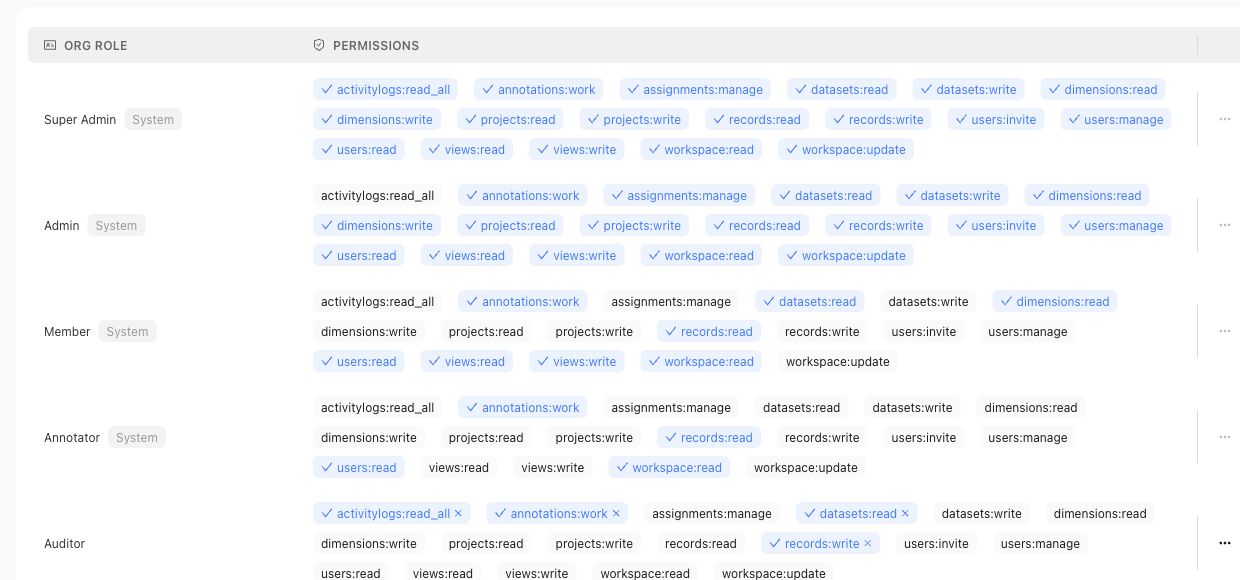
Use the roles table for organization access claims, and use project permission pages for project-level access claims.
## Fields, states, or lifecycle rules
- Main-product project permissions use user or group subjects and code-backed `ADMIN` or `MEMBER` project roles.
- Admin Console roles are workspace roles with permission keys managed through the admin app.
- Reviewer assignments and review ownership are workflow concepts; they should not be treated as workspace role names.
- Approval actions require accountable ownership; AI suggestions do not approve themselves.
## Related objects
Related objects may include workspace users, workspace groups, workspace roles, permission keys, project permission assignments, reviewer assignments, review sessions, approvals, and the correctness artifacts those users can access.
{% example-demo title="Human approval boundary" %}
A domain expert receives a Contribution and can complete its assigned Tasks. The same person is also a member of one Project, so they can inspect that Project's permitted surfaces. Neither fact makes them an organization administrator or grants authority to approve every governed artifact. Read access, Contribution assignment, artifact approval, and Workspace administration from their owning surfaces.
{% /example-demo %}
## Source confidence
Code-backed: this page is grounded in the main product project permission routes and Admin Console role management source listed in source_refs.
## Related task pages
{% related-card-grid title="Related task pages" %}
- [Request an Expert Contribution](/docs/expert-contributions/request-contribution)
- [Build policies and rubrics](/docs/operating-manual/build-policies-and-rubrics)
- [Manage Project Members](/docs/project-settings/project-members)
{% /related-card-grid %}
---
id: governance.rubric-versioning
title: Rubric Versioning
summary: Track changes to pass/fail criteria and the evidence they produce.
kind: reference
product_area: governance
status: stable
updated: 2026-08-23
canonical: /docs/governance/rubric-versioning
---
# Rubric Versioning
## Definition
A Rubric version preserves one observable binary evaluation criterion and its relationship to a Policy, applicability boundary, and normative force. The durable Rubric identity connects revisions; the version identity explains which exact criterion produced a historical result.
## Fields, states, or lifecycle rules
- Change the version when criterion meaning, pass/fail threshold, applicability, Policy relationship, or normative force changes.
- Editorial cleanup that genuinely preserves meaning should not be described as a new correctness rule without evidence.
- A Rubric must remain testable as one binary criterion; combining several independent requirements makes failures ambiguous.
- Suggested or contributed wording is not admitted evaluation authority until the owning workflow approves it.
- Existing Runs retain the exact Rubric version they evaluated.
- A new Rubric version can require a new Benchmark Version before it affects future evidence.
- Prefer-level improvement does not cancel a must-level regression.
## Related objects
Use Correctness Governance to inspect criterion text, Policy linkage, applicability, Cases, and approval state. Use Binary Rubrics when authoring or splitting a criterion. Use Benchmark Versioning when the revised Rubric should become part of future evaluation evidence.
{% example-demo title="Splitting an ambiguous criterion" %}
A Rubric currently passes only when an answer cites the controlling source and states uncertainty when no source is available. Reviewers find that the combined criterion produces unclear failures. They retain the original historical version and approve two narrower Rubrics for citation support and missing-source uncertainty. Future Benchmark Versions admit the new criteria; old Runs keep their original result meaning.
{% /example-demo %}
## Source confidence
Code-backed: Rubric types and detail routes expose criterion, version, Policy relationship, applicability, normative force, linked Cases, and evaluation context. Linked authoring and Benchmark pages define approval and admission boundaries.
## Related task pages
{% related-card-grid title="Related task pages" %}
- [Rubrics](/docs/object-model/rubrics)
- [Binary Rubrics](/docs/correctness-governance/binary-rubrics)
- [Versioning and Staleness](/docs/governance/versioning-and-staleness)
- [Product quickstart](/docs/quickstart)
- [Task index](/docs/operating-manual/task-index)
{% /related-card-grid %}
---
id: governance.staleness-detection
title: Detect and route stale correctness evidence
summary: Identify which current claims need review after Cases, standards, coverage, sources, or target behavior change.
kind: task
product_area: governance
status: stable
updated: 2026-09-07
canonical: /docs/governance/staleness-detection
---
# Detect and route stale correctness evidence
## What staleness means
Staleness means a downstream claim may no longer be supported by the current upstream state. It is a review signal, not automatic deletion and not a claim that historical evidence was invalid when produced.
Teammately objects change independently. A revised Policy may affect linked Rubrics and current benchmark interpretation without changing the exact evidence captured in an earlier Snapshot. A changed Harness may require a new Run while leaving the Benchmark Version unchanged.
## Common triggers
- A Case input, context, source attachment, or supported reference output changes.
- A Policy rule, scope, approval, or applicable boundary changes.
- A Rubric criterion or link changes.
- Coverage facets or selected Case membership change.
- A source becomes superseded or the target product changes.
- A saved Harness version changes before candidate comparison.
## Prerequisites
- The changed object and its earlier and current versions can be identified.
- The team can trace current downstream artifacts that rely on the changed fact.
- An owner can decide whether current evidence needs qualification, replacement, or no action.
### Task steps: Assess and route staleness
1. Name the changed object, its earlier and current versions, and the reason for change.
2. Identify downstream artifacts that rely on the changed fact: linked standards, selected Cases, Snapshots, Runs, comparisons, or customer-owned human review context.
3. Classify each artifact as historically valid, current and unaffected, current but requiring qualification, or requiring replacement.
4. Route the correction to the owning workflow: edit a Case, govern a new Policy or Rubric version, refresh coverage, create a Snapshot, or run a saved Harness again.
5. Preserve the old version and its evidence. Add a note that states which boundary the evidence still supports.
6. Confirm that current navigation and handoff material point to the new canonical version.
## Object and state changes
A changed object does not make every connected artifact unusable. If a Policy wording change does not affect a particular Case or Rubric, document that determination. If a candidate configuration changes, create a new Run rather than a new Benchmark Version. If selected membership changes, create a new Snapshot rather than editing an old one.
Comparison Directions have a narrower advisory state. **Potentially stale** applies to untouched AI-suggested directions considered inconsistent with newer project context. It does not automatically apply to user-created or user-edited directions, and dismissing the label does not delete the direction or govern any downstream artifact.
## Success criteria
- The trigger and affected version boundaries are named.
- Historical evidence remains interpretable under its original boundary.
- Current artifacts are explicitly unaffected, qualified, or routed to the owning workflow.
- New Snapshots or Runs are created only when their respective evidence boundary changed.
## Common failure modes
- Treating every connected artifact as invalid after one upstream change.
- Editing a historical Snapshot or Run to resemble current state.
- Creating a new Benchmark Version when only the Harness changed.
- Confusing the advisory Comparison Direction label with governed-object staleness.
{% example-demo title="Source document superseded" %}
A new service policy supersedes the source used by twelve refund Cases. The operator preserves the old Snapshot and its Runs, updates affected current Cases, checks the linked Policy and Rubrics, and creates a new Snapshot. Two Cases describe historical behavior and remain unchanged with an explicit time boundary; ten move to the current version.
{% /example-demo %}
## Source confidence
Code-backed: Policy and Rubric types, Benchmark Version and Snapshot surfaces, and Run detail preserve the version boundaries needed for this assessment. Comparison Directions explicitly expose their narrower advisory stale label. Cross-object dependency assessment and the decision to rerun or revise remain owner-reviewed work.
## Related reference pages
{% related-card-grid title="Related workflows" %}
- [Versioning and Staleness](/docs/governance/versioning-and-staleness)
- [Coverage Refresh](/docs/coverage-engineering/coverage-refresh)
- [Benchmark Versioning](/docs/governance/benchmark-versioning)
- [Comparison Directions](/docs/assets/comparison-directions)
{% /related-card-grid %}
## Related troubleshooting pages
{% related-card-grid title="Diagnose stale evidence" %}
- [Stale Dimensions](/docs/troubleshooting/stale-dimensions)
- [Benchmark results changed unexpectedly](/docs/troubleshooting/benchmark-results-changed-unexpectedly)
- [Weak applicability logic](/docs/troubleshooting/weak-applicability-logic)
{% /related-card-grid %}
---
id: governance.versioning-staleness
title: Versioning and Staleness
summary: Know when correctness objects changed and when old evidence may need review.
kind: concept
product_area: governance
status: stable
updated: 2026-09-07
canonical: /docs/governance/versioning-and-staleness
---
# Versioning and Staleness
## Definition
Versioning preserves the exact artifact state used by an earlier decision or evaluation. Staleness is the signal that current evidence, configuration, or interpretation may no longer support the same claim after a related object changes. A stale signal routes review; it does not automatically delete an artifact, invalidate every historical result, or approve a replacement.
## Why it matters
Cases, Policies, Rubrics, Benchmark Versions, Harness Versions, and Improvement Session goals can change independently. Named versions keep old evidence interpretable. Staleness helps teams decide which current Datasets, evaluator links, Runs, or customer-owned human review context need attention before being treated as current.
## Where it appears in the product
Use the owning object page to inspect its current version and activity. Use Dataset Snapshots and Benchmark Versioning for immutable evaluation boundaries. Use Staleness Detection to identify downstream artifacts affected by a change. Use Conflict Resolution when expert or source evidence disagrees about what the new governed state should be.
## Artifacts it affects
Common triggers include changed Case input or materials, revised Policy scope, revised Rubric criteria, changed dataset membership, changed Harness configuration, and superseded source material. The responsible next action depends on the owner: correct a Case, approve a new standard version, refresh coverage, create a new Snapshot, run a new evaluation, or preserve an old result as historical context.
Comparison Directions use a narrower stale signal. **Potentially stale** is an advisory label for untouched AI-suggested directions, not a versioned approval state and not automatic removal. User-created and user-edited directions remain user-owned even when Teammately considers them while avoiding duplicate suggestions.
## Operational check
Name the changed artifact and version, identify which downstream claim depended on it, and decide whether the old evidence remains historically valid, requires qualification, or needs replacement through a new canonical workflow. Never “resolve” staleness by editing a label while leaving the evidence boundary ambiguous.
When the object is a Comparison Direction, also check whether a **Potentially stale** label is only advisory. Dismiss the label if the team decides the direction still represents a useful boundary.
{% example-demo title="Revised applicability after evaluation" %}
Experts revise a Policy so it applies only when the customer explicitly requests a recommendation. Runs against the old Benchmark Version remain valid evidence under the former applicability rule. The current Dataset and linked Rubrics are reviewed, a new Snapshot and Benchmark Version establish the revised boundary, and new Runs use it. Any customer-owned human review context names both boundaries instead of marking every old result simply “wrong.”
{% /example-demo %}
## Related workflows
{% related-card-grid title="Related workflows" %}
- [Versions, staleness, and resolution](/docs/object-model/versions-staleness-and-resolution)
- [Staleness Detection](/docs/governance/staleness-detection)
- [Compare Harness Versions](/docs/benchmark-evaluations/compare)
- [Product quickstart](/docs/quickstart)
- [Task index](/docs/operating-manual/task-index)
{% /related-card-grid %}
## Source confidence
Code-backed: current Policy and Rubric types preserve versioned governance facts, Snapshot routes preserve immutable benchmark evidence, and Comparison Directions expose a deliberately narrower advisory stale label. Cross-object staleness remains a review and routing decision, not an automatic global state transition.
---
id: governance.ai-feature-boundaries
title: What AI Features Can and Cannot Do
summary: Explain the difference between AI-assisted suggestions and approved correctness infrastructure.
kind: reference
product_area: governance
status: stable
updated: 2026-09-07
canonical: /docs/governance/what-ai-features-can-and-cannot-do
---
# What AI Features Can and Cannot Do
## Definition
AI-assisted features can help prepare correctness work, but they do not own the approval boundary. They may draft, classify, summarize, propose, or organize artifacts; a human still needs to approve governed standards and review context before benchmark evidence depends on them.
Use this page when a reader needs to separate preparation from authority. A fluent suggestion can be useful, but it is not an approved Policy, Rubric, Case-scoped reference output, Benchmark evidence, or downstream customer decision by itself.
> Human approval boundary
>
> AI features can draft, summarize, classify, or suggest; they do not approve policies, rubrics, benchmark evidence, or customer-owned decisions by themselves.
## Fields, states, or lifecycle rules
- AI-assisted output can be draft material, review support, classification help, or summarization.
- AI-assisted output should not be treated as approved standards, benchmark evidence, or customer-owned decisions without human approval.
- Suggested policies, rubrics, and classifications need visible approval or rejection state before they affect governed evidence.
- AI-suggested Comparison Directions are different from suggested standards: they can become active directions immediately, but they still do not approve policies, rubrics, cases, benchmark membership, or review context.
- AI-assistance language does not establish model-provider behavior, data retention, compliance posture, or autonomous approval.
- Source-backed product pages decide exact supported behavior; this page defines the public boundary.
## Related objects
Read this with [Human Approval Boundaries](/docs/governance/human-approval-boundaries), [Comparison Directions](/docs/assets/comparison-directions), [Using Expert Judgment](/docs/concepts/correctness-elicitation), [Using Checkpoints](/docs/expert-contributions/complete-contribution), and [Noisy AI Suggestions](/docs/troubleshooting/noisy-ai-suggestions).
{% example-demo title="What AI Features Can and Cannot Do boundary" %}
Draft suggestion: An AI-assisted workflow proposes a new compatibility policy after reading rejected cases.
Allowed use: The suggestion can help a reviewer start the policy draft.
Not allowed as governed evidence: A benchmark should not cite the policy until an accountable human approves the artifact and its applicability.
Interpretation: The AI feature accelerated preparation; the human approval boundary still controls whether the standard can govern benchmark evidence.
{% /example-demo %}
{% example-demo title="Example: active AI-suggested direction" %}
AI-suggested direction: Teammately suggests a stale-source conflict Comparison Direction after project cases and ontology values show that gap.
Allowed use: The direction can become active immediately and can guide preview examples or future variant generation.
Not allowed as governed evidence: The direction does not approve a policy, rubric, generated case, benchmark membership, or downstream decision. Users still review generated examples and manage the direction normally.
{% /example-demo %}
## Source confidence
Code-backed: generation surfaces can propose Dimension schemas, synthesize candidate Cases, and suggest Comparison Directions; Policy approval and contributed-artifact state establish separate human-governance boundaries. These sources support the product-state distinction here, not claims about model providers, retention, or autonomous authority.
## Related task pages
{% related-card-grid title="Related task pages" %}
- [Human Approval Boundaries](/docs/governance/human-approval-boundaries)
- [Comparison Directions](/docs/assets/comparison-directions)
- [Using Expert Judgment](/docs/concepts/correctness-elicitation)
- [Using Checkpoints](/docs/expert-contributions/complete-contribution)
- [Product quickstart](/docs/quickstart)
- [Task index](/docs/operating-manual/task-index)
{% /related-card-grid %}
---
id: governance.workspace-administration
title: Workspace Administration
summary: Administer workspace and project boundaries so correctness work has clear ownership and scope.
kind: reference
product_area: governance
status: stable
updated: 2026-09-07
canonical: /docs/governance/workspace-administration
---
# Workspace Administration
## Definition
Workspace Administration covers two code-backed layers:
- Organization administration in the Admin Console, including members, groups, roles, domain control, IP address control, audit log, usage statistics, profile, support settings, integrations, and API keys.
- Project administration in the main product, including project members, groups, and project permission assignments.
Keep these layers separate when writing or operating from the docs. A workspace-level admin control is not the same as a project-specific correctness workflow.
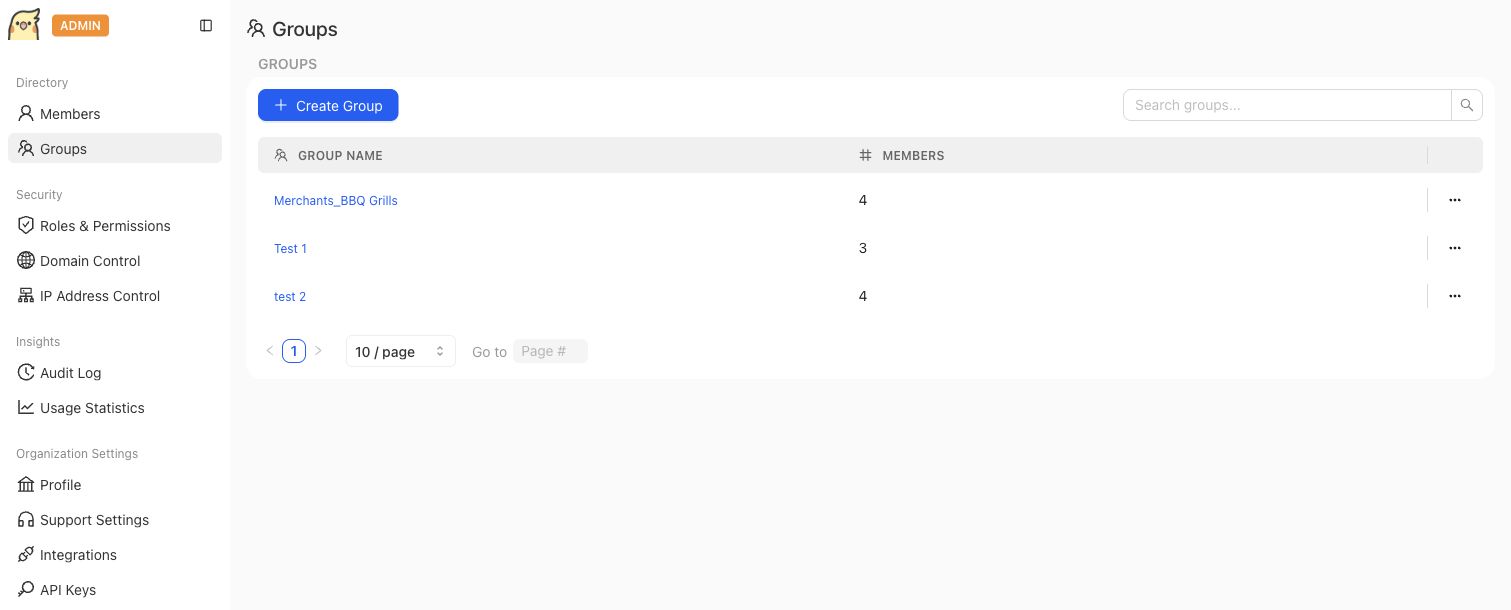
Organization groups belong to the admin layer. Project membership and correctness artifact ownership remain separate concepts.
## Fields, states, or lifecycle rules
- Project permissions in the main product are code-backed for user and group subjects with `ADMIN` or `MEMBER` project roles.
- The Admin Console exposes additional organization-level controls such as roles, domain control, IP address control, integrations, and API keys.
- Do not infer compliance status, retention rules, SSO behavior, billing behavior, rate limits, or deployment options from the existence of an admin screen.
- Approval actions in correctness workflows require accountable ownership; AI suggestions do not approve themselves.
## Related objects
Related objects may include workspace members, groups, workspace roles, permission keys, project permission assignments, domain controls, IP controls, API keys, notification integrations, and the project artifacts those people can access.
{% example-demo title="Human approval boundary" %}
A Workspace administrator manages an organization group in the Admin Console. A Project owner then grants that group access under Project Settings. The group can inspect the Project according to the current Project membership surface, but this does not change organization security controls or create authority over every governed correctness artifact.
{% /example-demo %}
## Source confidence
Code-backed: this page is grounded in the Admin Console navigation and the main product project settings routes listed in source_refs.
## Related task pages
{% related-card-grid title="Related task pages" %}
- [Request an Expert Contribution](/docs/expert-contributions/request-contribution)
- [Manage Project Members](/docs/project-settings/project-members)
- [Import and prepare cases](/docs/operating-manual/import-and-prepare-cases)
{% /related-card-grid %}
---
id: object-model.versions-staleness-resolution
title: Versions, staleness, and resolution
summary: Track how correctness objects evolve and how teams resolve conflicting evidence.
kind: reference
product_area: object_model
status: stable
updated: 2026-08-23
canonical: /docs/object-model/versions-staleness-and-resolution
---
# Versions, staleness, and resolution
## Definition
Versions, staleness, and resolution describe how correctness artifacts evolve without making old evidence ambiguous. Cases, Policies, Rubrics, Benchmark Versions, supported Case-scoped reference outputs, and customer-owned review context can change at different times; version boundaries explain which evidence belongs to which state.
Use this reference when a result changed unexpectedly, a policy was revised, a case was refreshed, or reviewers need to know whether older benchmark evidence still applies.
## Fields, states, or lifecycle rules
- Versions preserve what changed and what evidence was produced before the change.
- Staleness means older evidence may no longer reflect the current case, standard, coverage, or candidate boundary.
- Resolution work should name whether the fix belongs to a case, output, policy, rubric, coverage plan, benchmark version, or run metadata.
- Comparisons are weak when artifact versions are hidden.
- This page describes public object semantics, not retention, audit-log completeness, or compliance guarantees.
## Related objects
Versions, staleness, and resolution should be read with [Versioning and Staleness](/docs/governance/versioning-and-staleness), [Benchmark versioning](/docs/governance/benchmark-versioning), [Case versioning](/docs/governance/case-versioning), and [Policy Conflicts and Revisions](/docs/governance/conflict-resolution).
{% example-demo title="Versions, staleness, and resolution boundary" %}
State change: Reviewers revise a compatibility policy after finding unsupported-claim failures.
Benchmark evidence: Runs against the old policy remain interpretable, but they should not be summarized as current evidence without naming the old policy version.
Interpretation: The resolution note explains whether to rerun, revise the benchmark version, or preserve the old result as historical context.
{% /example-demo %}
## Source confidence
Code-backed: Benchmark, Policy, and Rubric types carry version facts; Benchmark Datasets → Snapshots and Policy activity preserve named historical boundaries. Cross-object staleness and conflict resolution are explicit review decisions rather than a universal automatic state.
## Related task pages
{% related-card-grid title="Related task pages" %}
- [Versioning and Staleness](/docs/governance/versioning-and-staleness)
- [Conflict Resolution](/docs/governance/conflict-resolution)
- [Product quickstart](/docs/quickstart)
- [Task index](/docs/operating-manual/task-index)
{% /related-card-grid %}