# User roles
Generated: 2026-09-13T04:34:24.539Z
Source build: local
Canonical docs: https://teammately.ai/docs
---
id: orientation.user-roles
title: User roles
summary: Understand the responsibilities of project operators, domain experts, AI engineers, accountable owners, and organization administrators.
kind: reference
product_area: reference
status: stable
updated: 2026-08-22
canonical: /docs/getting-oriented/user-roles
---
# User roles
## Definition
Teammately work is coordinated across responsibilities rather than one universal operator. A **project operator** maintains reusable context, assets, standards, and benchmark work. A **domain expert** supplies specialist judgment through Contributions. An **AI engineer** owns candidate Harness behavior and evaluation interpretation. An **accountable owner** decides how customer-owned downstream processes use the evidence. An **organization administrator** manages membership and organizational controls.
Product roles and permissions determine access, but responsibility can still vary by team. The important rule is to preserve who supplied judgment, who changed an artifact, and who owns the next action.
## Fields, states, or lifecycle rules
- Project operators configure Agent Setup, Project Input Schema, Coverage Facets, Assets, and benchmark work according to their access.
- Domain experts use the focused Contribution experience and do not require the full project workbench to complete assigned work.
- Expert profiles are global rather than a project-specific roster; a Contribution selects an appropriate expert for its application domain.
- AI engineers save Harness versions, start or inspect Benchmark Evaluations, and participate in Improvement Sessions.
- Accountable owners inspect versioned evidence and retain authority over downstream product, governance, or operational choices.
- Organization administrators manage organization-level access and controls without becoming the automatic approver of every policy, rubric, or Contribution.
- AI agents prepare and coordinate work but do not inherit human authority.
## Responsibility handoffs
An operator can prepare a Contribution, but the expert owns the specialist judgment. The resulting material can be reconciled into Correctness Governance, Assets, or Coverage Management. An AI engineer can change the Harness and produce new Runs, but cannot rewrite the expert provenance behind a rubric. An accountable owner can act on the evidence without turning that action into a Teammately artifact unless a source-backed workflow exists.
{% example-demo title="Example: role handoff" %}
A project operator requests a grounding Contribution from the policy owner. The expert confirms source authority and contributes a rubric. The operator reconciles it in Correctness Governance. An AI engineer evaluates a saved Harness version and starts an Improvement Session from the failures. The accountable product owner later decides what downstream action to take from the evidence.
{% /example-demo %}
## Source confidence
Code-backed: current project navigation, Contribution expert routes, and administration surfaces support these responsibility boundaries. Exact permissions remain governed by the active role configuration.
## Related task pages
{% related-card-grid title="Related task pages" %}
- [Request an Expert Contribution](/docs/expert-contributions/request-contribution)
- [Complete an Expert Contribution](/docs/expert-contributions/complete-contribution)
- [Run a Benchmark Evaluation](/docs/benchmark-evaluations/run-evaluation)
{% /related-card-grid %}
---
id: orientation.product-map
title: Product map
summary: Navigate Teammately across workspace entry points, project foundations, benchmark workspaces, expert contribution UI, and administration.
kind: concept
product_area: introduction
status: stable
updated: 2026-09-07
canonical: /docs/getting-oriented/product-map
---
# Product map
Teammately separates reusable project foundations from benchmark-scoped work. The Main UI uses the selected project and benchmark to route operators to the right scope. Experts receive a focused Expert contribution UI. Admin Console owns organization-level controls, while AI-assisted background work prepares and coordinates bounded tasks.
> Surface routing
>
> Before changing an artifact, identify its scope. Project foundations can affect several benchmarks; dataset selection, Contributions, Evaluations, and Improvement Sessions belong to a selected benchmark or benchmark version.
## Definition
The **Main UI** begins at Project Home and groups project-level work into Correctness Governance, Coverage Facets, Assets, Agent Setup, and Project Settings. After a benchmark is selected, its workspace exposes Benchmark Overview, Benchmark Datasets, Coverage Management, Expert Contributions, Benchmark Evaluations, and Improve.
The **Expert contribution UI** presents one Contribution and its form, chat, interview, case-review, checkpoint, waiting, and completion states. The expert does not need the full project navigation to supply attributable judgment.
The **Admin Console** contains organization administration such as members, groups, roles, domain controls, integrations, and other code-backed administrative surfaces. Public docs keep detailed security, billing, retention, and compliance claims outside the boundary unless separately verified.
**AI-assisted background work** can index reference material, prepare contributions, suggest coverage or standards, construct cases, run evaluations, and coordinate candidate exploration. Its outputs retain the authority of the owning artifact and workflow.
## Decision checkpoint
| Work | Scope | Surface |
| --- | --- | --- |
| Project purpose and knowledge | Project | Agent Setup |
| Policies and rubrics | Project | Correctness Governance |
| Dimensions, Topics, and construction patterns | Project | Coverage Facets |
| Reusable Cases and Harnesses | Project | Assets |
| Input architecture | Project | Project Settings |
| Benchmark-level run fields | Benchmark | Benchmark Evaluations |
| Selected Cases, representation, and snapshots | Benchmark | Benchmark Datasets |
| Coverage setup, Stories, Case Review, and Foundry | Benchmark | Coverage Management |
| Specialist requests and contributed artifacts | Benchmark | Expert Contributions |
| Runs, results, Compare, and Arena | Benchmark version | Benchmark Evaluations |
| Goal Contracts, candidates, and frontier | Benchmark version | Improve |
## How selection affects navigation
Project surfaces require a project. Benchmark surfaces also require a benchmark, and Evaluations or Improve may resolve the current benchmark version. If a destination is unavailable, confirm the current selectors before assuming that the feature or data is missing.
Project folders and search help users move across a larger workspace, but they do not change artifact ownership. Search results and creation actions should preserve the selected project or benchmark scope.
{% surface-map title="Teammately product surfaces" %}
{% /surface-map %}
{% example-demo title="Route a new rubric need" %}
An evaluation exposes inconsistent handling of expired agreements. The operator uses the benchmark workspace to request an Expert Contribution with the failed cases. The expert works in the focused contribution UI. The resulting rubric is reconciled in Correctness Governance at project scope, then included in a later benchmark version and evaluation.
{% /example-demo %}
## Related workflows
{% related-card-grid title="Related workflows" %}
- [Task index](/docs/operating-manual/task-index)
- [Operating Teammately end to end](/docs/getting-oriented/operating-teammately-end-to-end)
- [Product quickstart](/docs/quickstart)
{% /related-card-grid %}
## Related reference pages
{% related-card-grid title="Related reference pages" %}
- [Key objects and relationships](/docs/getting-oriented/key-objects-and-relationships)
- [User roles](/docs/getting-oriented/user-roles)
- [Product boundaries](/docs/introduction/product-boundaries)
{% /related-card-grid %}
## Source confidence
Code-backed: current navigation and active project, benchmark, Contribution, and administration routes establish the scope and labels described here.
---
id: expert-contributions.overview
title: Expert Contributions
summary: Coordinate benchmark-scoped expert work, attributable judgment, governed artifacts, and the decisions that move correctness forward.
kind: concept
product_area: expert_contributions
status: stable
updated: 2026-09-07
canonical: /docs/expert-contributions
---
# Expert Contributions
Expert Contributions is the benchmark-scoped workspace for requesting, conducting, and materializing specialist work. It coordinates the expert, objective, selected evidence, task sequence, checkpoints, attributable responses, and contributed artifacts needed to move a benchmark forward.
## Definition
The administrator workspace contains **Overview**, **Contributions**, **Contributed Artifacts**, and **Logs & Status**. **Request Contribution** opens the composer for a new contribution. The expert follows a contribution-specific experience that can contain form, chat, interview, and case-review tasks, along with checkpoints and completion states.
A Contribution is the unit of requested expert effort. It replaces broad workflow configuration with a bounded statement of what this benchmark needs from this expert now. The work can result in contributed policies, rubrics, cases, or coverage observations without flattening all expert activity into one generic approval record.
## Decision checkpoint
| Need | Contribution element | Result to inspect |
| --- | --- | --- |
| Resolve a specific benchmark question | Contribution statement and scoped objectives | The expert can explain the requested decision |
| Ground work in concrete behavior | Selected or designated cases | Case-level responses remain attributable |
| Supply supporting knowledge | Attachments and scoped statements | The expert sees the relevant source boundary |
| Choose the right interaction | Form, chat, interview, or case review task | Task output matches the kind of judgment needed |
| Confirm consequential learning | Checkpoint | Accepted, revised, or unresolved state is explicit |
| Reuse the result | Contributed Artifacts | Policies, rubrics, cases, and coverage observations retain provenance |
## Lifecycle and status
The durable Contribution statuses are `PREPARING_DIRECTION`, `AWAITING_DIRECTION_ALIGNMENT`, `MATERIALIZING_TASKS`, `READY`, `IN_PROGRESS`, `COMPLETED`, and `CANCELLED`. The interface presents these as planning direction, waiting for alignment, preparing tasks, ready, active, completed, or cancelled. The exact task sequence can vary by Contribution.
Realtime updates and durable transitions help the administrator and expert see current progress without inventing completion. A waiting state, checkpoint, or finalization step should be shown as such. Completing the expert experience does not imply that every proposed artifact has been accepted into its project-level owner.
## Contribution evidence
Logs & Status exposes operational and engagement records. Contributed Artifacts organizes materialized or contributed cases, policies, rubrics, and new coverage observations. Correctness Governance, Assets, or Coverage Management owns the resulting project or benchmark artifact after materialization.
This model improves return on expert effort. Agents prepare focused work from project context, indexed material, benchmark cases, and unresolved questions. The expert supplies the authority; the result can be reused across standards, coverage, evaluation, and improvement.
{% example-demo title="Resolve source authority" %}
A benchmark contains cases where an operational runbook conflicts with a newer policy page. The operator requests a Contribution from the policy owner, selects the conflicting cases, attaches both sources, and uses case review plus a checkpoint. The expert establishes which source controls, contributes a scoped policy and rubric, and records one coverage observation for an unrepresented exception.
{% /example-demo %}
## Related workflows
{% related-card-grid title="Related workflows" %}
- [Request an Expert Contribution](/docs/expert-contributions/request-contribution)
- [Complete an Expert Contribution](/docs/expert-contributions/complete-contribution)
- [Build policies and rubrics](/docs/operating-manual/build-policies-and-rubrics)
{% /related-card-grid %}
## Related reference pages
{% related-card-grid title="Related reference pages" %}
- [Contributed Artifacts](/docs/expert-contributions/contributed-artifacts)
- [Contribution lifecycle and status](/docs/expert-contributions/lifecycle-and-status)
- [Logs & Status](/docs/expert-contributions/logs-and-status)
- [Agent Setup](/docs/agent-setup)
- [Human Approval Boundaries](/docs/governance/human-approval-boundaries)
{% /related-card-grid %}
## Source confidence
Code-backed: the active benchmark workspace, Contribution dashboard, composer, administrator detail, and expert routes support the scope, task, status, and artifact model described here.
---
id: governance.roles-permissions
title: Roles and Permissions
summary: Use roles and permissions to route ownership, review, and approval work clearly.
kind: reference
product_area: governance
status: stable
updated: 2026-09-07
canonical: /docs/governance/roles-and-permissions
---
# Roles and Permissions
## Definition
Roles and Permissions covers the access controls visible in the current product source. It is not a generic enterprise RBAC promise.
The main product exposes project permission management for users and groups. The Admin Console exposes workspace role management and permission keys. Orientation pages may describe common personas such as product owner, reviewer, expert, AI engineer, or administrator, but those personas are not exact permission values unless a code-backed source says so.
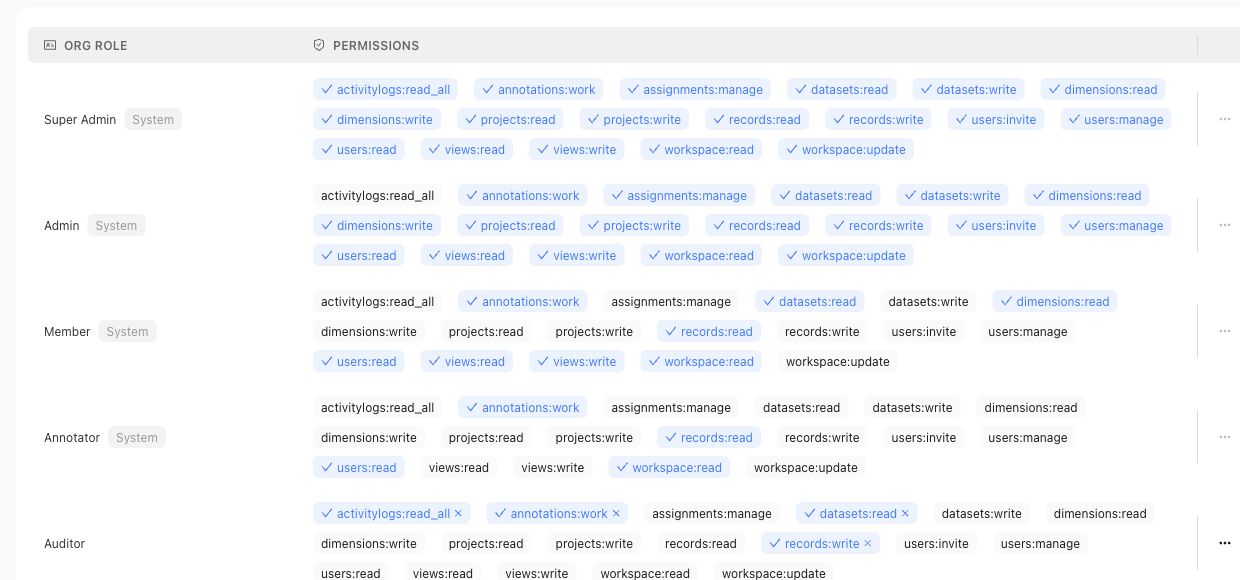
Use the roles table for organization access claims, and use project permission pages for project-level access claims.
## Fields, states, or lifecycle rules
- Main-product project permissions use user or group subjects and code-backed `ADMIN` or `MEMBER` project roles.
- Admin Console roles are workspace roles with permission keys managed through the admin app.
- Reviewer assignments and review ownership are workflow concepts; they should not be treated as workspace role names.
- Approval actions require accountable ownership; AI suggestions do not approve themselves.
## Related objects
Related objects may include workspace users, workspace groups, workspace roles, permission keys, project permission assignments, reviewer assignments, review sessions, approvals, and the correctness artifacts those users can access.
{% example-demo title="Human approval boundary" %}
A domain expert receives a Contribution and can complete its assigned Tasks. The same person is also a member of one Project, so they can inspect that Project's permitted surfaces. Neither fact makes them an organization administrator or grants authority to approve every governed artifact. Read access, Contribution assignment, artifact approval, and Workspace administration from their owning surfaces.
{% /example-demo %}
## Source confidence
Code-backed: this page is grounded in the main product project permission routes and Admin Console role management source listed in source_refs.
## Related task pages
{% related-card-grid title="Related task pages" %}
- [Request an Expert Contribution](/docs/expert-contributions/request-contribution)
- [Build policies and rubrics](/docs/operating-manual/build-policies-and-rubrics)
- [Manage Project Members](/docs/project-settings/project-members)
{% /related-card-grid %}