# Contribution Lifecycle and Status
Generated: 2026-09-13T04:42:28.543Z
Source build: local
Canonical docs: https://teammately.ai/docs
---
id: expert-contributions.lifecycle
title: Contribution Lifecycle and Status
summary: Interpret Contribution, activity, task, expert-runtime, and checkpoint states without inferring completion.
kind: reference
product_area: expert_contributions
status: stable
updated: 2026-08-22
canonical: /docs/expert-contributions/lifecycle-and-status
---
# Contribution Lifecycle and Status
## Definition
Contribution status, task status, expert-runtime state, and checkpoint state describe different layers. Read them together before diagnosing delay or declaring completion.
## Fields, states, or lifecycle rules
### Contribution status
| Status | Meaning |
| --- | --- |
| `PREPARING_DIRECTION` | Teammately is planning the direction and requested work |
| `AWAITING_DIRECTION_ALIGNMENT` | An administrator decision or alignment is required |
| `MATERIALIZING_TASKS` | The confirmed plan is becoming executable expert activities |
| `READY` | Work is prepared and available to the expert |
| `IN_PROGRESS` | At least part of the expert work is active |
| `COMPLETED` | Required expert work and finalization reached the durable terminal state |
| `CANCELLED` | Further work was stopped while preserving the record |
Planned activities can be Case Review, Form, Chat, or Interview. An individual review task can be preparing, blocked, ready, in progress, completed, skipped, or superseded. A superseded task remains provenance for what changed; it should not be counted as current outstanding work.
### Runtime and checkpoints
The expert runtime moves through preparing, ready, active, final checkpoint, completed, or exhausted. `EXHAUSTED` means the current executable path has no further work; it is not a synonym for a successfully completed Contribution.
A checkpoint moves from preparing to ready to reconciled. Its requirements may be pending, retryable, materialized, terminal-empty, or failed. Checkpoints can consolidate requirements, capture Policy meaning, prepare or record an Interview, or materialize Rubric meaning. A ready checkpoint still needs the expert's reconciliation.
### Diagnosing state
If the Contribution is `IN_PROGRESS` but the expert sees no action, inspect the current task, runtime, and checkpoint. A blocked task may be waiting for evidence; a final checkpoint may need confirmation; an exhausted runtime may require administrator follow-up. Use Logs & Status for durable timing and engagement evidence rather than relying on a stale open browser view.
> Completion boundary
>
> `COMPLETED` makes contributed evidence available for downstream governance. It does not automatically approve a Policy or Rubric, select a Case into a benchmark, or apply a coverage observation.
## Related task pages
{% related-card-grid title="Related task pages" %}
- [Request an Expert Contribution](/docs/expert-contributions/request-contribution)
- [Complete an Expert Contribution](/docs/expert-contributions/complete-contribution)
{% /related-card-grid %}
## Source confidence
Code-backed: administrator and expert runtime sources define the layered Contribution, task, runtime, checkpoint, and requirement states described here.
---
id: expert-contributions.overview
title: Expert Contributions
summary: Coordinate benchmark-scoped expert work, attributable judgment, governed artifacts, and the decisions that move correctness forward.
kind: concept
product_area: expert_contributions
status: stable
updated: 2026-09-07
canonical: /docs/expert-contributions
---
# Expert Contributions
Expert Contributions is the benchmark-scoped workspace for requesting, conducting, and materializing specialist work. It coordinates the expert, objective, selected evidence, task sequence, checkpoints, attributable responses, and contributed artifacts needed to move a benchmark forward.
## Definition
The administrator workspace contains **Overview**, **Contributions**, **Contributed Artifacts**, and **Logs & Status**. **Request Contribution** opens the composer for a new contribution. The expert follows a contribution-specific experience that can contain form, chat, interview, and case-review tasks, along with checkpoints and completion states.
A Contribution is the unit of requested expert effort. It replaces broad workflow configuration with a bounded statement of what this benchmark needs from this expert now. The work can result in contributed policies, rubrics, cases, or coverage observations without flattening all expert activity into one generic approval record.
## Decision checkpoint
| Need | Contribution element | Result to inspect |
| --- | --- | --- |
| Resolve a specific benchmark question | Contribution statement and scoped objectives | The expert can explain the requested decision |
| Ground work in concrete behavior | Selected or designated cases | Case-level responses remain attributable |
| Supply supporting knowledge | Attachments and scoped statements | The expert sees the relevant source boundary |
| Choose the right interaction | Form, chat, interview, or case review task | Task output matches the kind of judgment needed |
| Confirm consequential learning | Checkpoint | Accepted, revised, or unresolved state is explicit |
| Reuse the result | Contributed Artifacts | Policies, rubrics, cases, and coverage observations retain provenance |
## Lifecycle and status
The durable Contribution statuses are `PREPARING_DIRECTION`, `AWAITING_DIRECTION_ALIGNMENT`, `MATERIALIZING_TASKS`, `READY`, `IN_PROGRESS`, `COMPLETED`, and `CANCELLED`. The interface presents these as planning direction, waiting for alignment, preparing tasks, ready, active, completed, or cancelled. The exact task sequence can vary by Contribution.
Realtime updates and durable transitions help the administrator and expert see current progress without inventing completion. A waiting state, checkpoint, or finalization step should be shown as such. Completing the expert experience does not imply that every proposed artifact has been accepted into its project-level owner.
## Contribution evidence
Logs & Status exposes operational and engagement records. Contributed Artifacts organizes materialized or contributed cases, policies, rubrics, and new coverage observations. Correctness Governance, Assets, or Coverage Management owns the resulting project or benchmark artifact after materialization.
This model improves return on expert effort. Agents prepare focused work from project context, indexed material, benchmark cases, and unresolved questions. The expert supplies the authority; the result can be reused across standards, coverage, evaluation, and improvement.
{% example-demo title="Resolve source authority" %}
A benchmark contains cases where an operational runbook conflicts with a newer policy page. The operator requests a Contribution from the policy owner, selects the conflicting cases, attaches both sources, and uses case review plus a checkpoint. The expert establishes which source controls, contributes a scoped policy and rubric, and records one coverage observation for an unrepresented exception.
{% /example-demo %}
## Related workflows
{% related-card-grid title="Related workflows" %}
- [Request an Expert Contribution](/docs/expert-contributions/request-contribution)
- [Complete an Expert Contribution](/docs/expert-contributions/complete-contribution)
- [Build policies and rubrics](/docs/operating-manual/build-policies-and-rubrics)
{% /related-card-grid %}
## Related reference pages
{% related-card-grid title="Related reference pages" %}
- [Contributed Artifacts](/docs/expert-contributions/contributed-artifacts)
- [Contribution lifecycle and status](/docs/expert-contributions/lifecycle-and-status)
- [Logs & Status](/docs/expert-contributions/logs-and-status)
- [Agent Setup](/docs/agent-setup)
- [Human Approval Boundaries](/docs/governance/human-approval-boundaries)
{% /related-card-grid %}
## Source confidence
Code-backed: the active benchmark workspace, Contribution dashboard, composer, administrator detail, and expert routes support the scope, task, status, and artifact model described here.
---
id: expert-contributions.complete
title: Complete an Expert Contribution
summary: Work through form, chat, interview, case-review, and checkpoint tasks while keeping specialist judgment attributable.
kind: task
product_area: expert_contributions
status: stable
updated: 2026-08-22
canonical: /docs/expert-contributions/complete-contribution
---
# Complete an Expert Contribution
Complete a Contribution by following its prepared task sequence and making the requested specialist judgments from the evidence shown. The expert experience can adapt between structured forms, agent chat, interviews, case review, and checkpoints.
## Prerequisites
- A valid Contribution link or authenticated expert entry point.
- Access to the Contribution and its assigned tasks.
- Enough source and case context to explain each answer.
- A stable connection when the task uses realtime agent interaction.
## Steps
1. Open the Contribution and read its objective, selected cases, and expected components before answering.
2. Complete each task according to its type. Planned activities can be Case Review, Form, Chat, or Interview; Curation, Comparative, and Trajectory components shape the prepared work those activities present.
3. Use attachments and visible case materials as the evidence boundary. State uncertainty when the supplied material does not resolve the question.
4. At a checkpoint, inspect the proposed summary or artifact meaning. Checkpoints prepare and reconcile requirements, consolidator or Policy statements, interview requests or records, and Rubrics. Confirm only what matches your judgment; retry, revise, or leave unresolved anything that does not.
5. Continue through the task handoff until the Contribution reaches its final step.
6. Review the completion state. If the experience shows a waiting, retry, or synchronization state, do not assume the administrator has received final evidence until the product confirms it.
## Object and state changes
Answers create durable task responses and can advance task sessions, checkpoints, handoffs, and Contribution status. Chat or interview activity can produce transcripts and structured learning. Case review can attach judgment to selected cases. Completion makes the contribution available for reconciliation and materialization but does not itself make every proposed artifact governed.
Review tasks can be `PREPARING`, `BLOCKED`, `READY`, `IN_PROGRESS`, `COMPLETED`, `SKIPPED`, or `SUPERSEDED`. The expert runtime can be `PREPARING`, `READY`, `ACTIVE`, `FINAL_CHECKPOINT`, `COMPLETED`, or `EXHAUSTED`. Checkpoints can be preparing, ready, or reconciled, with individual requirements pending, retryable, materialized, empty, or failed. These layered states explain why a Contribution can be active while one task is blocked or a final checkpoint is still pending.
## Success criteria
- Every answer addresses the Contribution objective and cites the visible evidence where needed.
- Case-level judgments remain connected to the relevant case.
- Checkpoints distinguish accepted, revised, and unresolved meaning.
- The final state is visibly complete rather than inferred from navigation.
- Uncertainty or source conflict remains explicit for the administrator.
## Common failure modes
- Answering from private background without identifying that the supplied evidence is incomplete.
- Treating an agent summary as accurate without checking the checkpoint.
- Leaving a form or chat task in a local unsynchronized state.
- Continuing after a stale task handoff instead of following the current Contribution route.
- Assuming that completion directly changes policies, rubrics, cases, or coverage.
{% example-demo title="Example: checkpoint correction" %}
An interview summary says that every expired agreement should be ignored. The expert corrects the checkpoint: expired agreements may still be relevant when the current agreement explicitly incorporates them. The corrected statement remains attributable and prevents an overbroad policy from being materialized.
{% /example-demo %}
## Related reference pages
{% related-card-grid title="Related reference pages" %}
- [Expert Contributions](/docs/expert-contributions)
- [Contributed Artifacts](/docs/expert-contributions/contributed-artifacts)
- [Human Approval Boundaries](/docs/governance/human-approval-boundaries)
{% /related-card-grid %}
## Related troubleshooting pages
{% related-card-grid title="Related troubleshooting pages" %}
- [Expert Contribution problems](/docs/troubleshooting/expert-contributions)
- [Permissions](/docs/troubleshooting/permissions)
- [Authentication](/docs/troubleshooting/authentication)
{% /related-card-grid %}
## Source confidence
Code-backed: the current expert experience supports form, chat, interview, case-review, checkpoint, completion, waiting, and task-handoff routes with durable command and reconciliation behavior.
---
id: expert-contributions.logs-status
title: Logs & Status
summary: Inspect contribution reviews, sessions, interviews, engagement, and operational records within the benchmark scope.
kind: reference
product_area: expert_contributions
status: stable
updated: 2026-09-07
canonical: /docs/expert-contributions/logs-and-status
---
# Logs & Status
## Definition
Logs & Status is the benchmark-scoped operational record for Expert Contributions. It exposes reviews, review sessions and plans, interviews, expert or contribution engagement, and related activity tables. Use it to answer when work happened, which record is active, and where a stalled or disputed result came from.
## Fields, states, or lifecycle rules
- Every table remains scoped to the selected benchmark.
- Review, session, interview, engagement, and artifact records keep separate identities and statuses.
- Filters, sorting, and detail views change presentation without rewriting the underlying Contribution.
- Available transcript and response detail follows the user's project permissions.
## Choose the right record
- **Reviews** shows review work and its Case or artifact relationship.
- **Review Sessions** and plans show the bounded sequence that presented work to an expert.
- **Interviews** exposes interview identity, targets, state, and available transcript detail.
- **Expert Engagement** and **Contribution Engagement** show participation and operational progress.
- Specialized tables can expose new-Case, output, draft-Policy, Case-specific Rubric, or review-question activity.
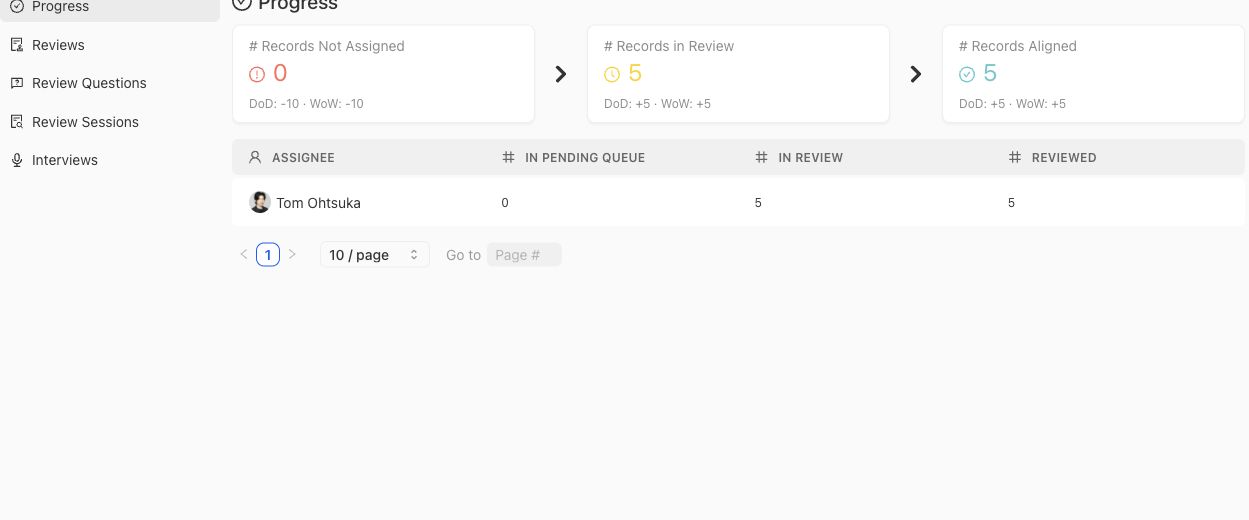
Use progress counts to locate work operationally; they do not establish whether contributed judgment was accepted.
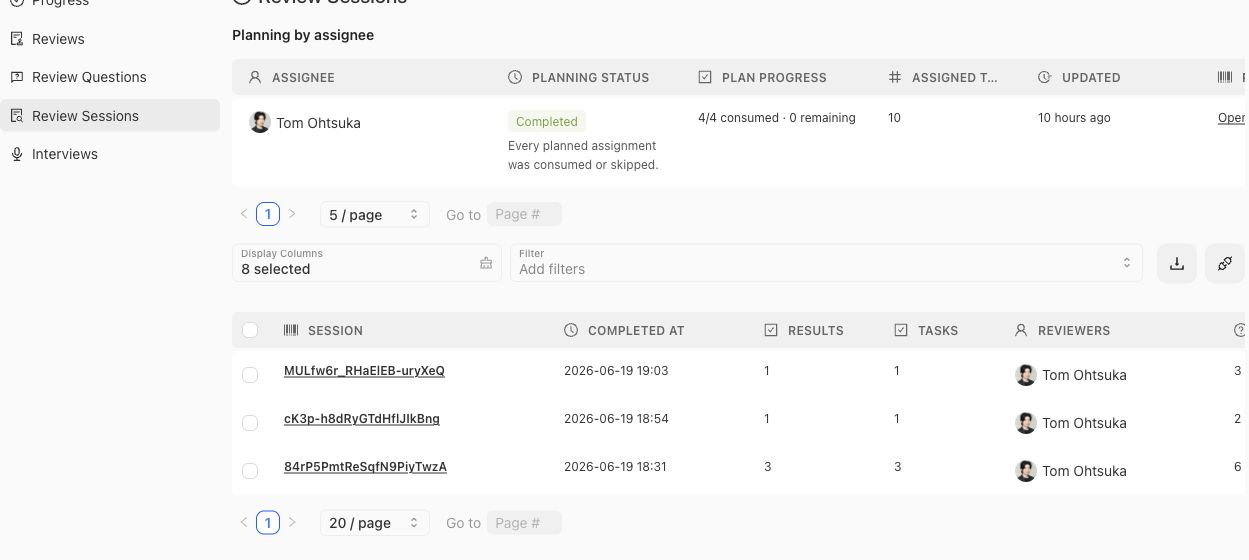
Open a session when you need its task and result provenance rather than inferring it from aggregate progress.
Filter and sort within the benchmark scope before comparing counts. A session, interview, review, and contributed artifact are separate objects and may have different completion times. Do not add their row counts together as a measure of unique Contributions or experts.
## Provenance and diagnosis
Start from the Contribution when explaining intent, then follow its planned activity to the session, review, interview, checkpoint, and materialized artifact. Transcript or response evidence may explain a decision, but the owning Policy, Rubric, Case, or coverage surface determines the artifact's current governance status.
When work appears stuck, compare durable status with the latest task or checkpoint rather than inferring from engagement alone. An expert can open a Contribution without completing a task, and a completed interview can still be waiting for checkpoint reconciliation or materialization.
> Operational evidence, not correctness proof
>
> Logs demonstrate activity and provenance. They do not prove that contributed content was accepted, that experts agreed, or that a candidate system passed an evaluation.
## Related task pages
{% related-card-grid title="Related task pages" %}
- [Request an Expert Contribution](/docs/expert-contributions/request-contribution)
- [Complete an Expert Contribution](/docs/expert-contributions/complete-contribution)
{% /related-card-grid %}
## Source confidence
Code-backed: the active Logs & Status routes define benchmark-scoped review, session, interview, and engagement tables and their detail surfaces.