# Set Up Benchmark Coverage
Generated: 2026-09-13T04:36:00.436Z
Source build: local
Canonical docs: https://teammately.ai/docs
---
id: coverage-management.get-started
title: Set Up Benchmark Coverage
summary: Define benchmark intent, facet handling, artifact preferences, and evidence requirements before generating coverage work.
kind: task
product_area: coverage_management
status: stable
updated: 2026-08-22
canonical: /docs/coverage-management/get-started
---
# Set Up Benchmark Coverage
## Prerequisites
- Project Coverage Facets and Input Schema are available.
- The benchmark intent and evidence risk can be stated concretely.
**Get Started** records the coverage contract that drives Coverage Stories and Case Foundry. Complete it before treating generated coverage work as aligned to the benchmark.
## Define the intent and facet treatment
Describe the benchmark intent and concrete requirements. For each Dimension ontology value, choose the benchmark role required by the setup. Configure Topic Group handling and Case Construction Pattern behavior rather than assuming every active project facet must be represented equally.
Dimension roles, Topic Group handling, and Pattern modes are different controls. A required Dimension value constrains represented behavior. A Topic Group can require every Topic, require group-level coverage, provide guidance, or be excluded. A Pattern can be left to the system, preferred, or avoided. Preserve those distinctions when explaining the resulting coverage plan.
## Define artifact and evidence expectations
For image, document, tabular, presentation, source-text, and audio artifacts, choose **mandatory**, **optional**, or **never**. Set portfolio limits and accepted formats so construction does not create unsupported or gratuitous material.
The evidence profile can specify actor, workflow, grounding, evidence carriers, difficulty, transformation, and data-handling expectations. These fields make a behavior testable. They are not decorative prose: Case Review uses them to judge whether a prepared candidate proves the intended situation.
## Save and check readiness
Setup moves through `draft`, `ready`, `generated`, `changed_since_generation`, and `archived` states. Resolve the readiness guidance before generation. If the setup changes after stories or cases were generated, treat the previous work as based on an older input rather than silently presenting it as current.
A coverage guideline can apply to `foundry_only` or `overall_coverage`. Overall coverage can require provenance backfill for existing Cases. The coverage compiler can preview reconciled revisions, but an operator confirms the durable update.
> Generation boundary
>
> Saving setup does not create trusted Cases or a Dataset Snapshot. It defines the instructions and evidence profile for downstream story and case work.
## Object and state changes
Saving creates or revises benchmark-scoped coverage setup and its readiness status. Generation records which setup revision it used. Archiving stops the setup from acting as the current contract without erasing history.
## Success criteria
- Intent, requirements, facet treatment, artifacts, and evidence profile agree.
- Readiness is explicit and downstream generation can identify the exact setup.
- Overall-coverage provenance needs are handled deliberately.
## Common failure modes
- Requiring every active facet without regard to benchmark intent.
- Marking unsupported artifacts mandatory.
- Editing setup after generation and ignoring the stale result.
## Related reference pages
{% related-card-grid title="Related reference pages" %}
- [Coverage Management](/docs/coverage-management)
- [Project Input Schema](/docs/project-settings/input-schema)
- [Coverage Dimensions and ontology](/docs/coverage-engineering/dimensions-ontology)
{% /related-card-grid %}
## Related troubleshooting pages
{% related-card-grid title="Related troubleshooting pages" %}
- [Unbalanced coverage](/docs/troubleshooting/unbalanced-coverage)
- [Unrealistic synthetic Cases](/docs/troubleshooting/unrealistic-synthetic-cases)
{% /related-card-grid %}
## Source confidence
Code-backed: the active setup page, types, readiness rules, and save states define the benchmark-scoped coverage contract and its lifecycle.
---
id: coverage-management.overview
title: Coverage Management
summary: Manage benchmark coverage from setup through representation, Coverage Stories, case review, Case Foundry, and contribution requests.
kind: concept
product_area: coverage_management
status: stable
updated: 2026-09-07
canonical: /docs/coverage-management
---
# Coverage Management
Coverage Management is the benchmark-scoped workspace for deciding whether the current dataset represents the behavior space the benchmark is meant to test. It connects project Coverage Facets to dataset representation, coverage guidance, Coverage Stories, case preparation, and expert contribution requests.
## Definition
Project Coverage Facets define reusable Dimensions, Project Topics, and Case Construction Patterns. Coverage Management applies those foundations to one benchmark. **Get Started** establishes benchmark coverage guidance. The overview shows representation and operational status. Coverage Stories organize meaningful slices or gaps. Case Review inspects prepared cases and materials. Case Foundry coordinates case construction work.
The goal is to make missing or thin behavior explicit before evaluation evidence is trusted. Coverage Management does not replace Benchmark Datasets; it explains and improves the representation of the selected data.
## Decision checkpoint
| Observation | Use | Next durable result |
| --- | --- | --- |
| Benchmark purpose or guidance is missing | Get Started | Saved coverage setup and readiness |
| A facet tuple is thin or absent | Representation and Coverage Stories | Named coverage need and intended evidence |
| More cases are needed | Case Foundry | Bounded construction work tied to the gap |
| Generated cases may be unclear | Case Review | Reviewed case and material quality |
| Specialist judgment is required | Contribution request from coverage context | Benchmark-scoped Expert Contribution |
| Coverage changed materially | Benchmark Datasets | Updated selection and snapshot boundary |
## Coverage Stories and case work
A Coverage Story gives a gap or behavior slice an operational narrative: why it matters, which facet combinations define it, what evidence exists, and what sourcing work remains. It should be concrete enough to guide case construction and expert attention.
Case Foundry can prepare case work from that structure. Case Review checks the resulting inputs and generated materials before they enter trusted dataset evidence. AI assistance can accelerate preparation, but selection and benchmark interpretation remain explicit human and product-state decisions.
## Coverage and correctness
Coverage gaps sometimes reveal missing correctness rather than missing cases. If experts cannot say how a represented situation should be judged, request an Expert Contribution and update policies or rubrics. If the standard is clear but no case exercises it, use Weave and Case Foundry. If cases exist but are not selected or snapshotted, use Benchmark Datasets.
This routing prevents Comparison Directions, Contribution-scoped agent behavior, and coverage structure from being mixed together. Comparison Directions guide response variation; Coverage Facets and Coverage Stories describe the benchmark behavior space.
{% example-demo title="Conflicting-source story" %}
Representation shows that the benchmark covers current-source questions but almost never combines them with a plausible superseded document. A Coverage Story names the conflict pattern, relevant source-freshness and impact facets, and the desired case count. Case Foundry prepares candidates, Case Review rejects unrealistic material, and the accepted cases enter a new dataset snapshot.
{% /example-demo %}
## Related workflows
{% related-card-grid title="Related workflows" %}
- [Set up benchmark coverage](/docs/coverage-management/get-started)
- [Work with Coverage Stories](/docs/coverage-management/coverage-stories)
- [Run Case Foundry](/docs/coverage-management/case-foundry)
- [Review prepared Cases](/docs/coverage-management/case-review)
- [Plan benchmark coverage](/docs/coverage-engineering/plan-benchmark-coverage)
- [Work with Benchmark Datasets](/docs/benchmark-datasets)
- [Request an Expert Contribution](/docs/expert-contributions/request-contribution)
{% /related-card-grid %}
## Related reference pages
{% related-card-grid title="Related reference pages" %}
- [Coverage Engineering](/docs/coverage-engineering)
- [Cases](/docs/assets/cases)
- [Comparison Directions](/docs/assets/comparison-directions)
{% /related-card-grid %}
## Source confidence
Code-backed: the active benchmark coverage routes expose setup, overview, Coverage Stories, Case Review, Case Foundry integration, realtime state, and contribution-request entry points.
---
id: coverage-management.coverage-stories
title: Coverage Stories
summary: Organize benchmark coverage intent into governed Stories and testable facet tuples.
kind: task
product_area: coverage_management
status: stable
updated: 2026-08-22
canonical: /docs/coverage-management/coverage-stories
---
# Coverage Stories
## Prerequisites
- Ready coverage setup or a clearly justified manual Story.
- Coverage Facets that can name the intended behavior slice.
A Coverage Story turns benchmark intent into a coherent behavior slice. It explains what matters, why it matters, and which facet combinations must be exercised without pretending that a chart category alone describes a real product situation.
Stories can be created manually or proposed by generation. Their lifecycle is `draft`, `active`, or `archived`, and their origin remains visible as AI-generated or manual. A Story contains a title, description, rationale, intent, budget, referenced facets, suggested Topic Groups, and one or more tuples.
## Make tuples testable
Each tuple names a smaller test obligation through its title, `must_prove` statement, facet references, target, accepted count, status, and flags. Write `must_prove` so Case Review can decide whether a candidate actually supplies the required evidence. Avoid vague goals such as “good edge cases.” Name the actor, conflict, evidence, constraint, or transformation that distinguishes the tuple.
Targets express desired evidence volume; accepted counts report materialized evidence. Neither number proves quality. A tuple can meet its count while still containing redundant or unrealistic Cases, so review remains mandatory.
## Edit and govern the Story map
Use the editor to create or revise a Story and add, edit, or remove tuples. Archive a Story whose behavior is no longer in benchmark scope. Do not delete or rewrite the rationale merely because the current dataset already covers it; that rationale explains why the evidence exists.
When generation is running, partial, failed, or based on changed setup, read the displayed generation state before acting. A generated Story remains a proposal until the saved story and tuple structure reflects the benchmark intent.
{% example-demo title="Example: superseded-source conflict" %}
A Story covers answers that cite a plausible but superseded policy. One tuple must prove that the candidate detects the date conflict; another must prove that it asks for clarification when the current source is incomplete. Their separate targets prevent several near-duplicate date cases from masquerading as coverage of both behaviors.
{% /example-demo %}
## Object and state changes
Creating or editing changes the saved Story and tuple map. Archiving removes a Story from active planning while preserving it. Generation can propose Stories but does not accept Cases into the dataset.
## Success criteria
- Every active Story has a clear rationale and testable tuples.
- Targets and accepted counts remain distinguishable.
- Story origin and generation freshness are visible.
## Common failure modes
- Writing tuples that cannot be judged in Case Review.
- Treating target count as evidence quality.
- Merging distinct Topic or facet obligations into vague coverage prose.
## Related reference pages
{% related-card-grid title="Related reference pages" %}
- [Coverage Management](/docs/coverage-management)
- [Project Topics](/docs/coverage-engineering/project-topics)
- [Case Construction Patterns](/docs/coverage-engineering/case-construction-patterns)
{% /related-card-grid %}
## Related troubleshooting pages
{% related-card-grid title="Related troubleshooting pages" %}
- [Unbalanced coverage](/docs/troubleshooting/unbalanced-coverage)
- [Stale Dimensions](/docs/troubleshooting/stale-dimensions)
{% /related-card-grid %}
## Source confidence
Code-backed: the current Coverage Stories page, editor, and types define Story origin, lifecycle, fields, tuple structure, counts, and generation presentation.
---
id: coverage.dimensions-ontology
title: Dimensions and Ontology
summary: Define reusable behavior axes and their allowed values, then inspect how cases and benchmarks cover them.
kind: reference
product_area: coverage_engineering
status: stable
updated: 2026-09-07
canonical: /docs/coverage-engineering/dimensions-ontology
---
# Dimensions and Ontology
## Definition
Dimensions are reusable project-level axes for describing how cases differ. Each Dimension contains ontology values: the named members used to classify cases and measure representation. A Dimension might be **Source condition**, with values such as **Current**, **Superseded**, **Conflicting**, and **Missing**.
Use **Project Foundations → Coverage Facets → Dimension** to create, generate, inspect, and maintain them.
## Fields, states, or lifecycle rules
### What a Dimension contains
| Element | Purpose |
| --- | --- |
| Name and description | Explain the behavior axis and its boundary |
| Ontology values | Define the values used for classification |
| Examples | Show classified cases and the reason for a value assignment |
| Statistics | Show case-pool and benchmark distribution by ontology value |
| Benchmark focus | Show whether values are required, sampled, diagnostic, or ignored in benchmark setup |
Dimensions and ontology values are project foundations. A benchmark does not copy them. **Get Started** assigns benchmark-specific roles to the project values, and **Representation** reports how the selected cases cover them.
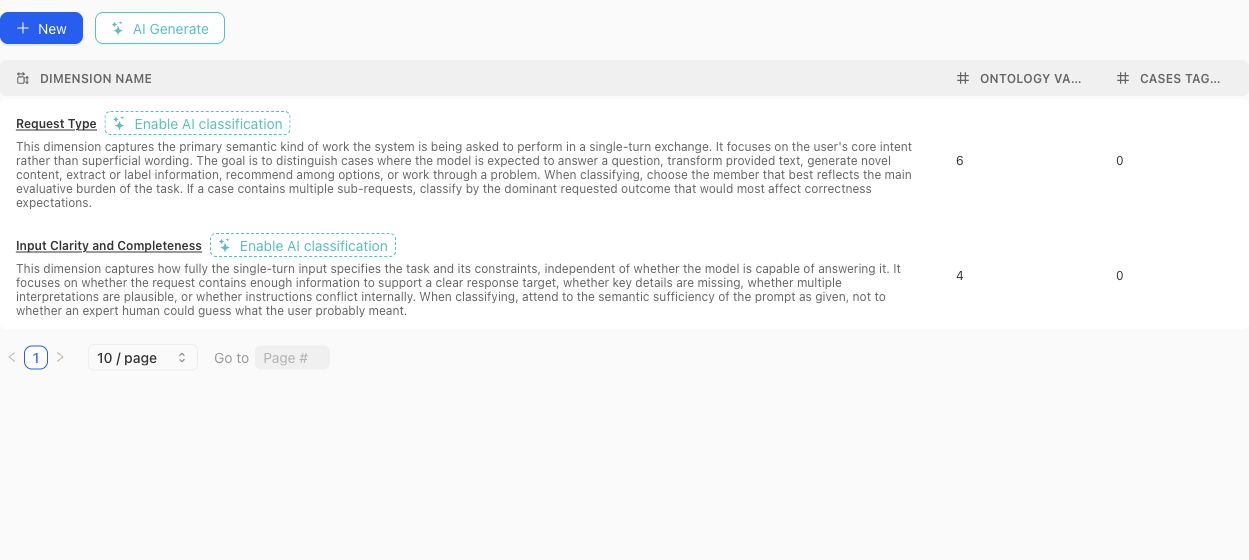
Use the table to compare each Dimension's definition with its ontology and current classification footprint before opening the detail view.
### Create or generate a schema
Create a Dimension manually when the axis and vocabulary are already understood. Use the dimension-schema generator when project context or source material should produce a reviewable proposal. Generated proposals can include a definition, why the Dimension matters, proposed ontology members, and warnings.
A proposal is not the active schema. Review each proposed Dimension and value before accepting it. Avoid accepting near-duplicates simply because they use different wording.
> Classification boundary
>
> Creating or editing a Dimension does not instantly classify every existing case. Missing or stale classifications can be queued and monitored separately. Treat unclassified cases as missing evidence, not as an implicit ontology value.
### Design rules
- Make the Dimension answer one stable question. Split axes that mix several independent concerns.
- Give every ontology value a definition that distinguishes it from neighboring values.
- Prefer values that can be applied consistently to real cases.
- Do not use a Dimension to encode case quality, policy approval, or a desired model score.
- Review distributions after changing values. A clean schema can still leave important cases unclassified.
- Delete only after checking Case Pool and benchmark usage; removal changes the project coverage vocabulary.
### Benchmark roles
In benchmark Get Started, each Dimension and ontology value can receive a focus role:
- **Required:** the benchmark is expected to cover this value.
- **Sampled:** include it as part of the desired mix.
- **Diagnostic:** track it for analysis without making it part of the main denominator.
- **Ignored:** exclude it from the benchmark coverage intention.
- **Unset:** no explicit benchmark instruction has been recorded.
Those roles shape Coverage Story generation and interpretation. They do not alter the project-level definition of the value.
{% example-demo title="Example: source condition" %}
The project defines a Source condition Dimension with Current, Superseded, Conflicting, and Missing values. One benchmark marks all four as required; another marks Current as required and the remaining values as diagnostic. The same project vocabulary supports different benchmark intentions without duplicating the Dimension.
{% /example-demo %}
## Related task pages
{% related-card-grid title="Related task pages" %}
- [Generate a dimension schema](/docs/coverage-engineering/generate-dimension-schema)
- [Work with Project Topics](/docs/coverage-engineering/project-topics)
- [Plan Benchmark Coverage](/docs/coverage-engineering/plan-benchmark-coverage)
- [Analyze dataset representation](/docs/benchmark-datasets/representation)
{% /related-card-grid %}
## Source confidence
Code-backed: the current Dimension list, detail, settings, proposal, classification, examples, and statistics surfaces establish these fields and lifecycle boundaries.
---
id: coverage.project-topics
title: Project Topics
summary: Maintain source-grounded subject areas, editable groups, and Atlas relationships used to organize project and benchmark coverage.
kind: reference
product_area: coverage_engineering
status: stable
updated: 2026-09-07
canonical: /docs/coverage-engineering/project-topics
---
# Project Topics
## Definition
Project Topics are reusable subject areas derived from project knowledge, entered by an administrator, or contributed by an expert. They organize cases by what they are about. Unlike a Dimension, a Project Topic is not one value on a fixed behavior axis: a case can belong to several Topics.
The Project Topics workspace contains **Topics**, **Groups**, and **Atlas**.
## Fields, states, or lifecycle rules
### Topics
Each Topic has a name, description, active state, author type, case usage, benchmark usage, and source mentions where available. Source mentions retain evidence such as the originating Reference Material, Project Agent Brief, manual entry, or expert suggestion.
The Topic detail shows its definition and source grounding, linked and example cases, coverage confidence, nearby-topic signals, coverage by Dimensions and ontology values, and editable membership in Topic Groups.
An AI-created or source-extracted Topic remains an editable project artifact. Review its definition and grounding before using it to steer a benchmark.
### Groups
A Project Topic Group is an editable bundle of Topics. It does not merge or replace its members. Groups let benchmark setup express intent at a useful scale while retaining Topic-level traceability.
In **Get Started**, a Group can be handled as:
- **Cover every topic:** the benchmark should represent each member Topic.
- **Cover the group:** the group should be represented without requiring every member.
- **Use as guidance:** it can guide story construction without becoming a coverage obligation.
- **Do not use:** exclude the Group from this benchmark's setup.
- **Unset:** no explicit instruction.
Groups can start from manual work, AI suggestions, source material, or Atlas exploration. Manual edits remain significant; regenerating a suggestion should not be treated as authority to overwrite the reviewed group.
### Atlas
Atlas visualizes Topics, relationships, and Groups. Use it to inspect neighborhoods, redundancy, missing nearby Topics, and possible groupings. Relationships are analytical evidence, not a taxonomy merge. A close position or strong relation score does not mean two Topics are interchangeable.
The Topic coverage view can distinguish direct case grounding from breadth, Dimension spread, and binding confidence. When a Topic looks thin, inspect the linked cases before generating more. The problem may be missing cases, weak classification, an overly broad definition, or a duplicate Topic.
### Refresh and review
Project Topics can be refreshed from current project context and indexed sources. Refreshing can create or update Topics, source mentions, evidence, and relationship analysis. Review the resulting changes and recommendation runs before incorporating them into Groups or benchmark setup.
{% example-demo title="Example: group without flattening" %}
The project has Topics for Contract renewal, Price adjustment, and Termination notice. An administrator groups them as Agreement lifecycle. One benchmark chooses Cover every topic because each action has distinct risk. Another chooses Use as guidance because it only needs broad agreement-related examples. The individual Topics remain traceable in both benchmarks.
{% /example-demo %}
## Related task pages
{% related-card-grid title="Related task pages" %}
- [Work with Dimensions and Ontology](/docs/coverage-engineering/dimensions-ontology)
- [Define Case Construction Patterns](/docs/coverage-engineering/case-construction-patterns)
- [Configure benchmark Get Started](/docs/coverage-management/get-started)
- [Analyze dataset representation](/docs/benchmark-datasets/representation)
{% /related-card-grid %}
## Source confidence
Code-backed: the current Topic, Group, source-mention, statistics, relationship, Atlas, suggestion, and benchmark-handling contracts establish this model.