# Synthesize cases
Generated: 2026-09-13T04:41:36.746Z
Source build: local
Canonical docs: https://teammately.ai/docs
---
id: coverage.synthesize-cases
title: Synthesize cases
summary: Generate candidate cases to fill coverage gaps before adding them to benchmarks or curated datasets.
kind: task
product_area: coverage_engineering
status: stable
updated: 2026-09-07
canonical: /docs/coverage-engineering/synthesize-cases
---
# Synthesize cases
Synthesize candidate cases to fill a known coverage gap without pretending synthetic examples are automatically review context.
## When to use it
Use **Assets → Cases → Synthesize** when creating reusable project Case candidates. Use **Coverage Management → Case Foundry** when the work begins from a named need in one Benchmark. In either path, generated output is candidate material until reviewed.
## Prerequisites
- A named coverage gap.
- Policies, rubrics, or dimensions that define the behavior boundary.
- A review plan for synthetic cases.
- A way to mark synthetic source and realism concerns.
## Role or permission
AI engineers or coverage owners generate candidate cases. Experts or product owners review realism before benchmark promotion.
## Steps
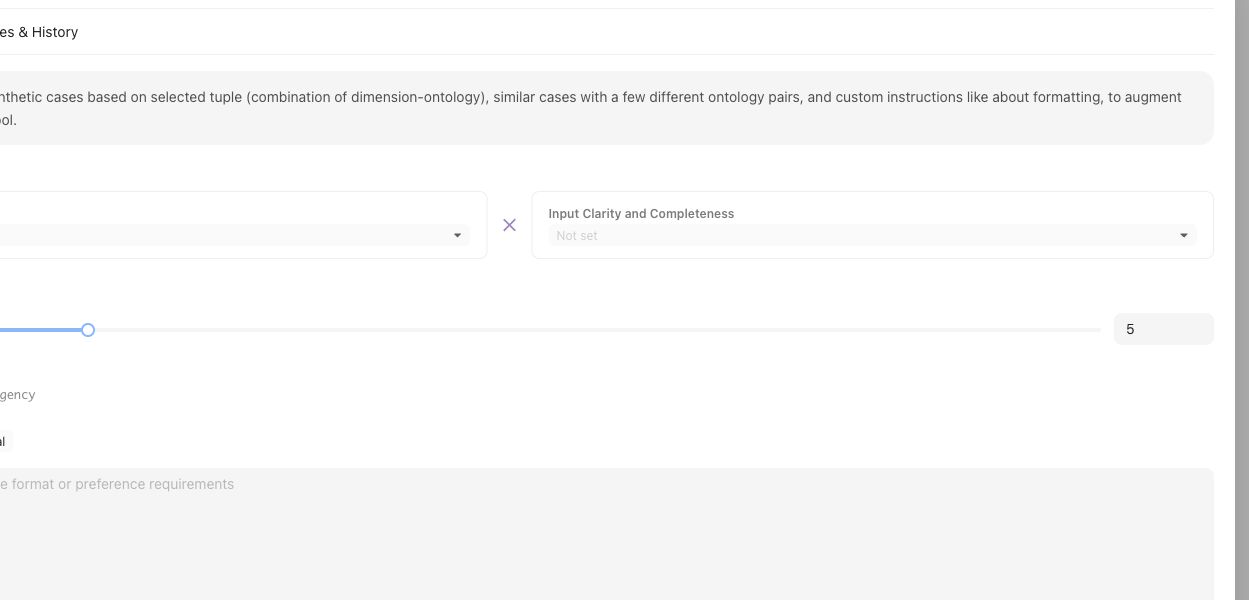
Synthesis starts from a named tuple or coverage gap, not from a generic request for more cases.
1. Name the Coverage Facet tuple, Coverage Story, or Case Construction Pattern the synthesis should fulfill.
2. Choose the Assets synthesis path or benchmark-scoped Case Foundry path.
3. Supply representative source Cases, applicable Comparison Directions, and explicit target-system constraints.
4. Inspect generated candidates for realism, duplication, source context, and compatibility with the intended Coverage Facets.
5. Keep impossible, misleading, or context-incomplete candidates out of Benchmark selection.
6. Use **Coverage Management → Case Review** for benchmark-scoped preparation and admission.
7. Select reviewed Cases in **Benchmark Datasets** and create a Snapshot only when the intended set is ready.
## Object and state changes
Completed generation registers candidate Cases in the project Case collection. Case Review and Benchmark Datasets determine whether suitable Cases become selected membership for a Benchmark. Generation completion alone does not change a Snapshot or Benchmark Version.
## Success criteria
- Each synthetic case maps to a named gap or boundary.
- Reviewers can tell synthetic cases from production-derived cases.
- Only realistic, context-complete cases affect benchmark evidence.
## Common failure modes
- Synthetic cases are generated for volume rather than a specific gap.
- Cases combine many variations and obscure the failure reason.
- Unreviewed synthetic cases enter benchmark evidence.
- The generated case lacks the context needed for expert judgment.
## Related reference pages
{% related-card-grid title="Related reference pages" %}
- [Case pool](/docs/object-model/case-pool)
- [Coverage dimensions](/docs/object-model/coverage-dimensions)
- [Comparison Directions](/docs/assets/comparison-directions)
{% /related-card-grid %}
## Related troubleshooting pages
{% related-card-grid title="Related troubleshooting pages" %}
- [Synthetic cases that feel unrealistic](/docs/troubleshooting/unrealistic-synthetic-cases)
- [Unbalanced coverage](/docs/troubleshooting/unbalanced-coverage)
- [Unclear cases](/docs/troubleshooting/unclear-cases)
{% /related-card-grid %}
{% example-demo title="Fill a stale-source gap" %}
Coverage shows few stale-source cases. The engineer synthesizes examples with old and new policy documents, experts reject unrealistic ones, and only reviewed cases enter the benchmark candidate pool.
{% /example-demo %}
## Source confidence
Code-backed: the Assets synthesizer defines generation input, candidate cards, and lifecycle; Case Foundry supplies benchmark-scoped coordination; Case Review supplies the preparation and admission boundary. The product does not treat generation completion as Snapshot membership.
---
id: coverage.case-pool
title: Case Pool
summary: Use the Case Pool to collect, triage, enrich, and promote candidate cases.
kind: concept
product_area: coverage_engineering
status: stable
updated: 2026-09-07
canonical: /docs/coverage-engineering/case-pool
---
# Case Pool
## Definition
Case Pool is the project-level working set for reusable Cases and Case sourcing activity. The current UI routes Case inspection through **Assets → Cases** and keeps **Sourcing Tasks** under Coverage Engineering. Together they let operators inspect Case content and provenance, follow preparation tasks, classify coverage, and select Cases for one or more Benchmarks.
## Why it matters
Cases often arrive before the team knows whether they are clear, representative, or tied to a meaningful coverage need. The Case Pool provides a project boundary where imported, generated, or contributed Cases can be reviewed without treating every item as benchmark evidence.
## Where it appears in the product
Use Assets → Cases for the reusable Case collection. Use Sourcing Tasks to inspect find, synthesize, classification, and preparation activity. From selected Cases, use the supported add-to-benchmark action to change editable Benchmark Dataset membership. Use Benchmark Datasets to inspect the selected set and create Snapshots.
## Artifacts it affects
Each Case keeps backend-issued identity, canonical content, materials, source or contributor context, Coverage Facet assignments, and benchmark inclusion where available. Task state is not Case approval, and benchmark inclusion is not Snapshot membership. Preserve those separate states when reporting progress.
## Operational check
Before selecting a Case, inspect its canonical input, required materials, source trace, coverage assignments, and any supported reference output or evaluator relationship relevant to the intended Benchmark. Check for near duplicates and verify that selection closes a named need rather than merely increasing row count.
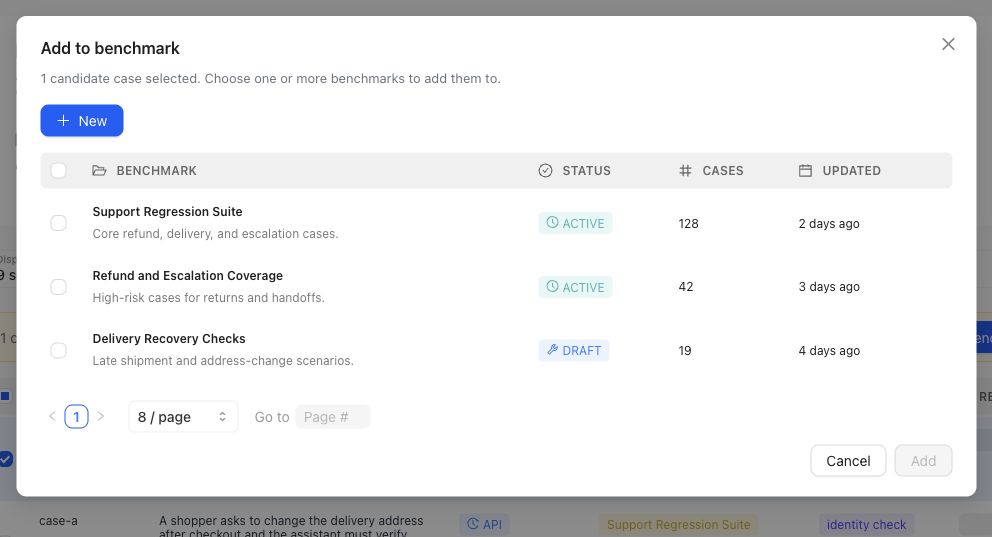
Selection is explicit: choose the intended Benchmark in this dialog. The action changes editable dataset membership, not a historical Snapshot.
{% example-demo title="Routing a sourced Case" %}
A sourcing task finds a production-informed question involving a superseded policy attachment. The operator opens the Case in Assets, confirms the current Input Schema and both materials, assigns the source-authority Coverage Facet, and adds it to the support Benchmark's current dataset. The team reviews Representation and creates a new Snapshot later; the selection action alone does not change historical Runs.
{% /example-demo %}
## Related workflows
{% related-card-grid title="Related workflows" %}
- [Assets](/docs/assets)
- [Importing cases](/docs/operating-manual/import-and-prepare-cases)
- [Synthesize cases](/docs/coverage-engineering/synthesize-cases)
- [Dimensions and ontology](/docs/coverage-engineering/dimensions-ontology)
- [Product quickstart](/docs/quickstart)
{% /related-card-grid %}
## Source confidence
Code-backed: current Case Pool navigation separates reusable Assets Cases from Sourcing Tasks, while Case sourcing types expose provenance, coverage targets, classification context, and benchmark inclusion. Benchmark Dataset pages own selection and Snapshot evidence.
---
id: coverage.plan-benchmark-coverage
title: Plan Benchmark Coverage
summary: Apply project Coverage Facets to one benchmark, inspect representation, and turn important gaps into concrete case or contribution work.
kind: task
product_area: coverage_engineering
status: stable
updated: 2026-09-07
canonical: /docs/coverage-engineering/plan-benchmark-coverage
---
# Plan Benchmark Coverage
Plan coverage by applying reusable project facets to one benchmark and comparing the intended behavior space with the selected dataset representation.
## Prerequisites
- A selected project and benchmark.
- A clear benchmark purpose.
- Relevant Dimensions, Project Topics, and Case Construction Patterns, or enough project knowledge to create them.
- Existing Cases or a plan for sourcing and constructing them.
## Steps
1. Review **Coverage Facets** at project scope. Confirm that Dimensions, Project Topics, and Case Construction Patterns describe reusable behavior structure rather than one benchmark's current case count.
2. Open the benchmark and select **Coverage Management → Get Started**.
3. Define the benchmark-specific coverage guidance and confirm setup readiness.
4. Open Coverage Management and inspect current dataset representation across the relevant facets and tuples.
5. Name important thin or absent combinations as Coverage Stories. Explain why each slice matters and what evidence would make it usable.
6. Route the gap according to its cause: Case Foundry or case sourcing for missing situations, Expert Contributions for missing judgment, Correctness Governance for missing standards, or Benchmark Datasets for missing selection.
7. Review generated or contributed cases in Case Review before relying on them.
8. Update dataset selection and create a new snapshot when the represented evidence changes materially.
## Object and state changes
This task can update benchmark coverage setup, representation guidance, Coverage Stories, Case Foundry work, case-review state, contribution requests, dataset selection, and snapshots. Project Coverage Facets may also change when the work discovers a reusable missing axis or construction pattern.
## Success criteria
- The benchmark purpose maps to explicit project Coverage Facets.
- Important combinations have selected evidence or a named gap.
- Each gap is routed to a responsible artifact or workstream.
- Constructed cases pass case review and Project Input Schema checks.
- Dataset snapshots make material coverage changes explicit.
## Common failure modes
- Using case count as the coverage goal.
- Creating benchmark-only tags where a reusable Dimension or Topic is needed.
- Treating response-variation guidance as coverage structure.
- Generating cases before defining which gap they should close.
- Trusting representation after selection changes without a new snapshot boundary.
{% example-demo title="Example: plan high-impact exception coverage" %}
The team maps exception type, source authority, and customer impact. Representation shows many low-impact ordinary cases but no high-impact cases with conflicting authority. A Coverage Story names the gap, an expert Contribution clarifies the controlling rule, and Case Foundry prepares cases for the missing tuple before a new snapshot is created.
{% /example-demo %}
## Related reference pages
{% related-card-grid title="Related reference pages" %}
- [Coverage Engineering](/docs/coverage-engineering)
- [Coverage Management](/docs/coverage-management)
- [Benchmark Datasets](/docs/benchmark-datasets)
{% /related-card-grid %}
## Related troubleshooting pages
{% related-card-grid title="Related troubleshooting pages" %}
- [Unbalanced coverage](/docs/troubleshooting/unbalanced-coverage)
- [Stale dimensions](/docs/troubleshooting/stale-dimensions)
- [Unrealistic synthetic cases](/docs/troubleshooting/unrealistic-synthetic-cases)
{% /related-card-grid %}
## Source confidence
Code-backed: current setup, overview, representation, Coverage Story, Case Foundry, and Case Review routes support this workflow.
---
id: concepts.dimensions-ontology
title: Dimensions and ontology
summary: Learn how dimensions and ontology values define the coverage space for a Teammately project.
kind: concept
product_area: object_model
status: stable
updated: 2026-09-07
canonical: /docs/concepts/dimensions-and-ontology
---
# Dimensions and ontology
## Definition
Dimensions and ontology describe how Teammately classifies cases into behavior segments that humans can reason about. Dimensions name the axes that matter, while ontology values provide the controlled labels used for coverage planning, case review, and result analysis.
## Why it matters
This matters because aggregate benchmark results can hide an unsafe gap. A candidate may pass common cases while missing a stale-source segment, a boundary condition, a product tier, or a policy exception that reviewers care about.
## Coverage vocabulary check
| Good coverage vocabulary does... | Weak vocabulary does... |
| --- | --- |
| Names behavior slices that change judgment or risk. | Uses labels that only describe where the case came from. |
| Keeps ontology values consistent enough for comparison. | Lets free-form tags drift until segment results are meaningless. |
| Makes missing or thin segments visible before review. | Treats a large case count as representative coverage. |
## Where it appears in the product
Create and maintain Dimensions and ontology values under **Coverage Facets → Dimensions and Ontology**. Benchmark Datasets uses them to inspect representation, while Benchmark Evaluations can group existing evidence by supported Coverage Facets. The Case Pool and Case Review surfaces use the same vocabulary when classifying and preparing Cases.
## Artifacts it affects
Dimensions affect Case classification, Benchmark Dataset representation, Coverage Stories, synthesis targets, Case Review, and result grouping. Changing the current vocabulary does not rewrite the labels or interpretation of historical Snapshots and Runs.
{% example-demo title="Stale-source segment" %}
An enterprise-search team adds a **Source freshness** Dimension with current, superseded, and unknown values. Benchmark Datasets then reveals that superseded-source Cases are thinly represented. The team prepares additional Cases, reviews their classifications, and creates a new Snapshot before using that segment in evaluation interpretation.
{% /example-demo %}
## Related workflows
{% related-card-grid title="Related workflows" %}
- [Generate a dimension schema](/docs/coverage-engineering/generate-dimension-schema)
- [Inspect Dataset representation](/docs/benchmark-datasets/representation)
- [Review prepared Cases](/docs/coverage-management/case-review)
- [Diagnose classification](/docs/troubleshooting/dimension-classification)
- [Refresh changed coverage](/docs/coverage-engineering/coverage-refresh)
{% /related-card-grid %}
## Related reference pages
{% related-card-grid title="Related reference pages" %}
- [Coverage Dimensions](/docs/object-model/coverage-dimensions)
- [Ontology](/docs/object-model/ontology)
- [Project Topics](/docs/coverage-engineering/project-topics)
- [Case Construction Patterns](/docs/coverage-engineering/case-construction-patterns)
{% /related-card-grid %}
## Source confidence
Code-backed: Dimension types and the Dimensions and Ontology surfaces define the project vocabulary and editable fields; Benchmark Dataset Representation shows how that vocabulary is used to inspect selected Cases.