# Coverage Engineering
Generated: 2026-09-13T04:32:42.823Z
Source build: local
Canonical docs: https://teammately.ai/docs
---
id: coverage.overview
title: Coverage Engineering
summary: Design the behavior space a benchmark must represent and connect reusable project facets to benchmark coverage work.
kind: concept
product_area: coverage_engineering
status: stable
updated: 2026-09-07
canonical: /docs/coverage-engineering
---
# Coverage Engineering
Coverage Engineering is the capability for designing what a specialist AI benchmark must represent. It turns requirements, project knowledge, existing cases, and observed failures into a structured coverage map that guides dataset selection, case construction, expert contributions, and evaluation interpretation.
## Definition
Coverage work has two scopes. At project scope, **Coverage Facets** manages reusable Dimensions, Project Topics, and Case Construction Patterns. At benchmark scope, **Coverage Management** applies those facets to setup, representation, Coverage Stories, Case Review, Case Foundry, and contribution requests. **Benchmark Datasets** owns the selected Cases and snapshots that embody the resulting coverage.
Coverage Engineering is therefore broader than adding cases. It explains why a behavior slice matters, how it is represented, which combinations are thin, and what work should close the gap.
## Decision checkpoint
| Question | Product surface | Durable result |
| --- | --- | --- |
| Which axes distinguish important behavior? | Coverage Facets → Dimensions | Reusable coverage axes |
| Which domain subjects must be represented? | Coverage Facets → Project Topics | Project topic structure |
| How should cases be constructed repeatedly? | Coverage Facets → Case Construction Patterns | Reusable construction guidance |
| What should this benchmark cover? | Coverage Management → Get Started | Benchmark-specific coverage guidance |
| Where is the selected dataset thin? | Representation and Coverage Stories | Named gaps and sourcing work |
| Which exact cases define evidence? | Benchmark Datasets | Selection and snapshot boundary |
## Coverage map and benchmark evidence
A coverage map should identify meaningful combinations rather than isolated tags. A source-freshness Dimension may be well populated overall while the combination of superseded source, high customer impact, and exception request remains absent. Coverage Stories make those combinations operational; Case Foundry and expert contribution requests can then target them.
Representation is evidence about the dataset, not proof that the benchmark is complete. A large or balanced count can still omit a critical boundary. Product teams should use specialist judgment to decide which gaps materially affect trust.
## Relationship to correctness and construction
Correctness Elicitation answers what should count as correct in a represented situation. Weave constructs or imports the cases and materials needed to exercise the situation. If the team cannot judge a coverage slice, request an Expert Contribution. If the judgment is clear but no case exists, use Case Foundry or other case-construction work. If cases exist but are not selected, update Benchmark Datasets.
Comparison Directions are not Coverage Facets. They guide comparative response variation and belong to **Assets → Comparison Directions**. Keep benchmark representation in Dimensions, Topics, Patterns, Stories, and dataset snapshots.
{% example-demo title="Authority-conflict coverage" %}
A project creates source authority and customer impact Dimensions, a Project Topic for eligibility exceptions, and a pattern for pairing current and superseded documents. Coverage Management shows that the high-impact conflict tuple has no selected cases. A Coverage Story justifies the gap, Case Foundry prepares cases, and the accepted cases enter a new dataset snapshot.
{% /example-demo %}
## Related workflows
{% related-card-grid title="Related workflows" %}
- [Plan benchmark coverage](/docs/coverage-engineering/plan-benchmark-coverage)
- [Manage Coverage](/docs/coverage-management)
- [Work with Benchmark Datasets](/docs/benchmark-datasets)
{% /related-card-grid %}
## Related reference pages
{% related-card-grid title="Related reference pages" %}
- [Coverage Dimensions](/docs/object-model/coverage-dimensions)
- [Ontology](/docs/object-model/ontology)
- [Cases](/docs/assets/cases)
{% /related-card-grid %}
## Source confidence
Code-backed: current navigation and benchmark coverage routes establish project Coverage Facets, benchmark Coverage Management, setup, representation, Stories, Case Review, and Case Foundry responsibilities.
---
id: coverage.benchmark-snapshots
title: Benchmark snapshots
summary: Freeze a benchmark into a version so every run measures the same cases and judgment rules.
kind: concept
product_area: coverage_engineering
status: stable
updated: 2026-08-23
canonical: /docs/coverage-engineering/benchmark-snapshots
---
# Benchmark snapshots
## Definition
A Benchmark Dataset Snapshot is the immutable evidence boundary created from a benchmark's current editable dataset. It records the selected Cases, eligible Policy and Rubric relationships, representation facts, label, content hash, Case count, and creation time used to establish a Benchmark Version.
The live dataset can continue changing after the Snapshot exists. Those later changes do not rewrite an earlier Snapshot or any Run that used its Benchmark Version.
## Why it matters
Evaluation results are comparable only when readers know which evidence boundary each Run used. Without the Snapshot identity, a score can move because the Harness changed, because Case membership changed, because evaluator relationships changed, or because representation shifted. Freezing the dataset keeps those explanations separate.
## Where it appears in the product
Use **Benchmark Datasets → Snapshots** to run readiness checks, create the immutable Snapshot, and inspect its read-only Cases and Representation. Use Coverage Management to improve gaps before snapshotting. Use Benchmark Evaluations after the resulting Benchmark Version is available.
## Artifacts it affects
A Snapshot binds selected Case versions, admitted evaluator relationships, and representation facts. It does not freeze the entire project, lock the current dataset, approve weak Cases, or prove that coverage is sufficient. Project Cases, Policies, Rubrics, and Coverage Facets remain reusable objects with their own lifecycle.
Create a new Snapshot when a change affects the claim an evaluation will support—for example Case membership, relevant Case content or materials, admitted evaluator relationships, or the represented behavior boundary. A label-only correction that does not change evidence should not be described as new behavioral coverage.
## Operational check
Before creating a Snapshot, confirm that readiness has no blockers, Cases are interpretable, required materials are ready, evaluator links are eligible and approved, and Representation supports the intended benchmark claim. After creation, record the Snapshot or Benchmark Version identity in every Run, comparison, and Improvement Session that depends on it.
{% example-demo title="Preserving a coverage expansion" %}
A source-authority Coverage Story produces eight reviewed Cases covering conflicts between current and superseded documents. The team adds those Cases to the current dataset and confirms their Rubric relationships. Earlier Runs remain attached to the old Benchmark Version. The operator creates a new Snapshot and uses its resulting version for the next evaluation, making the coverage change explicit instead of presenting the score movement as a Harness-only change.
{% /example-demo %}
## Related workflows
{% related-card-grid title="Related workflows" %}
- [Benchmarks and versions](/docs/concepts/benchmarks-and-versions)
- [Create a Dataset Snapshot](/docs/benchmark-datasets/snapshots)
- [Run a benchmark evaluation](/docs/benchmark-evaluations/run-evaluation)
- [Inspect evaluation results](/docs/benchmark-evaluations/inspect-results)
- [Product quickstart](/docs/quickstart)
- [Task index](/docs/operating-manual/task-index)
{% /related-card-grid %}
## Source confidence
Code-backed: the active Snapshot manager and benchmark-scoped Snapshots route define readiness, immutable Snapshot identity, content hashes, Case counts, and read-only inspection. Coverage sufficiency remains a human interpretation supported by Representation and Coverage Management.
---
id: coverage.benchmarks
title: Benchmarks
summary: Create and manage benchmark sets that measure important AI product behavior.
kind: concept
product_area: coverage_engineering
status: stable
updated: 2026-09-07
canonical: /docs/coverage-engineering/benchmarks
---
# Benchmarks
## Definition
A Benchmark is the durable project object that organizes one intended evaluation program. It owns benchmark-scoped work across Benchmark Datasets, Coverage Management, Expert Contributions, Benchmark Evaluations, and Improve. The Benchmark itself persists while its selected Cases, coverage work, standards, and executable candidates evolve through explicit versions and related artifacts.
Do not use “benchmark” interchangeably with a Case collection, a score, or a single Run. The current Benchmark Dataset is editable; a Dataset Snapshot and Benchmark Version freeze an evidence boundary; a Run evaluates an exact saved Harness Version against that boundary.
## Why it matters
A Benchmark keeps the work for one behavioral claim connected. Teams can see why Cases were selected, which expert work established the standard, what candidate version ran, and what evidence justified the next improvement. Without that object boundary, coverage, evaluator rules, and candidate results can drift independently while still being summarized under one ambiguous score.
## Where it appears in the product
The project-level Benchmarks list creates and routes into individual Benchmark workspaces. Inside a Benchmark, use Benchmark Datasets for selected Cases and Snapshots, Coverage Management for representation and gaps, Expert Contributions for scoped specialist work, Benchmark Evaluations for Runs and comparisons, and Improve for evidence-backed candidate changes.
## Artifacts it affects
A Benchmark references reusable project Cases, Coverage Facets, Policies, Rubrics, and Harnesses; it does not take ownership away from those project objects. Benchmark-scoped membership, contributions, Snapshots, Runs, and Improvement Sessions retain their own identities. Deleting or editing a project object must not be described as silently rewriting historical Benchmark Versions.
## Operational check
Before interpreting a Benchmark result, confirm the Benchmark purpose, exact Benchmark Version, selected Case population, evaluator boundary, saved Harness Version, and Run completeness. When the benchmark's intended behavior changes, update its coverage and dataset deliberately and create a new evidence boundary instead of treating current mutable state as historical truth.
{% example-demo title="One benchmark, two evidence boundaries" %}
A support-assistant Benchmark initially covers ordinary return requests. After specialists document an exception for opened safety equipment, Coverage Management identifies the missing boundary and the current dataset gains reviewed Cases and a new Rubric relationship. The Benchmark remains the same program, but the team creates a new Snapshot and Benchmark Version. Comparisons name the version so readers can separate candidate improvement from the expanded correctness boundary.
{% /example-demo %}
## Related workflows
{% related-card-grid title="Related workflows" %}
- [Benchmarks and versions](/docs/concepts/benchmarks-and-versions)
- [Create a benchmark](/docs/coverage-engineering/create-a-benchmark)
- [Plan benchmark coverage](/docs/coverage-engineering/plan-benchmark-coverage)
- [Benchmark snapshots](/docs/coverage-engineering/benchmark-snapshots)
- [Product quickstart](/docs/quickstart)
{% /related-card-grid %}
## Source confidence
Code-backed: the active Benchmarks list, benchmark-scoped workspace routes, and Benchmark types establish the durable Benchmark identity and its relationship to datasets, versions, and evaluation work. Linked pages define the exact behavior of each workspace.
---
id: coverage.boundary-cases
title: Boundary Cases
summary: Use edge and ambiguous cases to sharpen policies, applicability logic, and rubrics.
kind: concept
product_area: coverage_engineering
status: stable
updated: 2026-09-07
canonical: /docs/coverage-engineering/boundary-cases
---
# Boundary Cases
## Definition
A Boundary Case sits near a meaningful change in expected behavior: a Policy exception, an applicability edge, conflicting source authority, missing information, an escalation threshold, or another condition where a small contextual change should alter the correct output or action.
Boundary Cases are not simply unusual examples. They are deliberate tests of a named distinction in the benchmark's coverage and correctness model.
## Why it matters
Ordinary Cases can make a weak rule appear reliable because they never force the team to decide where it stops applying. Boundary Cases expose vague Policy scope, overlapping Rubrics, missing exceptions, and unsupported assumptions before those problems are hidden inside aggregate results.
## Where it appears in the product
Coverage Stories can name a boundary as a missing or thin behavior slice. Case Foundry or another sourcing workflow can prepare candidate Cases against that need. Case Review checks whether the input, materials, and contrast are realistic. If the expected judgment is unclear, route the selected Cases into an Expert Contribution instead of inventing the answer during case construction.
## Artifacts it affects
A useful Boundary Case records the exact contextual feature that changes the expectation, the controlling source material, the relevant Coverage Facets, and the Policy or Rubric question it exercises. Admission to the current Benchmark Dataset is a separate selection decision; admission to a Snapshot is a later immutable evidence decision.
## Operational check
Compare the Boundary Case with a nearby ordinary Case. The pair should differ in the intended condition, not in several unrelated dimensions. Confirm that specialists can explain why the expected behavior changes, that the Rubric tests one observable criterion, and that the Case materials make the boundary visible to the evaluated system.
{% example-demo title="Current versus superseded source" %}
Two Cases ask the same eligibility question. One contains only the current policy document; the other also contains a plausible superseded document with conflicting terms. Specialists confirm that the response must follow the controlling current source or state uncertainty. The pair becomes a Boundary Case set for source authority, and its Rubric fails unsupported blending rather than generic factual error.
{% /example-demo %}
## Related workflows
{% related-card-grid title="Related workflows" %}
- [Manage Coverage Stories](/docs/coverage-management/coverage-stories)
- [Review prepared Cases](/docs/coverage-management/case-review)
- [Applicability Logic](/docs/object-model/applicability-logic)
- [Comparison Directions](/docs/assets/comparison-directions)
- [Product quickstart](/docs/quickstart)
- [Task index](/docs/operating-manual/task-index)
{% /related-card-grid %}
## Source confidence
Code-backed: Coverage Stories can represent named coverage needs, Case Review exposes prepared Cases and materials, and Case sourcing types preserve coverage targets and source context. Specialist authority and evaluator approval remain separate workflows.
---
id: coverage.candidate-in-use-cases
title: Candidate and In-Use Cases
summary: Distinguish examples under consideration from cases that actively support benchmark evidence.
kind: reference
product_area: coverage_engineering
status: stable
updated: 2026-09-07
canonical: /docs/coverage-engineering/candidate-and-in-use-cases
---
# Candidate and In-Use Cases
## Definition
Candidate Cases are Cases or prepared Case proposals still being considered for reuse or benchmark membership. In-use Cases are already selected by one or more Benchmarks. The distinction describes current use, not intrinsic quality: a Candidate can be excellent but not yet selected, while an in-use Case can later require correction or removal from the editable dataset.
## Fields, states, or lifecycle rules
- Case Pool rows can retain source type, source label, coverage targets, review notes, and the Benchmarks that currently include the Case.
- Adding a Case to a Benchmark changes editable membership. It does not retroactively add the Case to an existing Snapshot or Benchmark Version.
- Removing a Case from a Benchmark does not delete the reusable project Case.
- A Case can be in use by several Benchmarks at once; membership must be interpreted per Benchmark.
- Generated or contributed Cases still require review for schema conformance, materials, realism, and intended coverage before selection.
- Historical Runs continue to reference the Case versions frozen into their Benchmark Version.
## Related objects
Use [Case Pool](/docs/coverage-engineering/case-pool) to inspect reusable Cases and sourcing work. Use [Benchmark Dataset Cases](/docs/benchmark-datasets/cases) to inspect or change membership for one Benchmark. Use [Dataset Snapshots](/docs/benchmark-datasets/snapshots) when that membership must become immutable evaluation evidence.
{% example-demo title="Promotion without rewriting history" %}
Case Foundry prepares a Case for a missing high-impact exception tuple. It remains a Candidate while reviewers inspect its input and materials. After approval, the operator adds it to the current dataset for the support Benchmark, so it becomes in use there. Earlier Snapshots remain unchanged; the Case enters evaluation evidence only after the team creates a new Snapshot and Benchmark Version.
{% /example-demo %}
## Source confidence
Code-backed: Case Pool navigation, benchmark Dataset Case actions, and Case sourcing types expose candidate counts, in-use counts, source context, coverage targets, and benchmark inclusion. Snapshot pages define the separate immutable evidence boundary.
## Related task pages
{% related-card-grid title="Related task pages" %}
- [Case Pool](/docs/coverage-engineering/case-pool)
- [Case pool](/docs/object-model/case-pool)
- [Importing cases](/docs/operating-manual/import-and-prepare-cases)
- [Product quickstart](/docs/quickstart)
- [Task index](/docs/operating-manual/task-index)
{% /related-card-grid %}
---
id: coverage.case-construction-patterns
title: Case Construction Patterns
summary: Define reusable mechanisms for constructing cases and steer how benchmarks use or avoid them.
kind: reference
product_area: coverage_engineering
status: stable
updated: 2026-09-07
canonical: /docs/coverage-engineering/case-construction-patterns
---
# Case Construction Patterns
## Definition
A Case Construction Pattern describes a reusable mechanism for building cases. It answers “how should this situation be constructed?” while Dimensions describe differentiating values and Project Topics describe subject matter.
Examples include conflicting authorities, missing prerequisite evidence, ambiguous user intent, multi-step state change, or a plausible but superseded source. A good Pattern is portable across Topics rather than tied to one case's wording.
## Fields, states, or lifecycle rules
Each Pattern has a name, description, origin, usage counts, examples, and benchmark statistics. Origins currently distinguish manual, AI-generated, expert-input, and imported Patterns. Usage can show Case Pool cases, benchmark cases, requirements, and benchmark steering.
Pattern suggestions can be grounded in Project Topics, source material, existing cases and Patterns, the Project Agent Brief, Dimensions and ontology, or expert input. Generated candidates include the proposed definition, why they were suggested, and source references. Accept or reject each candidate explicitly.
## Benchmark steering
Get Started can use one of three modes:
- **System choose:** allow construction to select appropriate Patterns from the project library.
- **Prefer:** encourage named Patterns when building Coverage Stories and cases.
- **Avoid:** prevent named Patterns from shaping this benchmark's intended case supply.
Coverage Story tuples can also reference specific Patterns. The tuple reference is the concrete construction instruction for that part of the story; the project Pattern remains reusable and independently editable.
## Design rules
- Name the mechanism, not the domain example. “Conflicting authorities” travels better than “Conflicting HR policies.”
- Explain what makes a case instantiate the Pattern.
- Keep Topics out of the Pattern definition unless they are only examples.
- Do not encode an expected answer or rubric verdict as a construction pattern.
- Inspect examples and usage before deleting or materially changing a Pattern.
- Treat AI and expert suggestions as reviewable proposals. Origin is provenance, not approval.
> Pattern versus requirement
>
> A Pattern describes a reusable structure. Benchmark requirements describe constraints for one benchmark, and a Coverage Tuple combines the relevant Dimensions, Topic Groups, Patterns, proof statement, and target case count.
{% example-demo title="Example: portable construction pattern" %}
The project defines **Plausible superseded authority**: construct a case where an older source appears credible but a newer source controls. Coverage Stories reuse the Pattern for procurement, support, and compliance Topics while applying different source-condition and impact ontology values.
{% /example-demo %}
## Related task pages
{% related-card-grid title="Related task pages" %}
- [Work with Project Topics](/docs/coverage-engineering/project-topics)
- [Configure benchmark Get Started](/docs/coverage-management/get-started)
- [Edit Coverage Stories](/docs/coverage-management/coverage-stories)
- [Review prepared cases](/docs/coverage-management/case-review)
{% /related-card-grid %}
## Source confidence
Code-backed: the current Pattern list, detail, generation, recommendation, usage, examples, classification, and benchmark-steering contracts establish this behavior.
---
id: coverage.case-pool
title: Case Pool
summary: Use the Case Pool to collect, triage, enrich, and promote candidate cases.
kind: concept
product_area: coverage_engineering
status: stable
updated: 2026-09-07
canonical: /docs/coverage-engineering/case-pool
---
# Case Pool
## Definition
Case Pool is the project-level working set for reusable Cases and Case sourcing activity. The current UI routes Case inspection through **Assets → Cases** and keeps **Sourcing Tasks** under Coverage Engineering. Together they let operators inspect Case content and provenance, follow preparation tasks, classify coverage, and select Cases for one or more Benchmarks.
## Why it matters
Cases often arrive before the team knows whether they are clear, representative, or tied to a meaningful coverage need. The Case Pool provides a project boundary where imported, generated, or contributed Cases can be reviewed without treating every item as benchmark evidence.
## Where it appears in the product
Use Assets → Cases for the reusable Case collection. Use Sourcing Tasks to inspect find, synthesize, classification, and preparation activity. From selected Cases, use the supported add-to-benchmark action to change editable Benchmark Dataset membership. Use Benchmark Datasets to inspect the selected set and create Snapshots.
## Artifacts it affects
Each Case keeps backend-issued identity, canonical content, materials, source or contributor context, Coverage Facet assignments, and benchmark inclusion where available. Task state is not Case approval, and benchmark inclusion is not Snapshot membership. Preserve those separate states when reporting progress.
## Operational check
Before selecting a Case, inspect its canonical input, required materials, source trace, coverage assignments, and any supported reference output or evaluator relationship relevant to the intended Benchmark. Check for near duplicates and verify that selection closes a named need rather than merely increasing row count.
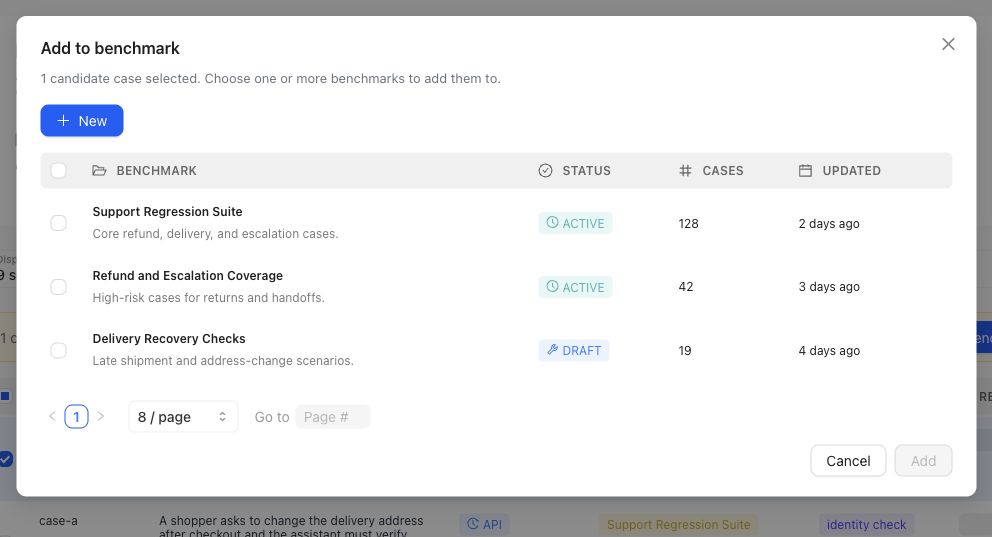
Selection is explicit: choose the intended Benchmark in this dialog. The action changes editable dataset membership, not a historical Snapshot.
{% example-demo title="Routing a sourced Case" %}
A sourcing task finds a production-informed question involving a superseded policy attachment. The operator opens the Case in Assets, confirms the current Input Schema and both materials, assigns the source-authority Coverage Facet, and adds it to the support Benchmark's current dataset. The team reviews Representation and creates a new Snapshot later; the selection action alone does not change historical Runs.
{% /example-demo %}
## Related workflows
{% related-card-grid title="Related workflows" %}
- [Assets](/docs/assets)
- [Importing cases](/docs/operating-manual/import-and-prepare-cases)
- [Synthesize cases](/docs/coverage-engineering/synthesize-cases)
- [Dimensions and ontology](/docs/coverage-engineering/dimensions-ontology)
- [Product quickstart](/docs/quickstart)
{% /related-card-grid %}
## Source confidence
Code-backed: current Case Pool navigation separates reusable Assets Cases from Sourcing Tasks, while Case sourcing types expose provenance, coverage targets, classification context, and benchmark inclusion. Benchmark Dataset pages own selection and Snapshot evidence.
---
id: coverage.case-segmentation
title: Case Segmentation
summary: Segment cases into meaningful behavior groups so benchmark coverage is explainable.
kind: concept
product_area: coverage_engineering
status: stable
updated: 2026-08-23
canonical: /docs/coverage-engineering/case-segmentation
---
# Case Segmentation
## Definition
Case segmentation is the act of reading a Case population by meaningful behavior slices instead of only as a total count. In Teammately, reusable Dimensions and ontology values provide governed segmentation axes; Project Topics and Case Construction Patterns provide additional intent; Benchmark Dataset Representation shows how selected Cases occupy those axes.
A segment is an analytical grouping, not a new Case object or a hidden approval state.
## Why it matters
Aggregate benchmark results can hide concentrated success and consequential absence. A candidate may score well overall while failing every Case with missing evidence, a particular jurisdiction, or a high-impact exception. Segmentation makes those differences inspectable and gives Coverage Stories a concrete population to address.
## Where it appears in the product
Define reusable axes in **Coverage Facets → Dimensions & Ontology**. Classify Cases against those values through supported Case and coverage workflows. Use **Benchmark Datasets → Representation** to inspect the current selected population. Use Coverage Management when a sparse or absent intersection needs a Story, Case Foundry work, or an Expert Contribution.
## Artifacts it affects
Keep three identities separate: the reusable Dimension, the ontology value assigned to a Case, and the Benchmark Dataset membership being analyzed. Changing a value can alter current Representation without modifying an older Snapshot. Adding a Case can change counts without changing the segmentation model. A filter is a view over evidence, not a new evidence object.
## Operational check
Choose axes that describe material behavior, context, risk, or source conditions. Check distinct Case counts as well as assignments, inspect unclassified and conflicting values, and avoid interpreting overlapping segments as additive totals. When reporting a result by segment, name the Benchmark Version whose Case assignments support the analysis.
{% example-demo title="Finding a hidden source-authority gap" %}
The dataset contains many high-impact Cases and many Cases with superseded sources, but Representation shows almost no Cases where both conditions occur together. The team creates a Coverage Story for that intersection. Case Foundry prepares candidates, reviewers confirm their realism, and a later Snapshot records the expanded segment. The Dimension definitions remain reusable across other Benchmarks.
{% /example-demo %}
## Related workflows
{% related-card-grid title="Related workflows" %}
- [Dimensions and ontology](/docs/coverage-engineering/dimensions-ontology)
- [Coverage dimensions](/docs/object-model/coverage-dimensions)
- [Coverage Gaps](/docs/coverage-engineering/coverage-gaps)
- [Product quickstart](/docs/quickstart)
- [Task index](/docs/operating-manual/task-index)
{% /related-card-grid %}
## Source confidence
Code-backed: the Representation explorer and Dimension classification types establish facet-based Case grouping, assigned and missing values, and benchmark-scoped distribution views. Coverage significance and gap priority remain accountable human judgments.
---
id: coverage.coverage-gaps
title: Coverage Gaps
summary: Find missing or underrepresented behavior areas before benchmark evidence becomes misleading.
kind: task
product_area: coverage_engineering
status: stable
updated: 2026-08-23
canonical: /docs/coverage-engineering/coverage-gaps
---
# Coverage Gaps
## When to use it
Use this task when the team suspects that a benchmark result is incomplete because the case set does not represent an important behavior area. A coverage gap is not just a low score. It is a missing or thin slice of the behavior space: a dimension value, ontology category, source condition, user intent, boundary scenario, policy exception, failure cluster, or product flow that should be represented before results are trusted.
Coverage gaps matter because Teammately helps the team reason about whether the benchmark actually represents the correctness space, instead of only running checks over available examples.
## Prerequisites
- A Benchmark Dataset or a named intended behavior slice already exists.
- Dimensions or ontology values are available, or the team knows which behavior axis is missing.
- Relevant Evaluation Runs, failure clusters, Expert Contribution findings, or product signals are available for inspection.
- Policies and rubrics are clear enough that the team can tell whether the problem is missing coverage rather than weak standards.
## Required role or permission
AI engineers, evaluation owners, and product owners usually identify coverage gaps together. Experts may be needed when the missing behavior depends on domain judgment. If the UI blocks investigation or case changes, inspect project membership and artifact access before changing the benchmark.
### Task steps: Coverage Gaps
1. Name the behavior area that may be missing: dimension, ontology value, product flow, policy exception, source condition, or boundary scenario.
2. Inspect **Benchmark Datasets → Representation** and the current Benchmark Version. Check whether the area is absent, represented by too few selected Cases, or represented only by easy examples.
3. Compare the suspected gap against evaluation failures, failure clusters, Expert Contribution notes, and recent product signals.
4. Rule out look-alike problems: missing outputs, stale cases, weak applicability logic, overly broad policies, ambiguous rubrics, or output mapping errors.
5. Route the gap: update Coverage Facets, create a Coverage Story, source or synthesize Cases, request an Expert Contribution, or select already reviewed Cases in Benchmark Datasets.
6. Review candidates in Case Review, create a new Snapshot when membership changes, and preserve the gap rationale in the owning coverage surfaces.
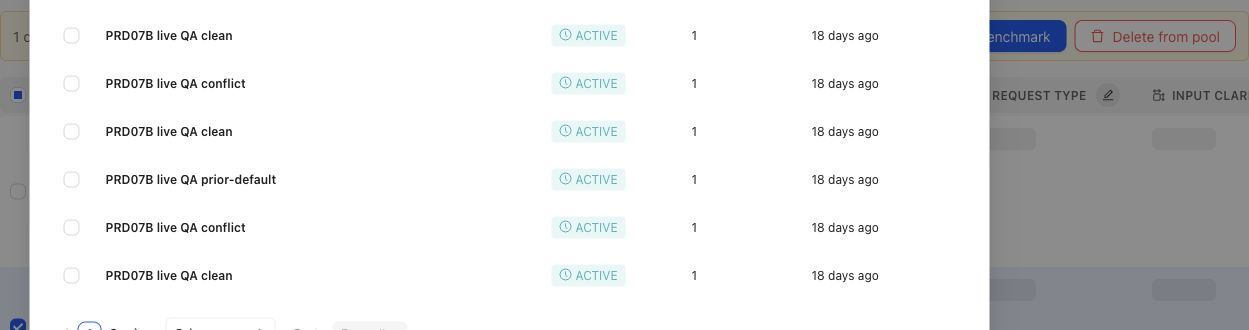
When a gap points to specific candidates, the operator can select cases and prepare them for benchmark membership.
## Object and state changes
Confirming a gap can create a Coverage Story, candidate Cases, Coverage Facet changes, Case Review work, selected Dataset changes, or an Expert Contribution. A gap does not silently change historical Benchmark meaning. When selected membership changes, create a new Dataset Snapshot and Benchmark Version before treating the revised set as reproducible evidence.
## Success criteria
- The missing or underrepresented behavior area is named precisely.
- The team can explain why the issue is a true coverage gap rather than missing outputs, weak applicability, stale artifacts, or mapping errors.
- The resulting case, dimension, ontology, or benchmark change is traceable to source evidence or expert judgment.
- Future benchmark results can distinguish behavior improvement from coverage refresh.
## Common failure modes
- Treating a model failure as a coverage gap when the benchmark already contains representative cases.
- Adding many similar cases without naming the missing dimension or ontology value.
- Refreshing benchmark coverage without preserving the version boundary.
- Mistaking missing outputs or output mapping failures for missing coverage.
- Creating synthetic cases that are unrealistic because they lack source context or expert judgment.
- Ignoring a small high-risk slice because aggregate coverage looks balanced.
{% example-demo title="Boundary case for enterprise search" %}
Raw case: An employee asks for a policy that changed last week, and the retrieved documents contain both old and new guidance.
Expert judgment: Coverage must include cases where stale and current sources conflict.
Policy: Answers must prefer the approved current source and disclose conflicts when confidence is low.
Applicability: Applies when retrieval includes multiple policy versions or stale documents.
Binary rubric: The answer identifies the current source or asks for confirmation instead of blending policies.
Benchmark result: A candidate output fails because it combines old and new terms into one invented policy.
Interpretation: Coverage notes show whether stale-source boundary behavior is represented before the next run is trusted.
{% /example-demo %}
## Related reference pages
{% related-card-grid title="Related reference pages" %}
- [Candidate and In-Use Cases](/docs/coverage-engineering/candidate-and-in-use-cases)
- [Case pool](/docs/coverage-engineering/case-pool)
- [Dimensions and ontology](/docs/coverage-engineering/dimensions-ontology)
- [Benchmark snapshots](/docs/coverage-engineering/benchmark-snapshots)
- [Case versions](/docs/governance/case-versioning)
{% /related-card-grid %}
## Related troubleshooting pages
{% related-card-grid title="Related troubleshooting pages" %}
- [Access troubleshooting](/docs/troubleshooting/authentication)
- [Unbalanced coverage](/docs/troubleshooting/unbalanced-coverage)
- [Weak applicability logic](/docs/troubleshooting/weak-applicability-logic)
- [Missing outputs](/docs/troubleshooting/missing-outputs)
- [Benchmark results changed unexpectedly](/docs/troubleshooting/benchmark-results-changed-unexpectedly)
{% /related-card-grid %}
## Source confidence
Code-backed: Benchmark Dataset Representation exposes selected distribution; Coverage Management and Coverage Stories expose benchmark needs; Case Review exposes the admission boundary for prepared Cases. Human judgment determines whether an observed thin slice is consequential.
---
id: coverage.refresh
title: Refresh coverage after product change
summary: Reconcile coverage facets, Cases, benchmark membership, and Snapshots after the target system or its evidence changes.
kind: task
product_area: coverage_engineering
status: stable
updated: 2026-09-07
canonical: /docs/coverage-engineering/coverage-refresh
---
# Refresh coverage after product change
## When to use it
Refresh coverage when new Cases reveal an unrepresented behavior, source material or product behavior changes, experts qualify an earlier assumption, or a governed Policy changes which situations matter. This is a coordinated workflow across Coverage Engineering—not a single refresh action.
## Prerequisites
- Name the changed signal and the date or version at which it changed.
- Identify the Benchmark whose claims may be affected.
- Preserve the current Snapshot and historical Runs; do not edit them to resemble the new state.
- Decide who can confirm the changed behavior and who owns the resulting Benchmark Version.
### Task steps: Refresh benchmark coverage
1. Open the Benchmark's **Coverage Management** overview and identify which coverage claim is no longer supported.
2. Review **Coverage Facets**. Update Dimensions, ontology values, Project Topics, or Case Construction Patterns only when the behavior model itself changed.
3. Return to the **Case Pool**. Source, upload, draft, or synthesize candidate Cases for the missing or changed region.
4. Inspect the candidates for source context, realistic inputs, duplication, and the intended coverage labels. Keep uncertain Cases out of benchmark use.
5. Use **Coverage Management → Get Started** and the overview to update coverage guidance. Use **Case Review** and **Benchmark Datasets** to change selected Cases deliberately.
6. Create a new Dataset Snapshot and Benchmark Version for the revised evidence boundary.
7. Run a new evaluation when current candidate evidence is required. Compare it with older Runs using the named Benchmark Versions.
## Object and state changes
A refresh may change coverage-facet definitions, Case classifications, candidate Cases, selected benchmark Cases, and the next Snapshot. It does not rewrite an earlier Snapshot or make its Runs invalid. Older results remain evidence for their original version; the new version answers the current coverage question.
If only candidate behavior changed, keep the Benchmark Version fixed and run the new candidate against it. If the Case set, applicable standards, or coverage boundary changed, create a new Benchmark Version before interpreting a new Run as comparable.
## Success criteria
- The changed product reality maps to an explicit coverage facet or documented boundary.
- Candidate Cases have enough source context to be reviewed and are not mistaken for in-use benchmark evidence.
- The new selected set addresses the gap without silently removing still-important behavior.
- The new Snapshot names a reproducible evidence boundary.
- Comparisons distinguish candidate changes from Benchmark Version changes.
## Common failure modes
- Treating refresh as a single button and missing a changed facet, Case set, or Snapshot boundary.
- Rewriting a historical Snapshot instead of creating a new one.
- Adding generated or newly sourced Cases to a Benchmark before review.
- Comparing Runs without naming whether the candidate, Benchmark Version, or both changed.
{% example-demo title="A newly supported exception" %}
A support assistant gains an approved exception path for one account tier. The team adds or revises the account-tier ontology, sources Cases for eligible and ineligible requests, reviews them in Case Review, updates the coverage guidance, and changes the selected Benchmark Dataset. A new Snapshot freezes the revised membership. Previous Runs still describe the old rule; new Runs evaluate the approved exception boundary.
{% /example-demo %}
## Source confidence
Code-backed: Coverage Management, Coverage Facets, the Case Pool, Case Review, Benchmark Datasets, and Dataset Snapshots establish the current sequence and the objects that can change. The decision that a product change requires a refresh remains a team-owned interpretation of evidence.
## Related reference pages
{% related-card-grid title="Continue the workflow" %}
- [Coverage gaps](/docs/coverage-engineering/coverage-gaps)
- [Dimensions and ontology](/docs/coverage-engineering/dimensions-ontology)
- [Case Pool](/docs/coverage-engineering/case-pool)
- [Plan benchmark coverage](/docs/coverage-engineering/plan-benchmark-coverage)
- [Benchmark Snapshots](/docs/coverage-engineering/benchmark-snapshots)
{% /related-card-grid %}
## Related troubleshooting pages
{% related-card-grid title="Diagnose refresh problems" %}
- [Stale Dimensions](/docs/troubleshooting/stale-dimensions)
- [Unbalanced coverage](/docs/troubleshooting/unbalanced-coverage)
- [Synthetic Cases That Feel Unrealistic](/docs/troubleshooting/unrealistic-synthetic-cases)
{% /related-card-grid %}
---
id: coverage.create-benchmark
title: Create a benchmark
summary: Create the durable Benchmark workspace in which you will define coverage, select Cases, and create reproducible Snapshots.
kind: task
product_area: coverage_engineering
status: stable
updated: 2026-08-23
canonical: /docs/coverage-engineering/create-a-benchmark
---
# Create a benchmark
## Prerequisites
Write one sentence describing the behavior claim the Benchmark should support. You should also know the target system, the intended reviewers, and where candidate Cases will come from. You do not need a finished Case set to create the Benchmark.
### Task steps: Create and prepare a benchmark
1. Open the Benchmark selector in the project navigation.
2. Select **Create New Benchmark**.
3. Enter a name that identifies the target behavior or decision boundary, then select **Create Benchmark**.
4. Open the new Benchmark and describe its purpose before curating evidence.
5. Open **Coverage Management → Get Started** to define the benchmark denominator and coverage guidance.
6. Use **Coverage Management** and **Benchmark Datasets** to prepare, review, and select Cases. Keep candidate material distinct from the selected Dataset.
7. Create a Dataset Snapshot only when the selected Cases are ready to become an immutable evidence boundary.
## Object and state changes
Creating a Benchmark establishes its identity and workspace; it does not create a complete Benchmark Version. The initial description is empty in the current creation flow, and the default name is **New Benchmark** when no name is supplied. Rename and describe it before teammates depend on it.
A Benchmark can evolve through coverage planning and Case selection. A Snapshot is the point at which a particular evidence set becomes reproducible. A Run belongs to a Benchmark Version; it is not the Benchmark itself.
## Name benchmarks for durable interpretation
Prefer a name such as **Support assistant — refund eligibility** over **August test**. Dates and change markers belong in Snapshots, Benchmark Versions, or version notes. The Benchmark name should remain meaningful as the Case set improves.
## Success criteria
- The Benchmark has a durable name and an explicit behavior claim.
- Its owner can explain the target system and intended decision.
- Coverage planning identifies what must be represented before Snapshot creation.
- Candidate Cases are not treated as selected benchmark evidence by default.
## Common failure modes
- Naming the Benchmark after a date or experiment rather than its durable behavior claim.
- Treating creation as though a complete Benchmark Version or Snapshot now exists.
- Selecting convenient Cases before defining the intended coverage boundary.
- Starting Runs before selected Cases and governed standards are ready.
{% example-demo title="Support escalation benchmark" %}
An AI engineer creates **Support assistant — escalation decisions**. The description says the Benchmark tests whether the assistant escalates high-risk cases while resolving routine ones. The team plans risk, account tier, and source-authority coverage, then curates Cases from the Case Pool. Only after review does the team create its first Snapshot.
{% /example-demo %}
## Source confidence
Code-backed: the Benchmark selector and creation modal define the current creation path; Coverage Management Get Started and Benchmark Datasets define the immediate next work. A newly created Benchmark is a durable workspace, not ready evaluation evidence.
## Related reference pages
{% related-card-grid title="Continue the workflow" %}
- [Benchmarks](/docs/coverage-engineering/benchmarks)
- [Plan benchmark coverage](/docs/coverage-engineering/plan-benchmark-coverage)
- [Case Pool](/docs/coverage-engineering/case-pool)
- [Benchmark Snapshots](/docs/coverage-engineering/benchmark-snapshots)
{% /related-card-grid %}
## Related troubleshooting pages
{% related-card-grid title="Diagnose benchmark setup" %}
- [Unbalanced coverage](/docs/troubleshooting/unbalanced-coverage)
- [Unclear Cases](/docs/troubleshooting/unclear-cases)
- [Benchmark run troubleshooting](/docs/troubleshooting/benchmark-runs)
{% /related-card-grid %}
---
id: coverage.dimensions-ontology
title: Dimensions and Ontology
summary: Define reusable behavior axes and their allowed values, then inspect how cases and benchmarks cover them.
kind: reference
product_area: coverage_engineering
status: stable
updated: 2026-09-07
canonical: /docs/coverage-engineering/dimensions-ontology
---
# Dimensions and Ontology
## Definition
Dimensions are reusable project-level axes for describing how cases differ. Each Dimension contains ontology values: the named members used to classify cases and measure representation. A Dimension might be **Source condition**, with values such as **Current**, **Superseded**, **Conflicting**, and **Missing**.
Use **Project Foundations → Coverage Facets → Dimension** to create, generate, inspect, and maintain them.
## Fields, states, or lifecycle rules
### What a Dimension contains
| Element | Purpose |
| --- | --- |
| Name and description | Explain the behavior axis and its boundary |
| Ontology values | Define the values used for classification |
| Examples | Show classified cases and the reason for a value assignment |
| Statistics | Show case-pool and benchmark distribution by ontology value |
| Benchmark focus | Show whether values are required, sampled, diagnostic, or ignored in benchmark setup |
Dimensions and ontology values are project foundations. A benchmark does not copy them. **Get Started** assigns benchmark-specific roles to the project values, and **Representation** reports how the selected cases cover them.
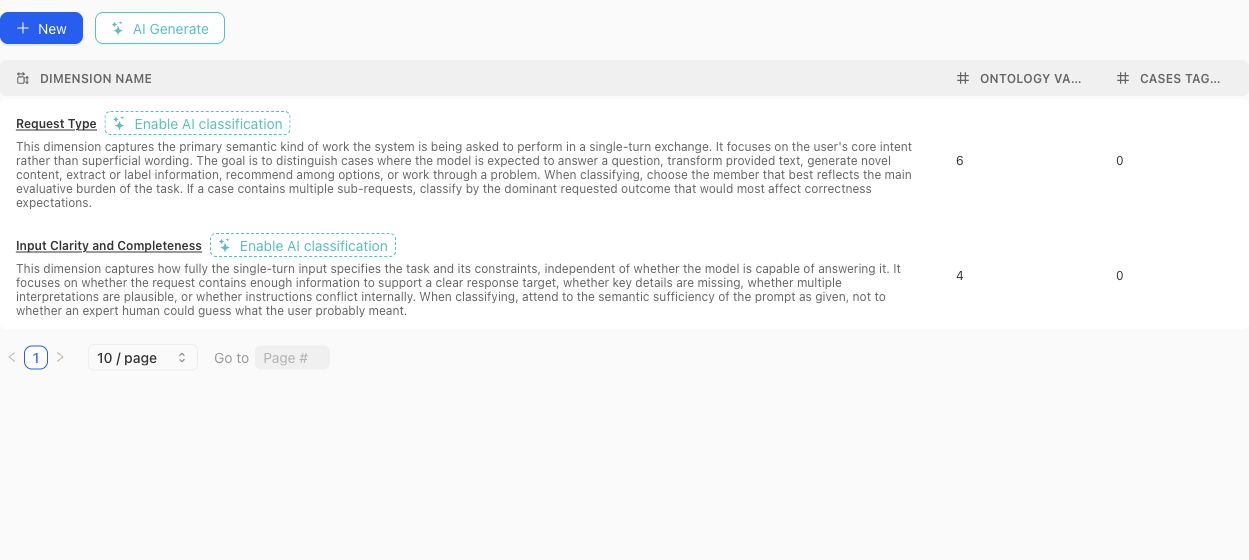
Use the table to compare each Dimension's definition with its ontology and current classification footprint before opening the detail view.
### Create or generate a schema
Create a Dimension manually when the axis and vocabulary are already understood. Use the dimension-schema generator when project context or source material should produce a reviewable proposal. Generated proposals can include a definition, why the Dimension matters, proposed ontology members, and warnings.
A proposal is not the active schema. Review each proposed Dimension and value before accepting it. Avoid accepting near-duplicates simply because they use different wording.
> Classification boundary
>
> Creating or editing a Dimension does not instantly classify every existing case. Missing or stale classifications can be queued and monitored separately. Treat unclassified cases as missing evidence, not as an implicit ontology value.
### Design rules
- Make the Dimension answer one stable question. Split axes that mix several independent concerns.
- Give every ontology value a definition that distinguishes it from neighboring values.
- Prefer values that can be applied consistently to real cases.
- Do not use a Dimension to encode case quality, policy approval, or a desired model score.
- Review distributions after changing values. A clean schema can still leave important cases unclassified.
- Delete only after checking Case Pool and benchmark usage; removal changes the project coverage vocabulary.
### Benchmark roles
In benchmark Get Started, each Dimension and ontology value can receive a focus role:
- **Required:** the benchmark is expected to cover this value.
- **Sampled:** include it as part of the desired mix.
- **Diagnostic:** track it for analysis without making it part of the main denominator.
- **Ignored:** exclude it from the benchmark coverage intention.
- **Unset:** no explicit benchmark instruction has been recorded.
Those roles shape Coverage Story generation and interpretation. They do not alter the project-level definition of the value.
{% example-demo title="Example: source condition" %}
The project defines a Source condition Dimension with Current, Superseded, Conflicting, and Missing values. One benchmark marks all four as required; another marks Current as required and the remaining values as diagnostic. The same project vocabulary supports different benchmark intentions without duplicating the Dimension.
{% /example-demo %}
## Related task pages
{% related-card-grid title="Related task pages" %}
- [Generate a dimension schema](/docs/coverage-engineering/generate-dimension-schema)
- [Work with Project Topics](/docs/coverage-engineering/project-topics)
- [Plan Benchmark Coverage](/docs/coverage-engineering/plan-benchmark-coverage)
- [Analyze dataset representation](/docs/benchmark-datasets/representation)
{% /related-card-grid %}
## Source confidence
Code-backed: the current Dimension list, detail, settings, proposal, classification, examples, and statistics surfaces establish these fields and lifecycle boundaries.
---
id: coverage.generate-dimension-schema
title: Generate a dimension schema
summary: Ask Teammately for coverage-dimension proposals, then accept only the dimensions and ontology values that describe meaningful behavior.
kind: task
product_area: coverage_engineering
status: stable
updated: 2026-09-07
canonical: /docs/coverage-engineering/generate-dimension-schema
---
# Generate a dimension schema
## When generation helps
Generate ideas when a project has enough Cases or product context to reveal recurring differences, but the team has not yet named the axes needed for coverage planning. Generation is useful for discovery and vocabulary. It does not prove that a proposed dimension is complete, mutually exclusive, or appropriate for benchmark governance.
## Prerequisites
State the target behavior, what the existing Case set fails to distinguish, and any constraints the proposal must preserve. A prompt such as “separate refund requests by source authority and exception eligibility” produces a more reviewable proposal than “make better dimensions.”
### Task steps: Generate and review dimension ideas
1. Open **Coverage Engineering → Coverage Facets → Dimensions and Ontology**.
2. Start **Generate dimension idea**.
3. Add context describing the behavior boundary, important Cases, and the decision the dimension should support.
4. Generate the proposal and read its dimension name, definition, proposed ontology members, why-it-matters note, and review warnings.
5. Compare it with current Dimensions and ontology values for overlap, ambiguous labels, and gaps.
6. Accept only proposals the team can classify consistently. Reject unsuitable proposals or regenerate with narrower context.
7. Inspect the accepted Dimension, refine its definition if necessary, and sample real Cases before using it in coverage plans.
## Object and state changes
The proposal timeline preserves generated attempts and decisions. Each proposed Dimension can be accepted or rejected independently. Acceptance creates product state; it does not automatically classify every Case, revise a Benchmark, or approve generated Cases.
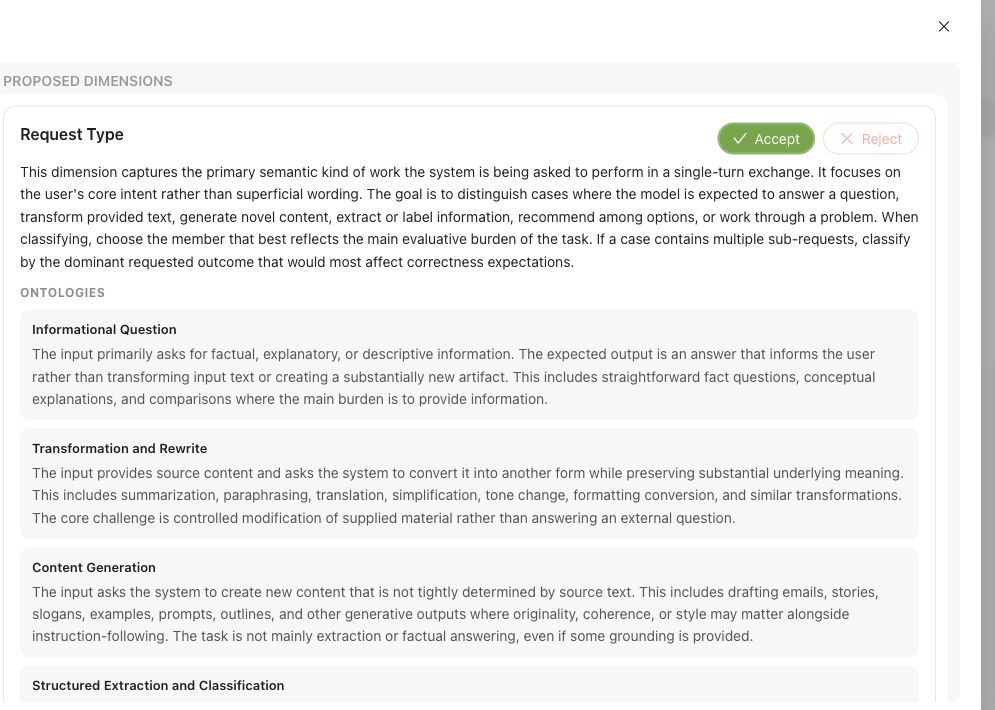
Review the Dimension definition and every proposed ontology value before accepting the proposal.
Project-context refreshes may produce updated recommendations and explain which context changes were considered. Treat those as review cues. A changed proposal is not evidence that the existing schema is wrong.
## Success criteria
- Does the Dimension represent one behavior axis rather than several bundled concerns?
- Are ontology values distinct enough that two reviewers would usually classify the same Case alike?
- Is there a clear treatment for unknown, conflicting, or not-applicable cases?
- Does it add information beyond existing Dimensions, Project Topics, or Case Construction Patterns?
- Will the classification support an actual coverage or evaluation decision?
## Common failure modes
- Supplying generic instructions that produce broad, overlapping Dimensions.
- Accepting a fluent proposal without comparing it with existing coverage facets.
- Treating acceptance as automatic Case classification or Benchmark approval.
- Using ontology values that reviewers cannot distinguish on real boundary Cases.
{% example-demo title="Source-authority dimension" %}
The team asks for a dimension that separates how an assistant handles conflicting product sources. Teammately proposes **Source authority** with values for canonical source, secondary source, conflicting sources, and unavailable source, plus a warning that “secondary” needs a project-specific definition. The team defines that boundary, samples Cases, and accepts the proposal. Classification and benchmark selection remain separate work.
{% /example-demo %}
## Source confidence
Code-backed: the Dimensions and Ontology route and generation components expose proposal instructions, a timeline, per-Dimension acceptance or rejection, definitions, ontology members, rationale, and review warnings. Consistency and fitness for a project remain human review decisions.
## Related reference pages
{% related-card-grid title="Continue the workflow" %}
- [Dimensions and ontology](/docs/coverage-engineering/dimensions-ontology)
- [Coverage dimensions](/docs/object-model/coverage-dimensions)
- [Dimension classification troubleshooting](/docs/troubleshooting/dimension-classification)
- [Coverage gaps](/docs/coverage-engineering/coverage-gaps)
{% /related-card-grid %}
## Related troubleshooting pages
{% related-card-grid title="Diagnose Dimension problems" %}
- [Dimension classification troubleshooting](/docs/troubleshooting/dimension-classification)
- [Stale Dimensions](/docs/troubleshooting/stale-dimensions)
- [Unbalanced coverage](/docs/troubleshooting/unbalanced-coverage)
{% /related-card-grid %}
---
id: coverage.plan-benchmark-coverage
title: Plan Benchmark Coverage
summary: Apply project Coverage Facets to one benchmark, inspect representation, and turn important gaps into concrete case or contribution work.
kind: task
product_area: coverage_engineering
status: stable
updated: 2026-09-07
canonical: /docs/coverage-engineering/plan-benchmark-coverage
---
# Plan Benchmark Coverage
Plan coverage by applying reusable project facets to one benchmark and comparing the intended behavior space with the selected dataset representation.
## Prerequisites
- A selected project and benchmark.
- A clear benchmark purpose.
- Relevant Dimensions, Project Topics, and Case Construction Patterns, or enough project knowledge to create them.
- Existing Cases or a plan for sourcing and constructing them.
## Steps
1. Review **Coverage Facets** at project scope. Confirm that Dimensions, Project Topics, and Case Construction Patterns describe reusable behavior structure rather than one benchmark's current case count.
2. Open the benchmark and select **Coverage Management → Get Started**.
3. Define the benchmark-specific coverage guidance and confirm setup readiness.
4. Open Coverage Management and inspect current dataset representation across the relevant facets and tuples.
5. Name important thin or absent combinations as Coverage Stories. Explain why each slice matters and what evidence would make it usable.
6. Route the gap according to its cause: Case Foundry or case sourcing for missing situations, Expert Contributions for missing judgment, Correctness Governance for missing standards, or Benchmark Datasets for missing selection.
7. Review generated or contributed cases in Case Review before relying on them.
8. Update dataset selection and create a new snapshot when the represented evidence changes materially.
## Object and state changes
This task can update benchmark coverage setup, representation guidance, Coverage Stories, Case Foundry work, case-review state, contribution requests, dataset selection, and snapshots. Project Coverage Facets may also change when the work discovers a reusable missing axis or construction pattern.
## Success criteria
- The benchmark purpose maps to explicit project Coverage Facets.
- Important combinations have selected evidence or a named gap.
- Each gap is routed to a responsible artifact or workstream.
- Constructed cases pass case review and Project Input Schema checks.
- Dataset snapshots make material coverage changes explicit.
## Common failure modes
- Using case count as the coverage goal.
- Creating benchmark-only tags where a reusable Dimension or Topic is needed.
- Treating response-variation guidance as coverage structure.
- Generating cases before defining which gap they should close.
- Trusting representation after selection changes without a new snapshot boundary.
{% example-demo title="Example: plan high-impact exception coverage" %}
The team maps exception type, source authority, and customer impact. Representation shows many low-impact ordinary cases but no high-impact cases with conflicting authority. A Coverage Story names the gap, an expert Contribution clarifies the controlling rule, and Case Foundry prepares cases for the missing tuple before a new snapshot is created.
{% /example-demo %}
## Related reference pages
{% related-card-grid title="Related reference pages" %}
- [Coverage Engineering](/docs/coverage-engineering)
- [Coverage Management](/docs/coverage-management)
- [Benchmark Datasets](/docs/benchmark-datasets)
{% /related-card-grid %}
## Related troubleshooting pages
{% related-card-grid title="Related troubleshooting pages" %}
- [Unbalanced coverage](/docs/troubleshooting/unbalanced-coverage)
- [Stale dimensions](/docs/troubleshooting/stale-dimensions)
- [Unrealistic synthetic cases](/docs/troubleshooting/unrealistic-synthetic-cases)
{% /related-card-grid %}
## Source confidence
Code-backed: current setup, overview, representation, Coverage Story, Case Foundry, and Case Review routes support this workflow.
---
id: coverage.project-topics
title: Project Topics
summary: Maintain source-grounded subject areas, editable groups, and Atlas relationships used to organize project and benchmark coverage.
kind: reference
product_area: coverage_engineering
status: stable
updated: 2026-09-07
canonical: /docs/coverage-engineering/project-topics
---
# Project Topics
## Definition
Project Topics are reusable subject areas derived from project knowledge, entered by an administrator, or contributed by an expert. They organize cases by what they are about. Unlike a Dimension, a Project Topic is not one value on a fixed behavior axis: a case can belong to several Topics.
The Project Topics workspace contains **Topics**, **Groups**, and **Atlas**.
## Fields, states, or lifecycle rules
### Topics
Each Topic has a name, description, active state, author type, case usage, benchmark usage, and source mentions where available. Source mentions retain evidence such as the originating Reference Material, Project Agent Brief, manual entry, or expert suggestion.
The Topic detail shows its definition and source grounding, linked and example cases, coverage confidence, nearby-topic signals, coverage by Dimensions and ontology values, and editable membership in Topic Groups.
An AI-created or source-extracted Topic remains an editable project artifact. Review its definition and grounding before using it to steer a benchmark.
### Groups
A Project Topic Group is an editable bundle of Topics. It does not merge or replace its members. Groups let benchmark setup express intent at a useful scale while retaining Topic-level traceability.
In **Get Started**, a Group can be handled as:
- **Cover every topic:** the benchmark should represent each member Topic.
- **Cover the group:** the group should be represented without requiring every member.
- **Use as guidance:** it can guide story construction without becoming a coverage obligation.
- **Do not use:** exclude the Group from this benchmark's setup.
- **Unset:** no explicit instruction.
Groups can start from manual work, AI suggestions, source material, or Atlas exploration. Manual edits remain significant; regenerating a suggestion should not be treated as authority to overwrite the reviewed group.
### Atlas
Atlas visualizes Topics, relationships, and Groups. Use it to inspect neighborhoods, redundancy, missing nearby Topics, and possible groupings. Relationships are analytical evidence, not a taxonomy merge. A close position or strong relation score does not mean two Topics are interchangeable.
The Topic coverage view can distinguish direct case grounding from breadth, Dimension spread, and binding confidence. When a Topic looks thin, inspect the linked cases before generating more. The problem may be missing cases, weak classification, an overly broad definition, or a duplicate Topic.
### Refresh and review
Project Topics can be refreshed from current project context and indexed sources. Refreshing can create or update Topics, source mentions, evidence, and relationship analysis. Review the resulting changes and recommendation runs before incorporating them into Groups or benchmark setup.
{% example-demo title="Example: group without flattening" %}
The project has Topics for Contract renewal, Price adjustment, and Termination notice. An administrator groups them as Agreement lifecycle. One benchmark chooses Cover every topic because each action has distinct risk. Another chooses Use as guidance because it only needs broad agreement-related examples. The individual Topics remain traceable in both benchmarks.
{% /example-demo %}
## Related task pages
{% related-card-grid title="Related task pages" %}
- [Work with Dimensions and Ontology](/docs/coverage-engineering/dimensions-ontology)
- [Define Case Construction Patterns](/docs/coverage-engineering/case-construction-patterns)
- [Configure benchmark Get Started](/docs/coverage-management/get-started)
- [Analyze dataset representation](/docs/benchmark-datasets/representation)
{% /related-card-grid %}
## Source confidence
Code-backed: the current Topic, Group, source-mention, statistics, relationship, Atlas, suggestion, and benchmark-handling contracts establish this model.
---
id: coverage.synthesize-cases
title: Synthesize cases
summary: Generate candidate cases to fill coverage gaps before adding them to benchmarks or curated datasets.
kind: task
product_area: coverage_engineering
status: stable
updated: 2026-09-07
canonical: /docs/coverage-engineering/synthesize-cases
---
# Synthesize cases
Synthesize candidate cases to fill a known coverage gap without pretending synthetic examples are automatically review context.
## When to use it
Use **Assets → Cases → Synthesize** when creating reusable project Case candidates. Use **Coverage Management → Case Foundry** when the work begins from a named need in one Benchmark. In either path, generated output is candidate material until reviewed.
## Prerequisites
- A named coverage gap.
- Policies, rubrics, or dimensions that define the behavior boundary.
- A review plan for synthetic cases.
- A way to mark synthetic source and realism concerns.
## Role or permission
AI engineers or coverage owners generate candidate cases. Experts or product owners review realism before benchmark promotion.
## Steps
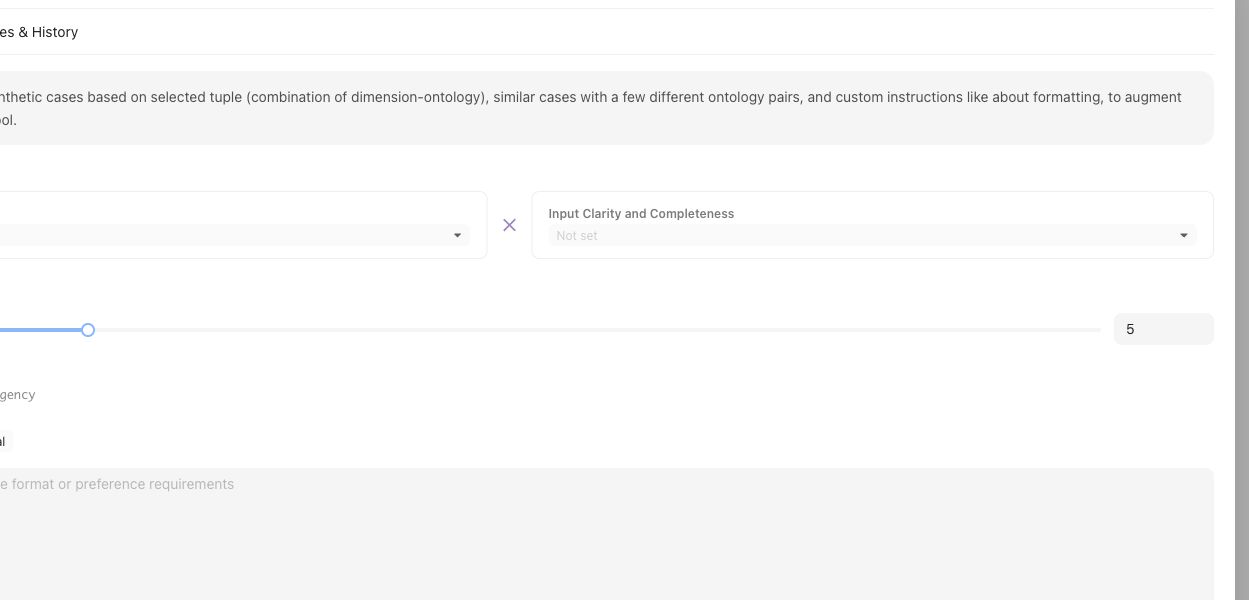
Synthesis starts from a named tuple or coverage gap, not from a generic request for more cases.
1. Name the Coverage Facet tuple, Coverage Story, or Case Construction Pattern the synthesis should fulfill.
2. Choose the Assets synthesis path or benchmark-scoped Case Foundry path.
3. Supply representative source Cases, applicable Comparison Directions, and explicit target-system constraints.
4. Inspect generated candidates for realism, duplication, source context, and compatibility with the intended Coverage Facets.
5. Keep impossible, misleading, or context-incomplete candidates out of Benchmark selection.
6. Use **Coverage Management → Case Review** for benchmark-scoped preparation and admission.
7. Select reviewed Cases in **Benchmark Datasets** and create a Snapshot only when the intended set is ready.
## Object and state changes
Completed generation registers candidate Cases in the project Case collection. Case Review and Benchmark Datasets determine whether suitable Cases become selected membership for a Benchmark. Generation completion alone does not change a Snapshot or Benchmark Version.
## Success criteria
- Each synthetic case maps to a named gap or boundary.
- Reviewers can tell synthetic cases from production-derived cases.
- Only realistic, context-complete cases affect benchmark evidence.
## Common failure modes
- Synthetic cases are generated for volume rather than a specific gap.
- Cases combine many variations and obscure the failure reason.
- Unreviewed synthetic cases enter benchmark evidence.
- The generated case lacks the context needed for expert judgment.
## Related reference pages
{% related-card-grid title="Related reference pages" %}
- [Case pool](/docs/object-model/case-pool)
- [Coverage dimensions](/docs/object-model/coverage-dimensions)
- [Comparison Directions](/docs/assets/comparison-directions)
{% /related-card-grid %}
## Related troubleshooting pages
{% related-card-grid title="Related troubleshooting pages" %}
- [Synthetic cases that feel unrealistic](/docs/troubleshooting/unrealistic-synthetic-cases)
- [Unbalanced coverage](/docs/troubleshooting/unbalanced-coverage)
- [Unclear cases](/docs/troubleshooting/unclear-cases)
{% /related-card-grid %}
{% example-demo title="Fill a stale-source gap" %}
Coverage shows few stale-source cases. The engineer synthesizes examples with old and new policy documents, experts reject unrealistic ones, and only reviewed cases enter the benchmark candidate pool.
{% /example-demo %}
## Source confidence
Code-backed: the Assets synthesizer defines generation input, candidate cards, and lifecycle; Case Foundry supplies benchmark-scoped coordination; Case Review supplies the preparation and admission boundary. The product does not treat generation completion as Snapshot membership.
---
id: concepts.dimensions-ontology
title: Dimensions and ontology
summary: Learn how dimensions and ontology values define the coverage space for a Teammately project.
kind: concept
product_area: object_model
status: stable
updated: 2026-09-07
canonical: /docs/concepts/dimensions-and-ontology
---
# Dimensions and ontology
## Definition
Dimensions and ontology describe how Teammately classifies cases into behavior segments that humans can reason about. Dimensions name the axes that matter, while ontology values provide the controlled labels used for coverage planning, case review, and result analysis.
## Why it matters
This matters because aggregate benchmark results can hide an unsafe gap. A candidate may pass common cases while missing a stale-source segment, a boundary condition, a product tier, or a policy exception that reviewers care about.
## Coverage vocabulary check
| Good coverage vocabulary does... | Weak vocabulary does... |
| --- | --- |
| Names behavior slices that change judgment or risk. | Uses labels that only describe where the case came from. |
| Keeps ontology values consistent enough for comparison. | Lets free-form tags drift until segment results are meaningless. |
| Makes missing or thin segments visible before review. | Treats a large case count as representative coverage. |
## Where it appears in the product
Create and maintain Dimensions and ontology values under **Coverage Facets → Dimensions and Ontology**. Benchmark Datasets uses them to inspect representation, while Benchmark Evaluations can group existing evidence by supported Coverage Facets. The Case Pool and Case Review surfaces use the same vocabulary when classifying and preparing Cases.
## Artifacts it affects
Dimensions affect Case classification, Benchmark Dataset representation, Coverage Stories, synthesis targets, Case Review, and result grouping. Changing the current vocabulary does not rewrite the labels or interpretation of historical Snapshots and Runs.
{% example-demo title="Stale-source segment" %}
An enterprise-search team adds a **Source freshness** Dimension with current, superseded, and unknown values. Benchmark Datasets then reveals that superseded-source Cases are thinly represented. The team prepares additional Cases, reviews their classifications, and creates a new Snapshot before using that segment in evaluation interpretation.
{% /example-demo %}
## Related workflows
{% related-card-grid title="Related workflows" %}
- [Generate a dimension schema](/docs/coverage-engineering/generate-dimension-schema)
- [Inspect Dataset representation](/docs/benchmark-datasets/representation)
- [Review prepared Cases](/docs/coverage-management/case-review)
- [Diagnose classification](/docs/troubleshooting/dimension-classification)
- [Refresh changed coverage](/docs/coverage-engineering/coverage-refresh)
{% /related-card-grid %}
## Related reference pages
{% related-card-grid title="Related reference pages" %}
- [Coverage Dimensions](/docs/object-model/coverage-dimensions)
- [Ontology](/docs/object-model/ontology)
- [Project Topics](/docs/coverage-engineering/project-topics)
- [Case Construction Patterns](/docs/coverage-engineering/case-construction-patterns)
{% /related-card-grid %}
## Source confidence
Code-backed: Dimension types and the Dimensions and Ontology surfaces define the project vocabulary and editable fields; Benchmark Dataset Representation shows how that vocabulary is used to inspect selected Cases.
---
id: coverage-management.overview
title: Coverage Management
summary: Manage benchmark coverage from setup through representation, Coverage Stories, case review, Case Foundry, and contribution requests.
kind: concept
product_area: coverage_management
status: stable
updated: 2026-09-07
canonical: /docs/coverage-management
---
# Coverage Management
Coverage Management is the benchmark-scoped workspace for deciding whether the current dataset represents the behavior space the benchmark is meant to test. It connects project Coverage Facets to dataset representation, coverage guidance, Coverage Stories, case preparation, and expert contribution requests.
## Definition
Project Coverage Facets define reusable Dimensions, Project Topics, and Case Construction Patterns. Coverage Management applies those foundations to one benchmark. **Get Started** establishes benchmark coverage guidance. The overview shows representation and operational status. Coverage Stories organize meaningful slices or gaps. Case Review inspects prepared cases and materials. Case Foundry coordinates case construction work.
The goal is to make missing or thin behavior explicit before evaluation evidence is trusted. Coverage Management does not replace Benchmark Datasets; it explains and improves the representation of the selected data.
## Decision checkpoint
| Observation | Use | Next durable result |
| --- | --- | --- |
| Benchmark purpose or guidance is missing | Get Started | Saved coverage setup and readiness |
| A facet tuple is thin or absent | Representation and Coverage Stories | Named coverage need and intended evidence |
| More cases are needed | Case Foundry | Bounded construction work tied to the gap |
| Generated cases may be unclear | Case Review | Reviewed case and material quality |
| Specialist judgment is required | Contribution request from coverage context | Benchmark-scoped Expert Contribution |
| Coverage changed materially | Benchmark Datasets | Updated selection and snapshot boundary |
## Coverage Stories and case work
A Coverage Story gives a gap or behavior slice an operational narrative: why it matters, which facet combinations define it, what evidence exists, and what sourcing work remains. It should be concrete enough to guide case construction and expert attention.
Case Foundry can prepare case work from that structure. Case Review checks the resulting inputs and generated materials before they enter trusted dataset evidence. AI assistance can accelerate preparation, but selection and benchmark interpretation remain explicit human and product-state decisions.
## Coverage and correctness
Coverage gaps sometimes reveal missing correctness rather than missing cases. If experts cannot say how a represented situation should be judged, request an Expert Contribution and update policies or rubrics. If the standard is clear but no case exercises it, use Weave and Case Foundry. If cases exist but are not selected or snapshotted, use Benchmark Datasets.
This routing prevents Comparison Directions, Contribution-scoped agent behavior, and coverage structure from being mixed together. Comparison Directions guide response variation; Coverage Facets and Coverage Stories describe the benchmark behavior space.
{% example-demo title="Conflicting-source story" %}
Representation shows that the benchmark covers current-source questions but almost never combines them with a plausible superseded document. A Coverage Story names the conflict pattern, relevant source-freshness and impact facets, and the desired case count. Case Foundry prepares candidates, Case Review rejects unrealistic material, and the accepted cases enter a new dataset snapshot.
{% /example-demo %}
## Related workflows
{% related-card-grid title="Related workflows" %}
- [Set up benchmark coverage](/docs/coverage-management/get-started)
- [Work with Coverage Stories](/docs/coverage-management/coverage-stories)
- [Run Case Foundry](/docs/coverage-management/case-foundry)
- [Review prepared Cases](/docs/coverage-management/case-review)
- [Plan benchmark coverage](/docs/coverage-engineering/plan-benchmark-coverage)
- [Work with Benchmark Datasets](/docs/benchmark-datasets)
- [Request an Expert Contribution](/docs/expert-contributions/request-contribution)
{% /related-card-grid %}
## Related reference pages
{% related-card-grid title="Related reference pages" %}
- [Coverage Engineering](/docs/coverage-engineering)
- [Cases](/docs/assets/cases)
- [Comparison Directions](/docs/assets/comparison-directions)
{% /related-card-grid %}
## Source confidence
Code-backed: the active benchmark coverage routes expose setup, overview, Coverage Stories, Case Review, Case Foundry integration, realtime state, and contribution-request entry points.
---
id: benchmark-datasets.overview
title: Benchmark Datasets
summary: Select benchmark Cases, inspect representation, and freeze immutable Snapshots for reproducible evidence.
kind: concept
product_area: benchmark_datasets
status: stable
updated: 2026-08-22
canonical: /docs/benchmark-datasets
---
# Benchmark Datasets
Benchmark Datasets defines the evidence set for one benchmark through **Cases**, **Representation**, and **Snapshots**.
The current dataset is editable. It selects reusable project Cases and reflects current facet, policy, rubric, and contributor facts. A Snapshot freezes the exact dataset state needed by a Benchmark Version and its evaluations. These are deliberately different surfaces: editing the current set must not rewrite historical evidence.
## Decision checkpoint
| Surface | Use it to | Evidence rule |
| --- | --- | --- |
| Cases | Inspect and change current benchmark membership | Selection is live until snapshotted |
| Representation | Find concentration and absence across governed facets | Read distribution together with distinct Case counts |
| Snapshots | Freeze Cases, evaluator links, and representation facts | Snapshot content is read-only |
Coverage Management acts on gaps found in the dataset. Assets remains the project-level reusable pool. Benchmark Evaluations runs exact Harness Versions against an immutable Benchmark Version rather than an unspecified “current dataset.”
## Evidence flow
Cases usually begin in project Assets or materialize through Case Review or Expert Contributions. Selecting them makes them part of the current benchmark dataset. Representation then summarizes the current assignments and evaluator relationships. Snapshot readiness checks whether that state can be frozen. A Snapshot supplies the immutable dataset facts used by a Benchmark Version.
This flow is one-way for historical evidence. Later edits to an Asset, facet assignment, Policy, Rubric, or current membership may improve the next Snapshot, but they do not update a previous Snapshot. Compare candidates within one Benchmark Version unless the analysis explicitly accounts for a moved evidence boundary.
## Before creating evidence
Check Case clarity and schema conformance, then inspect Representation for intended behavior and provenance. Confirm approved eligible evaluator links. Resolve Snapshot blockers and preserve the resulting label, version, content hash, creation time, and Case count.
A Snapshot can be reproducible while still being incomplete as product coverage. Reproducibility answers which evidence was evaluated; Representation and Coverage Management answer whether that evidence supports the intended product claim.
{% example-demo title="Example: editable set versus frozen evidence" %}
The current dataset gains four Cases and a corrected Rubric link after an expert Contribution is reconciled. An earlier Run still points to its old Benchmark Version. The operator creates a new Snapshot and Version for the changed set rather than comparing the new candidate against the old Run as though only Harness behavior moved.
{% /example-demo %}
{% related-card-grid title="Dataset workflows" %}
- [Manage benchmark Cases](/docs/benchmark-datasets/cases)
- [Inspect Representation](/docs/benchmark-datasets/representation)
- [Create and inspect Snapshots](/docs/benchmark-datasets/snapshots)
- [Manage coverage](/docs/coverage-management)
{% /related-card-grid %}
## Source confidence
Code-backed: the active dataset routes establish the editable current set, representation workspace, and immutable Snapshot boundary.
---
id: concepts.weave
title: Weave
summary: Construct deliberate challenge sets from coverage structure, canonical cases, variants, multimodal materials, and supported worlds.
kind: concept
product_area: weave
status: stable
updated: 2026-09-07
canonical: /docs/concepts/weave
---
# Weave
Weave is the case-construction capability inside Teammately correctness infrastructure. It turns structured coverage intent into the cases, response variants, supporting materials, and supported environments needed to challenge a specialist AI system. Its goal is deliberate representation, not undirected synthetic volume.
## Definition
Coverage Engineering supplies the structure: Dimensions, Project Topics, Case Construction Patterns, coverage tuples, and known gaps. Weave uses that structure to prepare candidate cases that exercise meaningful combinations and boundaries. Cases follow the project's Input Schema, so their primary input and required materials have a consistent, inspectable shape.
A case can include text, chat messages, structured data, images, documents, tabular files, presentations, source text, or audio when the Project Input Schema accepts those artifacts. Static support belongs to case materials. An executable or queryable environment is a separate world boundary and should only be used where the product supplies an inspectable world reference and runtime.
## Decision checkpoint
| Construction need | Use | Verify before benchmark membership |
| --- | --- | --- |
| Add a known real example | Assets → Cases or dataset import | Input and materials conform to Project Input Schema |
| Cover a missing facet combination | Coverage Management and Case Foundry | The case targets a named tuple or gap |
| Generate a meaningful output variation | Case construction plus Comparison Directions | The idea guides variation without pretending the output is already reviewed |
| Include supporting files | Canonical case materials | Artifact family and extension are accepted by the project |
| Exercise changing state or tools | Supported World | World identity, capabilities, visibility, and lifecycle are explicit |
## Deliberate construction
Case count is a weak target. A useful challenge set explains why every important slice exists and which behavior boundary it exercises. Case Construction Patterns provide reusable ways to instantiate a behavior problem. Coverage Management shows where cases already exist and where the benchmark remains thin. Case Review lets operators inspect generated materials before those cases become trusted dataset members.
Comparison Directions are reusable Assets selected by comparative Contributions. They guide how candidate responses should vary—for example, changing evidence quality or reasoning approach—without serving as a coverage taxonomy or an automatically accepted collection of variants.
## Canonical case boundary
`content.input` is the primary case input. Optional `content.case_materials` contains declared supporting values or artifacts. `record_content.case_view` is a rendered projection for users and execution adapters; it is not a second source of truth. Static runtime delivery uses case-material references. Executable worlds use a world instance reference.
This distinction keeps the same case understandable to case authors, experts, harness code, and evaluation services. It also lets the system reject material that is missing, undeclared, or incompatible before a Run produces misleading evidence.
{% example-demo title="Conflicting-source case" %}
Coverage Management identifies a thin tuple combining policy exception, superseded source, and high customer impact. A Case Construction Pattern describes how to pair a current rule with a plausible older document. Weave creates a chat input and attaches both documents as case materials. Case Review confirms that the conflict is visible and realistic before the case enters the benchmark dataset snapshot.
{% /example-demo %}
## Related workflows
{% related-card-grid title="Related workflows" %}
- [Configure Project Input Schema](/docs/project-settings/input-schema)
- [Manage benchmark coverage](/docs/coverage-management)
- [Work with Benchmark Datasets](/docs/benchmark-datasets)
{% /related-card-grid %}
## Related reference pages
{% related-card-grid title="Related reference pages" %}
- [Assets and cases](/docs/assets)
- [Cases](/docs/object-model/cases)
- [Comparison Directions](/docs/assets/comparison-directions)
{% /related-card-grid %}
## Source confidence
Doctrine-backed: this page defines Weave as the public construction capability. It deliberately limits world claims to the verified runtime boundary and delegates current controls to linked code-backed pages.