# Refresh coverage after product change
Generated: 2026-09-13T04:40:40.336Z
Source build: local
Canonical docs: https://teammately.ai/docs
---
id: coverage.refresh
title: Refresh coverage after product change
summary: Reconcile coverage facets, Cases, benchmark membership, and Snapshots after the target system or its evidence changes.
kind: task
product_area: coverage_engineering
status: stable
updated: 2026-09-07
canonical: /docs/coverage-engineering/coverage-refresh
---
# Refresh coverage after product change
## When to use it
Refresh coverage when new Cases reveal an unrepresented behavior, source material or product behavior changes, experts qualify an earlier assumption, or a governed Policy changes which situations matter. This is a coordinated workflow across Coverage Engineering—not a single refresh action.
## Prerequisites
- Name the changed signal and the date or version at which it changed.
- Identify the Benchmark whose claims may be affected.
- Preserve the current Snapshot and historical Runs; do not edit them to resemble the new state.
- Decide who can confirm the changed behavior and who owns the resulting Benchmark Version.
### Task steps: Refresh benchmark coverage
1. Open the Benchmark's **Coverage Management** overview and identify which coverage claim is no longer supported.
2. Review **Coverage Facets**. Update Dimensions, ontology values, Project Topics, or Case Construction Patterns only when the behavior model itself changed.
3. Return to the **Case Pool**. Source, upload, draft, or synthesize candidate Cases for the missing or changed region.
4. Inspect the candidates for source context, realistic inputs, duplication, and the intended coverage labels. Keep uncertain Cases out of benchmark use.
5. Use **Coverage Management → Get Started** and the overview to update coverage guidance. Use **Case Review** and **Benchmark Datasets** to change selected Cases deliberately.
6. Create a new Dataset Snapshot and Benchmark Version for the revised evidence boundary.
7. Run a new evaluation when current candidate evidence is required. Compare it with older Runs using the named Benchmark Versions.
## Object and state changes
A refresh may change coverage-facet definitions, Case classifications, candidate Cases, selected benchmark Cases, and the next Snapshot. It does not rewrite an earlier Snapshot or make its Runs invalid. Older results remain evidence for their original version; the new version answers the current coverage question.
If only candidate behavior changed, keep the Benchmark Version fixed and run the new candidate against it. If the Case set, applicable standards, or coverage boundary changed, create a new Benchmark Version before interpreting a new Run as comparable.
## Success criteria
- The changed product reality maps to an explicit coverage facet or documented boundary.
- Candidate Cases have enough source context to be reviewed and are not mistaken for in-use benchmark evidence.
- The new selected set addresses the gap without silently removing still-important behavior.
- The new Snapshot names a reproducible evidence boundary.
- Comparisons distinguish candidate changes from Benchmark Version changes.
## Common failure modes
- Treating refresh as a single button and missing a changed facet, Case set, or Snapshot boundary.
- Rewriting a historical Snapshot instead of creating a new one.
- Adding generated or newly sourced Cases to a Benchmark before review.
- Comparing Runs without naming whether the candidate, Benchmark Version, or both changed.
{% example-demo title="A newly supported exception" %}
A support assistant gains an approved exception path for one account tier. The team adds or revises the account-tier ontology, sources Cases for eligible and ineligible requests, reviews them in Case Review, updates the coverage guidance, and changes the selected Benchmark Dataset. A new Snapshot freezes the revised membership. Previous Runs still describe the old rule; new Runs evaluate the approved exception boundary.
{% /example-demo %}
## Source confidence
Code-backed: Coverage Management, Coverage Facets, the Case Pool, Case Review, Benchmark Datasets, and Dataset Snapshots establish the current sequence and the objects that can change. The decision that a product change requires a refresh remains a team-owned interpretation of evidence.
## Related reference pages
{% related-card-grid title="Continue the workflow" %}
- [Coverage gaps](/docs/coverage-engineering/coverage-gaps)
- [Dimensions and ontology](/docs/coverage-engineering/dimensions-ontology)
- [Case Pool](/docs/coverage-engineering/case-pool)
- [Plan benchmark coverage](/docs/coverage-engineering/plan-benchmark-coverage)
- [Benchmark Snapshots](/docs/coverage-engineering/benchmark-snapshots)
{% /related-card-grid %}
## Related troubleshooting pages
{% related-card-grid title="Diagnose refresh problems" %}
- [Stale Dimensions](/docs/troubleshooting/stale-dimensions)
- [Unbalanced coverage](/docs/troubleshooting/unbalanced-coverage)
- [Synthetic Cases That Feel Unrealistic](/docs/troubleshooting/unrealistic-synthetic-cases)
{% /related-card-grid %}
---
id: intro.correctness-lifecycle
title: The Teammately correctness lifecycle
summary: Follow specialist AI work from project foundations through coverage, elicitation, construction, evaluation, and improvement.
kind: concept
product_area: introduction
status: stable
updated: 2026-08-22
canonical: /docs/introduction/correctness-lifecycle
---
# The Teammately correctness lifecycle
The correctness lifecycle describes how a team turns domain knowledge into an improving specialist AI system. It begins with reusable project foundations, narrows into a benchmark workspace, and cycles through coverage, expert contribution, evaluation, and improvement without losing the evidence that explains each change.
## Definition
The lifecycle has three scopes:
1. **Project foundation.** Define Project Context and Reference Materials, configure the Project Input Schema, govern policies and rubrics, establish Coverage Facets, and manage reusable Assets. Reusable Review Screens and Comparison Directions are authored under Assets; Contribution-specific agent behavior and asset selection happen in benchmark work.
2. **Benchmark work.** Select a benchmark dataset and snapshot, manage coverage, request expert contributions, and bind the work to a benchmark version.
3. **Evaluation and improvement.** Evaluate saved harness versions, inspect cases and rubric results, compare candidates, and start an Improvement Session from pinned evidence.
The public five-capability model runs through these scopes. Coverage Engineering shapes representation. Correctness Elicitation captures judgment. Weave constructs the challenge set. Trialground produces evaluation evidence. Coevolve turns that evidence into bounded candidate work.
## Decision checkpoint
| Current condition | Next lifecycle action | Boundary to preserve |
| --- | --- | --- |
| Agents lack the project purpose or controlling knowledge | Complete Agent Setup | Project Context and Reference Materials remain distinct from governed policies |
| Case shape is ambiguous | Configure Project Input Schema | `content.input` and case materials follow one declared architecture |
| Coverage exists but correctness is tacit | Request an Expert Contribution | Human responses remain attributable before materialization |
| Cases and standards are ready | Create or select a benchmark snapshot and evaluate a saved Harness version | The run stays bound to exact versions and settings |
| Evaluation evidence exposes a candidate weakness | Start an Improvement Session | The Goal Contract and starting evidence remain pinned |
| Candidate exploration exposes a benchmark gap | Return to coverage, standards, or cases | Do not interpret missing evidence as candidate failure |
## Why ordering matters
Running evaluations before the benchmark has deliberate coverage can produce precise but misleading results. Writing rubrics without expert-grounded policies can turn vague preferences into brittle checks. Generating cases without a Project Input Schema can create records that reviewers or harnesses interpret differently. Starting improvement from an aggregate score can hide the cases and standards that actually justify a change.
The lifecycle prevents those shortcuts by giving each artifact an owner and scope. Project foundations are reusable across benchmarks. Benchmark datasets and versions define the evidence boundary. Contributions provide human authority. Runs and comparisons expose candidate behavior. Improvement Sessions retain the chronology between a goal, a proposed change, and its evaluation receipt.
## How learning returns to the system
The lifecycle closes when new evidence changes an upstream artifact. A failed run may show that a policy is too broad, a rubric is ambiguous, a case lacks required material, or a coverage tuple is absent. An expert can contribute a new policy, rubric, case, or coverage observation. An Improvement Session can test a harness candidate while also reporting missing correctness or coverage.
Each return path should name the responsible artifact. Simultaneously changing cases, standards, harness code, and evaluation settings makes the next result difficult to explain.
{% example-demo title="Specialist procurement assistant" %}
The team configures structured procurement inputs and indexes its buying rules. Coverage Engineering maps product category, contract state, and exception type. An expert contribution resolves when an exception requires escalation and materializes the policy and rubric. Weave prepares cases with conflicting contract material. Trialground evaluates a saved harness version and exposes failures on expired agreements. Coevolve tests a source-date validation change while retaining the original benchmark evidence.
{% /example-demo %}
## Where the lifecycle stops
Teammately makes correctness work inspectable and reusable. It does not determine the customer's downstream deployment, operational, or governance action. The product supplies governed artifacts, benchmark evidence, and improvement history so the accountable team can make that decision with a clear record.
## Related workflows
{% related-card-grid title="Related workflows" %}
- [First correctness loop](/docs/operating-manual/first-correctness-loop)
- [Product quickstart](/docs/quickstart)
- [Task index](/docs/operating-manual/task-index)
{% /related-card-grid %}
## Related reference pages
{% related-card-grid title="Related reference pages" %}
- [Project Input Schema](/docs/project-settings/input-schema)
- [Expert Contributions](/docs/expert-contributions)
- [Improvement Sessions](/docs/improve)
{% /related-card-grid %}
## Source confidence
Doctrine-backed: this lifecycle joins the current public capability model to code-backed product scopes. Linked pages define individual object and state behavior.
---
id: coverage.coverage-gaps
title: Coverage Gaps
summary: Find missing or underrepresented behavior areas before benchmark evidence becomes misleading.
kind: task
product_area: coverage_engineering
status: stable
updated: 2026-08-23
canonical: /docs/coverage-engineering/coverage-gaps
---
# Coverage Gaps
## When to use it
Use this task when the team suspects that a benchmark result is incomplete because the case set does not represent an important behavior area. A coverage gap is not just a low score. It is a missing or thin slice of the behavior space: a dimension value, ontology category, source condition, user intent, boundary scenario, policy exception, failure cluster, or product flow that should be represented before results are trusted.
Coverage gaps matter because Teammately helps the team reason about whether the benchmark actually represents the correctness space, instead of only running checks over available examples.
## Prerequisites
- A Benchmark Dataset or a named intended behavior slice already exists.
- Dimensions or ontology values are available, or the team knows which behavior axis is missing.
- Relevant Evaluation Runs, failure clusters, Expert Contribution findings, or product signals are available for inspection.
- Policies and rubrics are clear enough that the team can tell whether the problem is missing coverage rather than weak standards.
## Required role or permission
AI engineers, evaluation owners, and product owners usually identify coverage gaps together. Experts may be needed when the missing behavior depends on domain judgment. If the UI blocks investigation or case changes, inspect project membership and artifact access before changing the benchmark.
### Task steps: Coverage Gaps
1. Name the behavior area that may be missing: dimension, ontology value, product flow, policy exception, source condition, or boundary scenario.
2. Inspect **Benchmark Datasets → Representation** and the current Benchmark Version. Check whether the area is absent, represented by too few selected Cases, or represented only by easy examples.
3. Compare the suspected gap against evaluation failures, failure clusters, Expert Contribution notes, and recent product signals.
4. Rule out look-alike problems: missing outputs, stale cases, weak applicability logic, overly broad policies, ambiguous rubrics, or output mapping errors.
5. Route the gap: update Coverage Facets, create a Coverage Story, source or synthesize Cases, request an Expert Contribution, or select already reviewed Cases in Benchmark Datasets.
6. Review candidates in Case Review, create a new Snapshot when membership changes, and preserve the gap rationale in the owning coverage surfaces.
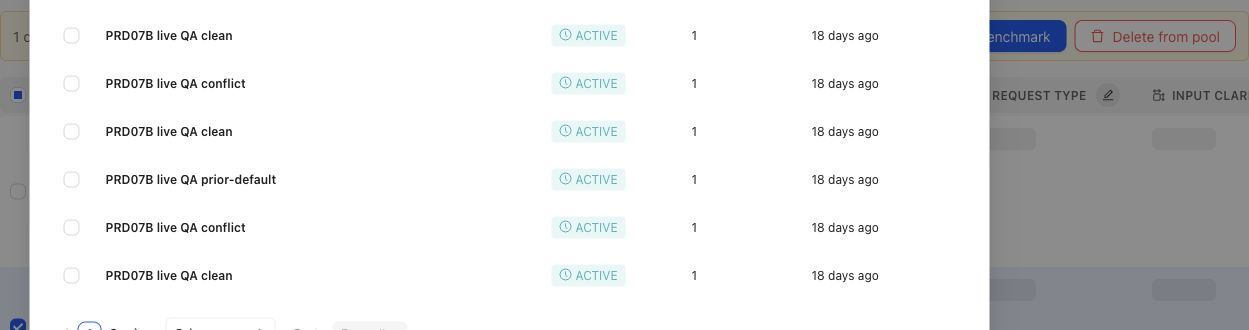
When a gap points to specific candidates, the operator can select cases and prepare them for benchmark membership.
## Object and state changes
Confirming a gap can create a Coverage Story, candidate Cases, Coverage Facet changes, Case Review work, selected Dataset changes, or an Expert Contribution. A gap does not silently change historical Benchmark meaning. When selected membership changes, create a new Dataset Snapshot and Benchmark Version before treating the revised set as reproducible evidence.
## Success criteria
- The missing or underrepresented behavior area is named precisely.
- The team can explain why the issue is a true coverage gap rather than missing outputs, weak applicability, stale artifacts, or mapping errors.
- The resulting case, dimension, ontology, or benchmark change is traceable to source evidence or expert judgment.
- Future benchmark results can distinguish behavior improvement from coverage refresh.
## Common failure modes
- Treating a model failure as a coverage gap when the benchmark already contains representative cases.
- Adding many similar cases without naming the missing dimension or ontology value.
- Refreshing benchmark coverage without preserving the version boundary.
- Mistaking missing outputs or output mapping failures for missing coverage.
- Creating synthetic cases that are unrealistic because they lack source context or expert judgment.
- Ignoring a small high-risk slice because aggregate coverage looks balanced.
{% example-demo title="Boundary case for enterprise search" %}
Raw case: An employee asks for a policy that changed last week, and the retrieved documents contain both old and new guidance.
Expert judgment: Coverage must include cases where stale and current sources conflict.
Policy: Answers must prefer the approved current source and disclose conflicts when confidence is low.
Applicability: Applies when retrieval includes multiple policy versions or stale documents.
Binary rubric: The answer identifies the current source or asks for confirmation instead of blending policies.
Benchmark result: A candidate output fails because it combines old and new terms into one invented policy.
Interpretation: Coverage notes show whether stale-source boundary behavior is represented before the next run is trusted.
{% /example-demo %}
## Related reference pages
{% related-card-grid title="Related reference pages" %}
- [Candidate and In-Use Cases](/docs/coverage-engineering/candidate-and-in-use-cases)
- [Case pool](/docs/coverage-engineering/case-pool)
- [Dimensions and ontology](/docs/coverage-engineering/dimensions-ontology)
- [Benchmark snapshots](/docs/coverage-engineering/benchmark-snapshots)
- [Case versions](/docs/governance/case-versioning)
{% /related-card-grid %}
## Related troubleshooting pages
{% related-card-grid title="Related troubleshooting pages" %}
- [Access troubleshooting](/docs/troubleshooting/authentication)
- [Unbalanced coverage](/docs/troubleshooting/unbalanced-coverage)
- [Weak applicability logic](/docs/troubleshooting/weak-applicability-logic)
- [Missing outputs](/docs/troubleshooting/missing-outputs)
- [Benchmark results changed unexpectedly](/docs/troubleshooting/benchmark-results-changed-unexpectedly)
{% /related-card-grid %}
## Source confidence
Code-backed: Benchmark Dataset Representation exposes selected distribution; Coverage Management and Coverage Stories expose benchmark needs; Case Review exposes the admission boundary for prepared Cases. Human judgment determines whether an observed thin slice is consequential.
---
id: governance.versioning-staleness
title: Versioning and Staleness
summary: Know when correctness objects changed and when old evidence may need review.
kind: concept
product_area: governance
status: stable
updated: 2026-09-07
canonical: /docs/governance/versioning-and-staleness
---
# Versioning and Staleness
## Definition
Versioning preserves the exact artifact state used by an earlier decision or evaluation. Staleness is the signal that current evidence, configuration, or interpretation may no longer support the same claim after a related object changes. A stale signal routes review; it does not automatically delete an artifact, invalidate every historical result, or approve a replacement.
## Why it matters
Cases, Policies, Rubrics, Benchmark Versions, Harness Versions, and Improvement Session goals can change independently. Named versions keep old evidence interpretable. Staleness helps teams decide which current Datasets, evaluator links, Runs, or customer-owned human review context need attention before being treated as current.
## Where it appears in the product
Use the owning object page to inspect its current version and activity. Use Dataset Snapshots and Benchmark Versioning for immutable evaluation boundaries. Use Staleness Detection to identify downstream artifacts affected by a change. Use Conflict Resolution when expert or source evidence disagrees about what the new governed state should be.
## Artifacts it affects
Common triggers include changed Case input or materials, revised Policy scope, revised Rubric criteria, changed dataset membership, changed Harness configuration, and superseded source material. The responsible next action depends on the owner: correct a Case, approve a new standard version, refresh coverage, create a new Snapshot, run a new evaluation, or preserve an old result as historical context.
Comparison Directions use a narrower stale signal. **Potentially stale** is an advisory label for untouched AI-suggested directions, not a versioned approval state and not automatic removal. User-created and user-edited directions remain user-owned even when Teammately considers them while avoiding duplicate suggestions.
## Operational check
Name the changed artifact and version, identify which downstream claim depended on it, and decide whether the old evidence remains historically valid, requires qualification, or needs replacement through a new canonical workflow. Never “resolve” staleness by editing a label while leaving the evidence boundary ambiguous.
When the object is a Comparison Direction, also check whether a **Potentially stale** label is only advisory. Dismiss the label if the team decides the direction still represents a useful boundary.
{% example-demo title="Revised applicability after evaluation" %}
Experts revise a Policy so it applies only when the customer explicitly requests a recommendation. Runs against the old Benchmark Version remain valid evidence under the former applicability rule. The current Dataset and linked Rubrics are reviewed, a new Snapshot and Benchmark Version establish the revised boundary, and new Runs use it. Any customer-owned human review context names both boundaries instead of marking every old result simply “wrong.”
{% /example-demo %}
## Related workflows
{% related-card-grid title="Related workflows" %}
- [Versions, staleness, and resolution](/docs/object-model/versions-staleness-and-resolution)
- [Staleness Detection](/docs/governance/staleness-detection)
- [Compare Harness Versions](/docs/benchmark-evaluations/compare)
- [Product quickstart](/docs/quickstart)
- [Task index](/docs/operating-manual/task-index)
{% /related-card-grid %}
## Source confidence
Code-backed: current Policy and Rubric types preserve versioned governance facts, Snapshot routes preserve immutable benchmark evidence, and Comparison Directions expose a deliberately narrower advisory stale label. Cross-object staleness remains a review and routing decision, not an automatic global state transition.