# Case Segmentation
Generated: 2026-09-13T04:33:13.023Z
Source build: local
Canonical docs: https://teammately.ai/docs
---
id: coverage.case-segmentation
title: Case Segmentation
summary: Segment cases into meaningful behavior groups so benchmark coverage is explainable.
kind: concept
product_area: coverage_engineering
status: stable
updated: 2026-08-23
canonical: /docs/coverage-engineering/case-segmentation
---
# Case Segmentation
## Definition
Case segmentation is the act of reading a Case population by meaningful behavior slices instead of only as a total count. In Teammately, reusable Dimensions and ontology values provide governed segmentation axes; Project Topics and Case Construction Patterns provide additional intent; Benchmark Dataset Representation shows how selected Cases occupy those axes.
A segment is an analytical grouping, not a new Case object or a hidden approval state.
## Why it matters
Aggregate benchmark results can hide concentrated success and consequential absence. A candidate may score well overall while failing every Case with missing evidence, a particular jurisdiction, or a high-impact exception. Segmentation makes those differences inspectable and gives Coverage Stories a concrete population to address.
## Where it appears in the product
Define reusable axes in **Coverage Facets → Dimensions & Ontology**. Classify Cases against those values through supported Case and coverage workflows. Use **Benchmark Datasets → Representation** to inspect the current selected population. Use Coverage Management when a sparse or absent intersection needs a Story, Case Foundry work, or an Expert Contribution.
## Artifacts it affects
Keep three identities separate: the reusable Dimension, the ontology value assigned to a Case, and the Benchmark Dataset membership being analyzed. Changing a value can alter current Representation without modifying an older Snapshot. Adding a Case can change counts without changing the segmentation model. A filter is a view over evidence, not a new evidence object.
## Operational check
Choose axes that describe material behavior, context, risk, or source conditions. Check distinct Case counts as well as assignments, inspect unclassified and conflicting values, and avoid interpreting overlapping segments as additive totals. When reporting a result by segment, name the Benchmark Version whose Case assignments support the analysis.
{% example-demo title="Finding a hidden source-authority gap" %}
The dataset contains many high-impact Cases and many Cases with superseded sources, but Representation shows almost no Cases where both conditions occur together. The team creates a Coverage Story for that intersection. Case Foundry prepares candidates, reviewers confirm their realism, and a later Snapshot records the expanded segment. The Dimension definitions remain reusable across other Benchmarks.
{% /example-demo %}
## Related workflows
{% related-card-grid title="Related workflows" %}
- [Dimensions and ontology](/docs/coverage-engineering/dimensions-ontology)
- [Coverage dimensions](/docs/object-model/coverage-dimensions)
- [Coverage Gaps](/docs/coverage-engineering/coverage-gaps)
- [Product quickstart](/docs/quickstart)
- [Task index](/docs/operating-manual/task-index)
{% /related-card-grid %}
## Source confidence
Code-backed: the Representation explorer and Dimension classification types establish facet-based Case grouping, assigned and missing values, and benchmark-scoped distribution views. Coverage significance and gap priority remain accountable human judgments.
---
id: coverage.dimensions-ontology
title: Dimensions and Ontology
summary: Define reusable behavior axes and their allowed values, then inspect how cases and benchmarks cover them.
kind: reference
product_area: coverage_engineering
status: stable
updated: 2026-09-07
canonical: /docs/coverage-engineering/dimensions-ontology
---
# Dimensions and Ontology
## Definition
Dimensions are reusable project-level axes for describing how cases differ. Each Dimension contains ontology values: the named members used to classify cases and measure representation. A Dimension might be **Source condition**, with values such as **Current**, **Superseded**, **Conflicting**, and **Missing**.
Use **Project Foundations → Coverage Facets → Dimension** to create, generate, inspect, and maintain them.
## Fields, states, or lifecycle rules
### What a Dimension contains
| Element | Purpose |
| --- | --- |
| Name and description | Explain the behavior axis and its boundary |
| Ontology values | Define the values used for classification |
| Examples | Show classified cases and the reason for a value assignment |
| Statistics | Show case-pool and benchmark distribution by ontology value |
| Benchmark focus | Show whether values are required, sampled, diagnostic, or ignored in benchmark setup |
Dimensions and ontology values are project foundations. A benchmark does not copy them. **Get Started** assigns benchmark-specific roles to the project values, and **Representation** reports how the selected cases cover them.
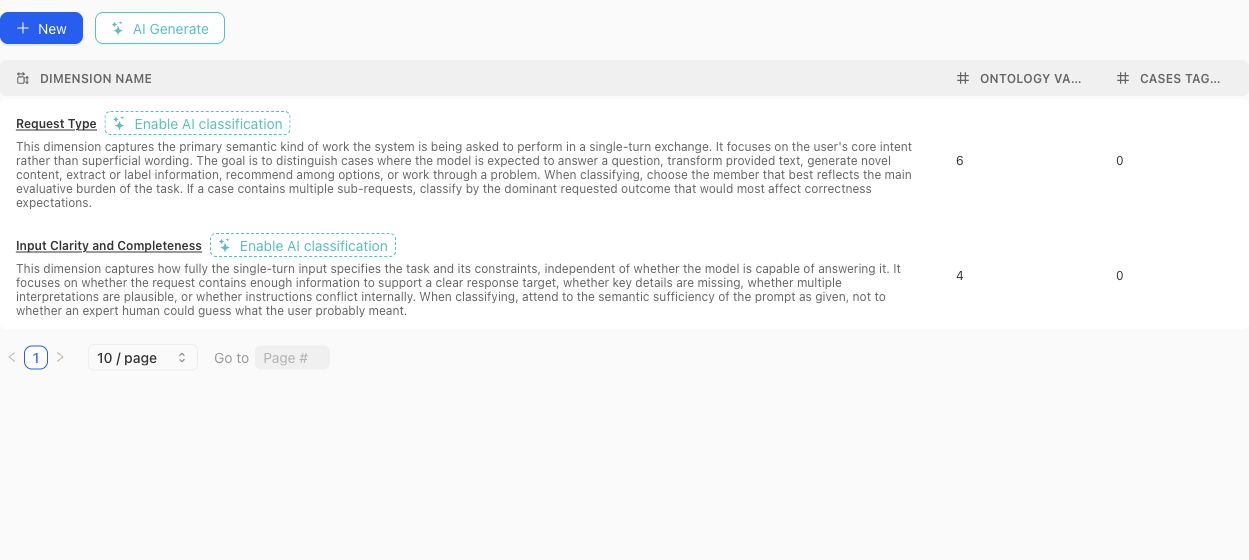
Use the table to compare each Dimension's definition with its ontology and current classification footprint before opening the detail view.
### Create or generate a schema
Create a Dimension manually when the axis and vocabulary are already understood. Use the dimension-schema generator when project context or source material should produce a reviewable proposal. Generated proposals can include a definition, why the Dimension matters, proposed ontology members, and warnings.
A proposal is not the active schema. Review each proposed Dimension and value before accepting it. Avoid accepting near-duplicates simply because they use different wording.
> Classification boundary
>
> Creating or editing a Dimension does not instantly classify every existing case. Missing or stale classifications can be queued and monitored separately. Treat unclassified cases as missing evidence, not as an implicit ontology value.
### Design rules
- Make the Dimension answer one stable question. Split axes that mix several independent concerns.
- Give every ontology value a definition that distinguishes it from neighboring values.
- Prefer values that can be applied consistently to real cases.
- Do not use a Dimension to encode case quality, policy approval, or a desired model score.
- Review distributions after changing values. A clean schema can still leave important cases unclassified.
- Delete only after checking Case Pool and benchmark usage; removal changes the project coverage vocabulary.
### Benchmark roles
In benchmark Get Started, each Dimension and ontology value can receive a focus role:
- **Required:** the benchmark is expected to cover this value.
- **Sampled:** include it as part of the desired mix.
- **Diagnostic:** track it for analysis without making it part of the main denominator.
- **Ignored:** exclude it from the benchmark coverage intention.
- **Unset:** no explicit benchmark instruction has been recorded.
Those roles shape Coverage Story generation and interpretation. They do not alter the project-level definition of the value.
{% example-demo title="Example: source condition" %}
The project defines a Source condition Dimension with Current, Superseded, Conflicting, and Missing values. One benchmark marks all four as required; another marks Current as required and the remaining values as diagnostic. The same project vocabulary supports different benchmark intentions without duplicating the Dimension.
{% /example-demo %}
## Related task pages
{% related-card-grid title="Related task pages" %}
- [Generate a dimension schema](/docs/coverage-engineering/generate-dimension-schema)
- [Work with Project Topics](/docs/coverage-engineering/project-topics)
- [Plan Benchmark Coverage](/docs/coverage-engineering/plan-benchmark-coverage)
- [Analyze dataset representation](/docs/benchmark-datasets/representation)
{% /related-card-grid %}
## Source confidence
Code-backed: the current Dimension list, detail, settings, proposal, classification, examples, and statistics surfaces establish these fields and lifecycle boundaries.
---
id: object-model.coverage-dimensions
title: Coverage dimensions
summary: Organize cases by the behavior axes that matter to product correctness.
kind: reference
product_area: object_model
status: stable
updated: 2026-09-07
canonical: /docs/object-model/coverage-dimensions
---
# Coverage dimensions
## Definition
Coverage dimensions are the axes used to explain what behavior space a case set represents. A dimension can describe source freshness, request type, risk level, product area, policy boundary, or another classification that matters for review and benchmark interpretation.
Use this reference when a benchmark score is not enough and the team needs to ask which kinds of behavior are represented or missing.
## Fields, states, or lifecycle rules
- Dimensions should describe meaningful behavior axes, not arbitrary tags.
- Ontology values should keep each dimension's labels consistent enough for coverage planning.
- Coverage dimensions can reveal untested segments even when aggregate benchmark scores look strong.
- Changing a dimension schema can change how old benchmark evidence is interpreted.
- This page describes object semantics, not a public schema contract.
## Related objects
Coverage dimensions should be read with [Ontology](/docs/object-model/ontology), [Case pool](/docs/object-model/case-pool), [Benchmarks](/docs/object-model/benchmarks), and [Dimensions and ontology](/docs/coverage-engineering/dimensions-ontology).
{% example-demo title="Coverage dimensions boundary" %}
Dimension: Source support level.
Ontology values: Explicit support, implied support, conflicting source, no source.
Interpretation: A compatibility benchmark can show whether failures concentrate in cases where the source does not explicitly support the claim.
{% /example-demo %}
## Source confidence
Code-backed: Dimension and classification types plus the Dimensions and Ontology list and detail routes establish Dimensions, ontology values, origin, examples, and Case classification. Whether a Dimension is meaningful or complete remains a coverage-design judgment.
## Related task pages
{% related-card-grid title="Related task pages" %}
- [Dimensions and ontology](/docs/coverage-engineering/dimensions-ontology)
- [Dimensions and ontology](/docs/concepts/dimensions-and-ontology)
- [Ontology](/docs/object-model/ontology)
- [Product quickstart](/docs/quickstart)
- [Task index](/docs/operating-manual/task-index)
{% /related-card-grid %}
---
id: coverage.coverage-gaps
title: Coverage Gaps
summary: Find missing or underrepresented behavior areas before benchmark evidence becomes misleading.
kind: task
product_area: coverage_engineering
status: stable
updated: 2026-08-23
canonical: /docs/coverage-engineering/coverage-gaps
---
# Coverage Gaps
## When to use it
Use this task when the team suspects that a benchmark result is incomplete because the case set does not represent an important behavior area. A coverage gap is not just a low score. It is a missing or thin slice of the behavior space: a dimension value, ontology category, source condition, user intent, boundary scenario, policy exception, failure cluster, or product flow that should be represented before results are trusted.
Coverage gaps matter because Teammately helps the team reason about whether the benchmark actually represents the correctness space, instead of only running checks over available examples.
## Prerequisites
- A Benchmark Dataset or a named intended behavior slice already exists.
- Dimensions or ontology values are available, or the team knows which behavior axis is missing.
- Relevant Evaluation Runs, failure clusters, Expert Contribution findings, or product signals are available for inspection.
- Policies and rubrics are clear enough that the team can tell whether the problem is missing coverage rather than weak standards.
## Required role or permission
AI engineers, evaluation owners, and product owners usually identify coverage gaps together. Experts may be needed when the missing behavior depends on domain judgment. If the UI blocks investigation or case changes, inspect project membership and artifact access before changing the benchmark.
### Task steps: Coverage Gaps
1. Name the behavior area that may be missing: dimension, ontology value, product flow, policy exception, source condition, or boundary scenario.
2. Inspect **Benchmark Datasets → Representation** and the current Benchmark Version. Check whether the area is absent, represented by too few selected Cases, or represented only by easy examples.
3. Compare the suspected gap against evaluation failures, failure clusters, Expert Contribution notes, and recent product signals.
4. Rule out look-alike problems: missing outputs, stale cases, weak applicability logic, overly broad policies, ambiguous rubrics, or output mapping errors.
5. Route the gap: update Coverage Facets, create a Coverage Story, source or synthesize Cases, request an Expert Contribution, or select already reviewed Cases in Benchmark Datasets.
6. Review candidates in Case Review, create a new Snapshot when membership changes, and preserve the gap rationale in the owning coverage surfaces.
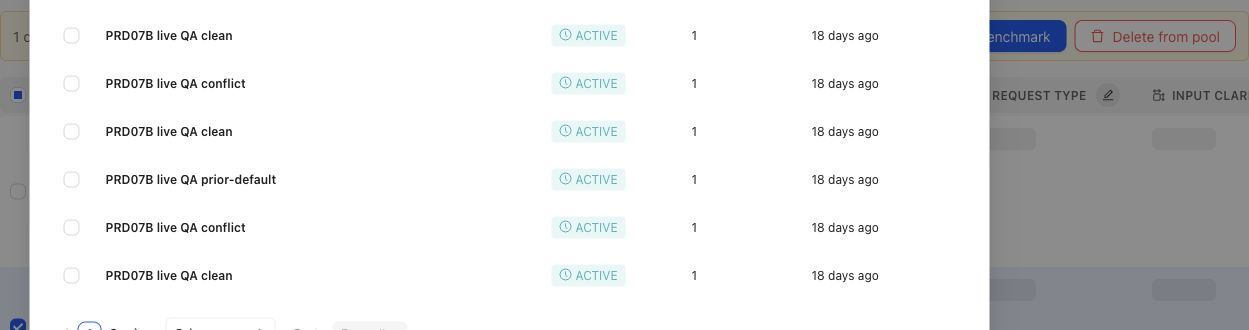
When a gap points to specific candidates, the operator can select cases and prepare them for benchmark membership.
## Object and state changes
Confirming a gap can create a Coverage Story, candidate Cases, Coverage Facet changes, Case Review work, selected Dataset changes, or an Expert Contribution. A gap does not silently change historical Benchmark meaning. When selected membership changes, create a new Dataset Snapshot and Benchmark Version before treating the revised set as reproducible evidence.
## Success criteria
- The missing or underrepresented behavior area is named precisely.
- The team can explain why the issue is a true coverage gap rather than missing outputs, weak applicability, stale artifacts, or mapping errors.
- The resulting case, dimension, ontology, or benchmark change is traceable to source evidence or expert judgment.
- Future benchmark results can distinguish behavior improvement from coverage refresh.
## Common failure modes
- Treating a model failure as a coverage gap when the benchmark already contains representative cases.
- Adding many similar cases without naming the missing dimension or ontology value.
- Refreshing benchmark coverage without preserving the version boundary.
- Mistaking missing outputs or output mapping failures for missing coverage.
- Creating synthetic cases that are unrealistic because they lack source context or expert judgment.
- Ignoring a small high-risk slice because aggregate coverage looks balanced.
{% example-demo title="Boundary case for enterprise search" %}
Raw case: An employee asks for a policy that changed last week, and the retrieved documents contain both old and new guidance.
Expert judgment: Coverage must include cases where stale and current sources conflict.
Policy: Answers must prefer the approved current source and disclose conflicts when confidence is low.
Applicability: Applies when retrieval includes multiple policy versions or stale documents.
Binary rubric: The answer identifies the current source or asks for confirmation instead of blending policies.
Benchmark result: A candidate output fails because it combines old and new terms into one invented policy.
Interpretation: Coverage notes show whether stale-source boundary behavior is represented before the next run is trusted.
{% /example-demo %}
## Related reference pages
{% related-card-grid title="Related reference pages" %}
- [Candidate and In-Use Cases](/docs/coverage-engineering/candidate-and-in-use-cases)
- [Case pool](/docs/coverage-engineering/case-pool)
- [Dimensions and ontology](/docs/coverage-engineering/dimensions-ontology)
- [Benchmark snapshots](/docs/coverage-engineering/benchmark-snapshots)
- [Case versions](/docs/governance/case-versioning)
{% /related-card-grid %}
## Related troubleshooting pages
{% related-card-grid title="Related troubleshooting pages" %}
- [Access troubleshooting](/docs/troubleshooting/authentication)
- [Unbalanced coverage](/docs/troubleshooting/unbalanced-coverage)
- [Weak applicability logic](/docs/troubleshooting/weak-applicability-logic)
- [Missing outputs](/docs/troubleshooting/missing-outputs)
- [Benchmark results changed unexpectedly](/docs/troubleshooting/benchmark-results-changed-unexpectedly)
{% /related-card-grid %}
## Source confidence
Code-backed: Benchmark Dataset Representation exposes selected distribution; Coverage Management and Coverage Stories expose benchmark needs; Case Review exposes the admission boundary for prepared Cases. Human judgment determines whether an observed thin slice is consequential.