# Case Pool
Generated: 2026-09-13T04:40:46.038Z
Source build: local
Canonical docs: https://teammately.ai/docs
---
id: coverage.case-pool
title: Case Pool
summary: Use the Case Pool to collect, triage, enrich, and promote candidate cases.
kind: concept
product_area: coverage_engineering
status: stable
updated: 2026-09-07
canonical: /docs/coverage-engineering/case-pool
---
# Case Pool
## Definition
Case Pool is the project-level working set for reusable Cases and Case sourcing activity. The current UI routes Case inspection through **Assets → Cases** and keeps **Sourcing Tasks** under Coverage Engineering. Together they let operators inspect Case content and provenance, follow preparation tasks, classify coverage, and select Cases for one or more Benchmarks.
## Why it matters
Cases often arrive before the team knows whether they are clear, representative, or tied to a meaningful coverage need. The Case Pool provides a project boundary where imported, generated, or contributed Cases can be reviewed without treating every item as benchmark evidence.
## Where it appears in the product
Use Assets → Cases for the reusable Case collection. Use Sourcing Tasks to inspect find, synthesize, classification, and preparation activity. From selected Cases, use the supported add-to-benchmark action to change editable Benchmark Dataset membership. Use Benchmark Datasets to inspect the selected set and create Snapshots.
## Artifacts it affects
Each Case keeps backend-issued identity, canonical content, materials, source or contributor context, Coverage Facet assignments, and benchmark inclusion where available. Task state is not Case approval, and benchmark inclusion is not Snapshot membership. Preserve those separate states when reporting progress.
## Operational check
Before selecting a Case, inspect its canonical input, required materials, source trace, coverage assignments, and any supported reference output or evaluator relationship relevant to the intended Benchmark. Check for near duplicates and verify that selection closes a named need rather than merely increasing row count.
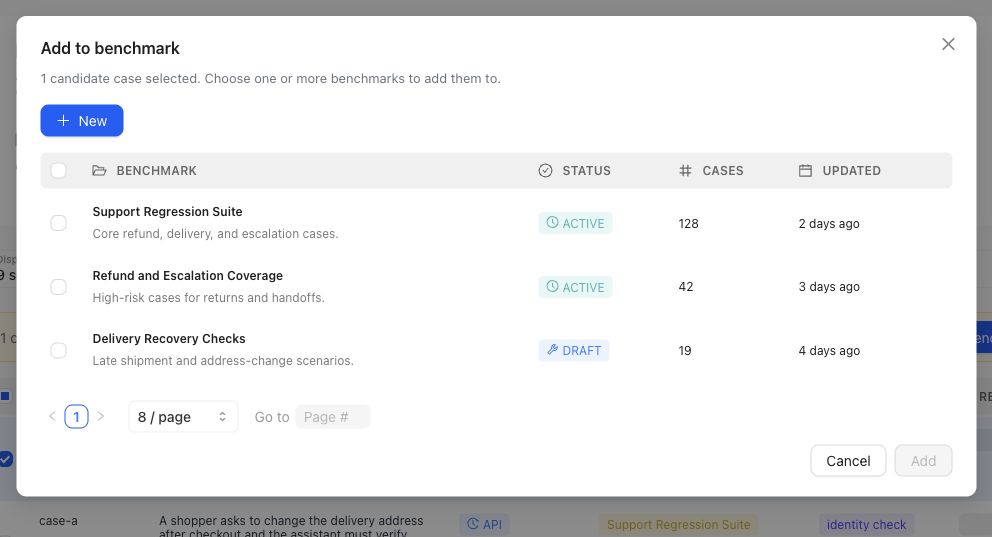
Selection is explicit: choose the intended Benchmark in this dialog. The action changes editable dataset membership, not a historical Snapshot.
{% example-demo title="Routing a sourced Case" %}
A sourcing task finds a production-informed question involving a superseded policy attachment. The operator opens the Case in Assets, confirms the current Input Schema and both materials, assigns the source-authority Coverage Facet, and adds it to the support Benchmark's current dataset. The team reviews Representation and creates a new Snapshot later; the selection action alone does not change historical Runs.
{% /example-demo %}
## Related workflows
{% related-card-grid title="Related workflows" %}
- [Assets](/docs/assets)
- [Importing cases](/docs/operating-manual/import-and-prepare-cases)
- [Synthesize cases](/docs/coverage-engineering/synthesize-cases)
- [Dimensions and ontology](/docs/coverage-engineering/dimensions-ontology)
- [Product quickstart](/docs/quickstart)
{% /related-card-grid %}
## Source confidence
Code-backed: current Case Pool navigation separates reusable Assets Cases from Sourcing Tasks, while Case sourcing types expose provenance, coverage targets, classification context, and benchmark inclusion. Benchmark Dataset pages own selection and Snapshot evidence.
---
id: assets.cases
title: Cases
summary: Understand canonical project cases, their input and materials, and how they become members of benchmark datasets.
kind: reference
product_area: assets
status: stable
updated: 2026-08-22
canonical: /docs/assets/cases
---
# Cases
## Definition
A Case is a project-level situation used for expert contribution, benchmark coverage, or candidate evaluation. It has canonical input content and may include declared supporting materials. Cases live in the Assets pool and can be selected into one or more benchmark datasets.
The Project Input Schema determines how the primary input and materials are represented. A benchmark snapshot determines which selected cases belong to one versioned evidence boundary.
## Fields, states, or lifecycle rules
- Canonical primary input is stored under `content.input`.
- Optional supporting values or artifacts are stored under `content.case_materials` according to the project's declared keys.
- `record_content.case_view` is a rendered projection used for inspection and delivery; it is not a second editable payload.
- Inputs can use plain-text, chat, or structured architecture as configured by the project.
- Materials can include admitted artifact families and must satisfy any required-field and file-extension rules.
- A project Case is not automatically part of every benchmark. Benchmark Datasets owns selection and snapshots.
- Generated or imported Cases should be reviewed for clarity, source authority, and schema conformance before they are trusted as benchmark evidence.
- Static case materials and executable Worlds remain separate. A document supplied to a Harness does not become a world merely because it affects execution.
## Case identity and change
Treat the persisted case identity as opaque. Do not construct IDs in client code or documentation. When case content changes materially, benchmark interpretation must use a snapshot or version boundary that makes the selected content clear.
Responses produced by a Harness are evaluation outputs attached to a Run. They are not the primary case input. Expert-authored acceptable examples can inform standards or contribution work, but the current evaluation contract should remain explicit about which candidate produced each response.
{% example-demo title="Example: multimaterial case" %}
A chat case asks whether an exception applies. Its required `current_policy` PDF and optional `account_history` table are stored as case materials admitted by Project Input Schema. The rendered case view presents the conversation and both materials. A benchmark snapshot selects the case, and a Run records the evaluated Harness response separately.
{% /example-demo %}
## Source confidence
Code-backed: the active Assets Cases route and case-content services define canonical input, case materials, and the rendered case view. Public import or export APIs are outside this reference unless separately documented.
## Related task pages
{% related-card-grid title="Related task pages" %}
- [Configure Project Input Schema](/docs/project-settings/input-schema)
- [Work with Benchmark Datasets](/docs/benchmark-datasets)
- [Manage benchmark coverage](/docs/coverage-management)
{% /related-card-grid %}
---
id: operating.import-prepare-cases
title: Import and prepare cases
summary: Bring cases into the project, conform them to Project Input Schema, inspect materials, and prepare benchmark selection.
kind: task
product_area: operating_manual
status: stable
updated: 2026-08-23
canonical: /docs/operating-manual/import-and-prepare-cases
---
# Import and prepare cases
Bring existing examples into the project and make them usable by experts, coverage work, and Harness execution without losing their input or material boundaries.
## Prerequisites
- A saved Project Input Schema.
- Source examples with identifiable primary input.
- Required case materials and accepted artifact formats.
- A selected project and permission to manage Cases.
## Steps
1. Review **Project Settings → Input Schema** and confirm plain-text, chat, or structured architecture.
2. Identify the primary input for each source example and map it to `content.input`.
3. Map supporting values or artifacts to declared `content.case_materials` keys.
4. Reject or correct records missing required materials, using unsupported artifact types, or violating the structured schema.
5. Import or create the Cases through the available product path.
6. Open representative Cases and inspect the rendered case view. Confirm that inputs, materials, labels, and source authority are understandable without private explanation.
7. Classify or connect the relevant Coverage Facets.
8. Select reviewed Cases in Benchmark Datasets and create a snapshot when the membership defines a new evaluation boundary.
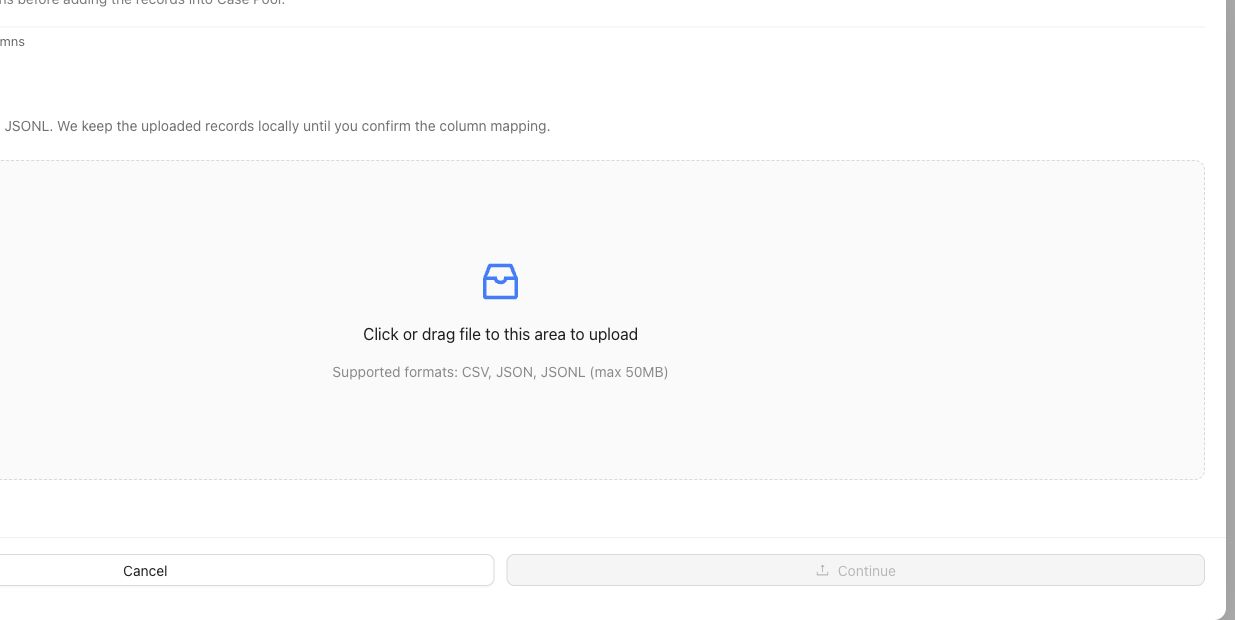
The upload step stages source records. Continue through column mapping and inspect representative rendered Cases before selecting them for a Benchmark.
## Object and state changes
This task creates project Cases and may attach artifact records, material references, coverage classifications, and benchmark selection. The rendered case view is derived from canonical content. Selecting a Case for one benchmark does not remove it from the reusable project pool or select it for every benchmark.
## Success criteria
- Every Case conforms to the Project Input Schema.
- Required materials are present and use accepted formats.
- The rendered case view preserves the intended input and evidence.
- Cases can be understood by an expert and delivered to a Harness.
- Benchmark selection and snapshot state are explicit.
## Common failure modes
- Putting supporting documents into an unstructured metadata field.
- Treating candidate responses as the primary case input.
- Importing artifacts the project schema does not admit.
- Selecting unclear Cases into a benchmark before review.
- Changing case content while comparing Runs against an earlier snapshot.
{% example-demo title="Example: import chat cases with documents" %}
A project uses chat architecture and requires a `policy_document` material. The operator maps each conversation to canonical messages, attaches the controlling PDF, rejects rows without the document, and inspects rendered case views. Only reviewed Cases are selected for the benchmark snapshot.
{% /example-demo %}
## Related reference pages
{% related-card-grid title="Related reference pages" %}
- [Cases](/docs/assets/cases)
- [Project Input Schema](/docs/project-settings/input-schema)
- [Benchmark Datasets](/docs/benchmark-datasets)
{% /related-card-grid %}
## Related troubleshooting pages
{% related-card-grid title="Related troubleshooting pages" %}
- [Dataset upload](/docs/troubleshooting/dataset-upload)
- [Unclear cases](/docs/troubleshooting/unclear-cases)
- [Missing outputs](/docs/troubleshooting/missing-outputs)
{% /related-card-grid %}
## Source confidence
Code-backed: the active Cases surface and case-content contract support canonical input, materials, rendering, and schema validation. Exact import mechanisms can depend on the available product configuration.
---
id: coverage.synthesize-cases
title: Synthesize cases
summary: Generate candidate cases to fill coverage gaps before adding them to benchmarks or curated datasets.
kind: task
product_area: coverage_engineering
status: stable
updated: 2026-09-07
canonical: /docs/coverage-engineering/synthesize-cases
---
# Synthesize cases
Synthesize candidate cases to fill a known coverage gap without pretending synthetic examples are automatically review context.
## When to use it
Use **Assets → Cases → Synthesize** when creating reusable project Case candidates. Use **Coverage Management → Case Foundry** when the work begins from a named need in one Benchmark. In either path, generated output is candidate material until reviewed.
## Prerequisites
- A named coverage gap.
- Policies, rubrics, or dimensions that define the behavior boundary.
- A review plan for synthetic cases.
- A way to mark synthetic source and realism concerns.
## Role or permission
AI engineers or coverage owners generate candidate cases. Experts or product owners review realism before benchmark promotion.
## Steps
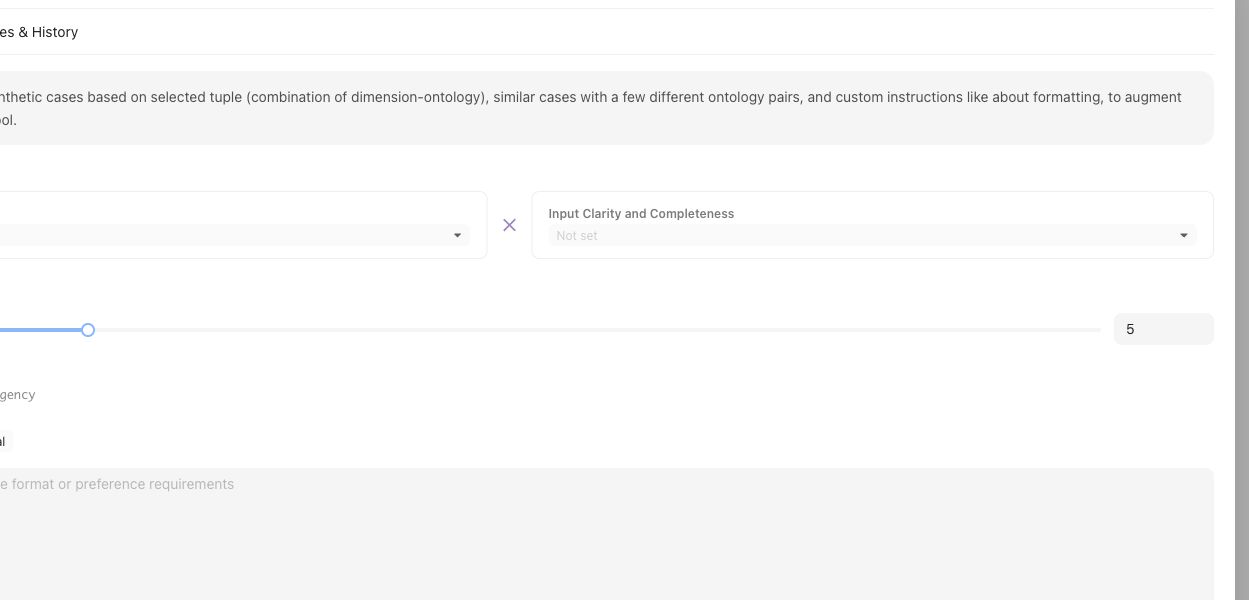
Synthesis starts from a named tuple or coverage gap, not from a generic request for more cases.
1. Name the Coverage Facet tuple, Coverage Story, or Case Construction Pattern the synthesis should fulfill.
2. Choose the Assets synthesis path or benchmark-scoped Case Foundry path.
3. Supply representative source Cases, applicable Comparison Directions, and explicit target-system constraints.
4. Inspect generated candidates for realism, duplication, source context, and compatibility with the intended Coverage Facets.
5. Keep impossible, misleading, or context-incomplete candidates out of Benchmark selection.
6. Use **Coverage Management → Case Review** for benchmark-scoped preparation and admission.
7. Select reviewed Cases in **Benchmark Datasets** and create a Snapshot only when the intended set is ready.
## Object and state changes
Completed generation registers candidate Cases in the project Case collection. Case Review and Benchmark Datasets determine whether suitable Cases become selected membership for a Benchmark. Generation completion alone does not change a Snapshot or Benchmark Version.
## Success criteria
- Each synthetic case maps to a named gap or boundary.
- Reviewers can tell synthetic cases from production-derived cases.
- Only realistic, context-complete cases affect benchmark evidence.
## Common failure modes
- Synthetic cases are generated for volume rather than a specific gap.
- Cases combine many variations and obscure the failure reason.
- Unreviewed synthetic cases enter benchmark evidence.
- The generated case lacks the context needed for expert judgment.
## Related reference pages
{% related-card-grid title="Related reference pages" %}
- [Case pool](/docs/object-model/case-pool)
- [Coverage dimensions](/docs/object-model/coverage-dimensions)
- [Comparison Directions](/docs/assets/comparison-directions)
{% /related-card-grid %}
## Related troubleshooting pages
{% related-card-grid title="Related troubleshooting pages" %}
- [Synthetic cases that feel unrealistic](/docs/troubleshooting/unrealistic-synthetic-cases)
- [Unbalanced coverage](/docs/troubleshooting/unbalanced-coverage)
- [Unclear cases](/docs/troubleshooting/unclear-cases)
{% /related-card-grid %}
{% example-demo title="Fill a stale-source gap" %}
Coverage shows few stale-source cases. The engineer synthesizes examples with old and new policy documents, experts reject unrealistic ones, and only reviewed cases enter the benchmark candidate pool.
{% /example-demo %}
## Source confidence
Code-backed: the Assets synthesizer defines generation input, candidate cards, and lifecycle; Case Foundry supplies benchmark-scoped coordination; Case Review supplies the preparation and admission boundary. The product does not treat generation completion as Snapshot membership.
---
id: coverage.dimensions-ontology
title: Dimensions and Ontology
summary: Define reusable behavior axes and their allowed values, then inspect how cases and benchmarks cover them.
kind: reference
product_area: coverage_engineering
status: stable
updated: 2026-09-07
canonical: /docs/coverage-engineering/dimensions-ontology
---
# Dimensions and Ontology
## Definition
Dimensions are reusable project-level axes for describing how cases differ. Each Dimension contains ontology values: the named members used to classify cases and measure representation. A Dimension might be **Source condition**, with values such as **Current**, **Superseded**, **Conflicting**, and **Missing**.
Use **Project Foundations → Coverage Facets → Dimension** to create, generate, inspect, and maintain them.
## Fields, states, or lifecycle rules
### What a Dimension contains
| Element | Purpose |
| --- | --- |
| Name and description | Explain the behavior axis and its boundary |
| Ontology values | Define the values used for classification |
| Examples | Show classified cases and the reason for a value assignment |
| Statistics | Show case-pool and benchmark distribution by ontology value |
| Benchmark focus | Show whether values are required, sampled, diagnostic, or ignored in benchmark setup |
Dimensions and ontology values are project foundations. A benchmark does not copy them. **Get Started** assigns benchmark-specific roles to the project values, and **Representation** reports how the selected cases cover them.
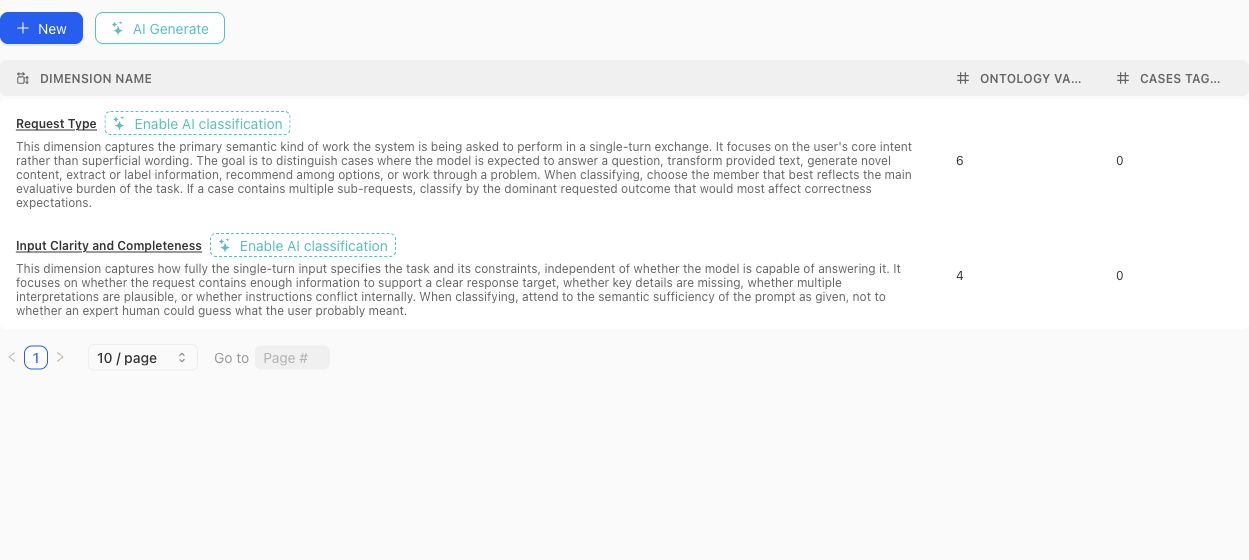
Use the table to compare each Dimension's definition with its ontology and current classification footprint before opening the detail view.
### Create or generate a schema
Create a Dimension manually when the axis and vocabulary are already understood. Use the dimension-schema generator when project context or source material should produce a reviewable proposal. Generated proposals can include a definition, why the Dimension matters, proposed ontology members, and warnings.
A proposal is not the active schema. Review each proposed Dimension and value before accepting it. Avoid accepting near-duplicates simply because they use different wording.
> Classification boundary
>
> Creating or editing a Dimension does not instantly classify every existing case. Missing or stale classifications can be queued and monitored separately. Treat unclassified cases as missing evidence, not as an implicit ontology value.
### Design rules
- Make the Dimension answer one stable question. Split axes that mix several independent concerns.
- Give every ontology value a definition that distinguishes it from neighboring values.
- Prefer values that can be applied consistently to real cases.
- Do not use a Dimension to encode case quality, policy approval, or a desired model score.
- Review distributions after changing values. A clean schema can still leave important cases unclassified.
- Delete only after checking Case Pool and benchmark usage; removal changes the project coverage vocabulary.
### Benchmark roles
In benchmark Get Started, each Dimension and ontology value can receive a focus role:
- **Required:** the benchmark is expected to cover this value.
- **Sampled:** include it as part of the desired mix.
- **Diagnostic:** track it for analysis without making it part of the main denominator.
- **Ignored:** exclude it from the benchmark coverage intention.
- **Unset:** no explicit benchmark instruction has been recorded.
Those roles shape Coverage Story generation and interpretation. They do not alter the project-level definition of the value.
{% example-demo title="Example: source condition" %}
The project defines a Source condition Dimension with Current, Superseded, Conflicting, and Missing values. One benchmark marks all four as required; another marks Current as required and the remaining values as diagnostic. The same project vocabulary supports different benchmark intentions without duplicating the Dimension.
{% /example-demo %}
## Related task pages
{% related-card-grid title="Related task pages" %}
- [Generate a dimension schema](/docs/coverage-engineering/generate-dimension-schema)
- [Work with Project Topics](/docs/coverage-engineering/project-topics)
- [Plan Benchmark Coverage](/docs/coverage-engineering/plan-benchmark-coverage)
- [Analyze dataset representation](/docs/benchmark-datasets/representation)
{% /related-card-grid %}
## Source confidence
Code-backed: the current Dimension list, detail, settings, proposal, classification, examples, and statistics surfaces establish these fields and lifecycle boundaries.