# Review Screens
Generated: 2026-09-13T04:42:44.339Z
Source build: local
Canonical docs: https://teammately.ai/docs
---
id: assets.review-screens
title: Review Screens
summary: Configure reusable project templates for the context and presentation experts see during Contribution work.
kind: reference
product_area: assets
status: stable
updated: 2026-09-07
canonical: /docs/assets/review-screens
---
# Review Screens
## Definition
Review Screens are reusable project Assets for designing how experts see Case context and Contribution questions. A screen can present selected inputs, Case materials, Dimensions, candidate outputs, and review controls in a consistent layout.
Review Screens control presentation. They do not change Case content, the Contribution objective, Policy meaning, Rubric semantics, or expert authority.
## Fields, states, or lifecycle rules
- The library is available at **Assets → Review Screens**.
- A screen has a project-owned identity and can be opened in the visual designer for editing and preview.
- The designer can use current Dimensions, context keys, and declared Project Input Schema material fields as presentation inputs.
- A screen can be selected for Contribution work; the Contribution still supplies the benchmark-specific objective, expert, Cases, attachments, and task components.
- Creating or editing a screen affects future presentation. It does not rewrite completed responses, Checkpoints, or historical Contribution evidence.
- A visible field is not automatically required by Project Input Schema, and a required Case material is not automatically appropriate for every screen.
## Designing for judgment
Show the smallest context set that lets an expert make and explain the requested decision. Include source conflicts, Case materials, candidate responses, and relevant coverage dimensions when they affect correctness. Keep administrative metadata and unrelated fields out of the primary judgment surface.
Test a screen against representative and boundary Cases before using it for broad Contribution work. If an expert must rely on private knowledge or locate a missing source, correct Project Context, Reference Materials, the Case, or the Contribution before changing the layout.
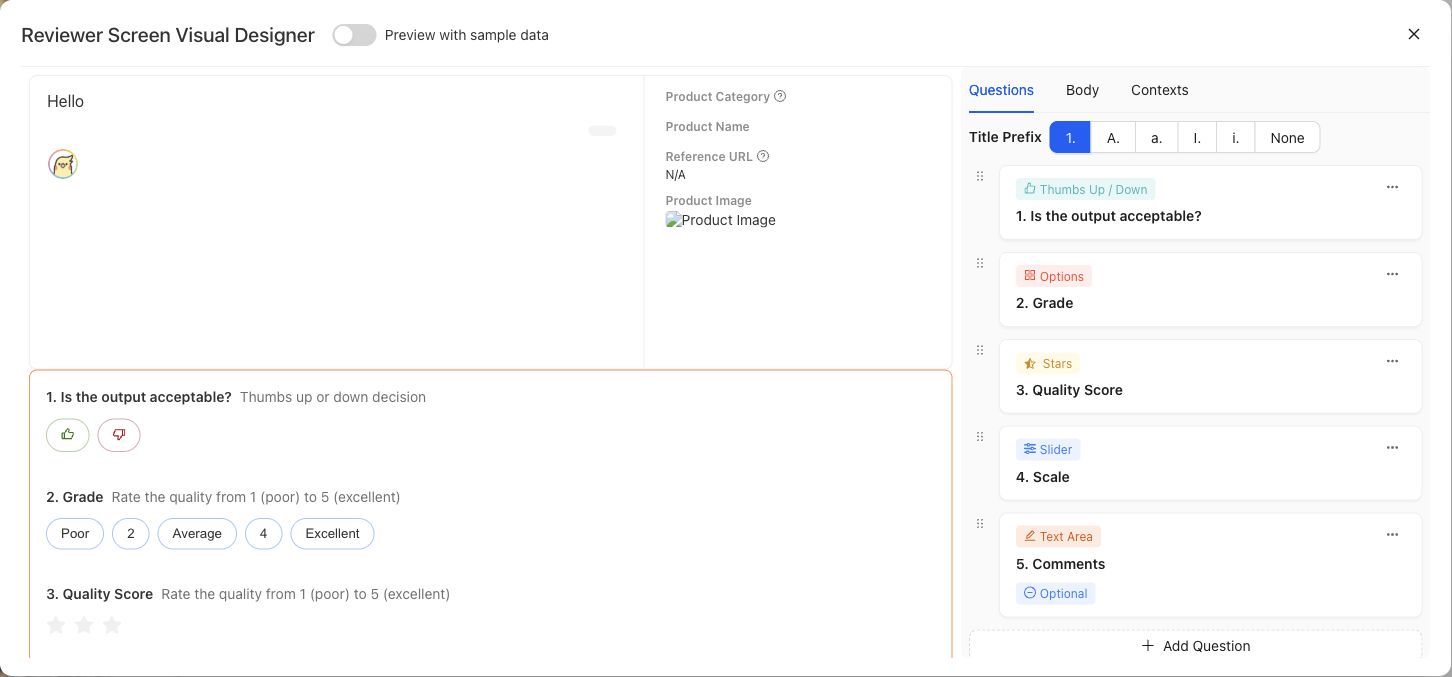
Preview the expert-facing Case and question layout with representative data before using it in a Contribution.
{% example-demo title="Example: source-grounding screen" %}
For a grounding Contribution, the screen displays the user request, candidate response, current source document, superseded source document, and source-freshness Dimension. It omits internal ingestion metadata so the expert can compare the response with both documents and explain which source controls.
{% /example-demo %}
## Source confidence
Code-backed: the active Review Screens library and detail routes provide paginated browsing, usage filtering, creation, editing, preview, and screen-authoring controls. The stable responsibility boundary is documented here without claiming every visual control is permanent.
## Related task pages
{% related-card-grid title="Related task pages" %}
- [Assets](/docs/assets)
- [Configure Project Input Schema](/docs/project-settings/input-schema)
- [Request an Expert Contribution](/docs/expert-contributions/request-contribution)
{% /related-card-grid %}
---
id: assets.overview
title: Assets
summary: Manage reusable project cases, worlds, project tools, harnesses, weights, comparison directions, and review screens before selecting them for benchmark work.
kind: concept
product_area: assets
status: stable
updated: 2026-09-07
canonical: /docs/assets
---
# Assets
Assets is the project-level pool for cases, worlds, project tools, harnesses, weights, Comparison Directions, and Review Screens. Assets are managed once at project scope and selected for use in a specific benchmark rather than being recreated inside every benchmark workspace.
## Definition
The active tabs are **Cases**, **Worlds**, **Project Tools**, **Harnesses**, **Weights**, **Comparison Directions**, and **Review Screens**. Cases provide the canonical situations evaluated or reviewed. Harnesses provide executable candidate implementations with Draft and saved Versions. Comparison Directions guide comparative output variation, and Review Screens provide reusable expert-facing presentation templates. Worlds, Project Tools, and Weights are visible categories whose current pages expose empty states rather than creation or lifecycle controls.
Assets is distinct from Benchmark Datasets. The project pool answers what is available to the project. A benchmark dataset answers which cases and snapshot define one benchmark's evidence boundary.
## Decision checkpoint
| Need | Asset or workspace | Boundary |
| --- | --- | --- |
| Create or inspect a reusable situation | Assets → Cases | Case content follows Project Input Schema |
| Edit candidate code or prompt logic | Assets → Harnesses | A Draft must be saved as an exact version before evaluation |
| Select cases for a benchmark | Benchmark Datasets | Selection and snapshot are benchmark-scoped |
| Supply static documents or values to a case | Case materials | Static support is not a World |
| Inspect planned environment assets | Worlds | Current product exposes the category but no public lifecycle yet |
| Inspect planned callable project assets | Project Tools | Current product exposes the category but no public lifecycle yet |
| Inspect planned model-weight assets | Weights | Current product exposes the category but no public lifecycle yet |
| Guide comparative output variation | Comparison Directions | Direction guidance is separate from coverage structure and approval |
| Configure reusable expert-facing presentation | Review Screens | Presentation is separate from Case content and Contribution objectives |
## Project reuse and benchmark selection
Project scope makes assets reusable across multiple benchmarks. That reuse also increases the impact of changes. Editing a case can affect any future benchmark snapshot that selects it. Saving a new Harness version does not silently change Runs that referenced an older version. Benchmark evidence should always identify the exact asset versions or snapshot involved.
Worlds, Project Tools, and Weights are visible product categories, but their current pages do not expose durable user actions. Do not infer persistence, activation, execution, or evaluation semantics from the navigation label alone. Their reference pages record this limitation so operators and agents do not invent a workflow.
## Relationship to the five capabilities
Weave creates and curates cases and supporting materials. Trialground evaluates saved Harness versions. Coevolve can materialize or evaluate candidate Harness versions during Improvement Sessions. Coverage Engineering and Correctness Elicitation influence which cases and candidates are useful, but ownership remains with the appropriate Asset or governed project surface.
{% example-demo title="Shared harness pool" %}
A project contains two saved retrieval Harness versions and one draft experiment. Two benchmarks select different case snapshots but can evaluate either saved Harness version. The draft remains editable and cannot be mistaken for the candidate used by an existing Run. Compare can therefore attribute result movement to the saved candidate and benchmark evidence boundary.
{% /example-demo %}
## Related workflows
{% related-card-grid title="Related workflows" %}
- [Work with cases](/docs/assets/cases)
- [Manage Harnesses](/docs/assets/harnesses)
- [Understand Project Tools](/docs/assets/project-tools)
- [Understand Worlds](/docs/assets/worlds)
- [Understand Weights](/docs/assets/weights)
- [Manage Comparison Directions](/docs/assets/comparison-directions)
- [Manage Review Screens](/docs/assets/review-screens)
- [Work with Benchmark Datasets](/docs/benchmark-datasets)
{% /related-card-grid %}
## Related reference pages
{% related-card-grid title="Related reference pages" %}
- [Project Input Schema](/docs/project-settings/input-schema)
- [Benchmarks](/docs/object-model/benchmarks)
- [Product boundaries](/docs/introduction/product-boundaries)
{% /related-card-grid %}
## Source confidence
Code-backed: the active Assets layout and navigation establish the project-level pool and tab names. Cases, Harnesses, Comparison Directions, and Review Screens have active surfaces; the current Worlds, Project Tools, and Weights routes expose empty states only.
---
id: expert-contributions.overview
title: Expert Contributions
summary: Coordinate benchmark-scoped expert work, attributable judgment, governed artifacts, and the decisions that move correctness forward.
kind: concept
product_area: expert_contributions
status: stable
updated: 2026-09-07
canonical: /docs/expert-contributions
---
# Expert Contributions
Expert Contributions is the benchmark-scoped workspace for requesting, conducting, and materializing specialist work. It coordinates the expert, objective, selected evidence, task sequence, checkpoints, attributable responses, and contributed artifacts needed to move a benchmark forward.
## Definition
The administrator workspace contains **Overview**, **Contributions**, **Contributed Artifacts**, and **Logs & Status**. **Request Contribution** opens the composer for a new contribution. The expert follows a contribution-specific experience that can contain form, chat, interview, and case-review tasks, along with checkpoints and completion states.
A Contribution is the unit of requested expert effort. It replaces broad workflow configuration with a bounded statement of what this benchmark needs from this expert now. The work can result in contributed policies, rubrics, cases, or coverage observations without flattening all expert activity into one generic approval record.
## Decision checkpoint
| Need | Contribution element | Result to inspect |
| --- | --- | --- |
| Resolve a specific benchmark question | Contribution statement and scoped objectives | The expert can explain the requested decision |
| Ground work in concrete behavior | Selected or designated cases | Case-level responses remain attributable |
| Supply supporting knowledge | Attachments and scoped statements | The expert sees the relevant source boundary |
| Choose the right interaction | Form, chat, interview, or case review task | Task output matches the kind of judgment needed |
| Confirm consequential learning | Checkpoint | Accepted, revised, or unresolved state is explicit |
| Reuse the result | Contributed Artifacts | Policies, rubrics, cases, and coverage observations retain provenance |
## Lifecycle and status
The durable Contribution statuses are `PREPARING_DIRECTION`, `AWAITING_DIRECTION_ALIGNMENT`, `MATERIALIZING_TASKS`, `READY`, `IN_PROGRESS`, `COMPLETED`, and `CANCELLED`. The interface presents these as planning direction, waiting for alignment, preparing tasks, ready, active, completed, or cancelled. The exact task sequence can vary by Contribution.
Realtime updates and durable transitions help the administrator and expert see current progress without inventing completion. A waiting state, checkpoint, or finalization step should be shown as such. Completing the expert experience does not imply that every proposed artifact has been accepted into its project-level owner.
## Contribution evidence
Logs & Status exposes operational and engagement records. Contributed Artifacts organizes materialized or contributed cases, policies, rubrics, and new coverage observations. Correctness Governance, Assets, or Coverage Management owns the resulting project or benchmark artifact after materialization.
This model improves return on expert effort. Agents prepare focused work from project context, indexed material, benchmark cases, and unresolved questions. The expert supplies the authority; the result can be reused across standards, coverage, evaluation, and improvement.
{% example-demo title="Resolve source authority" %}
A benchmark contains cases where an operational runbook conflicts with a newer policy page. The operator requests a Contribution from the policy owner, selects the conflicting cases, attaches both sources, and uses case review plus a checkpoint. The expert establishes which source controls, contributes a scoped policy and rubric, and records one coverage observation for an unrepresented exception.
{% /example-demo %}
## Related workflows
{% related-card-grid title="Related workflows" %}
- [Request an Expert Contribution](/docs/expert-contributions/request-contribution)
- [Complete an Expert Contribution](/docs/expert-contributions/complete-contribution)
- [Build policies and rubrics](/docs/operating-manual/build-policies-and-rubrics)
{% /related-card-grid %}
## Related reference pages
{% related-card-grid title="Related reference pages" %}
- [Contributed Artifacts](/docs/expert-contributions/contributed-artifacts)
- [Contribution lifecycle and status](/docs/expert-contributions/lifecycle-and-status)
- [Logs & Status](/docs/expert-contributions/logs-and-status)
- [Agent Setup](/docs/agent-setup)
- [Human Approval Boundaries](/docs/governance/human-approval-boundaries)
{% /related-card-grid %}
## Source confidence
Code-backed: the active benchmark workspace, Contribution dashboard, composer, administrator detail, and expert routes support the scope, task, status, and artifact model described here.
---
id: project-settings.input-schema
title: Project Input Schema
summary: Define the canonical input architecture, case-material fields, and accepted artifact formats for project cases.
kind: reference
product_area: project_settings
status: stable
updated: 2026-09-07
canonical: /docs/project-settings/input-schema
---
# Project Input Schema
## Definition
Project Input Schema is the project-managed contract for future cases. It declares the primary input architecture, optional structured-input schema, named case-material fields, and artifact families or file extensions the project accepts.
The active architectures are **plain text**, **chat**, and **structured**. The schema is a project singleton rather than a versioned benchmark object. When no setting exists, the default accepts one plain-text user message and no case materials or artifacts.
## Fields, states, or lifecycle rules
- `architecture` is `plain_text`, `chat`, or `structured`.
- Structured architecture requires a bounded `structuredInputSchema`.
- `caseMaterialSchema` is a closed, flat object. Each material key has a label, optional description, required flag, type, and any accepted artifact rules.
- Material keys use lowercase letters, digits, and underscores, start with a letter, and remain flat.
- `acceptedArtifacts` declares project-level artifact families. Supported families are image, document, tabular, presentation, source text, and audio.
- A case-material artifact rule must be a subset of the artifact families admitted at the project root.
- Saving a new schema governs future case validation. Operators should inspect existing cases before making a change that would make current content invalid.
## Canonical case content
The primary case payload is `content.input`. Optional supporting values and artifacts live in `content.case_materials`. The product renders `record_content.case_view` so people and execution adapters can inspect the canonical content consistently; that view is a projection rather than an alternate authoring contract.
Static support passed to a Harness uses `case_material_refs`. An executable or queryable environment uses an optional `world_instance_ref`. Do not collapse static documents, images, or values into the world boundary merely because a candidate consumes them during a Run.
{% example-demo title="Example: structured support case" %}
A project selects structured input with `question` and `customer_tier` properties. It declares a required `policy_document` case material that accepts PDF documents and an optional `account_history` tabular material. A case is valid only when its structured input matches the schema and the required document is present in the accepted format.
{% /example-demo %}
## Source confidence
Code-backed: the active settings route and backend validator define the input architectures, closed case-material schema, artifact families, defaults, and canonical case paths. This page explains the product contract without presenting internal handlers as a public API.
## Related task pages
{% related-card-grid title="Related task pages" %}
- [Project Settings](/docs/project-settings)
- [Product quickstart](/docs/quickstart)
- [Work with cases](/docs/assets/cases)
- [Design Review Screen](/docs/assets/review-screens)
{% /related-card-grid %}