# Assets
Generated: 2026-09-13T04:33:48.046Z
Source build: local
Canonical docs: https://teammately.ai/docs
---
id: assets.overview
title: Assets
summary: Manage reusable project cases, worlds, project tools, harnesses, weights, comparison directions, and review screens before selecting them for benchmark work.
kind: concept
product_area: assets
status: stable
updated: 2026-09-07
canonical: /docs/assets
---
# Assets
Assets is the project-level pool for cases, worlds, project tools, harnesses, weights, Comparison Directions, and Review Screens. Assets are managed once at project scope and selected for use in a specific benchmark rather than being recreated inside every benchmark workspace.
## Definition
The active tabs are **Cases**, **Worlds**, **Project Tools**, **Harnesses**, **Weights**, **Comparison Directions**, and **Review Screens**. Cases provide the canonical situations evaluated or reviewed. Harnesses provide executable candidate implementations with Draft and saved Versions. Comparison Directions guide comparative output variation, and Review Screens provide reusable expert-facing presentation templates. Worlds, Project Tools, and Weights are visible categories whose current pages expose empty states rather than creation or lifecycle controls.
Assets is distinct from Benchmark Datasets. The project pool answers what is available to the project. A benchmark dataset answers which cases and snapshot define one benchmark's evidence boundary.
## Decision checkpoint
| Need | Asset or workspace | Boundary |
| --- | --- | --- |
| Create or inspect a reusable situation | Assets → Cases | Case content follows Project Input Schema |
| Edit candidate code or prompt logic | Assets → Harnesses | A Draft must be saved as an exact version before evaluation |
| Select cases for a benchmark | Benchmark Datasets | Selection and snapshot are benchmark-scoped |
| Supply static documents or values to a case | Case materials | Static support is not a World |
| Inspect planned environment assets | Worlds | Current product exposes the category but no public lifecycle yet |
| Inspect planned callable project assets | Project Tools | Current product exposes the category but no public lifecycle yet |
| Inspect planned model-weight assets | Weights | Current product exposes the category but no public lifecycle yet |
| Guide comparative output variation | Comparison Directions | Direction guidance is separate from coverage structure and approval |
| Configure reusable expert-facing presentation | Review Screens | Presentation is separate from Case content and Contribution objectives |
## Project reuse and benchmark selection
Project scope makes assets reusable across multiple benchmarks. That reuse also increases the impact of changes. Editing a case can affect any future benchmark snapshot that selects it. Saving a new Harness version does not silently change Runs that referenced an older version. Benchmark evidence should always identify the exact asset versions or snapshot involved.
Worlds, Project Tools, and Weights are visible product categories, but their current pages do not expose durable user actions. Do not infer persistence, activation, execution, or evaluation semantics from the navigation label alone. Their reference pages record this limitation so operators and agents do not invent a workflow.
## Relationship to the five capabilities
Weave creates and curates cases and supporting materials. Trialground evaluates saved Harness versions. Coevolve can materialize or evaluate candidate Harness versions during Improvement Sessions. Coverage Engineering and Correctness Elicitation influence which cases and candidates are useful, but ownership remains with the appropriate Asset or governed project surface.
{% example-demo title="Shared harness pool" %}
A project contains two saved retrieval Harness versions and one draft experiment. Two benchmarks select different case snapshots but can evaluate either saved Harness version. The draft remains editable and cannot be mistaken for the candidate used by an existing Run. Compare can therefore attribute result movement to the saved candidate and benchmark evidence boundary.
{% /example-demo %}
## Related workflows
{% related-card-grid title="Related workflows" %}
- [Work with cases](/docs/assets/cases)
- [Manage Harnesses](/docs/assets/harnesses)
- [Understand Project Tools](/docs/assets/project-tools)
- [Understand Worlds](/docs/assets/worlds)
- [Understand Weights](/docs/assets/weights)
- [Manage Comparison Directions](/docs/assets/comparison-directions)
- [Manage Review Screens](/docs/assets/review-screens)
- [Work with Benchmark Datasets](/docs/benchmark-datasets)
{% /related-card-grid %}
## Related reference pages
{% related-card-grid title="Related reference pages" %}
- [Project Input Schema](/docs/project-settings/input-schema)
- [Benchmarks](/docs/object-model/benchmarks)
- [Product boundaries](/docs/introduction/product-boundaries)
{% /related-card-grid %}
## Source confidence
Code-backed: the active Assets layout and navigation establish the project-level pool and tab names. Cases, Harnesses, Comparison Directions, and Review Screens have active surfaces; the current Worlds, Project Tools, and Weights routes expose empty states only.
---
id: assets.cases
title: Cases
summary: Understand canonical project cases, their input and materials, and how they become members of benchmark datasets.
kind: reference
product_area: assets
status: stable
updated: 2026-08-22
canonical: /docs/assets/cases
---
# Cases
## Definition
A Case is a project-level situation used for expert contribution, benchmark coverage, or candidate evaluation. It has canonical input content and may include declared supporting materials. Cases live in the Assets pool and can be selected into one or more benchmark datasets.
The Project Input Schema determines how the primary input and materials are represented. A benchmark snapshot determines which selected cases belong to one versioned evidence boundary.
## Fields, states, or lifecycle rules
- Canonical primary input is stored under `content.input`.
- Optional supporting values or artifacts are stored under `content.case_materials` according to the project's declared keys.
- `record_content.case_view` is a rendered projection used for inspection and delivery; it is not a second editable payload.
- Inputs can use plain-text, chat, or structured architecture as configured by the project.
- Materials can include admitted artifact families and must satisfy any required-field and file-extension rules.
- A project Case is not automatically part of every benchmark. Benchmark Datasets owns selection and snapshots.
- Generated or imported Cases should be reviewed for clarity, source authority, and schema conformance before they are trusted as benchmark evidence.
- Static case materials and executable Worlds remain separate. A document supplied to a Harness does not become a world merely because it affects execution.
## Case identity and change
Treat the persisted case identity as opaque. Do not construct IDs in client code or documentation. When case content changes materially, benchmark interpretation must use a snapshot or version boundary that makes the selected content clear.
Responses produced by a Harness are evaluation outputs attached to a Run. They are not the primary case input. Expert-authored acceptable examples can inform standards or contribution work, but the current evaluation contract should remain explicit about which candidate produced each response.
{% example-demo title="Example: multimaterial case" %}
A chat case asks whether an exception applies. Its required `current_policy` PDF and optional `account_history` table are stored as case materials admitted by Project Input Schema. The rendered case view presents the conversation and both materials. A benchmark snapshot selects the case, and a Run records the evaluated Harness response separately.
{% /example-demo %}
## Source confidence
Code-backed: the active Assets Cases route and case-content services define canonical input, case materials, and the rendered case view. Public import or export APIs are outside this reference unless separately documented.
## Related task pages
{% related-card-grid title="Related task pages" %}
- [Configure Project Input Schema](/docs/project-settings/input-schema)
- [Work with Benchmark Datasets](/docs/benchmark-datasets)
- [Manage benchmark coverage](/docs/coverage-management)
{% /related-card-grid %}
---
id: assets.comparison-directions
title: Comparison Directions
summary: Create reusable guidance for meaningful candidate-output differences in comparative expert work.
kind: reference
product_area: assets
status: stable
updated: 2026-09-07
canonical: /docs/assets/comparison-directions
---
# Comparison Directions
## Definition
A Comparison Direction is a reusable project Asset that describes how candidate outputs should differ during comparative expert work. It can focus attention on a meaningful contrast such as evidence grounding, uncertainty handling, or response strategy without declaring which candidate is correct.
Comparison Directions are project-scoped. A Contribution can select or allow a pool of directions for its comparative component, while the benchmark Contribution still owns the objective, cases, candidates, and expert task.
## Fields, states, or lifecycle rules
- A direction has a name or label and a description of the intended contrast.
- Users can create, edit, pin, archive, and remove directions from **Assets → Comparison Directions**.
- Pinned directions are surfaced when a Contribution request selects comparative output guidance.
- The suggestion experience creates draft candidates in a suggestion run. Nothing enters the reusable library until a user accepts it.
- A direction can carry a staleness advisory when its source context has changed. Dismissing that advisory records a review decision; it does not approve a Policy, Rubric, Case, or Benchmark.
- A direction guides comparative presentation or generation. It does not create a Case, change coverage structure, or replace expert judgment.
## Correct scope
Use Dimensions, Project Topics, and Case Construction Patterns for the behavior space a benchmark should represent. Use Comparison Directions for how candidate outputs should be contrasted within a comparative Contribution. Use Correctness Governance for the approved standard that determines how an output is judged.
{% example-demo title="Example: source-grounding contrast" %}
A project creates one Comparison Direction asking for a response that cites the current source conservatively and another asking for a focused clarification when the source hierarchy is unresolved. A comparative Contribution can use those directions to elicit an expert preference. The direction does not approve either response or create the governing rubric.
{% /example-demo %}
## Source confidence
Code-backed: the active Assets routes expose the Comparison Directions library, detail controls, suggestion runs, accept or dismiss decisions, pinning, and staleness review. The API keeps legacy compatibility names internally, but this page uses the current product label.
## Related task pages
{% related-card-grid title="Related task pages" %}
- [Assets](/docs/assets)
- [Request an Expert Contribution](/docs/expert-contributions/request-contribution)
- [Manage benchmark coverage](/docs/coverage-management)
{% /related-card-grid %}
---
id: assets.harnesses
title: Harnesses
summary: Build versioned Python Harness bundles, validate and debug Drafts, publish exact Versions, and activate them for benchmark evaluations.
kind: reference
product_area: assets
status: stable
updated: 2026-08-22
canonical: /docs/assets/harnesses
---
# Harnesses
## Definition
A Harness is a project-level, versioned Python bundle used to produce behavior for benchmark cases. It implements `generate_result(request)` at its configured entrypoint and returns the result expected by the case contract. The workspace provides a multi-file editor, one editable Draft, immutable saved Versions, Coding Agent proposals, secret grants, debug runs, runtime preparation, export, and benchmark activation.
A Harness can represent prompt logic, retrieval, tools, orchestration, or other candidate behavior supported by the managed runtime. It is the executable candidate boundary, not a general model registry entry.
## Fields, states, or lifecycle rules
- A newly created Harness begins with one blank editable Draft.
- Draft source and runtime changes autosave after a short delay. Concurrent edits use a Draft revision and can surface a conflict that must be reloaded.
- The Draft contains source files, an entrypoint, Python version, dependency specifications, sandbox profile, and target-platform/runtime facts.
- Draft validation errors block publication. Warnings remain visible for operator review.
- **Publish** creates an immutable saved Version from the exact Draft bundle and runtime configuration. Publication also uses that Version for the currently selected benchmark.
- A previously saved Version can be selected with **Use this Version** for the current benchmark.
- Existing Runs keep their referenced Harness version even after later Draft or Saved changes.
- Archived Harnesses remain visible but cannot be edited, debugged, activated, or granted new secrets.
- Credentials belong in workspace secrets and are explicitly granted to the Harness. Secret values do not belong in source, case content, or Run Metadata.
- Coding Agent proposals are staged as file diffs. Accept or reject the proposed hunks before they modify the canonical Draft.
- Runtime delivery can include the rendered case view, static `case_material_refs`, and an optional supported `world_instance_ref`.
- Debug runs execute only a saved Version against a `harness_contract.v1` request. They are authoring checks, not benchmark evaluation evidence.
## Draft, saved version, and activation
Use Draft for active editing. Publish when a candidate is coherent enough to identify, compare, or evaluate. If a benchmark needs a different saved Version, select it explicitly. Do not describe a Run as evaluating “the current Harness” because the Draft and benchmark activation may have changed after the Run began.
The Evaluations execution settings show project Harnesses with saved Versions and control which are active for future managed Runs. Activation is benchmark-scoped. Every admitted Run still records the exact saved Harness Version, so later activation changes do not rewrite existing evidence.
## Runtime, debug, and output mapping
Publishing preserves bundle and dependency hashes and can prepare the immutable runtime image. A failed or missing runtime can be prepared or retried from the saved Version. Use Debug to send a single contract-shaped request before spending a benchmark Run.
Output mapping is a separate boundary. A Harness return must match the benchmark's declared result contract. For imported reference outputs, Benchmark Evaluations maps uploaded rows to immutable benchmark cases. Neither debug success nor a syntactically valid upload proves rubric correctness.
Improvement Sessions can generate or receive candidate Harness versions. Those candidates become meaningful in a session only when their identity and canonical evaluation receipt are observable.
{% example-demo title="Example: exact candidate identity" %}
An engineer edits retrieval filtering in a Harness Draft and publishes Version 12 for the selected benchmark. A managed Run records that exact Version. The engineer then continues editing the Draft toward Version 13. The existing Run still refers to Version 12, so its case responses and rubric results remain attributable even though the editor shows newer work.
{% /example-demo %}
## Source confidence
Code-backed: the active Harness list and editor establish creation, archive state, Draft autosave and conflicts, validation, publication, activation, secrets, debug, Coding Agent proposals, and runtime preparation. The runnable adapter supports the execution boundary without making its internal API public.
## Related task pages
{% related-card-grid title="Related task pages" %}
- [Run a benchmark evaluation](/docs/benchmark-evaluations/run-evaluation)
- [Start an Improvement Session](/docs/improve/start-improvement-session)
- [Configure Project Input Schema](/docs/project-settings/input-schema)
{% /related-card-grid %}
---
id: assets.project-tools
title: Project Tools
summary: Understand the current Project Tools asset surface and its deliberately limited public behavior.
kind: reference
product_area: assets
status: stable
updated: 2026-09-07
canonical: /docs/assets/project-tools
---
# Project Tools
## Definition
Project Tools is a visible project-level Asset category intended for reusable callable capabilities. In the current product, the page presents an empty state and does not expose creation, editing, versioning, permissions, activation, or execution controls.
> Current capability boundary
>
> Do not document a Project Tool lifecycle or claim that a Harness can select a Project Tool merely because the tab exists. No durable public workflow is exposed on the current page.
Harness source and dependencies remain in Harnesses. Connected knowledge remains in Reference Materials. Static Case inputs and materials remain governed by Project Input Schema and the Case.
## Fields, states, or lifecycle rules
There are currently no public fields, durable states, or lifecycle actions on this page. The absence of controls is itself the verified boundary.
## What to use today
Keep candidate-specific code and declared dependencies inside the Harness bundle. Use Workspace Secrets for credentials granted to the exact Harness, Reference Materials for connected knowledge, and Project Input Schema for Case inputs and materials. Do not relabel those objects as Project Tools because their ownership and evidence boundaries differ.
The empty state does not provide a Project Tool ID, activation action, persistence contract, or Harness-selection control.
{% related-card-grid title="Available alternatives" %}
- [Manage Harnesses](/docs/assets/harnesses)
- [Configure Reference Materials](/docs/agent-setup/reference-materials)
- [Configure Project Input Schema](/docs/project-settings/input-schema)
{% /related-card-grid %}
## Related task pages
{% related-card-grid title="Related task pages" %}
- [Manage Harnesses](/docs/assets/harnesses)
- [Configure Reference Materials](/docs/agent-setup/reference-materials)
{% /related-card-grid %}
## Source confidence
Code-backed: the Assets layout exposes the Project Tools tab and its current route renders “No Project Tools yet.” No additional public behavior is claimed.
---
id: assets.review-screens
title: Review Screens
summary: Configure reusable project templates for the context and presentation experts see during Contribution work.
kind: reference
product_area: assets
status: stable
updated: 2026-09-07
canonical: /docs/assets/review-screens
---
# Review Screens
## Definition
Review Screens are reusable project Assets for designing how experts see Case context and Contribution questions. A screen can present selected inputs, Case materials, Dimensions, candidate outputs, and review controls in a consistent layout.
Review Screens control presentation. They do not change Case content, the Contribution objective, Policy meaning, Rubric semantics, or expert authority.
## Fields, states, or lifecycle rules
- The library is available at **Assets → Review Screens**.
- A screen has a project-owned identity and can be opened in the visual designer for editing and preview.
- The designer can use current Dimensions, context keys, and declared Project Input Schema material fields as presentation inputs.
- A screen can be selected for Contribution work; the Contribution still supplies the benchmark-specific objective, expert, Cases, attachments, and task components.
- Creating or editing a screen affects future presentation. It does not rewrite completed responses, Checkpoints, or historical Contribution evidence.
- A visible field is not automatically required by Project Input Schema, and a required Case material is not automatically appropriate for every screen.
## Designing for judgment
Show the smallest context set that lets an expert make and explain the requested decision. Include source conflicts, Case materials, candidate responses, and relevant coverage dimensions when they affect correctness. Keep administrative metadata and unrelated fields out of the primary judgment surface.
Test a screen against representative and boundary Cases before using it for broad Contribution work. If an expert must rely on private knowledge or locate a missing source, correct Project Context, Reference Materials, the Case, or the Contribution before changing the layout.
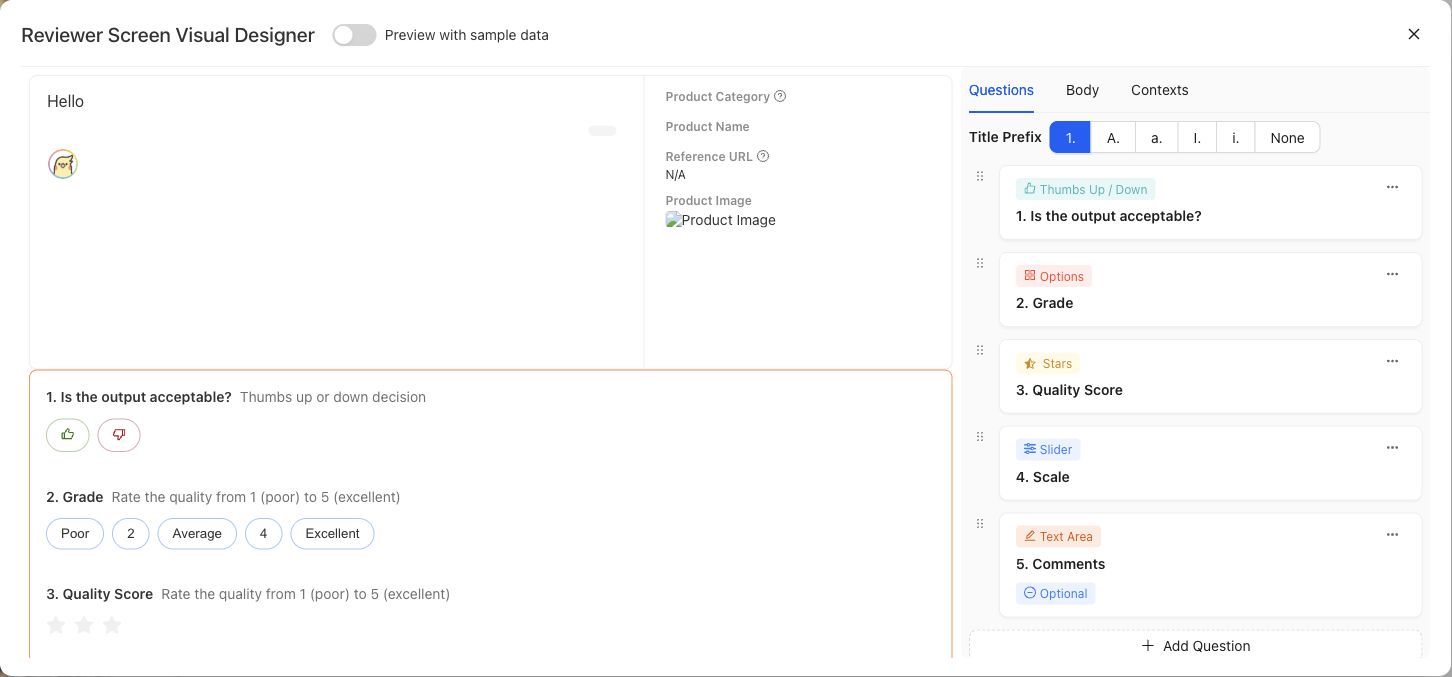
Preview the expert-facing Case and question layout with representative data before using it in a Contribution.
{% example-demo title="Example: source-grounding screen" %}
For a grounding Contribution, the screen displays the user request, candidate response, current source document, superseded source document, and source-freshness Dimension. It omits internal ingestion metadata so the expert can compare the response with both documents and explain which source controls.
{% /example-demo %}
## Source confidence
Code-backed: the active Review Screens library and detail routes provide paginated browsing, usage filtering, creation, editing, preview, and screen-authoring controls. The stable responsibility boundary is documented here without claiming every visual control is permanent.
## Related task pages
{% related-card-grid title="Related task pages" %}
- [Assets](/docs/assets)
- [Configure Project Input Schema](/docs/project-settings/input-schema)
- [Request an Expert Contribution](/docs/expert-contributions/request-contribution)
{% /related-card-grid %}
---
id: assets.weights
title: Weights
summary: Understand the current Weights asset surface and the absence of a public model-weight lifecycle.
kind: reference
product_area: assets
status: stable
updated: 2026-09-07
canonical: /docs/assets/weights
---
# Weights
## Definition
Weights is a visible project-level Asset category for model-weight artifacts. The current page presents an empty state and does not expose upload, registration, versioning, activation, deployment, or evaluation controls.
Model provider, model name, configuration, and execution receipts can appear in Harness Version or Run evidence. Those fields are not a Weights asset lifecycle.
> Current capability boundary
>
> Do not claim that model weights can be imported, fine-tuned, deployed, or compared from Assets until those actions and their durable identities are exposed by the product.
## Fields, states, or lifecycle rules
The current page defines no public weight fields, artifact states, or lifecycle actions. Model and provider facts in candidate or Run evidence remain owned by those records.
## What to record instead
When candidate behavior depends on a model, preserve the exact Harness Version and the model or provider configuration recorded by its source, runtime facts, Run Metadata, or evaluation receipt. Do not create a fictional Weights asset to make an experiment look versioned. Candidate code and dependency changes belong in Harness publication; evaluation evidence belongs to the Run and immutable Benchmark Version.
Run telemetry can report tokens, cost, or latency when captured. Those values describe execution and do not establish that a model checkpoint has been registered in Weights. Likewise, an Improvement Session candidate remains a saved Harness Version even when its behavior depends on model selection.
The empty state does not provide a weight artifact ID, supported format, upload action, version, Harness attachment, fine-tuning job, or deployment control. Use active Harness, Run, and provider-evidence surfaces for currently inspectable candidate identity.
{% related-card-grid title="Current related boundaries" %}
- [Manage Harnesses](/docs/assets/harnesses)
- [Configure Run Metadata](/docs/benchmark-evaluations/run-metadata)
- [Inspect evaluation results](/docs/benchmark-evaluations/inspect-results)
{% /related-card-grid %}
## Related task pages
{% related-card-grid title="Related task pages" %}
- [Manage Harnesses](/docs/assets/harnesses)
- [Run a benchmark evaluation](/docs/benchmark-evaluations/run-evaluation)
{% /related-card-grid %}
## Source confidence
Code-backed: the Assets layout exposes the Weights tab and the current route renders “No Weights yet.” No additional public behavior is claimed.
---
id: assets.worlds
title: Worlds
summary: Understand the current Worlds asset surface without inferring an environment lifecycle that the product does not expose.
kind: reference
product_area: assets
status: stable
updated: 2026-09-07
canonical: /docs/assets/worlds
---
# Worlds
## Definition
Worlds is a visible project-level Asset category for executable or queryable environments. The current Worlds page presents an empty state and does not expose creation, configuration, versioning, activation, or lifecycle controls.
The Harness execution contract can carry an optional supported World instance reference, but that runtime boundary does not establish a user-facing Worlds management workflow.
> World versus case material
>
> Static files, documents, images, and values supplied with a case are case materials. Do not call them Worlds. A World requires an observable executable-environment identity and lifecycle, which the current Assets page does not yet expose.
## Fields, states, or lifecycle rules
The current page defines no public World fields or states. The optional runtime reference is the only verified adjacent contract and must not be expanded into a management lifecycle.
## What the runtime reference does establish
A saved Harness can receive an optional supported `world_instance_ref` with its request. That establishes a boundary between executable environment context and static `case_material_refs`. It does not reveal who creates the instance, how long it lives, which benchmark owns it, whether state resets between attempts, or how a user chooses one.
Treat the reference as optional runtime input. It does not promise deterministic reset, persistence, query APIs, tool availability, or replay. If a Run depends on a World reference, preserve the exact Harness and Run evidence that Teammately exposes and state any known environment limitation separately.
## What to use today
Use Project Input Schema and Case materials for static evidence. Use Harness source for supported candidate orchestration. Do not upload a directory or service endpoint to the Worlds empty state, invent a World ID, or describe a Case fixture as a managed environment.
The empty state does not provide a World ID, configuration, version, instance-creation action, reset control, Harness attachment, telemetry view, or archive action.
{% related-card-grid title="Current related boundaries" %}
- [Manage Harnesses](/docs/assets/harnesses)
- [Configure Project Input Schema](/docs/project-settings/input-schema)
- [Understand Dataset Snapshots](/docs/benchmark-datasets/snapshots)
{% /related-card-grid %}
## Related task pages
{% related-card-grid title="Related task pages" %}
- [Manage Harnesses](/docs/assets/harnesses)
- [Configure Project Input Schema](/docs/project-settings/input-schema)
{% /related-card-grid %}
## Source confidence
Code-backed: the Assets layout exposes the Worlds tab and its current route renders “No Worlds yet.” Runtime types support optional World references but do not justify additional public management claims.
---
id: benchmark-datasets.overview
title: Benchmark Datasets
summary: Select benchmark Cases, inspect representation, and freeze immutable Snapshots for reproducible evidence.
kind: concept
product_area: benchmark_datasets
status: stable
updated: 2026-08-22
canonical: /docs/benchmark-datasets
---
# Benchmark Datasets
Benchmark Datasets defines the evidence set for one benchmark through **Cases**, **Representation**, and **Snapshots**.
The current dataset is editable. It selects reusable project Cases and reflects current facet, policy, rubric, and contributor facts. A Snapshot freezes the exact dataset state needed by a Benchmark Version and its evaluations. These are deliberately different surfaces: editing the current set must not rewrite historical evidence.
## Decision checkpoint
| Surface | Use it to | Evidence rule |
| --- | --- | --- |
| Cases | Inspect and change current benchmark membership | Selection is live until snapshotted |
| Representation | Find concentration and absence across governed facets | Read distribution together with distinct Case counts |
| Snapshots | Freeze Cases, evaluator links, and representation facts | Snapshot content is read-only |
Coverage Management acts on gaps found in the dataset. Assets remains the project-level reusable pool. Benchmark Evaluations runs exact Harness Versions against an immutable Benchmark Version rather than an unspecified “current dataset.”
## Evidence flow
Cases usually begin in project Assets or materialize through Case Review or Expert Contributions. Selecting them makes them part of the current benchmark dataset. Representation then summarizes the current assignments and evaluator relationships. Snapshot readiness checks whether that state can be frozen. A Snapshot supplies the immutable dataset facts used by a Benchmark Version.
This flow is one-way for historical evidence. Later edits to an Asset, facet assignment, Policy, Rubric, or current membership may improve the next Snapshot, but they do not update a previous Snapshot. Compare candidates within one Benchmark Version unless the analysis explicitly accounts for a moved evidence boundary.
## Before creating evidence
Check Case clarity and schema conformance, then inspect Representation for intended behavior and provenance. Confirm approved eligible evaluator links. Resolve Snapshot blockers and preserve the resulting label, version, content hash, creation time, and Case count.
A Snapshot can be reproducible while still being incomplete as product coverage. Reproducibility answers which evidence was evaluated; Representation and Coverage Management answer whether that evidence supports the intended product claim.
{% example-demo title="Example: editable set versus frozen evidence" %}
The current dataset gains four Cases and a corrected Rubric link after an expert Contribution is reconciled. An earlier Run still points to its old Benchmark Version. The operator creates a new Snapshot and Version for the changed set rather than comparing the new candidate against the old Run as though only Harness behavior moved.
{% /example-demo %}
{% related-card-grid title="Dataset workflows" %}
- [Manage benchmark Cases](/docs/benchmark-datasets/cases)
- [Inspect Representation](/docs/benchmark-datasets/representation)
- [Create and inspect Snapshots](/docs/benchmark-datasets/snapshots)
- [Manage coverage](/docs/coverage-management)
{% /related-card-grid %}
## Source confidence
Code-backed: the active dataset routes establish the editable current set, representation workspace, and immutable Snapshot boundary.